The Top 9 Active Directory Backup & Recovery Tools
Third-party Active Directory backup and recovery solutions for every size of organization

Microsoft Active Directory (AD) sits at the heart of most enterprise IT environments. When it goes down, employees can’t log in, applications stop working, and business grinds to a halt. Built‑in tools, like Windows Server Backup, offer only basic system‑state backups. And the AD Recycle Bin can recover deleted objects for a limited time but neither provides the granular, automated protection required for today’s hybrid environments.
🎬 Watch This Week in IT.
In this guide, I look at paid third‑party Active Directory backup and recovery solutions that go beyond native capabilities.
What to look for in Active Directory backup tools
Before diving into the tools, it’s important to know what differentiates a great AD backup solution:
- Granular vs. full backups: native tools rely on full server or system‑state backups. Third-party solutions provide incremental, object‑level backups, and the ability to restore individual users, groups, and Group Policy Objects (GPO).
- Automation: Recovery Point Objectives (RPO) and Recovery Time Objectives (RTO) define how much data you can afford to lose and how fast you need to recover. Third‑party tools automate backups, allow scheduling, and offer incremental backups to meet tight RPOs.
- Malware‑free recovery: snapshots and image‑based restores can reintroduce malware. Products like Cayosoft Guardian Instant Forest Recovery emphasize clean restores and isolated recovery labs to prevent reinfection.
- Hybrid AD support: many organisations use both on‑premises AD and Microsoft Entra ID (Azure AD). Look for tools that protect both environments and can recover entire forests or individual objects across hybrid setup.
- Offsite support: make sure your chosen tool allows you to store a copy of your backups offsite so that ransomware or hardware failure doesn’t delete every copy of your directory.
With these criteria in mind, here are the top paid AD backup tools available today.
Let’s have a look at some AD backup tools in more detail. The tools are categorized and listed alphabetically in each category.
Best dedicated AD backup tools
A general‑purpose backup platform will take a snapshot of your domain controller and let you restore a full virtual machine (VM), but that’s not the same as a dedicated Active Directory recovery tool. Tools like Cayosoft Guardian Instant Forest Recovery are built specifically to understand the intricacies of AD and to automate the recovery processes that a generic backup product leaves to you.
1. Cayosoft Guardian Instant Forest Recovery
Cayosoft Guardian Instant Forest Recovery is designed for organizations that need instant recovery across on‑premises, hybrid, and Entra ID environments. It continuously monitors directory changes and automates more than 35 recovery operations, including:
- Domain controller (DC) promotion
- DNS configuration
- Relative ID (RID) pool resets
- Flexible Single Master Operation (FSMO) role seizure
These automated operations allow IT to bring AD forests back online within minutes.
GFR performs targeted backups that exclude unnecessary data to speed up recovery and it offers isolated “virtual labs” so administrators can test recovery plans without impacting production. Its clean‑restore capability prevents rootkits and ransomware from being reintroduced during recovery.
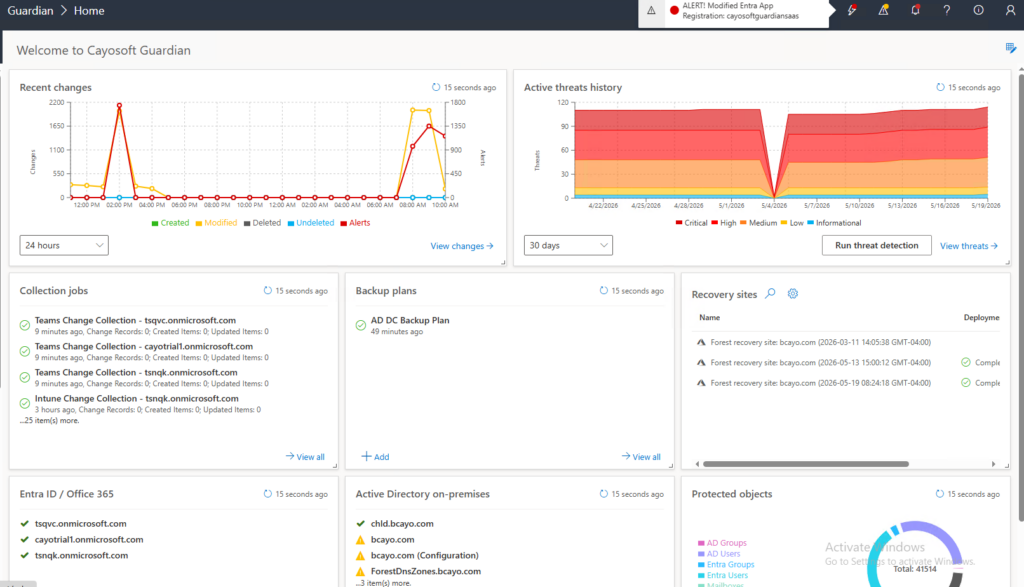
Cayosoft Guardian Instant Forest Recovery is unique among AD backup solutions as it blends continuous monitoring, granular object recovery, and full‑forest automation to deliver a clean, malware‑free restore across on‑premises and hybrid environments.
Pricing: No public pricing is available.
2. Quest Recovery Manager for Active Directory
Quest’s Recovery Manager for AD is purpose‑built for Active Directory. It offers incremental backups, continuous change monitoring, and the ability to compare backups to spot differences at the object level.
The tool can restore objects without restarting domain controllers and it provides a detailed roadmap to guide administrators through the recovery process.
Pricing: Quest does not publish pricing for Recovery Manager.
3. Semperis Active Directory Forest Recovery
Semperis’ Active Directory Forest Recovery (ADFR) focuses on cyber‑resilient recovery. It automates forest‑wide recovery, rebuilds domain controllers and DNS, resets RID pools and seizes FSMO roles without scripts.
ADFR performs “clean restores” to prevent re‑introducing rootkits or ransomware. A patented process removes malware from backups.
Pricing: Semperis does not publish pricing.
Best generic backup tools that also protect Active Directory
Generic backup tools are great for protecting VMs, files, and databases, but they don’t understand Active Directory’s special recovery requirements. Nevertheless, the following tools are ‘AD-aware’ and can be used to restore AD.
4. ManageEngine RecoveryManager Plus
ManageEngine’s RecoveryManager Plus is a comprehensive backup and recovery platform covering on‑premises AD, Entra ID, Microsoft 365, Google Workspace, and even Zoho WorkDrive. It performs continuous, incremental backups of AD objects and allows administrators to restore individual schema classes, Organizational Units (OU), groups, Exchange attributes and DNS records.
Backups can be stored on‑premises or in Azure Blob storage with custom retention periods and built‑in encryption. A technician auditing feature tracks who performed what recovery, which helps with compliance.
Pricing: The AD/Entra ID edition starts at US $475 per year for 250 user objects. Larger organisations can request a quote for custom plans.
5. Microsoft Azure Backup
Part of the Azure Recovery Services suite, Azure Backup provides one‑click backups and centralized management for Azure VMs, on‑premises servers, SQL Server, and SAP HANA. It uses application‑consistent snapshots and offers Locally Redundant, Zone Redundant, and Geo‑Redundant storage options. Azure Backup scales with your storage needs, integrates with Azure Monitor for alerts, and it can be managed through a unified portal.
Pricing: There is no fixed list price; costs are based on storage consumed and the number of protected instances.
6. Netwrix Recovery for Active Directory
Netwrix Recovery for Active Directory provides comprehensive recovery of deleted user and computer objects, DNS entries, and GPOs. Backups are encrypted to protect against theft, and the tool tracks changes to Access Control Lists (ACL) and other critical AD attributes. It can create backups on demand or according to your defined schedule. It integrates with the Microsoft Management Console (MMC) for familiar administration.
7. Veeam Backup & Replication
Veeam Backup & Replication protects AD domain controllers, VMs, servers, and cloud workloads. It supports granular recovery of AD objects, though backing up physical domain controllers requires using Veeam Agent (formerly Veeam Endpoint Backup) and it is less streamlined than VM‑based backups.
Veeam integrates data deduplication and encryption, and its large community forums provide peer support.
Pricing: Veeam sells licences in blocks of five workloads. Protecting five workloads for one year costs about US $642.

Best for budget‑conscious organisations
8. EaseUS Todo Backup Enterprise
EaseUS is known for consumer backup tools, but its Todo Backup Enterprise edition supports AD backups for servers and workstations. It offers partition‑level and disk‑level backups and it lets administrators select specific drives or folders to back up. The interface is intuitive, granular restores are available, and the price point is relatively low.
Pricing: EaseUS offers several licensing options. Prices start at US $49 per year per workstation or US $199 per year per server, with advanced server licences at US $299 per year.
9. Zmanda (Amanda Enterprise)
Zmanda is the commercial version of the open‑source Amanda backup software. It performs consistent AD backups using the Volume Shadow Copy Service, which is built in to Windows. It supports granular restores and it can save backups to disk, tape, or cloud storage.
Zmanda scales from small businesses to large environments and it includes an authoritative restore option for AD.
Pricing: US $29.99 per server per month, US $2.99 per workstation per month and US $5.99 per virtual machine per month. Cloud storage is extra at US $20 per terabyte per month.
Feature summary of the best AD backup tools
| Tool | Granular Object Restore | Hybrid AD Support | Security & Malware‑Free Restore | Pricing |
| Cayosoft Guardian Instant Forest Recovery | Yes – instant rollback at object and attribute level | Yes – built from the ground up for hybrid AD | Clean restore prevents malware reinfection | Quote only |
| EaseUS Todo Backup Enterprise | Yes – partition‑level and drive‑level restore | No – focused on local backups | No special malware‑free features | $49/yr per workstation, $199/yr per server |
| ManageEngine RecoveryManager Plus | Yes – backs up schema classes, OUs, GPOs and more | Yes – covers on‑prem AD and Entra ID | Supports encryption; depends on safe storage | Starts at $475/yr for 250 objects |
| Microsoft Azure Backup | No. Microsoft recommends using the AD Recycle Bin | No direct support for restoring Entra ID objects | No malware-free recovery process – at least not on its own | Costs are based on storage consumed and the number of protected instances |
| Netwrix Recovery for AD | Yes – granular rollback and encrypted backups | Primarily on‑prem; integrates with MMC | Tracks ACL changes; supports encryption | Quote only |
| Quest Recovery Manager for AD | Yes – object‑level restore without reboot | On‑prem focus | Uses comparison reporting and change auditing | Quote only |
| Semperis ADFR | Yes – full forest recovery and object‑level rollback | Yes – hybrid AD and Entra ID through add‑ons | Clean, malware‑free restore with patented process | Quote only |
| Veeam Backup & Replication | Yes – object restore, but physical DC backup is less convenient | Limited – primarily VM‑centric; physical DCs require agent | Encrypts backups; community support | ≈$642/year for five workloads |
| Zmanda (Amanda Enterprise) | Yes – authoritative and granular restores | Supports cloud, tape and disk targets | Relies on VSS consistency | $29.99/server/mo, $2.99/workstation/mo |
Choosing the right Active Directory backup tool
When selecting a backup solution, start by defining your organization’s RPO and RTO. If you run a large enterprise with multiple domains and hybrid environments, you’ll benefit from full‑featured platforms like Cayosoft Guardian Instant Forest Recovery, ManageEngine RecoveryManager Plus, or Semperis ADFR. These tools automate complex recovery scenarios and provide malware‑free restores.
If budget is your primary concern, EaseUS Todo Backup Enterprise and Zmanda offer low‑cost licensing, though they come with fewer enterprise‑grade features. Veeam sits in the middle: although its pricing depends on the number of workloads and it may be more attractive if you’re already using Veeam for other workloads.
Active Directory backup best practices
Restoring AD from backup should always be a last resort, but testing your backups is essential. You should regularly verify that backups are complete and perform test restores in an isolated environment. Additionally, document your recovery procedures and update them as your environment changes. I recommend backing up at least two DCs per domain, including one that holds FSMO roles, daily or twice daily in busy environments.
In the era of ransomware and hybrid identity attacks, having an up‑to‑date, tested AD backup strategy is not optional but a business requirement.
Frequently asked questions
How can you backup Active Directory?
Active Directory (AD) can be backed up using system state backups, which capture the AD database (NTDS.dit), SYSVOL, registry, and other critical components. The main approaches include:
Volume Shadow Copy Service (VSS): Used by many backup tools to capture a consistent snapshot of AD data without downtime.
Windows Server Backup (WSB): A built-in Microsoft tool that lets you perform system state backups and restore AD in case of corruption or loss.
Third-party backup tools: Enterprise-grade solutions such as Cayosoft, Veeam, Quest Recovery Manager, or Semperis provide more flexibility, granular recovery options, and automation.
Which tool is used for backup?
The tools commonly used for Active Directory backup include:
Windows Server Backup: Default choice for smaller environments or when sticking to native Microsoft solutions.
Cayosoft Guardian Instant Forest Recovery: Continuously monitors directory changes and automates more than 35 recovery operations.
Veeam Backup & Replication: Offers image-based backups, granular AD object recovery, and integration with Microsoft services.
Quest Recovery Manager for Active Directory: Known for granular restore of users, groups, and policies.
Does Veeam backup Active Directory?
Yes. Veeam Backup & Replication supports Active Directory backups by capturing the entire virtual machine or physical server hosting AD.
Where are Active Directory backups stored?
Active Directory backups are typically stored in system state backup files that include the AD database, SYSVOL, and other critical components. Where they are stored depends on the tool you use. By default, Windows Server Backup stores Active Directory system state backups on a local drive or network share. It’s recommended not to keep the backup on the same drive as the operating system to avoid losing both OS and backup in case of disk failure.

Russell Smith, the Editorial Director at Petri IT Knowledgebase, has over two decades of hands-on experience in IT, in both small business settings and government IT infrastructure projects. Russell started writing for Windows IT Pro Magazine in t...