4 Best Enterprise Active Directory Management Tools for Hybrid Environments
A practical comparison of leading management platforms for Active Directory and Microsoft Entra ID.

Enterprise-scale Active Directory management now involves Microsoft Entra ID, Microsoft 365, and cloud workloads, making native tools insufficient and increasing operational risks. Organizations use advanced AD management platforms to boost efficiency, delegation, and auditing while maintaining security.
This article reviews the five most widely used enterprise Active Directory management tools, highlighting how they improve efficiency for administrators in hybrid environments.
Disclaimer: Petri.com is owned by Cayosoft.
Why native Active Directory tools aren’t enough
Microsoft’s built‑in tools like Active Directory Users and Computers (ADUC) and Group Policy Management Console (GPMC) are powerful, but they weren’t designed for modern enterprise realities.
Common limitations include:
- Manual, error‑prone workflows
User provisioning, group changes, and access reviews still rely heavily on scripts or point‑in‑time admin actions. - Over‑privileged administrators
Active Directory enables granular delegation with ACLs, but native tools make enterprise-scale management challenging. Native delegation uses precise, low-level permissions that are difficult to create, audit, and maintain. In large hybrid environments, this often results in excessive access, delegation drift, or unnecessary elevated privileges for routine tasks, reducing efficiency and governance. - Limited visibility and auditing
Answering basic questions like who changed what, and why often requires stitching together event logs. - Poor hybrid awareness
ADUC has no understanding of Entra ID, Microsoft 365, or lifecycle workflows that span on‑premises and cloud. - Helpdesk bottlenecks
Routine requests (resets, group membership changes, onboarding/offboarding) consume admin time.
Enterprise AD management tools exist to solve these problems by abstracting complexity, automating common tasks, and enforcing governance without replacing Active Directory itself.
What to look for in an enterprise Active Directory management tool
For hybrid enterprise environments, the most effective platforms focus on:
- Operational efficiency at scale
- Granular role‑based delegation
- Automation across AD and Entra ID
- Auditability and compliance
- Helpdesk empowerment without elevated privilege
- Support for hybrid identity lifecycles
Cayosoft Administrator
Cayosoft Administrator is often deployed by organizations that want to modernize AD operations without re‑architecting identity. Its design centers on workflow automation, delegation, and visibility, rather than just security hardening.
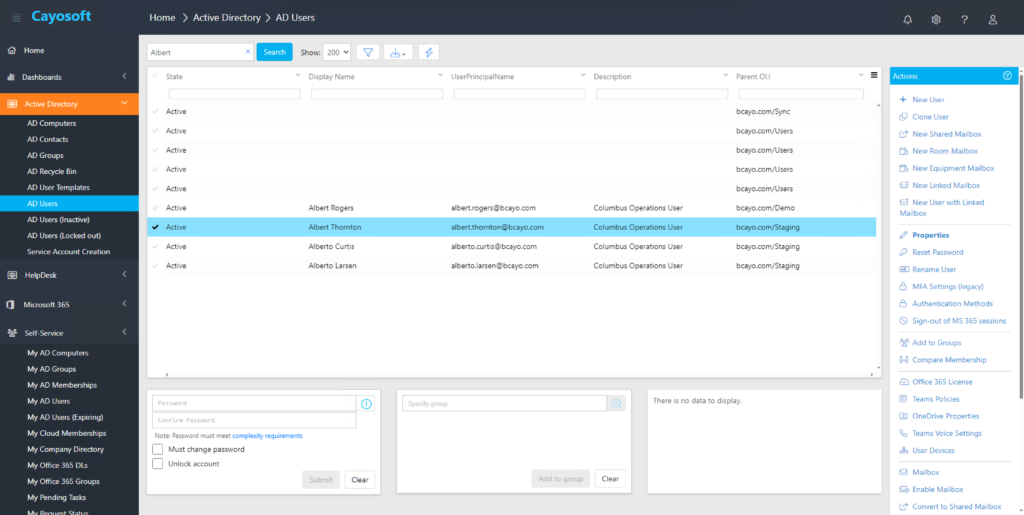
Where Cayosoft stands out is how directly it addresses daily operational pain in hybrid AD and Entra ID environments.
Key strengths
- Unified management across AD, Entra ID, Exchange, and Microsoft 365
Administrators can manage hybrid objects from a single interface without switching tools. - Strong lifecycle automation
Joiner, mover, and leaver automation workflows reduce manual provisioning work and enforce consistency. - Delegation without elevated access
Fine‑grained roles allow helpdesk and business admins to perform tasks safely. - Change Visibility and Operational Auditing
Centralized tracking of administrative actions improves accountability and reduces reliance on native event log correlation. - Scales well in complex, multi‑domain environments
Particularly useful for global enterprises with strict change controls.
Best fit
Cayosoft Administrator is well‑suited for organizations prioritizing operational efficiency and governance across hybrid identity systems, especially where AD remains mission‑critical.
ManageEngine ADManager Plus
ManageEngine ADManager Plus is frequently adopted by IT teams looking to offload manual AD work through templates and reporting, without heavy customization.
It focuses on simplifying common tasks and generating visibility for auditors and managers.
Key strengths
- Template‑based provisioning
Speeds up onboarding with consistent account creation. - Pre‑built reports
Makes it easier to answer audit and access review questions quickly. - Delegated helpdesk roles
Allows first‑line support to handle routine requests. - Broad feature coverage
Includes user management, reporting, and basic automation.
Best fit
ADManager Plus works well for organizations that want quick efficiency gains and strong reporting without building complex workflows.
Softerra Adaxes
Adaxes takes a rules‑based approach to Active Directory administration, emphasizing automation driven by business logic.
It enables admins to define how AD should behave and then enforces those rules consistently across changes.
Key strengths
- Highly customizable workflows
Uses conditions and actions to automate complex scenarios. - Self‑service capabilities
Users can request access or perform approved actions without IT intervention. - Strong delegation model
Limits administrative privileges through task‑based roles. - Flexible hybrid support
Can be extended to cover Entra ID–related workflows.
Best fit
Adaxes is best suited for teams with clear business rules who want fine‑tuned automation and are comfortable investing time in configuration.
One Identity Active Directory Manager
One Identity Active Directory Manager focuses on governed identity lifecycle management, often as part of a broader identity security strategy. The difference is not whether lifecycle tasks can be automated, but whether identity decisions are governed independently of administrators. This is an area where One Identity is fundamentally architected differently from the other tools in this article.
It emphasizes process enforcement and auditability across AD operations.
Key strengths
- Lifecycle‑centric workflows
Strong joiner/mover/leaver handling tied to approvals. - Separation of duties
Helps reduce standing privilege through workflow enforcement. - Audit‑friendly design
Generates records aligned with compliance requirements. - Integrates with broader identity platforms
Fits into Identity Governance and Administration (IGA) and Privileged Access Management (PAM) strategies.
Best fit
This tool is a good match for enterprises where identity governance and compliance are primary drivers.
| Tool | Primary Focus | Hybrid AD + Entra ID | Delegation Model | Operational Automation |
| Cayosoft Administrator | Operational efficiency & governance | Yes | Fine‑grained roles* | Strong |
| ManageEngine ADManager Plus | Task simplification & reporting | Partial – AD and Entra ID not modelled as equals | Task-based roles*** | Moderate |
| Softerra Adaxes | Rules‑based automation | Yes | Task‑based roles | Strong |
| One Identity AD Manager | Lifecycle governance | Yes | Workflow‑driven | Strong |
* Fine‑grained roles = “You are allowed to do very specific things, at very specific scope and attribute levels.”
** RBAC approvals = “You’re allowed to request actions, but they only happen after policy‑driven approval.”
*** Task‑based roles = “You can perform these specific actions.”
Final thoughts
Active Directory continues to be vital in enterprise IT, even as Entra ID use grows. Efficient AD management is crucial for both operations and security in increasingly hybrid, regulated environments. Enterprise-level tools help IT teams lower risk, save time, and scale without adding staff.

Russell Smith, the Editorial Director at Petri IT Knowledgebase, has over two decades of hands-on experience in IT, in both small business settings and government IT infrastructure projects. Russell started writing for Windows IT Pro Magazine in t...