Account Lockout Event ID 4740: Troubleshooting for IT Pros
A practical look at account lockout event ID 4740, explaining what it tells you, what it doesn’t, and how to efficiently troubleshoot account lockouts.

When a user account becomes locked, account lockout event id 4740 is logged on your domain controllers. It is the primary signal administrators rely on to begin troubleshooting. While the event itself is straightforward, interpreting it correctly and using it effectively to identify the true source of a lockout is not always obvious.
🎬 Watch This Week in IT.
What is account lockout event ID 4740?
When an Active Directory (AD) user account is locked out, the account lockout event id ‘4740’ is logged on the domain controllers (DC) that handled the authentication request, NOT on all DCs. (This is assuming you have auditing enabled – I’ll explain soon…)
Event 4740 tells you that the specified user account failed to authenticate too many times, forcing a lockout on the account. Domain-based Group Policy dictates the circumstances and thresholds for locking out accounts (e.g., 5 or more failed passwords in 10 minutes, etc.)
When and where is the event 4740 logged?
Event 4740 is stored in the Security Log of the Event Viewer on your DC.

TIP: There are a few settings in the log itself that you should confirm or validate on all your DCs.
Make sure the size of the log is increased from the default.
Also, verify that the setting to ‘recycle’ the log after it fills up is set. This way, you won’t have to worry about your log hitting the default quota and ceasing to record and log new events.
How to confirm auditing is enabled on your DCs
The only primary prerequisite for the logging of these events is to confirm that you have auditing enabled on your domain controllers. You can use Group Policy Management to confirm that the policy applied to your DCs is set correctly.
- First, open Group Policy Management from the Windows Tools menu on a DC or a client machine with the remote tools installed.
- Expand your domain and expand the ‘Domain Controllers’ OU.
- Either right-click on the ‘Default Domain Controllers Policy’ and click Edit, or create a new one and link it here, and do the same.
- Browse to Computer Configuration > Policies > Windows Settings > Security Settings > Advanced Audit Policy Configuration > Account Management.
- Double-click on ‘Audit User Account Management’ to open the setting.
- Check all the boxes to configure the setting and to audit both Success and Failure records.

Once that is set, account lockouts will now be logged in the Security Log of the DC that handles the client authentication request.
As a double check, make sure all of your DCs are in the Domain Controllers OU. I’m not even sure why you would move them, but if so, another policy may be applying a different audit configuration.
What makes up account lockout event ID 4740?
Event ID 4740 contains a relatively small number of fields, but each attribute plays a specific role when analyzing this AD account lockout event id. Troubleshooting efficiently means having a solid grasp of the meanings of these attributes.
- Security ID (SID) – The SID is a unique identifier for the account within the domain. This is typically helpful if usernames may have changed ot have been reused – the SID is immutable.
- Account Name – The sAMAccountName of the locked account. This is typically the primary data point admins look for, but on its own, it does not tell you why the lockout happened.
- Account Domain – The domain in which the account resides. In multi-domain forests, you need to watch these carefully so you don’t jump down the wrong rabbit hole.
- Caller Computer Name – This one can really throw you for a loop. This field is often the most misunderstood in the event.
- This value tells you the computer that submitted the authentication request that caused the lockout. This does NOT mean this is the device the user was attempting to log on to. This is often the true source of the problem.
- For example, a workstation with cached credentials (old/stale) or a server running a service under the user’s context. And more often in recent years, a mobile device with an old (email) password.
Common misinterpretations of account lockout event ID data
Besides chasing the Caller Computer Name above, there are other examples of going the wrong way. Another common misconception is that the account lockout always occurs on the DC housing the ‘PDC Emulator‘ role. Even though the PDC Emulator plays a role in password changes and policy management, Event ID 4740 is always logged on the DC that processes the lockout-triggering authentication attempt.
Another common example is that “Event ID 4740 tells me why the lockout happened.” Unfortunately, not. The event will not explain which password was attempted, how many failed attempts preceded the lockout, or whether the failure was interactive, app-driven, or even network-based.
The Active Directory account lockout event ID (4740) often requires more cursory examinations and investigations.
NOTE – Besides AD, Windows account lockout event id 4740 will also be logged for local accounts, not just AD accounts.
How do account lockouts occur in AD?
Account lockouts in AD are not a single event but the result of repeated authentication failures, crossing thresholds described and defined in the domain’s password and lockout policies. Every failed logon increments a bad password counter maintained per user account. Once the configured threshold is exceeded, the account is locked. These failures can originate from many different authentication paths, or lockout sources, which I’ll describe soon. Understanding where these failures typically come from is vital before Event ID 4740 can be used effectively for troubleshooting.
Common account lockout sources
While user error or human error contributes to account lockout events, the majority of recurring lockouts come from non-interactive or background authentication attempts. Here are the most common sources for these types of lockouts.
| Scenario | Description | Impact / Notes |
|---|---|---|
| Cached credentials on a workstation | Windows caches credentials for logins and other fields in the Windows Credential Manager. After a password change, the workstation may continue sending an old or stale password stored in these vaults. | Repeated authentication attempts with the old password can cause the account to be locked. |
| Services running under user accounts | Windows services configured to run under a user’s account (instead of a service account) rely on stored credentials. If the user’s password changes and the service configuration is not updated, the service will fail to start. | If the service is set to retry automatically (e.g., every 2 or 50 minutes), repeated failures can eventually lock the account. |
| Mobile devices and email clients | Mobile devices and apps (Outlook, Teams, Slack, etc.) often store account credentials. If the user changes their password but does not update these apps, they continue authenticating with the old password. | This can trigger account lockouts shortly after the account is unlocked. |
| VPN clients | VPN concentrators, network appliances, and wireless controllers may cache credentials and sometimes authenticate on behalf of the user. | Cached or out-of-sync credentials can contribute to password synchronization issues and account lockouts. |
Using PowerShell to quickly gather all event ID 4740s
And, of course, you can use PowerShell to get a list of recent account lockouts (Event ID 4740) on a domain controller. Use this command to get a simple table of data.
Get-WinEvent -FilterHashtable @(
LogName = ‘Security’
ID = 4740
}
I don’t have any lockouts in my lab environment, but you’ll get a nice display of the information you need. You can export it and utilize it in a script to email your admins about recent lockouts.
Troubleshooting with Event ID 4740
Event ID 4740 is most effective when used as an entry point, not the end-all, be-all answer. On its own, the event confirms that a lockout occurred and identifies the domain controller and triggering system. However, meaningful resolution requires following a tried and true method, taking in several variables into account. Identifying all ‘client’ devices in play, inquiring from the user when they last changed their password – this will speed up troubleshooting and resolution time.
First, identify the source system from the event – the ‘Caller Computer Name’ field. When accurate, this can identify the workstation with stale credentials, a mobile device trying to check for new email, or a server running a service in a user context.
Second, narrow down the scope from the entire environment to one or two machines. Also, if the Caller Computer Name is blank, generic, or unknown, it often points to indirect authentication where further correlation is required.
Common troubleshooting checklists
You should also utilize prior security events after discovering an event ID 4740. Here are 3 of the most common event IDs you’ll see in the Event Viewer when troubleshooting account lockouts.
- Event ID 4625 – Failed logon attempts (most often, a bad password)
- Event ID 4771 – Kerberos pre-authentication failures
- Event ID 4768/4769 – Kerberos ticket activity
By reviewing these events on the same DC, preferably within a short time window, you can most likely determine the logon type (interactive, network, service, etc.), the authentication protocol used (NTLM, Kerberos), and the frequency and/or pattern of auth failures.
What if I can’t find a corresponding event ID 4740 for a specific user?
In this scenario, you don’t have the 4740 event id to get some evidence. Try these avenues to help.
- You can also do a broader search in the Security Log on DCs and Exchange Servers to filter down to ‘Audit Failure’ events to assist.
- If you happen to utilize Network Protection Service (NPS) in your environment, search those logs for the username of your user that is getting locked out. This can help immensely.
- If you’re using any Unix/Linux/bsd machines, check those. You may have services or processes running under the user’s domain account. These ‘computers’ often won’t produce an Event ID account lockout (4740).
Best practices and preventative measures
While Event ID 4740 is basically required for diagnosing account lockouts, the most effective strategy comes from a proactive stance. In well-managed Active Directory environments, lockouts should be rare, explainable, and quickly traceable. The practices in this section focus on tools you can use to stay one step ahead of these occurrences happening in the first place.
The first stop on your road to developing an environment that is efficient and nondisruptive is to create and manage a solid account lockout policy. You need to strike a balance between security enforcement and operational reality. Overly aggressive thresholds can amplify minor issues into frequent lockouts, while overly permissive settings may weaken defenses against password-based attacks.
Take these considerations into account:
- Set a reasonable lockout threshold that accounts for background authentication situations.
- Use a lockout duration that limits disruption without requiring constant administrative overhead.
- Ensure policies align with modern authentication methods (for example, MFA, reducing reliance on lockouts as a primary control).
In many environments, frequent lockouts are not “human error-related” but a signal that the lockout policy does not reflect how credentials are actually used across services, devices, and applications.
Checking for Event ID 4625 on client computers
I’ve only mentioned the ‘server-side’ aspect of this event. If the account lockout occurs on a Windows client computer, Event ID 4625 will be logged in the device’s Security Log in Event Viewer.
You can utilize similar output for this event ID to assist in learning the logon type, the source IP Address, and other useful info.
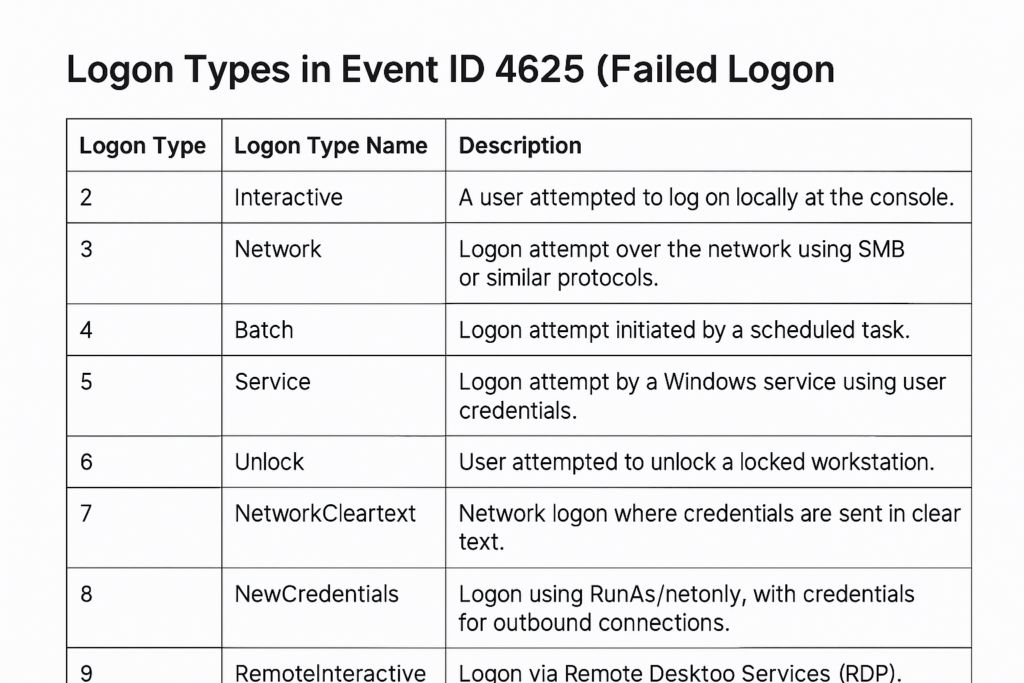
Here’s a table to explain the various logon types that are possible in Windows.
| Logon Type | Name | Description / Typical Use Case |
|---|---|---|
| 0 | System | Used only by the operating system. Indicates a system-level logon (not associated with a user). |
| 2 | Interactive | User logged on locally at the keyboard or console (physical access). |
| 3 | Network | Access to a resource over the network (e.g., file share, printer, IIS using Windows auth). No desktop session is created. |
| 4 | Batch | Used by scheduled tasks or batch jobs (Task Scheduler). |
| 5 | Service | Used when a Windows service starts under a user or service account. |
| 6 | Proxy | Deprecated / not used in modern versions of Windows. |
| 7 | Unlock | User unlocks a workstation that was previously locked. |
| 8 | NetworkCleartext | Network logon where credentials are sent in clear text (e.g., legacy authentication, IIS with basic auth). |
| 9 | NewCredentials | Logon using Run as /netonly. Local identity remains the same; new credentials are used for outbound connections. |
| 10 | RemoteInteractive | Logon via Remote Desktop Services (RDP) or Terminal Services. |
| 11 | CachedInteractive | User logs on using cached credentials (typically a laptop off the domain network). |
| 12 | CachedRemoteInteractive | Cached credentials used for a remote interactive logon (Windows 8 / Server 2012+). |
| 13 | CachedUnlock | Unlocking a workstation using cached credentials. |
Utilizing third-party tools to avoid account lockouts
Let me finish this article by mentioning some alternate tools you can use to further your troubleshooting analysis of Event ID 4740. Native Windows tools remain effective when used in a consistent fashion, but here’s a decent list of other third-party tools at your disposal.
- Cayosoft Guardian
- You can download the free Cayosoft Guardian Protector software from their website.
- This utility will offer a clean, dashboard-like view of many events visible in AD, including Account Lockouts.
- Netwrix Auditor
- Visit this website to learn all that Netwrix Auditor can do for your IT environment.
- “See who’s accessing what, when, and why. Netwrix IT audit software gives you the answers you need to identify risks, detect threats, and automate compliance.”
- ManageEngine ADAudit Plus
- Another helpful tool can be accessed here on ManageEngine’s website.

Frequently asked questions
What event ID indicates an account lockout in Windows?
The primary event ID for an account lockout in Windows is Event ID 4740. It is logged in the Security event log on domain controllers when an Active Directory user account becomes locked due to repeated failed logon attempts.
Where is Event ID 4740 logged?
Event ID 4740 is logged on the domain controller that processed the lockout. Client machines and servers typically log Event ID 4625 (failed logon) instead, which often precedes the lockout.
How do I find the source of an account lockout?
To identify the source, review Event ID 4740 and check the Caller Computer Name field. If that field is missing, correlate the lockout with Event ID 4625 or Kerberos authentication events to pinpoint the originating device or service.

Michael has been an IT Pro since 1998. He has worked predominantly in the Windows world including client and server operating systems, on-prem systems engineering (AD, DNS, etc.), and over the last ten years or so has embraced and immersed himself in...