Microsoft Entra Connect Health: What You Need to Know
Entra Connect Health provides valuable insights and capabilities, helping you maintain a robust and reliable identity infrastructure.

Microsoft Entra Connect Health (formerly Azure AD Connect Health) is a tool designed to give you visibility and troubleshooting information over synchronization between on-premises Active Directory and Microsoft Entra ID in the cloud. Let’s dive into the basics of what it is and how it can benefit you.
🎬 Watch This Week in IT.
What is Microsoft Entra Connect Health?
Microsoft Entra Connect Health is a cloud-based monitoring service that helps you keep an eye on your on-premises identity infrastructure. Think of it as a specialized health monitor for the components that connect your on-premises Active Directory (AD) to Microsoft Entra ID (formerly Azure Active Directory).
While Microsoft Entra ID provides identity services in the cloud, and Entra Connect synchronizes identities between your on-premises AD and Microsoft Entra ID, Entra Connect Health focuses specifically on the health and performance of these critical components (in the cloud). It’s not a replacement for Entra Connect itself, nor is it a full-fledged enterprise monitoring suite like System Center Operations Manager or Azure Monitor. It is a specialized, lightweight, and highly effective service tailored to the specific needs of hybrid identity environments.
Key features of Entra Connect Health: What can it do for you?
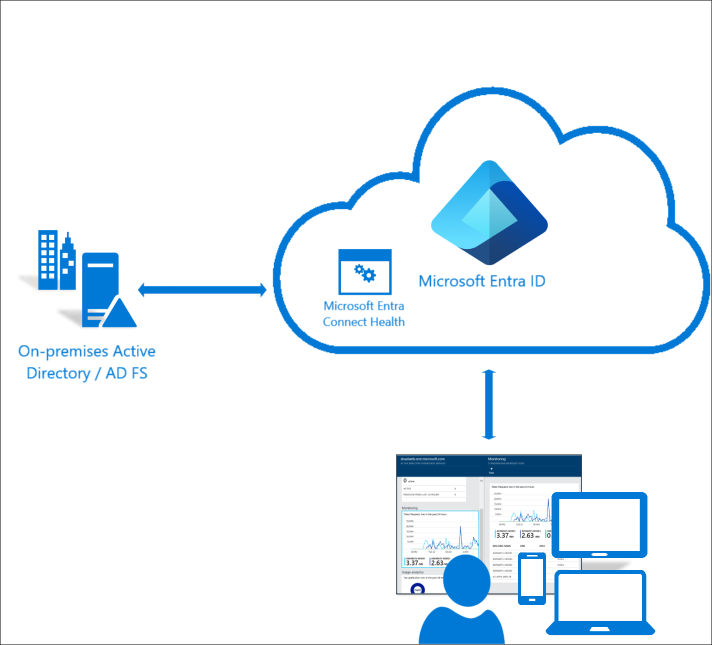
Microsoft Entra Connect Health offers several key features that provide invaluable insights and capabilities, helping you maintain a robust and reliable identity infrastructure.
1. How does Entra Connect Health work with Entra Connect?
Entra Connect Health provides comprehensive monitoring of your Entra Connect synchronization service. Why is this important? Because Entra Connect is the bridge between your on-premises directory and Microsoft Entra ID. If this bridge becomes disrupted, your users accessing Microsoft 365 won’t be able to log in or access cloud resources.
Specifically, Entra Connect Health gives you insights into:
- Synchronization status: You can see if synchronization cycles are running on schedule or if there are any delays. This is critical because a stalled sync means changes in your on-premises AD aren’t reaching Microsoft Entra ID, and vice versa.
- Synchronization errors: It highlights any sync errors that occur during the sync process. These could be anything from attribute conflicts to duplicate users, which, if left unaddressed, can lead to significant access issues. Unlike simply seeing an error in the Synchronization Service Manager on your server, Entra Connect Health aggregates and categorizes these errors, making them easier to manage and troubleshoot from a centralized console.
- Export failures: When objects are exported from Entra Connect to Microsoft Entra ID, sometimes these operations fail. Entra Connect Health identifies these failures, allowing you to investigate and resolve the underlying causes.
- Latency and performance: It tracks the performance of your synchronization service, helping you identify if the server itself is struggling or if the synchronization process is taking longer than expected. This can be a subtle indicator of underlying resource issues or changes in your environment.
Without Entra Connect Health, you’d have to log into each Entra Connect server individually, open the Synchronization Service Manager, and sift through logs – a time-consuming and inefficient process, especially in larger environments or with multiple sync servers. Even using PowerShell to remotely access this information still would take manual steps.
2. Can Entra Connect Health also help if I’m using Azure Active Directory Domain Services (Azure AD DS)?
Can Entra Connect Health also help if I’m using Azure AD DS? Yes, absolutely! While Entra Connect focuses on syncing your on-premises AD to the cloud, Azure AD DS provides managed domain services directly within Azure. It’s like having a domain controller in the cloud without the need to deploy and manage virtual machines yourself. Entra Connect Health extends its monitoring capabilities to this service as well.
Here’s what it offers for Azure AD DS:
- Replication health: It monitors the health of the replication between the domain controllers within your managed Azure AD DS domain. Just like with on-premises AD, healthy replication is vital for consistency and availability.
- Domain controller alerts: You’ll receive alerts if there are issues with the managed domain controllers, such as connectivity problems or unhealthy status. This proactive notification means you can address issues before they impact end-users.
- Operational insights: It provides insights into the operational status of your Azure AD DS environment, helping you understand if it’s running smoothly or if there are any underlying performance concerns.
This monitoring is crucial because, while Azure manages the underlying infrastructure for Azure AD DS, you are still responsible for managing identities and understanding the health of the service as it relates to your applications and users. Entra Connect Health simplifies this oversight, providing a unified view that complements your broader identity monitoring strategy.
How does Entra Connect Health work?
Now that we’ve covered what it does, how does Entra Connect Health actually gather all this information? Understanding the core mechanics will give you a clearer picture of how it integrates into your infrastructure.
What is the “Microsoft Entra Connect Health Agent” and how does it function?
At the heart of Entra Connect Health’s operation is a small, lightweight agent that you install on the servers you want to monitor. This agent installation acts as the eyes and ears for the Entra Connect Health service in the cloud. It’s crucial to understand that this isn’t the same as the Entra Connect synchronization agent itself, though it’s often installed on the same server. They are distinct pieces of software with different purposes.

Here’s how the Health Agent works:
- Installation: You typically install the Health Agent on your Entra Connect server, your Active Directory Federation Services (AD FS) servers, and your AD domain controllers (if you’re using it for AD DS monitoring). The installation process is straightforward and usually integrated with the Entra Connect setup or available as a standalone download.
- Data collection: Once installed, the agent securely collects specific data points related to the health and performance of the monitored service. For an Entra Connect server, this includes synchronization statistics, error logs, and export details. For an AD FS server, it would collect data on authentication attempts, server health, and proxy connectivity. It doesn’t collect sensitive user data or passwords; rather, it focuses on operational metrics and event logs.
- Secure communication: The agent establishes an outbound connection over HTTPS (port 443) to the Entra Connect Health service in Microsoft Entra ID. This means you generally don’t need to open inbound firewall ports on your on-premises network, which simplifies security configurations.
The agent is designed to be low-impact, meaning it consumes minimal resources on your servers. It’s a fundamental difference from traditional on-premises monitoring tools that often require complex agent deployments and direct access to your network. Plus, because it’s part of the cloud service, you don’t need to worry about having the latest version – Windows Update will take of that for you.
Data collection and reporting
Once the agent collects the data, how does it get to you? The Health Agent continuously sends the collected data to the Entra Connect Health service in the Microsoft cloud. This data is then processed, analyzed, and presented in an easily digestible format through the Azure portal.
Here’s the breakdown:
- Near real-time data: The agents typically send data every few minutes, providing you with a near real-time view of your infrastructure’s health. This isn’t strictly “real-time”, but it’s sufficiently current for operational monitoring and troubleshooting of identity services.
- Centralized dashboard: All the collected data from various agents across your different servers is aggregated and displayed in a unified dashboard within the Azure portal. This dashboard gives you a high-level overview of the health of all your monitored services. You can quickly see green checks for healthy services and red alerts for issues that need attention.
- Detailed reports and trends: Beyond the high-level overview, Entra Connect Health also provides detailed reports and historical trends. For instance, you can dive into synchronization error reports, view performance metrics over time, or analyze authentication activity. This historical data is valuable for identifying recurring issues, understanding performance degradation, and planning capacity. This contrasts sharply with simply looking at current event logs, as the cloud service provides aggregation and trending that a single server cannot.
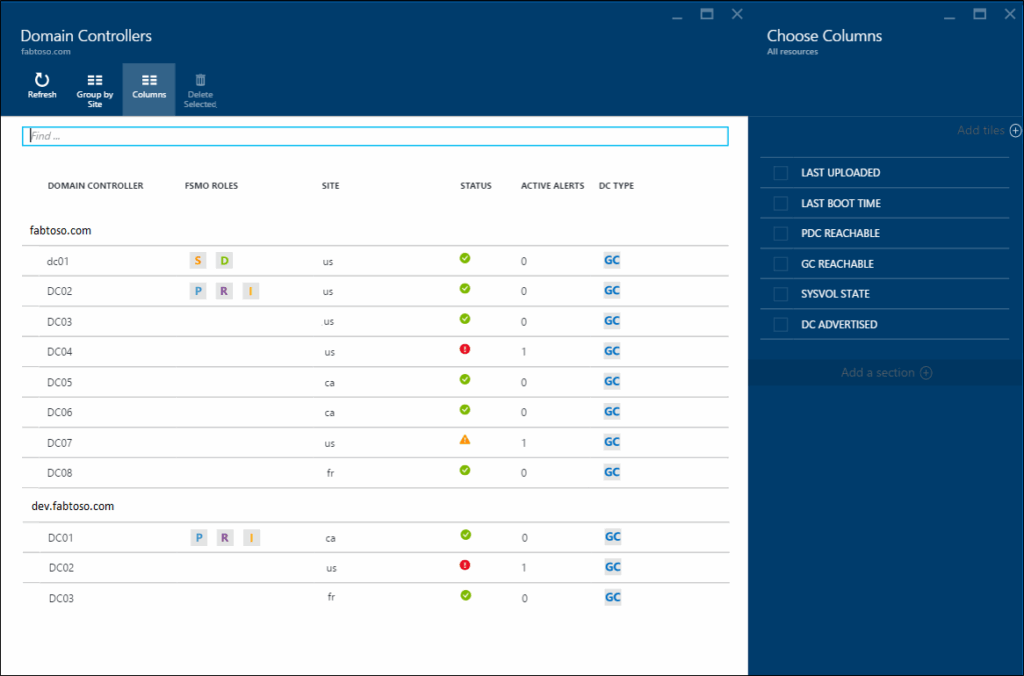
This centralized reporting eliminates the need to manually check multiple servers and interpret complex logs, drastically reducing the time and effort required for identity infrastructure management.
Alerts and notifications: What happens when Entra Connect Health detects an issue?
Entra Connect Health isn’t just a passive monitoring tool; it’s designed to proactively alert you to problems. When the service detects an issue based on predefined thresholds or anomaly detection, it generates an alert.
These alerts are:
| Alert type | Function |
| Configurable | You can configure the severity of alerts and even set up custom alert rules based on your specific needs. For example, you might want to be alerted immediately if synchronization hasn’t run for a certain period, or if a specific type of error count exceeds a threshold. |
| Actionable | Each alert provides details about the problem, often with a link to Microsoft documentation or suggested remediation steps. This guidance helps you quickly understand the issue and how to resolve it, rather than just telling you something is wrong. |
| Intergratable | Entra Connect Health can integrate with other Azure services like Azure Monitor and action groups. This means you can configure alerts to trigger notifications via email, SMS, push notifications to the Azure mobile app, or even integrate with ITSM tools or custom webhooks. This flexibility ensures that the right people are notified in the way that best suits your operational practices. |
The robust alerting system is a critical component, transforming Entra Connect Health from a simple monitoring dashboard into an active management and troubleshooting aid.
Potential challenges and gotchas
While Entra Connect Health is a powerful tool, it’s not without its nuances. Being aware of potential challenges and “gotchas” can help you avoid frustration and ensure a smoother experience.
What if my Entra Connect Health Agent isn’t connecting?
One of the most common issues users encounter is problems with the Health Agent connecting to the Entra Connect Health service. Since the agent relies on outbound HTTPS (port 443) communication, issues often stem from network configurations.
Here are the potential “gotchas”:
- Proxy servers: If your organization uses an outbound proxy server, the Health Agent needs to be configured correctly to use it. This often involves specifying the proxy address and credentials. If these are incorrect or change, the agent won’t be able to send data.
- Firewall rules: While it’s outbound, strict corporate firewalls might still block the necessary URLs or IP ranges. You’ll need to ensure that the server hosting the agent can reach the required Microsoft endpoints for Entra Connect Health. Always check your firewall logs if you suspect connectivity problems. If you use a firewall with IP-based rules, you’ll need to allow the Azure IP ranges for your region. Microsoft publishes these in the Azure IP ranges and service tags JSON.
| Purpose | Endpoint / URL | Port(s) |
|---|---|---|
| Service communication | *.servicebus.windows.net | TCP 443 (HTTPS) |
| Data upload and telemetry | *.adhybridhealth.azure.com | TCP 443 |
| Authentication and identity | login.microsoftonline.com / login.windows.net | TCP 443 |
| Certificate validation | crl.microsoft.com, ocsp.msocsp.com (CRL/OCSP checks) | TCP 80/443 |
| Azure AD Graph / Entra ID APIs | graph.windows.net / graph.microsoft.com | TCP 443 |
- TLS/SSL inspection: Some network security devices perform TLS/SSL inspection (man-in-the-middle). This can interfere with the agent’s secure communication with Microsoft. You might need to configure exceptions for the Entra Connect Health traffic on your inspection devices.
- Agent status: Occasionally, the agent service itself might stop or get stuck. Always check the Windows Services console on the server to ensure the “Microsoft Entra Connect Health Sync Agent” (or similar, depending on the service) is running.
When troubleshooting, start by checking the event logs on the server where the agent is installed for any errors related to Entra Connect Health or network connectivity.
The preferred portal to use is the Microsoft Entra Admin Center. Although a Global Administrator, of course, can access it, you should use an account with the least privilege to avoid potential security breaches. The safest bet is someone with the Hybrid Identity Administrator role.
Why isn’t the Entra Connect Health data showing up immediately?
While Entra Connect Health provides “near real-time” data, it’s not instantaneous. There’s an inherent latency between when an event occurs, when the agent collects it, when it’s sent to the cloud, and when it’s processed and displayed in the Azure portal.
Here’s what to consider:
- Collection interval: The agents collect and send data on a polling interval, typically every few minutes. This means a change might not be reflected in the portal for a short period after it actually happens.
- Processing time: Once the data reaches the cloud service, it needs to be processed and analyzed before it’s displayed on the dashboard or triggers alerts. This can add a few minutes to the overall latency.
- Expect a delay: Don’t expect to see an immediate reflection of every single event in your on-premises environment. If you make a configuration change on your Entra Connect server, it might take 5-15 minutes for Entra Connect Health to reflect that change or any subsequent impact. This is a common point of confusion for new users who expect instant updates.
It’s important to set realistic expectations for data freshness. For critical, immediate troubleshooting, you might still need to consult local server logs, but for overall health and trend analysis, Entra Connect Health provides excellent value.
Are all Entra Connect Health alerts equally urgent, and can I change them?
Microsoft Entra Connect Health Alerts comes with predefined alert thresholds and severities, but it’s crucial to understand that these are general and might not perfectly align with your organization’s specific operational requirements or risk tolerance.
Here are the key aspects:
- Default vs. custom: Entra Connect Health provides a set of default alerts for common issues (e.g., synchronization not running, export errors). While these are a good starting point, you often need to customize them.
- Noise vs. signal: If thresholds are too low or too sensitive, you might end up with a high volume of “noisy” alerts for minor, non-critical events. Conversely, if they’re too high, you might miss important issues.
- Context is king: An alert for “X number of synchronization errors” might be critical in one environment but acceptable for a short period in another. You need to understand the context of your own environment to fine-tune these thresholds. For example, if you know you have some benign attribute conflicts that you manually clean up, you might want to adjust the threshold for certain error types to avoid constant notifications.
- Configuration: You can configure alert rules, including their severity, criteria (e.g., error count, duration of an unhealthy state), and notification actions, within the Azure portal, often leveraging Azure Monitor’s capabilities.
Take the time to review the default alerts and adjust them to fit your operational needs. This proactive tuning will ensure that you receive meaningful notifications that help you respond effectively rather than being overwhelmed by unnecessary alerts.
I hope this deep dive into Microsoft Entra Connect Health has given you a solid foundation. If you have any further questions or specific scenarios you’d like to discuss, please feel free to leave a comment below!
Frequently asked questions
What is Microsoft Entra Connect Health?
Microsoft Entra Connect Health is a monitoring and analytics service that helps administrators maintain the health of hybrid identity infrastructures. It provides deep insights, alerts, and usage analytics for:
- Azure AD Connect (synchronization between on-premises AD and Azure AD)
- AD FS (Active Directory Federation Services)
- On-premises Active Directory Domain Services (AD DS)
By continuously monitoring these components, it identifies issues, helps with troubleshooting, and ensures reliable authentication and synchronization.
How to access Entra Connect Health?
You can access Entra Connect Health through the Azure portal:
- Sign in to the Azure portal.
- In the left navigation pane, go to Microsoft Entra ID.
- Under Monitoring, select Connect Health.
- Choose the service you want to monitor (AD FS, AD DS, or Azure AD Connect).
Note: You’ll need to install the Entra Connect Health agents on your on-premises servers (e.g., AD FS servers, domain controllers, or sync servers) for telemetry data to appear.
How to check Entra Connect Health version?
The Entra Connect Health agent runs locally on monitored servers. To check its version:
- Open Programs and Features (Windows Control Panel) and locate Microsoft Entra Connect Health Agent.
- Alternatively, open Services (services.msc), find the Azure AD Connect Health service, and check the installed version under the application properties.
- You can also check logs or PowerShell with:
Get-ItemProperty "HKLM:\SOFTWARE\Microsoft\AzureADConnectHealthAgent" | Select-Object VersionIs Entra Connect the same as AD Connect?
Not exactly — they are related but not identical:
- Azure AD Connect (now called Entra Connect): The synchronization tool that links on-premises Active Directory with Azure AD, enabling hybrid identity.
- Microsoft Entra Connect Health: A monitoring solution that works alongside AD Connect, AD DS, and AD FS to provide operational insights, alerts, and diagnostics.
So, AD Connect handles identity synchronization, while Entra Connect Health monitors the health of that synchronization and related services.

Michael has been an IT Pro since 1998. He has worked predominantly in the Windows world including client and server operating systems, on-prem systems engineering (AD, DNS, etc.), and over the last ten years or so has embraced and immersed himself in...