Microsoft Introduces Admin Insights For Windows 365 to Streamline Cloud PC Management
New feature consolidates key signals to help IT teams identify issues and optimize environments.

Key Takeaways:
- Admin Insights provides a unified view of Cloud PC health in Microsoft Intune.
- Insight cards highlight issues, trends, and optimization opportunities.
- This feature helps IT teams move from reactive troubleshooting to proactive management.
Microsoft has introduced support for Admin Insights for Windows 365 in public preview for commercial customers. This new feature allows enterprise admins to more easily manage Windows 365 Cloud PCs.
“Admin Insights for Windows 365 gives IT administrators a prioritized set of items to review—such as issues that need attention and opportunities to optimize your Cloud PC environment—directly in the Windows 365 experience in the Microsoft Intune admin center. Admin Insights is service-driven: items are generated by the Windows 365 service and aren’t configured through customer-defined thresholds or alert rules,” Microsoft explained.
A unified view of Cloud PC health in Microsoft Intune
This new Admin Insights feature enhances existing reporting and monitoring tools by consolidating key signals directly within the Windows 365 interface, which makes it easier for IT administrators to manage their Cloud PC environments. It enables IT admins to quickly identify issues that require attention, gain a clear overview of system health without reviewing multiple reports, detect unusual trends or performance problems, and take informed next steps using insights presented in a streamlined view.
Admin Insights presents automatically generated insight cards within the Windows 365 management portal in Microsoft Intune, based on patterns and activity across the Cloud PC environment to highlight important information. These cards (up to 15 at a time) appear as relevant changes occur, which draws attention to issues such as system health concerns or connectivity problems, with each card focusing on a specific scenario that may require administrative action.
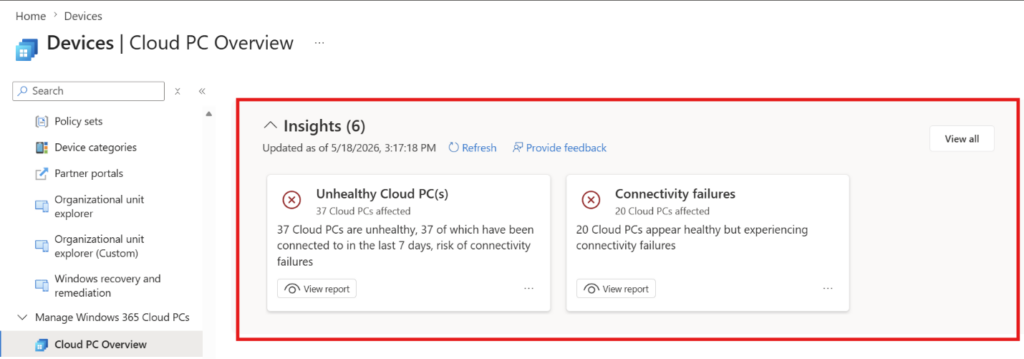
How to view Admin Insights for Windows 365?
To view Admin Insights, IT admins will need to sign in to the Microsoft Intune admin center and then head over to Devices > Manage Windows 365 Cloud PCs. They will be able to view Admin Insights as a section on the Cloud PC Overview page.
Microsoft notes that the Admin Insights feature is available for organizations with an active Windows 365 Enterprise or Windows 365 Flex (Windows 365 Frontline) license. These permissions are typically granted through roles such as Cloud PC Reader, Cloud PC Administrator, or Windows 365 Administrator.
Why Admin Insights matters for IT operations?
Admin Insights matters for organizations because it significantly reduces the operational burden on IT teams, especially in environments with large or rapidly growing Cloud PC deployments. Instead of relying on reactive troubleshooting or manually correlating data from multiple dashboards, IT teams can move toward a more proactive and predictive management approach, which involves catching issues before they affect end users.
This leads to improved employee productivity, as downtime and performance degradation can be addressed faster, and also helps organizations optimize resource usage by identifying inefficiencies such as underutilized or misconfigured systems. Over time, this kind of intelligent visibility can lower support costs, improve service reliability, and enable IT departments to focus more on strategic initiatives rather than routine monitoring.

Rabia has a master's degree in Software Engineering and she has years of experience writing professionally about Microsoft products and other technologies. Rabia has also written for OnMSFT.com as well as Windows Report. She is always up to date on t...