Microsoft Expands Windows Autopatch With Recovery, Reporting, and Update Controls
Microsoft is adding new readiness checks, reporting tools, update controls, and recovery capabilities to Windows Autopatch. For enterprises, the updates could improve visibility into update deployments and reduce downtime during large-scale incidents, though testing and governance processes remain essential.

Key Takeaways:
- Windows Autopatch now includes automated readiness checks designed to identify deployment blockers before updates are installed.
- Microsoft is adding new reporting, approval, scheduling, and compliance-management capabilities for Windows updates.
- Quick Machine Recovery management aims to help organizations recover devices affected by large-scale outages and boot failures.
As organizations accelerate AI adoption and modern workplace initiatives, keeping devices secure and up to date is becoming more complex. IT teams often struggle to balance security requirements with the operational impact of deploying updates across large fleets of devices. Troubleshooting failed deployments, tracking update progress, and recovering from outages can consume significant administrative resources.
In a recent update, Microsoft outlined several enhancements to Windows Autopatch aimed at improving update visibility, automating remediation, simplifying update approvals, and accelerating recovery from large-scale incidents. The company is positioning the service as a more intelligent and proactive approach to Windows update management that reduces manual effort while helping organizations maintain security and compliance.
Update management remains complex and reactive
Managing Windows updates at scale often requires IT administrators to identify deployment blockers, troubleshoot failed updates, monitor compliance, and coordinate maintenance schedules across thousands of devices. Traditional update management tools frequently provide limited visibility into why deployments fail, which forces IT teams to spend time investigating issues after users are affected.
New readiness and reporting capabilities
To help organizations become more proactive, Microsoft is introducing new update readiness capabilities in Windows Autopatch. The service now performs automated readiness checks that identify devices with specific prerequisites before updates are deployed. Administrators can review remediation recommendations and address issues before they cause deployment failures or user disruptions.
Microsoft is also adding a new device update journey view that provides detailed progress tracking for individual devices. This feature shows where a deployment may have stalled, including reasons why certain updates, such as hotpatches, could not be applied. Integrated audit trails and repair workflows are intended to make troubleshooting more transparent and efficient.
Other improvements include actionable alerts, guided remediation steps, integrated repair recommendations, and enhanced compliance reporting, which are designed to help administrators identify and resolve problems earlier in the deployment process.
Greater control over Windows Updates
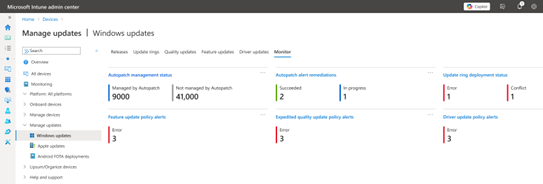
Microsoft is also expanding administrative control through new quality update scheduling and approval capabilities. Organizations can choose between automatic and manual approvals for security, non-security, and out-of-band updates while configuring deployment deferrals to support phased rollouts. Administrators can also pause and resume update deployment when business requirements demand greater flexibility.
Enhanced reporting tools provide visibility into deployment health, device compliance, update approvals, and unresolved issues, which help organizations monitor update performance across their environments.
Microsoft also highlighted support for Extended Security Updates (ESU) for systems that remain on Windows 10 after end of support. Administrators can track ESU enrollment status, identify devices that lack coverage, and receive alerts when systems fall behind on security updates through Windows Autopatch.
Hotpatching and maintenance Windows reduce disruption
Microsoft continues to expand support for Hotpatch, which delivers security fixes without requiring immediate device restarts. Microsoft noted that hotpatching is now available on 64-bit Arm devices.
Starting in early 2026, organizations will also gain access to maintenance windows, which will allow IT admins to define specific times for installing updates and restarting devices. This capability will support updates for drivers, .NET components, applications, and Windows itself, which gives IT teams greater control over when disruptions occur.
New Quick Machine Recovery management targets large-scale outages
Microsoft is also introducing Quick Machine Recovery (QMR) management in Windows Autopatch as part of the company’s broader Windows Resiliency Initiative. This feature is designed to help recover devices that experience boot failures caused by Windows issues or third-party kernel-mode drivers.
Affected devices can automatically scan the Windows Recovery Environment for Microsoft-issued fixes during large-scale incidents. Those fixes can be deployed automatically or require administrative approval before execution based on organizational policies. Microsoft says this capability can reduce downtime and accelerate recovery during widespread outages.
Administrators also receive QMR-specific alerts, remediation reporting, and visibility into affected devices, which helps IT teams track recovery progress and identify systems that require additional intervention.
Organizations should view these capabilities as operational improvements rather than a replacement for update governance. IT teams will still need testing processes, deployment policies, and device lifecycle management strategies to ensure successful update adoption. The new features, such as ESU monitoring and QMR, also help reduce risk, but they do not eliminate the need to migrate unsupported systems or maintain robust recovery planning.

Rabia has a master's degree in Software Engineering and she has years of experience writing professionally about Microsoft products and other technologies. Rabia has also written for OnMSFT.com as well as Windows Report. She is always up to date on t...