Entra ID vs Active Directory – Comparing Microsoft Identity Platforms
Which Microsoft IAM should you choose? The answer might be not one or the other but both.

As organizations transition to hybrid and cloud-native environments, understanding the distinctions of Entra ID vs Active Directory becomes crucial. This article explores architecture, capability, integration models, and security, providing IT professionals with a clear comparison of the two solutions.
🎬 Watch This Week in IT.
Entra ID vs Active Directory – What are these platforms?
Microsoft Active Directory, introduced in 1999 with the Windows 2000 Server platform, is its premier on-premises (on-prem) directory service. The primary use cases include identity and access management (IAM) within Windows-based networks.
Microsoft Entra ID (formerly Azure AD), announced and released back in the 2008-2010 timeframe, is their cloud-based IAM solution. Its primary designed for modern hybrid and cloud environments. Let’s go into some more detail next.
Active Directory
Active Directory is primarily used in on-premises environments. Domain controllers (DCs), which house all the directory information (users, computers, groups, etc.), Group Policies, and security principles, run on physical servers or in a virtual environment. Users log into domain-joined workstations and are authenticated by domain controllers. This grants them access tokens to access files on file servers, print to network printers, and other computers or AD objects.
Active Directory provides:
- Centralized user and device management – through domain controllers and domain-joined workstation devices.
- Domain-based authentication – using usernames and passwords through encrypted (LAN) connections.
- Group Policy management – for enforcing operational, security, and conforming policies.
- LDAP-based directory services – designed for applications requiring more structured identity data and services.
Entra ID (formerly Azure AD)
Entra ID, formerly called Azure Active Directory, or Azure AD, is the next evolution of identity and access management solutions for the cloud. Microsoft Entra ID takes the approach they started with Active Directory Domain Services to the next level by providing companies with an Identity as a Service (IDaaS) platform for all of their apps – on-premises and in the cloud.

Microsoft Entra ID acts as the identity provider, with single sign-on capabilities, for Microsoft 365 apps like Microsoft Teams, OneDrive, SharePoint, Word, Excel, and Outlook, and first-party cloud apps.
Entra ID offers:
- Multi-Factor Authentication (MFA) – improved sign-on security with Conditional Access policies to balance user impact and security requirements
- Single Sign-On (SSO) – for cloud applications like Microsoft 365 (Outlook, Teams, etc.)
- Role-Based Access Control (RBAC) – for managing permissions at a granular and safe level
- Integration with third-party Software as a Service (SaaS) applications – like Salesforce, Zoom, and Slack, to name a few
Unlike AD, Entra ID does not use domain controllers or traditional group policy. It provides native identity management, making it perfect for organizations moving to hybrid or cloud-first models…thank you, Satya. Managing identities, managing your mobile device footprint, and maintaining your security features are all easier with Entra ID. More on that soon.
Entra ID is more than just the cloud version of AD…but let’s get to that in the next section.
Is Entra ID a direct evolution of AD?
Not really. That is an oversimplified explanation. Microsoft Entra ID is more than just a cloud or hybrid alternative. The number of tools at your disposal when logging into Entra ID is dizzying at first – you can’t use muscle memory like you use in ADUC (Active Directory Users and Computers) and the AD Administrative Center. PowerShell commands are also rather different. Once you gain muscle memory with the Microsoft Entra admin center website, you’ll enjoy all the power you have at your disposal.
Let me present a table that explains how Entra ID is not a direct evolution of AD, and how it differs at a high level. We’ll go into greater detail very soon.
Key differences between AD and Entra ID
| Feature | Active Directory (AD) | Microsoft Entra ID |
|---|---|---|
| Deployment Model | On-premises | Cloud-based |
| Authentication | Kerberos, NTLM | OAuth, OpenID Connect, SAML |
| User Management | Domain-based | Tenant-based |
| Device Management | Group Policy, GPOs | Intune, Conditional Access |
| Application Access | Local network apps | Cloud apps (Microsoft 365, SaaS) |
| Security Features | Traditional password policies | MFA, Conditional Access, Identity Protection |
Infrastructure comparison
The various architecture pieces of Active Directory and Entra ID vary widely for the most part. There are inherent similarities as they’re both IAM platforms. But, as you’ll soon discover, their underpinnings help explain the contrast between “old” and “new”.
Architecture
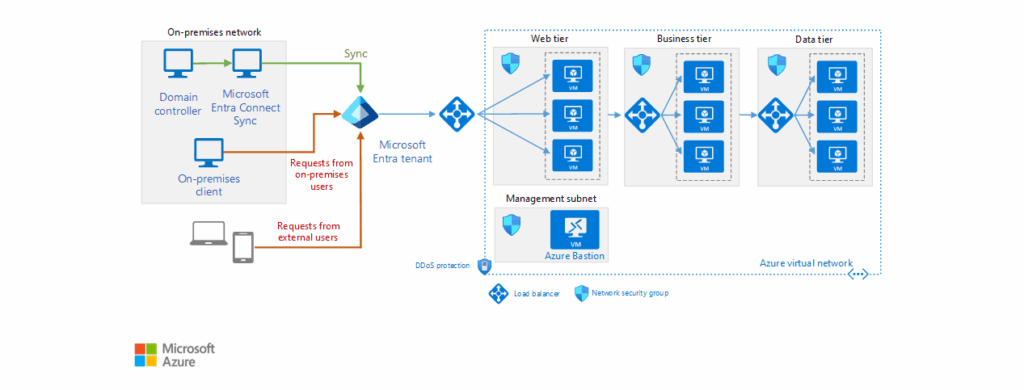
- Active Directory (AD) is an on-premises directory service that relies on servers, called domain controllers, to manage authentication, authorization, and identity storage within a Windows-based network.
- Microsoft Entra ID is a cloud-based identity and access management (IAM) solution designed for modern hybrid and cloud environments. It does not use domain controllers but instead operates on a multi-tenant cloud architecture.
Capabilities
Active Directory provides centralized identity management for on-premises environments and resources. This includes file shares, printers, and local applications.
Entra ID extends identity management to cloud apps, offering SSO, MFA, and Conditional Access.
This table describes key capabilities between the two.
| Capability | Active Directory (AD) | Microsoft Entra ID |
|---|---|---|
| User Authentication | Local domain authentication | Cloud-based authentication |
| Single Sign-On (SSO) | Limited to domain-joined devices | Supports cloud apps and SaaS |
| Multi-Factor Authentication (MFA) | Requires third-party integration | Built-in MFA support |
| Conditional Access | Not natively available | Supports adaptive security policies |
Device and application management
Where AD uses Group Policy Objects (GPOs) to centrally enforce security and configuration settings on domain-joined Windows devices, Entra ID integrates with Microsoft Intune for cloud-based device management, supporting Windows, iOS, macOS, and Android.
Let’s include another small table to hit it home.
| Management Feature | Active Directory (AD) | Microsoft Entra ID |
|---|---|---|
| Group Policy (GPOs) | Yes | No |
| Mobile Device Management (MDM) | No | Yes (via Intune) |
| Application Access | Local apps | Cloud apps (Microsoft 365, SaaS) |
Federation, sync, hybrid, oh my!
Active Directory requires Active Directory Federation Services (ADFS) for federated authentication with external apps. However, Entra ID supports these functions natively – it integrates with Microsoft Entra Connect and Entra Cloud Sync to sync on-premises AD identities to the cloud.
Another lovely table to let your CIOs absorb this material succinctly.
| Feature | Active Directory (AD) | Microsoft Entra ID |
|---|---|---|
| Federation Support | Requires ADFS | Built-in support |
| Identity Sync | Requires Entra Connect/Cloud Sync | Native cloud identities |
| Hybrid Identity | Supports hybrid AD environments | Designed for hybrid/cloud-first models |
Security
Security is a large topic. A dedicated article describing all the differences between security architecture could be written. But, I will keep things simple and overview-level for this post.
Active Directory relies on password policies and domain-based security as its infrastructure. Entra ID does indeed offer us an evolution of sorts related to security – Zero Trust principles, including MFA, Conditional Access, and Identity Protection, to name a few. These were built natively, from the ground up to offer a scalable and future-proof security footprint for your enterprise.
Let’s include one more table on the subject.
| Security Feature | Active Directory (AD) | Microsoft Entra ID |
|---|---|---|
| Password Policies | Yes | Yes |
| Multi-Factor Authentication (MFA) | Requires third-party integration | Built-in support |
| Conditional Access | No | Yes |
| Identity Protection | Limited | AI-driven risk-based authentication |
What about licensing and costs?
Because their deployment models are so diverse, licensing for Active Directory and Entra ID varies widely.
Active Directory is included with Windows Server (licenses), but organizations must also purchase CALs – Client Access Licenses for users and devices.
Here’s a table for Active Directory Licensing.
| Component | Cost Model |
|---|---|
| Windows Server License | One-time purchase or subscription (varies by edition) |
| Client Access License (CALs) | Required for each user/device accessing AD |
| AD Federation Services (ADFS) | Included with Windows Server but requires additional infrastructure |
| AD Domain Controllers | Requires physical or virtual servers, increasing hardware costs |
Next, Microsoft Entra ID offers tiered pricing, offering free and premium plans. Each premium plan offers a set of features to enhance security and reduce the administrative overhead of your cybersecurity teams.
Microsoft Entra ID offers tiered pricing, *with free and premium plans
| Plan | Cost (Per User/Month) | Key Features |
|---|---|---|
| Entra ID Free | $0 | Basic identity management, SSO for Microsoft 365 |
| Entra ID P1 | ~$6 | Hybrid identity, Conditional Access, MFA |
| Entra ID P2 | ~$9 | Identity Protection, Privileged Identity Management (PIM) |
| Entra ID Domain Services | Varies | Managed domain services for cloud-based workloads |
Would you like one more table to offer some cost considerations you should make when determining the next course on your identity road? Here you go.
Cost considerations
| Factor | Active Directory (AD) | Microsoft Entra ID |
|---|---|---|
| Upfront Costs | High (server, CALs, infrastructure) | Low (subscription-based) |
| Maintenance | Requires IT staff for updates and security | Managed by Microsoft |
| Scalability | Limited to on-premises infrastructure | Cloud-native, scales easily |
| Security Features | Requires third-party tools for MFA, Conditional Access | Built-in security features |
Would you like one more table to offer some cost considerations you should make when determining the next course of your identity road? Here you go.
Main advantages of Entra ID
Microsoft Entra ID offers tangible advantages over the traditional on-premises Active Directory. As a cloud-based IAM platform, it enhances security, scalability, and integration for modern IT environments, out-of-the-box. A key strength is its alignment with Zero Trust security principles – providing built-in modern authentication tech like MFA, Conditional Access, and AI-driven Identity Protection to mitigate unauthorized access risks.
A default install of Active Directory, even on the most recent version in Windows Server 2025, still requires manual steps to make it secure to today’s standards.
Here are some additional advantages of Entra ID over Active Directory:
- Modern Authentication – Supports modern protocols by default, such as OAuth, SAML, and OpenID Connect. These are often used when configuring Single Sign-On apps in Entra ID. This is not possible with AD.
- Entra ID doesn’t require you to maintain domain controllers, including deploying, patching, maintaining, etc. Entra ID is a cloud-native platform that does not require this ‘legacy’ footprint.
- Offers manual or dynamic groups with entitlement workflows – You can create dynamic groups of users or devices with sophisticated queries and criteria to ease your identity management footprint.
- Easier support of external users – With Entra B2B (Business to Business), external users use their existing identities – no more managing shadow accounts in a separate AD forest. Also, Entra ID supports federation with identity providers like Google or SAML-based systems, easing collaboration across organizations.
My recommendation – if you can ‘get away with’ Entra ID as your sole identity platform, do it. Unless you have specific needs for Windows Server Active Directory, don’t deploy it. What does ‘get away with’ mean? Well, here are some top reasons you may still need AD in your environment.
- Organizations with tightly controlled environments often depend on Group Policy and Organizational Units (OUs) to manage things like security baselines, software deployment, and user restrictions.
- Legacy application compatibility – Many enterprise applications, especially line-of-business (LOB) apps, still rely on Kerberos or NTLM authentication and LDAP queries.
- Network dependency and offline authentication – AD provides local authentication even when Internet access is not available. This can be crucial for remote sites, air-gapped environments, and disaster recovery scenarios.
Microsoft Entra Domain Services
Microsoft does offer Entra Domain Services – a managed domain service that provides AD-like capabilities in the cloud. You don’t need to deploy, patch, and maintain domain controllers – Microsoft handles this for you as part of the SaaS solution.
The primary use case for this solution is keeping around legacy applications that rely on traditional Windows authentication, but you don’t want to maintain the on-premises infrastructure for AD. Users can sign in with their existing credentials in the cloud, offering them a consistent identity experience across hybrid and cloud environments/applications.
FAQ: Entra ID vs Active Directory
Did Entra ID replace Active Directory?
No, Entra ID (formerly Azure Active Directory or Azure AD) did not replace Active Directory (AD). They are distinct but complementary identity solutions. Active Directory is an on-premises directory service primarily used for Windows domain networks, while Entra ID is a cloud-based identity and access management platform designed for modern cloud applications and services. Organizations often use them together in hybrid environments.
Should I use Entra ID?
You should consider using Entra ID if your organization utilizes Microsoft 365, Azure, or other cloud-based services. Entra ID enables secure sign-in, multi-factor authentication (MFA), conditional access, and single sign-on (SSO) for thousands of SaaS applications. It’s ideal for managing identities in a cloud or hybrid IT infrastructure.
Is Azure Active Directory P1 the same as Entra ID P1?
Yes, Azure AD P1 and Entra ID P1 are the same in terms of features and functionality. Microsoft rebranded Azure Active Directory to Entra ID in 2023, but the licensing tiers—P1 and P2—remain unchanged. So, Entra ID P1 includes the same capabilities as Azure AD P1, such as Conditional Access, hybrid identity support, and self-service password reset.
Is Entra ID a directory service?
Yes, Entra ID is a cloud-based directory service. It functions similarly to a traditional directory by managing user identities and access, but it’s designed for the modern cloud environment. It supports authentication, authorization, and identity governance for users accessing cloud apps, on-premises apps, and resources.

Michael has been an IT Pro since 1998. He has worked predominantly in the Windows world including client and server operating systems, on-prem systems engineering (AD, DNS, etc.), and over the last ten years or so has embraced and immersed himself in...