Microsoft Identity Manager: Your Best Options Beyond 2029
The End of an Era: What MIM's Retirement Means for You

Microsoft has announced that extended support for Microsoft Identity Manager (MIM) will end in 2029. For many organizations, this feels like the closing of a long chapter. MIM has been the backbone of identity synchronization, certificate management, and self-service provisioning for well over a decade. But just as with Forefront Identity Manager (FIM) before it, every tool eventually reaches the end of its lifecycle.
In this article, we will look at why Microsoft Identity Manager is being retired, and most importantly, what your options beyond MIM look like.
What does this mean for you if Microsoft Identity Manager is still running in your environment?
The short answer: you’ll need to plan your next steps now.
While 2029 may sound far off, identity migrations are rarely simple. They touch nearly every business system, application, and user. Organizations that delay planning could face painful last-minute scrambles, potential outages, or compliance risks.
What is Microsoft Identity Manager?
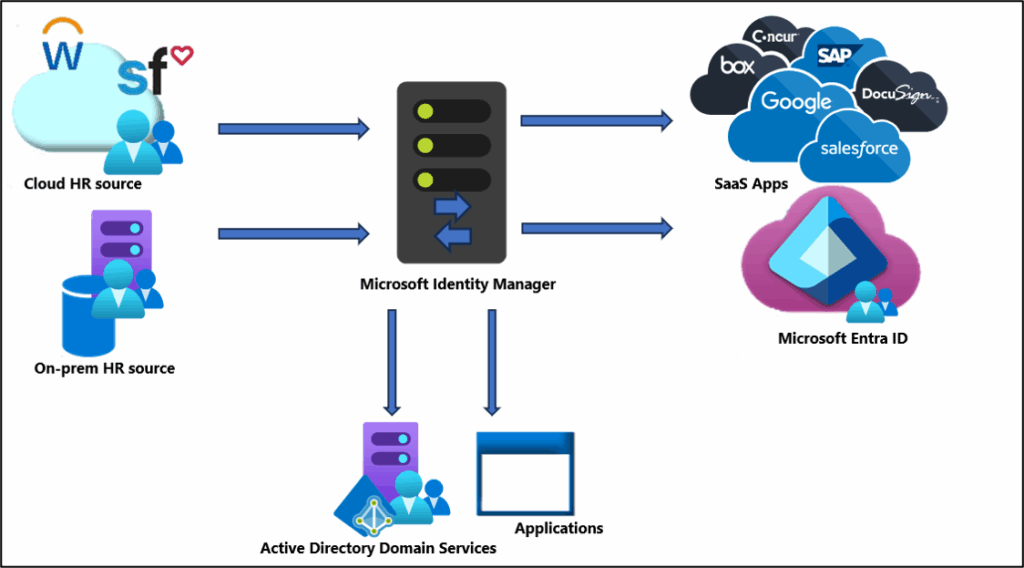
Microsoft Identity Manager 2016 is an on-premises identity and access management (IAM) solution. Its core features include:
- User and group synchronization between directories and applications.
- Password reset and self-service capabilities.
- Certificate and smart card lifecycle management (via MIM CM).
- Extensibility through custom workflows and connectors.
Many organizations adopted MIM to bridge the gap between on-premises Active Directory (AD) and other systems, enforcing governance and consistency across multiple identity stores.
Why is MIM being retired?
There are three main reasons Microsoft is retiring MIM:
- Cloud-first strategy Microsoft’s identity and access strategy is now centered on Microsoft Entra ID (formerly Azure AD). This is where new features, integrations, and security enhancements are happening, not on-premises MIM.
- Shrinking demand for on-premises IAM As organizations shift workloads to the cloud, reliance on purely on-premises identity systems has diminished. Hybrid identity remains important, but the industry momentum is toward SaaS-based identity services.
- The technology age and supportability MIM is built on a legacy architecture that requires significant customization and expertise to maintain. Extending its lifecycle beyond 2029 would hinder modernization and security innovation.
The urgency of transition: why you can’t afford to wait
Microsoft Identity Manager may have four years of extended support left (as of 2025), but here’s why waiting until 2028 to act is risky:
- Complex migrations take years: Mapping out identity flows, dependencies, and custom rules can be a long process.
- Skill scarcity: As fewer engineers specialize in MIM, finding expertise will become harder and more expensive.
- Security pressures: Cyber threats are accelerating, and MIM will not benefit from the same cutting-edge security investments as Entra ID.
- Regulatory risk: If MIM reaches the end of support while still in production, it could put your compliance posture at risk.
The bottom line: begin planning now.
Your core options beyond Microsoft Identity Manager
So what are your realistic paths forward? Broadly, you have three:
1. Microsoft Entra ID (formerly Azure Active Directory)
Entra ID is Microsoft’s flagship cloud identity solution. For many organizations, this is the most logical successor to MIM.
| Category | Details |
|---|---|
| Overview | Entra ID is Microsoft’s flagship cloud identity solution. For many organizations, this is the most logical successor to MIM. |
| Strengths | Deep integration with Microsoft 365, Azure, and thousands of SaaS apps.Native capabilities for SSO, MFA, Conditional Access, and identity governance.Cloud-based provisioning to SaaS apps and on-premises systems (via Entra Cloud Sync). Continual innovation: features like identity protection, lifecycle workflows, and external user management. |
| Challenges | May require rethinking your architecture, Entra ID isn’t a drop-in replacement for every MIM scenario. Some on-premises systems may still need connectors or hybrid strategies. |
2 and 3. Third-party identity management solutions or a hybrid approach
A rich ecosystem of third-party IAM platforms exists, such as:
- Entra ID
- Okta
- SailPoint
Or mixing and matching solutions for a hybrid approach.
| Feature | Entra ID | Okta | SailPoint | Hybrid approaches |
|---|---|---|---|---|
| Cloud-first | ✅ | ✅ | ✅ | ⚠️ Partial |
| Custom workflows | ⚠️ Limited | ✅ | ✅ | ✅ |
| Cost predictability | ✅ | ⚠️ | ⚠️ | ⚠️ |
| Governance tools | ✅ | ✅ | ✅ | ✅ |
Key considerations when choosing your path forward
Making the right choice requires careful evaluation. Here are the main aspects to consider:
Understanding your current identity landscape
- Which systems rely on MIM for provisioning today?
- What custom workflows, connectors, or rules are in place?
- How are certificates or smart cards managed?
Assessing your future needs and goals
- Will most of your workloads be in Microsoft 365 and Azure?
- Do you anticipate heavy use of SaaS apps outside Microsoft’s ecosystem?
- What governance or compliance frameworks must you meet?
Budget and resource allocation
- Cloud-first approaches, such as Entra ID, may reduce infrastructure costs but could increase subscription expenses.
- Third-party IAM often comes with higher licensing but may reduce long-term customization and support costs.
Security and compliance requirements
- Consider regulations like GDPR, HIPAA, SOX, or industry-specific mandates.
- Ensure the successor solution provides strong auditing, reporting, and least-privilege controls.
Take the quiz to get a recommendation for replacing Microsoft Identity Manager
Answer a few quick questions to get a recommendation: Microsoft Entra ID, Third-party IAM, or a Hybrid approach.
This self-assessment is intended for informational purposes only and should not be considered a substitute for professional identity and access management guidance.
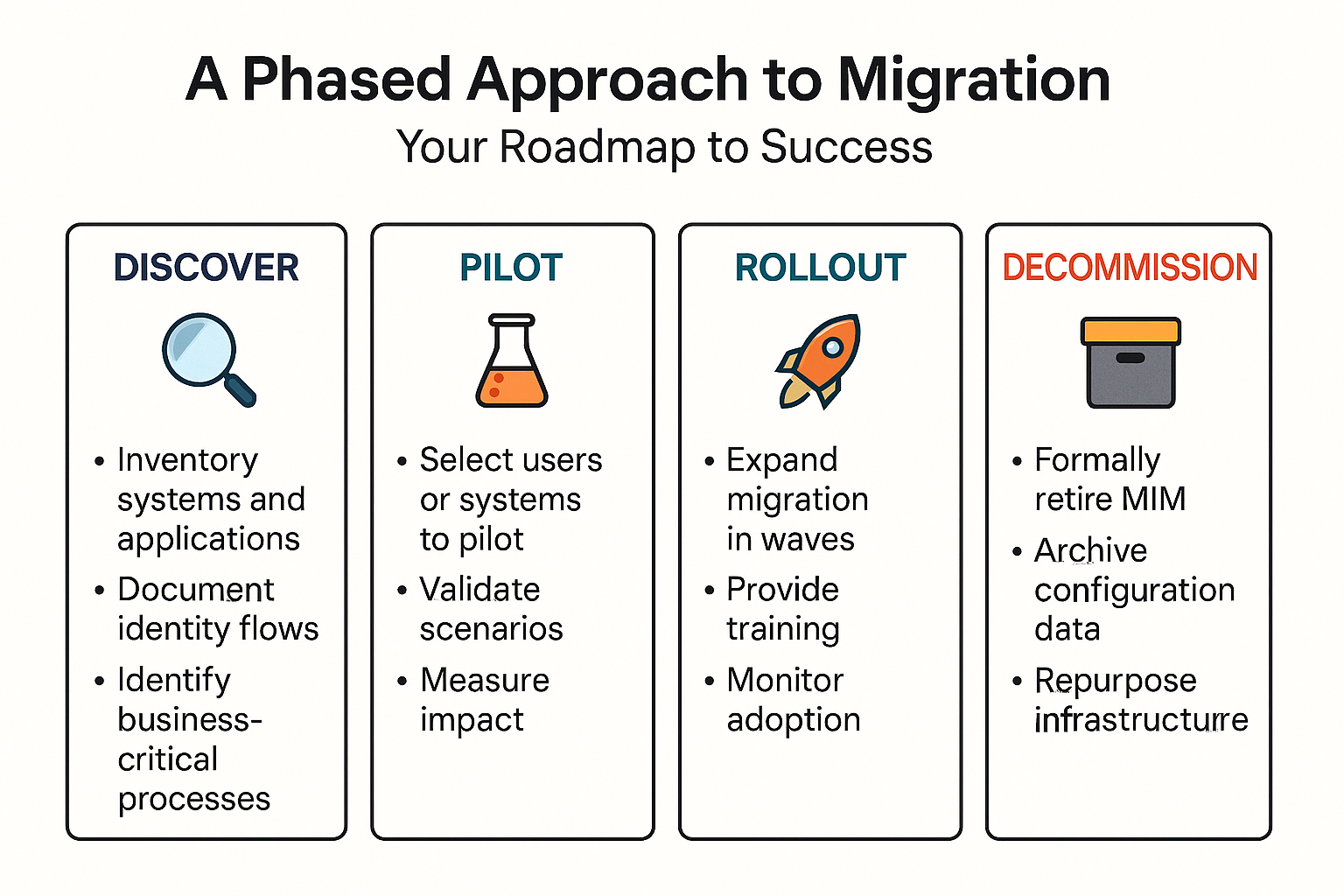
A phased approach to Microsoft Identity Manager migration
Identity migrations are too complex to execute in a single “big bang.” A phased strategy helps reduce risk.
Don’t go it alone: seeking expert guidance
Few organizations have the in-house expertise and engineering prowess to fully migrate from MIM to modern IAM platforms without assistance. Consider:
- Microsoft FastTrack and consulting partners for Entra ID transitions.
- Specialized IAM vendors or systems integrators for third-party solutions.
- Independent security consultants to validate compliance and risk management.
An external perspective can accelerate planning, surface blind spots, and reduce migration risk.
The future of identity management: beyond Microsoft Identity Manager
As MIM approaches retirement, the future of identity management is increasingly cloud-first, intelligent, and adaptive. Expect to see:
- Deeper automation of identity lifecycle tasks.
- AI-driven anomaly detection for insider threats and compromised accounts.
- Zero Trust frameworks are becoming the default, where no device or user is implicitly trusted.
- Convergence of IAM with security operations, making identity the new perimeter.
Microsoft Identity Manager played a pivotal role in identity management’s past. But its retirement signals a new era, one where flexibility, automation, and security innovation are delivered at cloud speed.
Frequently asked questions
What is the Microsoft Identity Manager?
Microsoft Identity Manager (MIM) is an identity and access management (IAM) solution developed by Microsoft. It helps organizations securely manage user identities, credentials, roles, and group memberships across multiple systems such as Active Directory (AD), Exchange, and Entra ID.
MIM automates the process of provisioning and de-provisioning users, synchronizing identity data between directories, and managing passwords. It provides self-service password reset, group management, and role-based access control (RBAC) features that streamline identity lifecycle management and improve security compliance.
MIM is typically used in on-premises or hybrid environments to maintain centralized control over identity governance while integrating with modern cloud identity platforms.
What replaces MIM?
Microsoft is phasing out Microsoft Identity Manager and moving toward cloud-based identity governance through Microsoft Entra. The replacement is Microsoft Entra ID Governance (part of the Microsoft Entra family), which includes advanced features for:
- Lifecycle workflows for user onboarding/offboarding
- Access reviews and entitlement management
- Cloud-native identity synchronization and policy enforcement
Entra ID Governance offers everything MIM provided — but delivered as a modern, SaaS-based identity management platform that integrates seamlessly with Azure Active Directory (now called Entra ID).
In short:
Microsoft Entra ID Governance replaces Microsoft Identity Manager as Microsoft’s modern identity management solution.
What is IDM in Active Directory?
IDM (Identity Management) in the context of Active Directory (AD) refers to the processes and tools that control user identity data, authentication, and access permissions within a Microsoft environment.
In AD, identity management includes:
- Creating and managing user accounts and groups
- Enforcing password policies and security rules
- Managing access to network resources
- Synchronizing identities across on-premises and cloud systems (via tools like MIM or Entra Connect)
Essentially, IDM ensures that only the right users have the right access to the right resources, following organizational and compliance policies.
What is identity management in Active Directory?
Identity management in Active Directory is the foundation of how Microsoft environments handle authentication and authorization. It includes the administration of user identities, credentials, and access rights across all systems connected to AD.
With tools such as Microsoft Identity Manager or Entra ID Governance, organizations can:
- Automate user provisioning and de-provisioning
- Implement single sign-on (SSO) across applications
- Manage password resets and account recovery
- Audit and report on user access compliance
This centralization improves both security and operational efficiency, ensuring identities are consistently managed across hybrid or cloud environments.

Michael has been an IT Pro since 1998. He has worked predominantly in the Windows world including client and server operating systems, on-prem systems engineering (AD, DNS, etc.), and over the last ten years or so has embraced and immersed himself in...