AD Site Topology Explained: What You Control, What AD Calculates, and Why It Matters
The most common Active Directory performance problems are caused by bad AD site topology, not AD itself.

AD site topology is the way Active Directory (AD) models your physical network using sites, subnets, and site links. It helps clients find nearby domain controllers and helps replication follow efficient network paths. But the most common Active Directory performance problems are caused by bad site topology, not AD itself.
In many environments, administrators spend too much time debating site names and domain controller placement while under-investing in the one input that matters most: accurate subnet mapping. When AD seems to choose the wrong domain controller, replicate inefficiently, or push traffic across expensive Wide Area Network (WAN) links, the root cause is often that the directory’s model of the network does not match the network that actually exists.
🎬 Watch This Week in IT.
That is why AD site topology matters. Microsoft Learn describes it as the logical representation of the physical network, used to route authentication and replication traffic efficiently. But the publishable takeaway is more practical than that definition: if your topology model is wrong, AD will still do exactly what it is designed to do, just against bad inputs. Most environments overcomplicate sites, under-model WAN reality, and leave subnet data incomplete. The result is not “bad AD.” It is bad guidance fed into a system that is trying to make smart decisions automatically.
Before you touch topology, separate logical design from network reality
Most admins get into trouble when they treat domains, forests, and sites as if they solve the same problem. They do not. Forests and domains are the logical structure of Active Directory. They define naming, trust, and administrative scope.
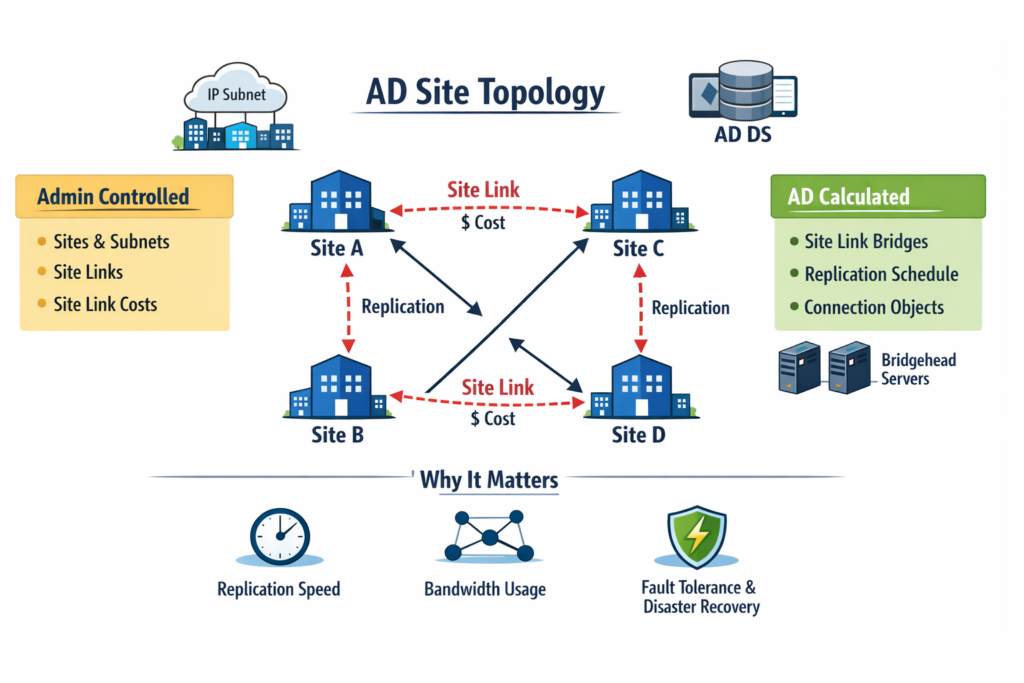
Sites, subnets, and site links are the physical model. They tell AD how the network behaves. If you only remember one distinction from this article, make it this one: logical structure explains who and what exists; site topology explains where traffic should go.
What AD needs from you and what it decides on its own
The easiest way to make site topology understandable is to stop treating it as a feature list. AD does not need you to hand-design every replication path. It needs a small set of good inputs: sites, subnets, and site links. From there, Active Directory calculates replication behavior. This matters more than memorizing console steps because it answers the question readers actually care about: what I control and what AD decides for me.
Why most AD site designs are too granular
A site should represent a set of well-connected IP subnets, not every office, VLAN, or administrative boundary someone wants to label. In practice, most environments have too many sites, not too few. When admins model every location on the org chart instead of every meaningful difference in connectivity, they create unnecessary complexity, increase the chance of misplaced domain controllers, and make intersite behavior harder to reason about than it needs to be.
- If you only fix one thing in site design: collapse sites that do not represent meaningfully different connectivity behavior.
- This matters more than: finding the perfect naming convention or mirroring every business location.
- Most admins get this wrong: they model organizational geography instead of network performance.
If your subnet mapping is wrong, nothing else matters
Subnet objects are where topology stops being theory and starts affecting outcomes. They are how clients and domain controllers determine which site they belong to. That makes subnet accuracy the highest-leverage part of site topology design. If your subnet mapping is incomplete, stale, or guessed at, AD cannot reliably place clients, prefer the right domain controllers, or make good locality decisions. You can spend hours refining site links, but if subnets are wrong, none of that work lands where it should.
- If you only fix one thing in the whole topology: audit every production subnet and map it to the correct site.
- This matters more than: hand-tuning replication behavior or debating site-link cost values.
- Failure pattern: clients authenticate across the WAN, domain controllers appear “misplaced,” and DC Locator feels unpredictable because subnet truth is missing.
Stop trying to control replication manually. Model intent instead
Site links are not there so you can draw replication by hand. They exist so you can describe WAN reality in a way AD can use. Cost, schedule, and interval are declarative inputs: they tell Active Directory which routes are preferred, which links are constrained, and when cross-site replication is appropriate. Most admins get this wrong when they treat site links like manual wiring diagrams. That leads to overcontrol, brittle designs, and confusion when AD recalculates the topology anyway.
- What matters most here: model real WAN preference and availability, not imaginary perfect paths.
- Common failure: expensive or backup links get used poorly because costs and schedules do not reflect the real network.
- Better mental model: you declare intent, and AD computes the working topology from it.
If you are tempted to micromanage every replication path, that is usually a sign that the topology inputs are not trustworthy enough. In healthy designs, admins control the model, not every resulting connection. That distinction is one of the clearest separators between stable AD environments and those that constantly fight their own topology.
Let AD build the topology it was designed to build
Replication topology is a calculated outcome, not the primary design surface. Knowledge Consistency Checker (KCC) and Inter-Site Topology Generator (ISTG) evaluate your sites, subnets, and site links, then derive the connection objects and routing decisions needed to keep the directory synchronized. If you find yourself manually designing replication as a default practice, that is usually a sign that your topology inputs are wrong or incomplete, not that AD needs more supervision.
This matters because many administrators still approach topology as if the safest option is to outsmart the platform. Usually, the safer option is the opposite: give AD better inputs and let it calculate. Manual connection design should be the exception, not the default pattern, because the system is already built to adapt when links, servers, costs, or availability change.
What you control vs. what AD calculates
The clearest way to understand site topology is to separate administrator-controlled inputs from system-calculated outputs. Most admins get into trouble when they try to control the right-hand column directly.
| You control | AD calculates |
| Sites | Intrasite and intersite replication topology |
| Subnet-to-site mappings | Which domain controllers are considered local or remote |
| Site link membership | Which replication paths are preferred based on available links |
| Site link cost, schedule, and interval | Connection objects and route selection created by KCC and ISTG |
| Whether to model nontransitive routing with site link bridges when needed | Failover and recalculation when topology, availability, or costs change |
If this article has a single operating principle, it is this: you are responsible for the topology inputs, and Active Directory is responsible for the topology output. The more time you spend improving subnet accuracy and realistic WAN modeling, the less time you spend fighting downstream symptoms like poor convergence, cross-site logons, and unexpected replication paths.
KCC and ISTG are only as good as the network story you tell them
KCC and ISTG do not rescue a topology model that is disconnected from reality. They automate topology generation, but only from the information you provide. If sites are too granular, subnets are incomplete, or site links misrepresent WAN behavior, those services will still calculate a topology—it will just be a topology that amplifies your mistakes. Topology work is really modeling work.
If you are seeing odd replication paths, resist the urge to start with manual fixes. Start by asking whether the inputs describe the real network accurately. Most of the time, the fastest way to improve calculated behavior is not to override AD. It is to give it a better map.
Why bad site topology shows up as everyday AD problems
Bad site topology rarely announces itself as a topology problem. It usually shows up as slow logons, unnecessary WAN usage, inconsistent service locality, or domain controllers that seem to serve the wrong users. That is why this topic deserves failure-driven explanation. The symptoms look operational, but the cause is often a poor physical model inside AD.
When DC Locator picks the “wrong” domain controller
Clients use site awareness during domain controller discovery, so they do not randomly authenticate anywhere in the forest. When users hit a remote domain controller, admins often blame AD selection logic. More often, the real problem is that subnet mapping is incomplete or the site design is too fragmented to reflect actual locality. If you are troubleshooting cross-WAN logons, start with subnets before you look anywhere else.
When replication feels slower than it should
Replication efficiency depends on whether AD correctly understands which traffic is local and which traffic crosses constrained links. Over-segmented sites and poorly modeled intersite links both make convergence harder to reason about. If changes are propagating more slowly than expected, this matters more than trying to tune around symptoms. Verify whether the site model still matches today’s network before you assume replication itself is the issue.
When WAN traffic gets used in all the wrong places
WAN misuse is one of the clearest signs of bad topology modeling. If expensive links are busy with avoidable authentication or replication traffic, AD is probably acting on assumptions you accidentally taught it. Site link cost, schedule, and interval are where you express intent about constrained or backup connectivity. If those values do not mirror reality, the resulting traffic pattern will not either.
When nearby services no longer feel nearby
DFS, Exchange, and Configuration Manager all benefit from accurate site awareness. When site topology is wrong, locality-sensitive services stop behaving locally. That often gets misdiagnosed as an application issue, even though the underlying problem is the same one driving poor logon and replication behavior. Good topology is shared infrastructure, so the cost of getting it wrong spreads beyond domain controllers.
If you’re unsure, optimize for simplicity and subnet accuracy
If you want default design guidance, start simpler than you think. Most environments do not need more sites; they need better subnet coverage and more honest WAN modeling. If you are unsure where to invest effort, prioritize the decisions that most directly change AD behavior.
- Define a site only when connectivity behavior is meaningfully different, not just because a location has a name.
- Map every active production subnet before you spend time fine-tuning anything else.
- Use site links to model WAN preference, availability, and constraints, not to simulate manual replication engineering.
- Let KCC and ISTG calculate the topology unless you have a specific exception case.
- Review logon locality, WAN usage, and replication outcomes to confirm that the model matches real-world behavior.
Avoid the common pattern of solving uncertainty by adding more topology objects. More sites, more links, and more manual intervention do not automatically create a better design. In most cases, they just make a bad model harder to debug.
Practical advice: what to do by default
If you are unsure how to design an AD site topology, default to fewer sites, better subnet mapping, and site links that reflect real WAN behavior. Start by teaching AD where things really are before you try to influence how it replicates. Avoid over-segmenting sites unless connectivity is genuinely different, and avoid manual replication design unless you have a clear exception that automation cannot satisfy. In most environments, the safest pattern is simple: model the network honestly, let AD calculate from good inputs, and fix subnet accuracy before anything else.
Frequently asked questions
What is Active Directory site topology?
Active Directory site topology is the way AD models your physical network using sites, subnets, and site links. It helps clients find nearby domain controllers and helps replication follow efficient network paths.
What are sites and subnets in Active Directory?
A site is a group of well-connected IP subnets, while subnet objects map IP ranges to the correct site. Together, they let AD determine client location and prefer local authentication and services.
How does Active Directory replication work between sites?
Between sites, AD replication follows site links, schedules, and costs that describe WAN connectivity. The system then calculates preferred replication paths automatically instead of requiring admins to wire everything by hand.
Why is Active Directory topology important?
Good topology improves logon performance, reduces unnecessary WAN traffic, and keeps replication efficient. If the topology model is wrong, AD can still make decisions automatically, but those decisions will be based on bad network inputs.

Michael has been an IT Pro since 1998. He has worked predominantly in the Windows world including client and server operating systems, on-prem systems engineering (AD, DNS, etc.), and over the last ten years or so has embraced and immersed himself in...