Active Directory Structure Explained: Domains vs Trees vs Forests
A quick, practical breakdown of AD’s core boundaries, with a comparison table and design guidance.

In Active Directory (AD), a domain is the main administrative boundary, a tree is a DNS-based grouping of related domains, and a forest is the top-level security boundary that can contain one or more trees and domains.
🎬 Watch This Week in IT.
Here’s the quick breakdown:
- Domain: the primary administrative boundary where users, computers, and policies live
- Tree: groups one or more domains that share a contiguous DNS namespace and automatic transitive trusts
- Forest: the top-level boundary that can contain multiple trees while sharing a common schema, configuration, and trust infrastructure.
AD domains vs forests vs trees: at-a-glance decision guide
- Start with one domain in one forest if you’re a typical organization and can meet most delegation and policy needs with OUs and Group Policy.
- Add a child domain if you need a hard administrative boundary, different account policies that can’t be met with OUs, or you must control replication across regions.
- Add a second tree (same forest) if you need a different, non-contiguous DNS name (common after mergers) but still want shared schema, global catalog, and forest-wide trusts.
- Create a separate forest only when you need true security or administrative isolation (for example, different organizations with separate control requirements) or when legal/regulatory constraints require it.
Domains in Active Directory
A domain represents the foundational administrative unit within Active Directory. It is the core component around which your network’s identity and resource management revolve.
What is a domain?
A domain is a logical group of network objects, such as users, computers, and other devices, that share a common directory database. All objects within a domain share common security policies and can be managed centrally. For instance, in my Hyper-V-based Active Directory lab environment, my domain name is reinders.local. This encompasses all users and computers belonging to my ‘artificial’ organization. Each domain has its own unique security boundary and administrative scope.
What a domain is used for?
Domains simplify resource management significantly. Within a domain, administrators can define Group Policy Objects (GPOs) to apply specific security settings, software deployments, or desktop configurations to users and computers. This centralized management reduces administrative overhead and ensures consistency across the environment. Do you need to enforce password complexity across all user accounts? A domain allows you to achieve this with a single policy.
Domains include at least one domain controller, a server that runs the Active DIrectory Domain Services (AD DS) role. They store a copy of the AD database, perform synchronization, and offer authentication and apply Group Policies to devices.
Trusts between domains
When multiple domains exist within an organization, they often need to communicate and share resources. This is facilitated by trust relationships. A trust relationship allows users authenticated in one domain to access resources in another domain. For example, a trust between reinders.local and my second child domain, corp.reinders.local would enable sales personnel to access spreadsheets and financial information on a file server in the other domain, with secured ease. Trusts can be one-way or two-way, transitive or non-transitive, defining the scope and direction of resource access.
| Feature | Domain | Tree | Forest |
| DNS Namespace | Unique; e.g., reinders.local | Contiguous; shares root DNS namespace | Non-contiguous (can be multiple distinct DNS namespaces) |
| Trusts | Trust with parent domain (if child) | Two-way, transitive trusts throughout the tree | Two-way, transitive trusts between all domains within the forest |
| Schema | Shares schema of the forest | Shares schema of its forest | Unique schema for the entire forest |
| Configuration | Shares configuration of the forest | Shares configuration of its forest | Unique configuration for the entire forest |
| Global Catalog | Contains partial attribute set of all objects in its forest | Contains partial attribute set of all objects in its forest | Contains a partial, searchable copy of every object in the entire forest |
| Administration | Managed by Domain Admins | Managed by Domain Admins of respective domains | Managed by Enterprise Admins and Schema Admins |
| Security | Security boundary for its objects | Security boundary for its domains | Ultimate security boundary; forest-wide security principals |
Trees in Active Directory
A tree in Active Directory is best thought of as a DNS-driven grouping of one or more domains that share a contiguous namespace. In practice, you rarely design an AD specifically “to have trees”. Trees are usually the natural result of domain naming requirements (for example, adding child domains under a shared root name).
What is a tree?
A tree is characterized by a contiguous DNS naming hierarchy. All domains within a tree share a common root domain name. For instance, if reinders.local is the root domain, then corp.reinders.local and hr.reinders.local are child domains within the same tree.
These child domains inherit a portion of their parent’s namespace. In most designs, trees aren’t created for departmental org charts; they show up when you need multiple domains that still fit under a single, contiguous DNS name.
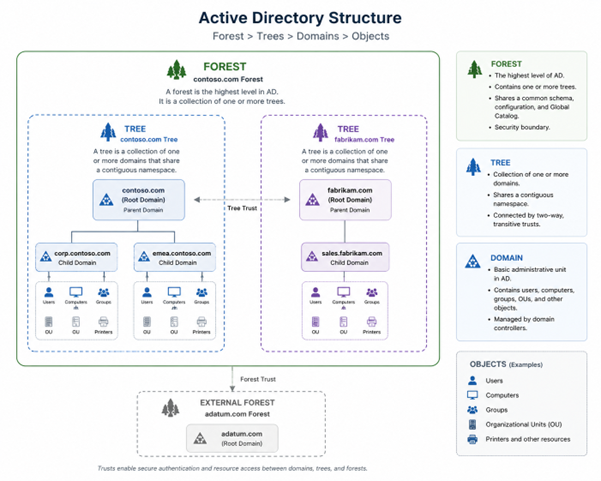
The hierarchical structure of a tree implies a parent-child relationship between domains. Child domains are created from a parent domain and automatically establish a two-way, transitive trust with their parent. This trust extends throughout the entire tree, allowing resources to be shared easily among all domains within that tree. The naming convention is critical; each domain name within a tree is unique and follows the established DNS namespace.
Why the root domain matters
The root domain is the first domain created in a new tree. It holds significant importance as it defines the base DNS name for all subsequent domains within that tree. The root domain’s health and security are paramount, as its compromise could impact all child domains. It is advisable to minimize the number of servers and applications directly within the root domain to reduce its attack surface.
Also, be sure to document, document, document all the important AD domain resources in your root domain. Securely but fundamentally saving these critical items and attributes is required during any kind of domain-level disaster or (forest) recovery process.
Forests in Active Directory
A forest represents the highest level of the Active Directory logical structure. It is the ultimate boundary for security, schema, and configuration.
What is a forest?
A forest is a collection of one or more Active Directory trees that do not necessarily share a contiguous DNS namespace but do share a common schema, configuration, and global catalog. All domains within a forest, regardless of which tree they belong to, implicitly trust each other through a two-way, transitive trust relationship. Consider reinders.local and reinderscorp.local as two distinct trees; they can exist within the same forest if they need to share a common AD infrastructure. But, they don’t have to. These design principles help you decide IF they should be in the same forest or in a completely separate forest, with no affiliation to the other.
Trusts across trees
Within a forest, all trees automatically establish two-way, transitive trust relationships with each other through the forest root domain. This means that users from any domain in any tree within the forest can authenticate and access resources in any other domain within the same forest, provided they have the necessary permissions. This simplifies cross-organizational resource sharing significantly.
Enterprise Admins and Schema Admins (forest-level control)
The Enterprise Admins and Schema Admins groups are special, highly privileged groups that exist only at the forest level. Membership in these groups grants administrative control over the entire forest. Security tip: Keep these groups empty until you need to perform a task that explicitly requires them.
- Schema Admins can modify the Active Directory schema, which defines the types of objects and attributes that can be stored in AD. Schema modifications are permanent and forest-wide, thus requiring extreme caution.
- Enterprise Admins have full administrative control over all domains within the forest. They can add or remove domains, configure forest-level settings, and manage trusts. These groups must be secured with the utmost rigor to prevent unauthorized access and potential forest-wide compromise.
Domains vs. forests vs. trees: A clear distinction
Understanding the differences is crucial for effective AD design and management.
Practical implications
For IT professionals, these distinctions translate directly into architectural decisions. When considering security, remember that the forest is the ultimate security boundary; compromise at the forest level means compromise of all domains. For administrative delegation, domains provide clear boundaries for local administration, while trees offer logical grouping for DNS management. Forests consolidate disparate organizations under a single AD infrastructure.
Design tips (when to use multiple domains, trees, or forests)
Strategic design of your AD environment is crucial for long-term scalability and security.
When to use multiple domains
Implement multiple domains within a single tree if you require:
- Different security policies for specific departments or geographical regions that cannot be achieved solely through Organizational Units (OUs).
- Distinct administrative boundaries where one group of administrators should not have control over another’s user accounts or resources.
- Replication control due to geographical dispersion and limited network bandwidth.
Do not create multiple domains merely for organizational structure; OUs can often fulfill this requirement more efficiently, especially by separating Group Policy Objects (GPOs). For the majority of environments, a single domain will suit you admirably.
When to use multiple trees
Consider implementing multiple trees within a single forest only when you have a real naming requirement for separate, non-contiguous DNS namespaces (often due to branding/legal boundaries or post-merger reality). Not because multiple trees are inherently “better” architecture.
- Your organization has distinct brand identities or legal entities requiring separate, non-contiguous DNS namespaces.
- You have merged with another company that already has its own Active Directory domain and DNS namespace, and a full migration into a single tree is not immediately feasible or desired.
- You have merged with another company that already possesses its own Active Directory domain and DNS namespace, and a full migration into a single tree is not immediately feasible or desired.
For most environments, a single tree is sufficient; add another tree when your DNS naming constraints (or a merger you’re not ready to consolidate) leave you little practical alternative.
Forest design considerations
When designing your forest, prioritize the following:
- Minimize the number of forests: A single forest simplifies management, reduces the need for external trusts, and provides a unified global catalog. Only create multiple forests when legally mandated or due to absolute autonomy requirements between business units.
- Secure the forest root domain: This domain is critical. If you only need one forest, you can place your user and group objects here. However, in the past, admins would often use the forest root domain as a dedicated admin boundary, not a user/resource domain. The forest root holds critical security groups like Enterprise Admins, Schema Admins, etc. Again, there is additional overhead in using multiple forest domains, so, it will most likely not be necessary in your environments.
- Control highly privileged groups: Strictly manage membership in Enterprise Admins and Schema Admins (again – keep them empty). Implement robust security measures, such as Privileged Access Workstations (PAWs) and just-in-time (JIT) access, for these accounts.
- Plan for disaster recovery: Ensure adequate backups of all domain controllers, especially those in the forest root, and develop a comprehensive recovery plan.

Michael has been an IT Pro since 1998. He has worked predominantly in the Windows world including client and server operating systems, on-prem systems engineering (AD, DNS, etc.), and over the last ten years or so has embraced and immersed himself in...