Active Directory DNS: Why It’s Required and How It Actually Works
How domain controllers are located, why things fail, and how to design DNS correctly.

Active Directory DNS is used to locate domain controllers and critical services (LDAP, Kerberos, and the Global Catalog) via SRV and host records. If DNS is missing or misconfigured, common outcomes include failed logons, Group Policy errors, and domain controller replication issues.
🎬 Watch This Week in IT.
This article explains how and why Active Directory depends on DNS, with practical guidance for production environments.
How Active Directory uses DNS (quick overview)
- Domain controllers register SRV records for LDAP, Kerberos, and the Global Catalog (GC).
- Clients query DNS to:
- Find a domain controller
- Authenticate users
- Apply Group Policy
- With AD-integrated DNS, zone data is stored in Active Directory and replicated via AD replication.
Why DNS is required for Active Directory
Active Directory Domain Services’s (AD DS) reliance on DNS is fundamental. It underpins nearly every operation, from user authentication to service location. This dependency necessitates a thorough understanding of how these two core services integrate and interact.
Active Directory vs. DNS
What is Active Directory? Active Directory (AD) is Microsoft’s directory service, providing centralized authentication and authorization services for Windows-based (and other) computer networks.
What is DNS? The Domain Name System (DNS) is a hierarchical and decentralized naming system for computers, services, or any resource connected to the Internet or a private network. It translates easy-to-read domain names (e.g., example.com) into numerical IP addresses (e.g., 192.168.1.1) that computers use to identify each other.
How Active Directory uses DNS (DC Locator and SRV records)
The operational integrity of Active Directory is directly reliant upon the health and accuracy of DNS. Active Directory domain controllers register their services and IP addresses in DNS, and clients query DNS to locate these services. This reliance is not optional; it is integral to AD’s design.
How Active Directory leverages DNS
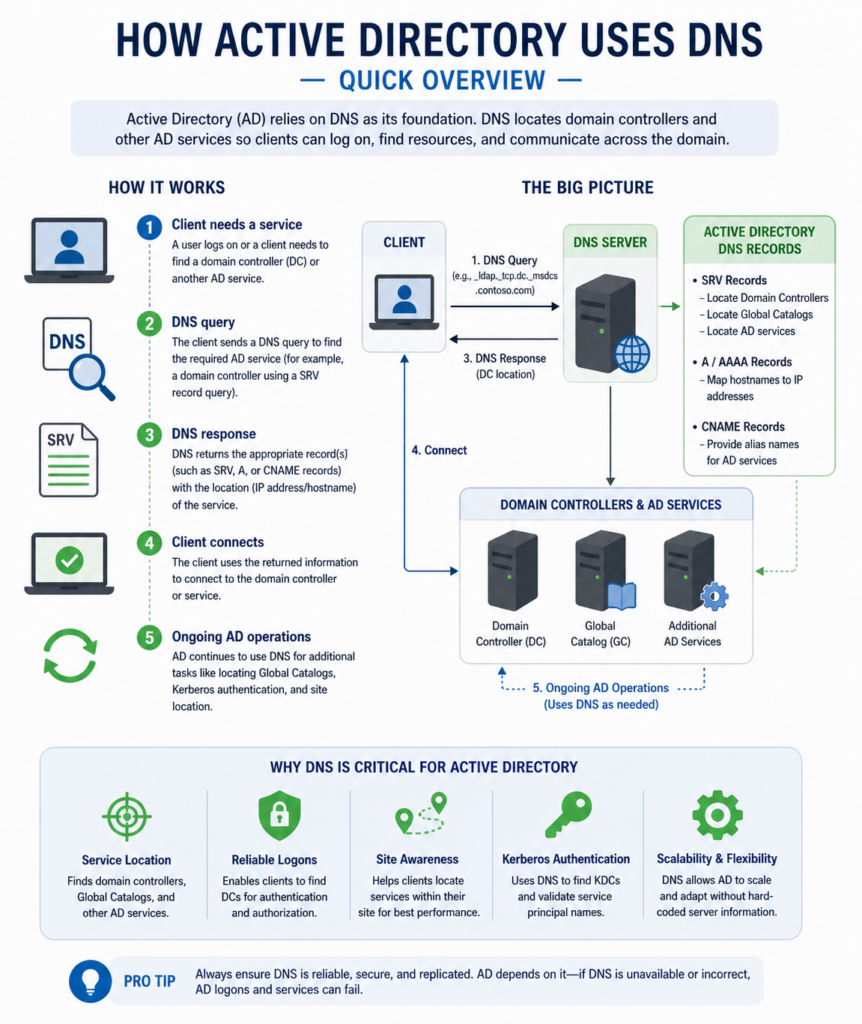
Active Directory uses DNS extensively for service location. When a client attempts to log in to a domain, access a shared resource, or apply Group Policies, it needs to find a domain controller. This discovery process is entirely dependent on DNS. Domain controllers register specific service locator (SRV) records in DNS, which indicate the services they provide, such as LDAP, Kerberos, and the Global Catalog. Clients query DNS for these SRV records, receive a list of available domain controllers, and then connect to one to perform their required operation. Without accurate DNS records, clients cannot find domain controllers, leading to authentication failures and an inability to access network resources.
Key DNS records for Active Directory
Several types of DNS records are crucial for Active Directory’s functionality. Each record type serves a distinct purpose, enabling clients to locate and interact with domain controllers and other AD-integrated services.
SRV records: the service locators
SRV (Service Location) records are paramount for Active Directory. They identify which servers provide specific services for a given domain. For example, when a client needs to authenticate, it queries DNS for SRV records that indicate domain controllers offering Kerberos or LDAP services. These records specify the port number, protocol, and hostname of the server providing the service. Without correct SRV records, clients cannot locate domain controllers, rendering the Active Directory domain inaccessible.
A and AAAA records: the IP address mappers
A records (for IPv4) and AAAA records (for IPv6) map a hostname to its corresponding IP address. Every domain controller must have correct A and AAAA records registered in DNS, associating its hostname with its IP address. When clients resolve an SRV record, they receive a hostname; they then perform an A or AAAA record lookup to resolve that hostname to an IP address, enabling a direct connection. These records are fundamental for any network communication.
NS records: name server declarations
NS (Name Server) records indicate the authoritative DNS servers for a zone. In an Active Directory-integrated DNS environment, domain controllers typically host the DNS zones for their domain and therefore have NS records pointing to themselves. These records are essential for delegating authority and ensuring that DNS queries are directed to the correct servers.
SOA records: zone authority information
The SOA (Start of Authority) record is the first record in any DNS zone file. It contains administrative information about the zone, such as the primary name server, the email address of the zone administrator, the serial number of the zone (used for zone transfers), and various timing parameters (refresh, retry, expire, and TTL values). The SOA record is paramount for zone consistency and replication.
PTR records: reverse DNS lookups
PTR (Pointer) records are used for reverse DNS lookups, mapping an IP address back to a hostname. While not strictly required for Active Directory’s core functionality, PTR records are crucial for many network services, troubleshooting, and security logging. For instance, many services perform reverse DNS lookups to verify the identity of connecting clients or servers. Domain controllers should ideally have corresponding PTR records for their A/AAAA records.
Recommended DNS configuration for Active Directory
This configuration reflects how Active Directory DNS is typically deployed in stable, production environments.
| Component | Recommended configuration | Why it matters |
| DNS zone type | AD-integrated zones for the AD DNS namespace | Stores zone data in Active Directory for multi-master replication and consistent updates across domain controllers. |
| DNS role placement | Install the DNS Server role on all domain controllers that host AD DNS zones | Improves resilience and local name resolution, and supports reliable domain controller discovery. |
| Dynamic updates | Secure dynamic updates only | Prevents unauthorized record registration/changes while allowing domain members to update records safely. |
| Client DNS settings | Clients use domain controllers for DNS only (no public/external resolvers) | Ensures clients can always resolve AD-specific SRV and host records; use forwarders on DNS servers for Internet lookups. |
| Internet name resolution | Use forwarders or root hints (choose intentionally) | Forwarders centralize control and logging; root hints allow direct recursion if you don’t have reliable upstream resolvers. |
Do
- Use AD-integrated DNS zones for your AD namespace
- Run the DNS Server role on the domain controllers that host the zone(s)
- Allow secure dynamic updates
- Point domain-joined clients to domain controllers for DNS only
- Use DNS forwarders (or root hints) on your DNS servers for Internet resolution
Don’t
- Point domain-joined clients at public DNS resolvers for day-to-day name resolution
- Mix internal and external DNS servers in client NIC settings
- Allow non-secure dynamic updates on AD DNS zones
- Rely on a single DNS server with no redundancy for AD name resolution
DNS zone design
- AD-integrated zones: store the AD DNS zone in Active Directory so updates replicate with AD.
- Replication scope (domain vs. forest): choose scope based on where clients and domain controllers need to resolve AD records, while minimizing unnecessary replication.
DNS server placement
- DNS role on domain controllers: run the DNS Server role on the domain controllers that host your AD DNS zones for resilient, local DC/service discovery.
- Avoid standalone DNS servers for AD namespaces: unless you have a specific design requirement and you can keep AD DNS zone data consistent and highly available.
Client resolution behavior
- Clients point only to domain controllers for DNS so SRV and host records for AD always resolve correctly.
- No public resolvers on NICs: keep client DNS settings internal; use your DNS servers for Internet recursion via forwarders/root hints.
External name resolution
- Forwarders vs. root hints: forwarders centralize control and logging; root hints enable direct recursion when you don’t have reliable upstream resolvers.
- Make this a server decision (not a client one): clients stay pointed at internal DNS, while DNS servers handle recursion/forwarding for Internet queries.
How DNS problems surface in an Active Directory environment
When DNS is wrong in an AD environment, the symptoms usually cluster into a few predictable failure modes.
Failure mode 1: Clients can’t locate a domain controller. If SRV or host records don’t resolve correctly (or clients are pointing at the wrong DNS servers), logons slow down or fail outright. You’ll often see trust relationship errors and intermittent authentication failures because clients can’t reliably find LDAP/Kerberos endpoints.
Failure mode 2: Domain controllers can’t find each other. When DC-to-DC name resolution breaks, replication partners can’t be located and replication starts failing. Over time this creates inconsistent directory state across DCs, which can look like “random” AD issues but is often rooted in stale or missing DNS records.
Failure mode 3: Policy processing and resource access become unreliable. If clients can’t consistently resolve DCs and servers, Group Policy processing fails (often due to SYSVOL/DC lookups), and access to shares, printers, and apps becomes intermittent. The result is a mix of “can’t apply policy” and “network path not found” style errors even when permissions are correct.
How to reason through DNS problems in Active Directory
When DNS breaks in an Active Directory environment, the goal isn’t to run every diagnostic tool available. It’s to answer a small number of questions in the right order so you can isolate whether the issue is client DC discovery, DC-to-DC resolution, or record registration/lookup.
Start by answering three questions:
- Can clients locate a domain controller? If clients can’t discover a DC via DNS, authentication and Group Policy are usually the first things to fail. Confirm that clients are querying the correct DNS servers and that SRV records resolve (for example, with NLTest and targeted SRV lookups).
- Can domain controllers locate each other reliably? Replication problems often mean DC-to-DC name resolution is broken or inconsistent. DNS-focused health checks (for example, DCDiag DNS tests) and DC event logs can help identify missing or stale records that prevent replication partners from being located.
- Are DNS records registering and resolving correctly? Even with the right servers in place, dynamic registration failures and stale records can cause intermittent issues. Verify that expected SRV and host records exist and resolve consistently (for example, using nslookup or Resolve-DnsName).
Common commands used to confirm DNS behavior
- DCDiag: dcdiag /test:dns
- NLTest: nltest /dsgetdc:<domainname>, nltest /sc_query:<domainname>
- DNS lookups: nslookup -type=SRV _ldap._tcp.dc._msdcs.<domain>, or PowerShell Resolve-DnsName
Advanced DNS concepts for Active Directory resilience
Beyond basic configuration, several advanced DNS concepts can further enhance the resilience, security, and manageability of your Active Directory environment.
GlobalNames zone
The GlobalNames zone is a single-label name resolution solution for environments that do not employ WINS and have a requirement for single-label name resolution across the forest. It acts as a centralized repository (database) for single-label names, allowing clients to resolve resources without needing to append their primary DNS suffix or rely on NetBIOS. This simplifies name resolution in complex multi-domain or multi-forest environments, reducing the number of DNS suffixes clients need to search.
DNSSEC for enhanced security
DNSSEC (DNS Security Extensions) adds cryptographic authentication to DNS, helping to prevent DNS spoofing and other attacks. By digitally signing DNS records, DNSSEC ensures the authenticity and integrity of DNS responses. Implementing DNSSEC in an Active Directory environment protects the critical DNS resolution process from tampering, making it significantly harder for attackers to redirect clients to malicious servers or compromise authentication.
DNS policies for granular control
DNS policies allow administrators to apply specific DNS configurations based on various criteria, such as client IP address, time of day, or protocol. This enables granular control over name resolution behavior, facilitating scenarios like traffic management, split-brain DNS configurations, and security filtering. For example, you can direct internal clients to internal resources while directing external clients to public resources, all while maintaining a single DNS namespace. DNS policies offer a powerful mechanism to customize and optimize DNS functionality within Active Directory.
FAQ
Does Active Directory require DNS?
Yes. AD DS depends on DNS for domain controller and service location (especially via SRV records). Without working DNS, clients and domain controllers can’t reliably locate the services needed for logon, replication, and Group Policy.
Can Active Directory work with external DNS?
For core AD functionality, clients must be able to query the DNS zone that contains your AD SRV records (typically hosted on AD-integrated DNS on domain controllers). You can use external DNS for public name resolution, but don’t point domain-joined clients directly at public resolvers for internal AD records, use forwarders on your internal DNS instead.
What DNS records does Active Directory use?
Most importantly, AD uses SRV records (for LDAP, Kerberos, and Global Catalog discovery). Domain controllers also rely on accurate A/AAAA records, and healthy zones depend on correct NS and SOA records. PTR records aren’t strictly required for AD to function, but they help with troubleshooting and some security logging.
What happens if DNS is misconfigured in AD?
Common symptoms include authentication failures, slow or failed logons, Group Policy processing errors, replication problems between domain controllers, and inability to access domain resources, often because clients or DCs can’t find the correct SRV and host records.
Should AD clients use public DNS like Google?
Typically, no. Domain-joined clients should use your internal DNS servers (usually domain controllers) so they can resolve AD-specific records. If you need Internet DNS resolution, configure DNS forwarders (or root hints) on the internal DNS servers rather than adding public resolvers to client network settings.

Michael has been an IT Pro since 1998. He has worked predominantly in the Windows world including client and server operating systems, on-prem systems engineering (AD, DNS, etc.), and over the last ten years or so has embraced and immersed himself in...