What is the Active Directory Global Catalog Server?
Learn how Global Catalog servers in Active Directory can be used to aid forest-wide searches.

An Active Directory Global Catalog works to simplify forest wide searches by storing a partial replica of all of the forest’s naming contexts. These replicas can be used in forest wide searches.
🎬 Watch This Week in IT.
What is a Global Catalog server?
A Global Catalog server is a domain controller that stores a full copy of the Active Directory data from its own domain, and a partial, read only copy of the Active Directory data from the other domains in the forest. This allows the Global Catalog to quickly locate objects from any domain in the forest, without the need for contacting multiple domain controllers.
The core problem the Global Catalog solves
When you deploy a domain controller, that domain controller services a specific domain within the Active Directory forest. In order to do so, the domain controller contains copies of the various objects within the domain, such as user and computer objects.
The problem is that an Active Directory forest can consist of multiple domains and sometimes a user may need to search across multiple domains. In the absence of a Global Catalog server, this would mean that there would need to be a seprate query for each domain. Depending the number of domains and the connectivity that exists between them, the need for multiple individual queries could lead to sluggish performance and increased network traffic.
Why a “normal” domain controller isn’t enough
A “normal” domain controller is designed to service its own domain by storing and managing objects and responding to queries. Although such a domain controller can indeed quickly respond to queries pertaining to its own domain, it is not really meant for handling multi-domain queries. A domain controller can participate in multi-domain queries, but such queries are extremely inefficient. In contrast, a Global Catalog server was specifically designed to help with multi-domain queries.
Because a Global Catalog server contains copies of objects from other domains within the forest, it is able to act as a single source of the truth, responding to multi domain queries without the need for contacting other domain controllers.
What the Global Catalog actually does
At its core, a Global Catalog’s job is to assist with locating objects within the Active Directory domain servcies. Every object within an Active Directory forest has a distinguished name that uniquely identifies the object across the entire forest.
Because the distinguised name is unique to the forest, an object’s distinguished name can be used to locate an object regardless of where in the Active Directory it resides. The problem is however, that often times an object’s distinguished name is unknown to the process that is attempting to locate the object.
If the object in question resides within the same domain partition or naming context as the process that is searching for the object, then locating the object is easy. However, if the object resides in a different domain partition then the process that is trying to locate the object will need to either contact a domain controller for each domain in the entire forest until it eventually locates the object in question, or it will need to query a Global Catalog server.
How it speeds up searches
A large Active Directory often consists of multiple partitions or naming contexts. Even so, the domain controllers within a specific domain only include objects that are local to that domain controller’s naming context. However, a Global Catalog works to simplify forest wide searches by storing a partial replica of all of the forest’s naming contexts. These replicas can be used in forest wide searches.
The role of Partial Attribute Set (PAS)
A Global Catalog contains a partial copy of the objects that exist within the Active Directory. This partial copy is sometimes referred to as a Partial Attribute Set.
In order to keep the Global Catalog size managable, Microsoft has designed the Active Directory Domain Services so that the Global Catalog contains only a subset of each object’s attributes. The attributes that are included are those that are most likely to be referenced within a search. This helps to optimize forest wide searches in multi-domain environments.
It is worth noting that the Active Directory Global Catalog is native to the Active Directory replication engine. In fact, the Active Directory automatically generates the replication topology that allows the Global Catalog to function.
Practical implications: Why you need a Global Catalog
There are various reasons why it is so important to include Global Catalog servers in an ad forest.
Faster logons and access
One of the main reasons why Global Catalogs are needed in multi-domain environments is that these servers can allow for faster logins. This is especially true in situations in which a user’s account exists in one domain, but the user’s device resides in another.
When this happens, the Global Catalog server retrieves the universal group memberships, which allow the user to authenticate even when they are logging in from another domain. Withoug these universal group memberships, the cross-domain authentication requests would likely fail. As such, Global Catalogs are an essential component in any multi-domain forest.
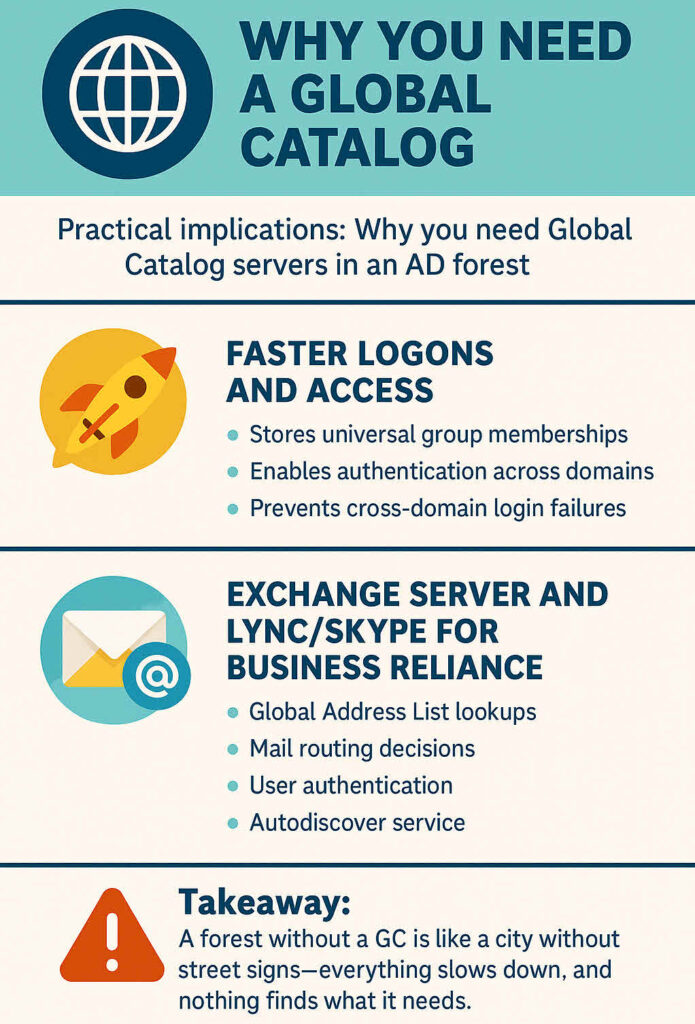
Exchange Server and Lync/Skype for business reliance
Numerous applications depend heavily on the Global Catalog. Exchange Server for example, uses the Global Catalog for functions such as Global Address Bool lookups, user authentication, mail routing decisions, and for the Autodiscover service.
Similarly, Lync and Skype (which have been largely replaced by Microsoft Teams) depend on the Global Catalog for functions such as user provisioning and discovery.
Global Catalog server placement: A strategic decision
Even though the Global Catalog is a native component within the Microsoft Active Directory, Windows Server administrators must carefully consider their Global Catalog placement strategy. When you create an Active Directory forest, the first domain controller in the forest is automatically assigned the Global Catalog server roll, because every forest requires at least one Global Catalog server.
When and where to deploy Global Catalog servers
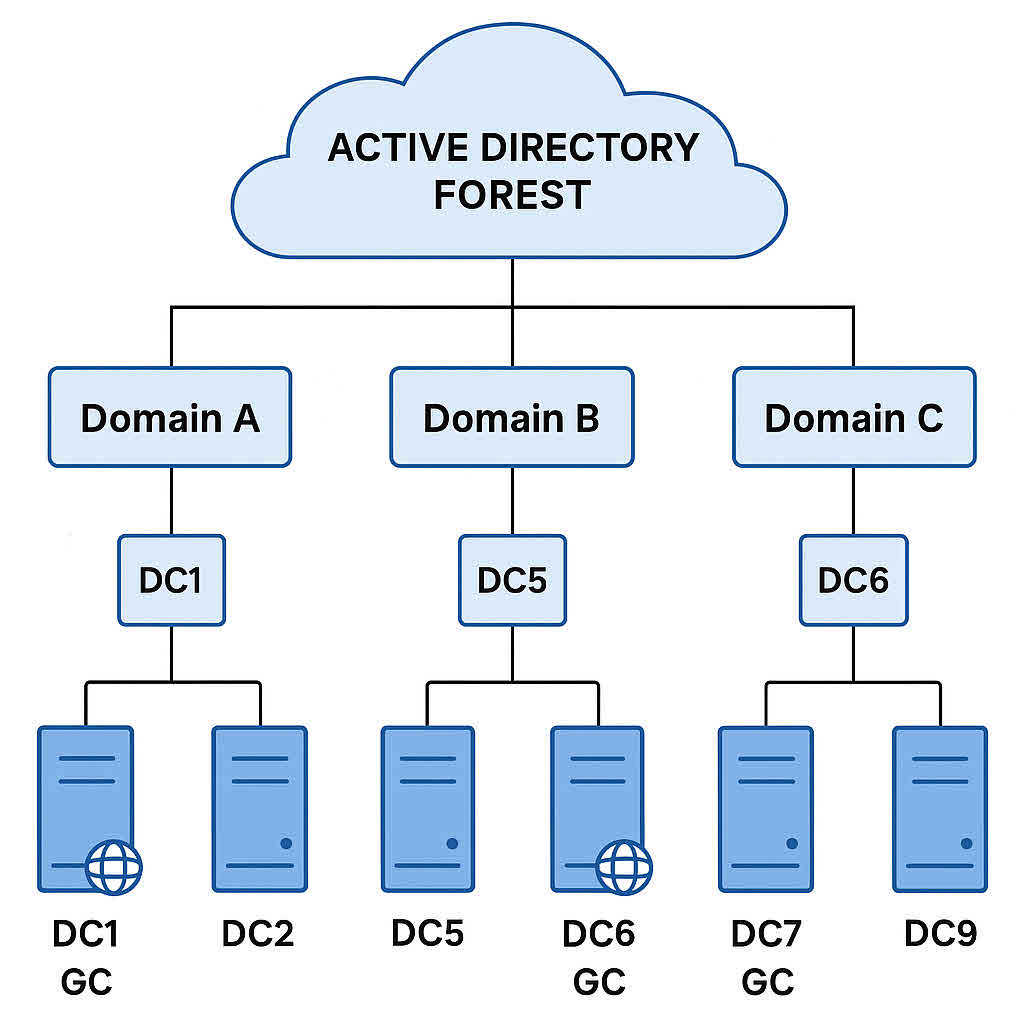
When it comes to Global Catalog placement, Microsoft recommends placing at least one Global Catalog server in each Microsoft Active Directory site. However, it has become a common best practice to deploy multiple Global Catalog servers for the sake of redundancy.
Windows Server administrators will often make every domain controller a Global Catalog server. This approach works well in a single-domain forest. However, designating each domain controller as a Global Catalog in a multi-domain forest can be problematic, as doing so will almost certainly increase replication traffic.
Key takeaways: Your Global Catalog cheat sheet
A Global Catalog server is a Windows Server that stores a full copy of its own Active Directory domain and a partial copy of all the other domains in the forest. It allows cross domain logins and forest-wide searches by resolving universal group membership. Global catalog servers are essential for applications such as Exchange Server. As a general rule, Microsoft recommends having at least one Global Catalog in each Active Directory site, though multiple Global Catalogs can be used for redundancy.
Frequently asked questions
1. What is a Global Catalog server?
A Global Catalog server is a domain controller configured to hold a full replica of its own domain’s objects plus a partial, read-only replica of all objects in all other domains in the forest. It thereby lets users and applications find directory objects anywhere in the forest without first knowing which domain holds them.
2. What does the Global Catalog do?
Some of the key functions of the Global Catalog are:
– Enabling forest-wide searches for directory objects — you can query the GC and discover objects in any domain without chasing referrals.
– Providing universal group membership information during logon in multi-domain forests (so a user’s membership in universal groups across domains is resolved).
– Resolving user principal names (UPNs) and helping cross-domain authentication scenarios.
3. Why is the Global Catalog important?
Because in a multi-domain forest, without a Global Catalog:
– Users logging on from a domain other than their account domain might face delayed or failed logons, since their universal group memberships cannot be resolved.
– Directory searches for objects in other domains become inefficient, often requiring multiple referrals to separate domain controllers.
– Applications and services (e.g., search, Exchange, authentication) that need forest-wide object access or universal group data may malfunction or degrade in performance.
4. How do you decide where to place Global Catalog servers?
Placement of GC servers requires planning:
– In a single-domain forest, you can configure all domain controllers as global catalog servers because the overhead is minimal.
– In multi-domain forests, you should ensure at least one GC per site (especially where logons and directory queries occur) so that authentication and searches don’t traverse slow WAN links.
– For remote sites with very limited bandwidth, you might instead enable Universal Group Membership Caching rather than deploy a full GC, depending on traffic and resource constraints.

As an internationally bestselling tech author and a former 22-time Microsoft MVP, Brien Posey has written or contributed to dozens of books and created a variety of full-length video training courses on all sorts of IT and space-related topics. He’...