What Is Microsoft Copilot Studio? Your Essential Guide
As organizations increasingly seek to leverage artificial intelligence for enhanced productivity and more intuitive user experiences, understanding the tools that facilitate this transformation becomes paramount.
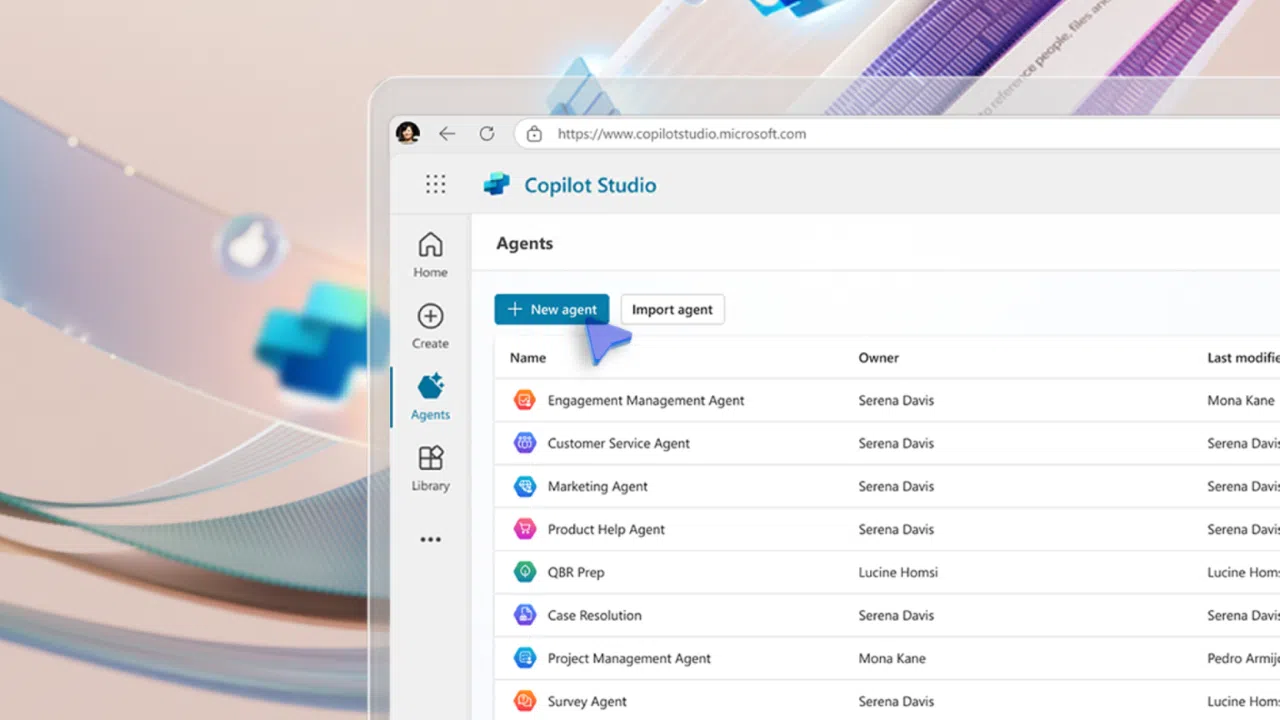
Quick summary:
Microsoft Copilot Studio is a low-code AI platform that lets businesses create and customize copilots — intelligent assistants that integrate with Microsoft 365, Azure, and Power Platform. It helps organizations automate workflows, connect data, and deliver conversational AI experiences for both customers and employees.
What is Microsoft Copilot Studio?
Microsoft Copilot Studio is an end-to-end, low-code platform designed to build, customize, and manage AI-powered conversational experiences. At its core, it empowers both developers and business users to create custom copilots, which are intelligent virtual assistants that can interact with users through natural language, perform actions, and integrate with a wide array of enterprise systems and data sources.
Think of it as a robust toolkit that allows you to bring your own specialized AI assistants to life, tailored precisely to your organization’s unique needs. Copilot Studio is specifically engineered to extend the capabilities of existing Microsoft Copilots, such as Microsoft 365 Copilot, and to enable the creation of entirely new, standalone conversational AI solutions.
Summary: Copilot Studio lets you design specialized AI copilots tailored to your organization’s needs while extending Microsoft’s built-in copilots such as Microsoft 365 Copilot.
The evolution of Copilot Studio: From Power Virtual Agents
To fully appreciate Copilot Studio, it’s helpful to understand where it all started. Microsoft Copilot Studio is the evolution of what was formerly known as Microsoft Power Virtual Agents. Power Virtual Agents established a strong foundation for low-code chatbot development, enabling users to create AI-powered virtual agents with relative ease, focusing on conversational flows and topic management.
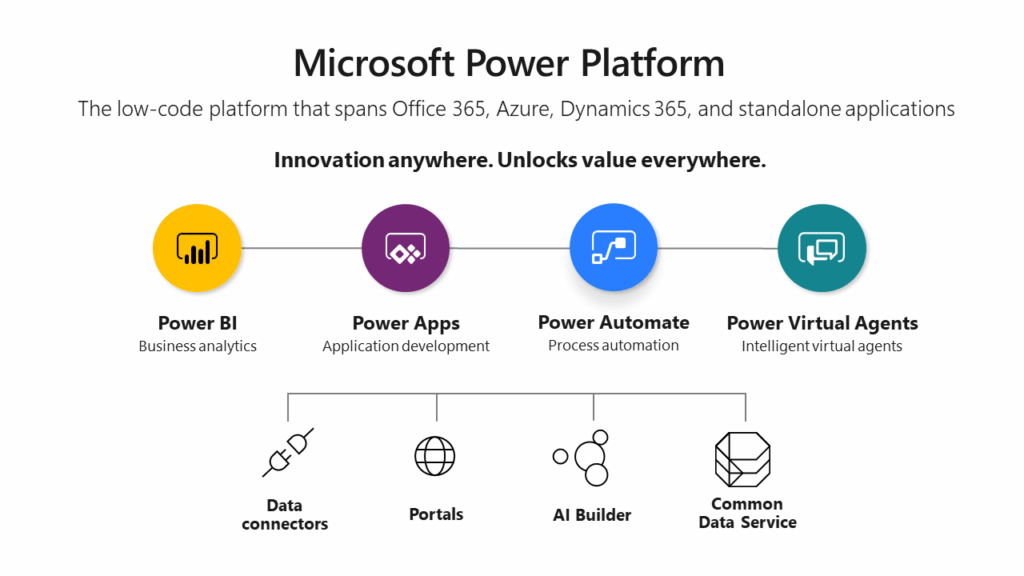
The move to Microsoft Copilot Studio is an expansion of those capabilities. While retaining the user-friendly, low-code interface that made Power Virtual Agents accessible, Copilot Studio integrates advanced generative AI features, a broader set of connectors, and deeper integration with the broader Microsoft AI ecosystem.
This evolution reflects Microsoft’s strategic emphasis on “copilots” as intelligent assistants that work alongside users, rather than merely responding to commands. The platform has matured from a simple chatbot builder to a comprehensive studio for creating highly intelligent, context-aware, and action-oriented AI assistants.
Key takeaway: Copilot Studio builds on Power Virtual Agents by integrating generative AI and deeper enterprise connectivity, transforming chatbots into intelligent copilots.
FAQs:
- Q: How is Copilot Studio different from Power Virtual Agents?
A: It adds generative AI, new connectors, and deeper integration across Microsoft 365 and Azure AI. - Q: Do I need coding experience to use Copilot Studio?
A: No. Copilot Studio uses a low-code interface designed for business users and developers alike.
Why Microsoft Copilot Studio matters: Key capabilities and benefits
Let’s look at how Copilot Studio democratizes AI development and provides benefits across various organizational functions.
Extending Microsoft 365 Copilot
One of the most powerful aspects of Microsoft Copilot Studio is that it extends and enhances Microsoft 365 Copilot. While Microsoft 365 Copilot has robust, general-purpose assistance across Microsoft applications, organizations often require features that are unique to their operations, data, or workflows.
Copilot Studio allows you to add custom knowledge, specific business processes, and proprietary data sources into the Microsoft 365 Copilot experience. This means you can create a specialized “skill” or “plugin” that Microsoft 365 Copilot can use, enabling it to answer questions about internal policies, access line-of-business applications, or automate company-specific tasks. This capability transforms a general-purpose AI assistant into a tailored, enterprise-specific partner.
Key takeaway: Copilot Studio turns Microsoft 365 Copilot into a fully customizable enterprise AI partner, capable of automating organization-specific tasks.
FAQs:
- Q: What are the main benefits of Copilot Studio?
A: It provides custom copilots, deep data integration, and generative AI for personalized automation. - Q: Can Copilot Studio connect with systems like Dynamics 365 or Salesforce?
A: Yes. It supports connectors for major enterprise systems and APIs.
How Copilot Studio fits into Microsoft’s AI ecosystem
Copilot Studio is part of Microsoft’s broader AI strategy, integrating with Azure AI, Dynamics 365, and the Microsoft Power Platform. It uses Azure OpenAI Service for natural language understanding and leverages Microsoft Entra for identity security.
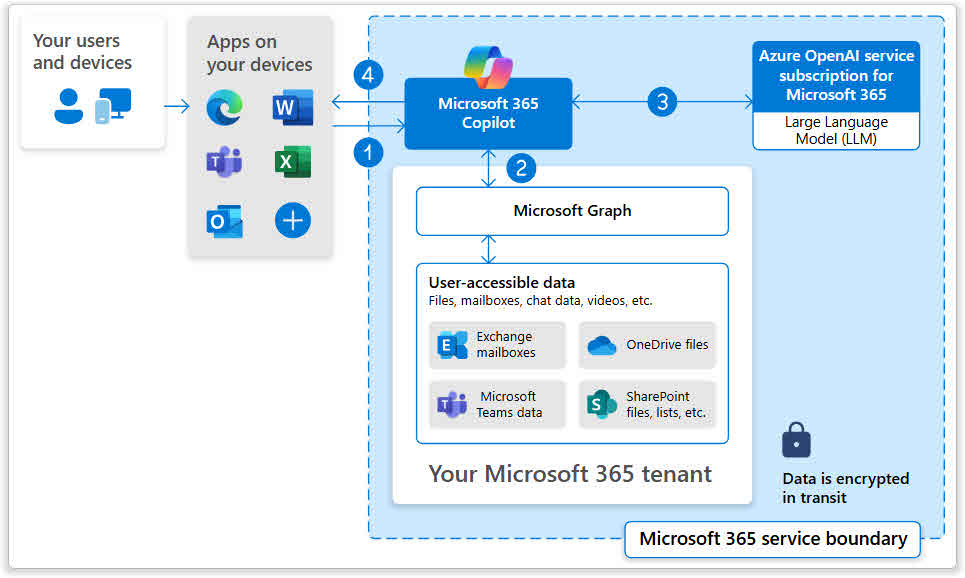
Key takeaway: Copilot Studio operates within Microsoft’s Responsible AI framework, ensuring secure, ethical, and compliant AI assistant deployment.
Related Entities:
- Azure AI Services
- Dynamics 365
- Microsoft Power Platform
- Microsoft Entra ID
Building custom AI assistants (copilots)
Beyond extending existing copilots, Microsoft Copilot Studio empowers you to build entirely new, standalone AI assistants from the ground up. Custom copilots can serve many purposes, from customer service bots that handle inquiries on a company website to internal HR assistants that guide employees through benefits enrollment, or even technical support bots that troubleshoot common IT issues.
The platform provides the tools to design conversational flows, integrate with backend systems, and deploy copilots across various channels, such as websites, Microsoft Teams, or mobile apps. This allows organizations to address specific business challenges with focused and intelligent conversational AI solutions.
Key takeaway: With Copilot Studio, organizations can create targeted, intelligent copilots to improve engagement, productivity, and user experience.
Connecting to enterprise data and systems
An important requirement for any AI assistant is the ability to access and act upon your organization’s data. Microsoft Copilot Studio has extensive connectivity options. You can easily connect your copilots to enterprise data sources, including:
- databases like SQL Server
- cloud storage like Azure Data Lake
- CRM systems such as Dynamics 365
- or Salesforce, ERP systems
- and even custom APIs.
This ensures that copilots have access to the most current and relevant information, enabling them to provide accurate answers and perform actions within your existing IT ecosystem. Robust integration is key to moving from simple Q&A bots to intelligent, operational assistants.
Enhancing developer productivity
For business users and subject matter experts, Copilot Studio’s low-code interface means they can contribute directly to the creation of copilots without needing a lot of programming knowledge. Users can define topics, design conversational flows, and train the AI with their own expertise.
For developers, the platform offers extensibility points through custom code, Azure Functions, and advanced connectors, allowing them to integrate complex logic and sophisticated integrations. This blend of low-code and pro-code capabilities means that development cycles can be shortened, and the burden on IT departments reduced, as more individuals within the organization can participate in AI solution development.
Key components and features of Microsoft Copilot Studio
To understand how Microsoft Copilot Studio helps create AI agents, it’s essential to examine its core components and features. The following elements work in together to enable the design, development, and deployment of sophisticated copilots.
Conversational AI and Natural Language Understanding (NLU)
At the heart of any conversational AI platform is its ability to understand human language. Microsoft Copilot Studio leverages advanced Natural Language Understanding (NLU), or sometimes known as Natural Language Processing. This means that when a user types or speaks a query, the copilot can accurately interpret the user’s intent, extract key entities (like dates, names, or product codes), and understand the context of the conversation.
The NLU engine is robust enough to handle variations in phrasing, synonyms, and even minor grammatical errors, ensuring that the copilot can engage in more natural and effective dialogue. As the builder, you train the copilot by providing example phrases for different “topics,” allowing the NLU model to learn and improve over time.
Generative AI capabilities
A differentiator for Copilot Studio is its integration of generative AI. This moves beyond predefined responses and allows the copilot to generate novel, coherent, and relevant text on the fly. For instance, instead of being limited to a set of pre-written answers for FAQs, a generative AI-powered copilot can take information from multiple sources to create a unique response to a complex query.
Generative AI improves the naturalness and intelligence of interactions, making the copilot feel more like a human assistant. It can also summarize documents, draft communications, or even help brainstorm ideas based on the provided context, significantly expanding the scope of what your copilot can achieve.
Topics and dialog flows
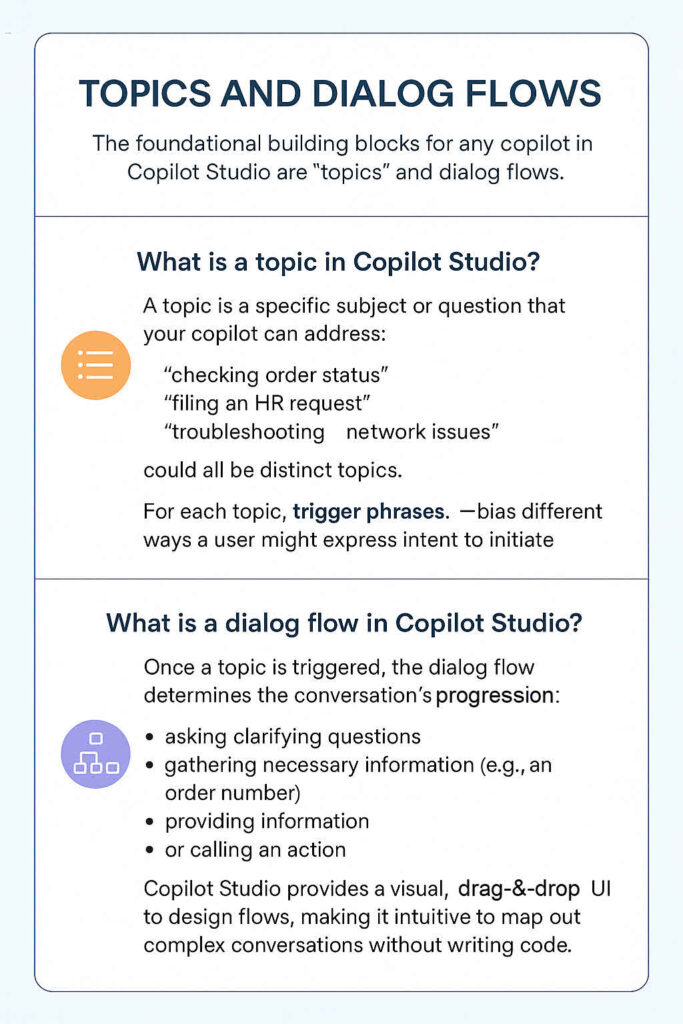
The foundational building blocks for any copilot in Copilot Studio are “topics” and “dialog flows.”
What is a topic in Copilot Studio?
A topic is a specific subject or question that your copilot can address. For example, “checking order status,” “filing an HR request,” or “troubleshooting network issues” could all be distinct topics. For each topic, you define “trigger phrases”, which are the different ways a user might express their intent to initiate that topic.
What is a dialog flow in Copilot Studio?
Once a topic is triggered, the dialog flow determines the conversation’s progression. This is where you design the step-by-step interaction:
- asking clarifying questions
- gathering necessary information (e.g., an order number)
- providing information
- or calling an action.
Copilot Studio provides a visual, drag-and-drop UI to design flows, making it intuitive to map out complex conversations without writing code. You can define conditions, branch paths based on user input, and loop back to previous steps, producing a robust and user-friendly experience.
Plugins and connectors
To perform actions and access external data, copilots rely on “plugins” and “connectors.”
What are connectors in Copilot Studio?
Connectors are pre-built integrations to hundreds of services, both within Microsoft’s ecosystem (like Dataverse, SharePoint, Teams) and third-party applications (like Salesforce, X, various databases). Connectors allow your copilot to read data from these services or write data back to them.
What are plugins in Copilot Studio?
Plugins extend connectors further by enabling your copilot to run specific actions or retrieve information from external systems. This can range from a simple API call to a complex business process automated via Power Automate.
For instance, you could create a plugin that retrieves an order’s shipping details from an e-commerce platform or one that submits a service ticket in an IT management system. These plugins let your copilot not just answer questions but actively participate in business processes.
Microsoft Power Platform integration
Microsoft Copilot Studio is a core component of the Microsoft Power Platform, which includes Power Apps, Power Automate, Power BI, and Power Pages. Deep integration brings advantages like:
- You can seamlessly use Power Automate flows as actions within your copilot’s dialog flows, enabling complex automations across hundreds of services without custom coding.
- Data stored in Dataverse, the common data service for Power Platform, can be easily accessed and used by your copilot.
- Copilots can be embedded within Power Apps or Power Pages to provide contextual assistance directly within applications or websites. This integration ensures a cohesive ecosystem where copilots can interact with and orchestrate components of your digital operations.
Security and governance
When deploying AI assistants, especially those handling sensitive enterprise data, security and governance are paramount. Microsoft Copilot Studio inherits the security features of the Microsoft Azure and Power Platform ecosystems. This includes identity management through Microsoft Entra ID, role-based access control, data encryption in transit and at rest, and compliance with various industry standards and regulations.
The platform also provides tools for monitoring copilot performance, analyzing user interactions, and reviewing conversation transcripts, allowing administrators to ensure compliance and continuously improve the copilot’s effectiveness and ethical behavior. You can control who can build, publish, and manage copilots, and audit their activity.
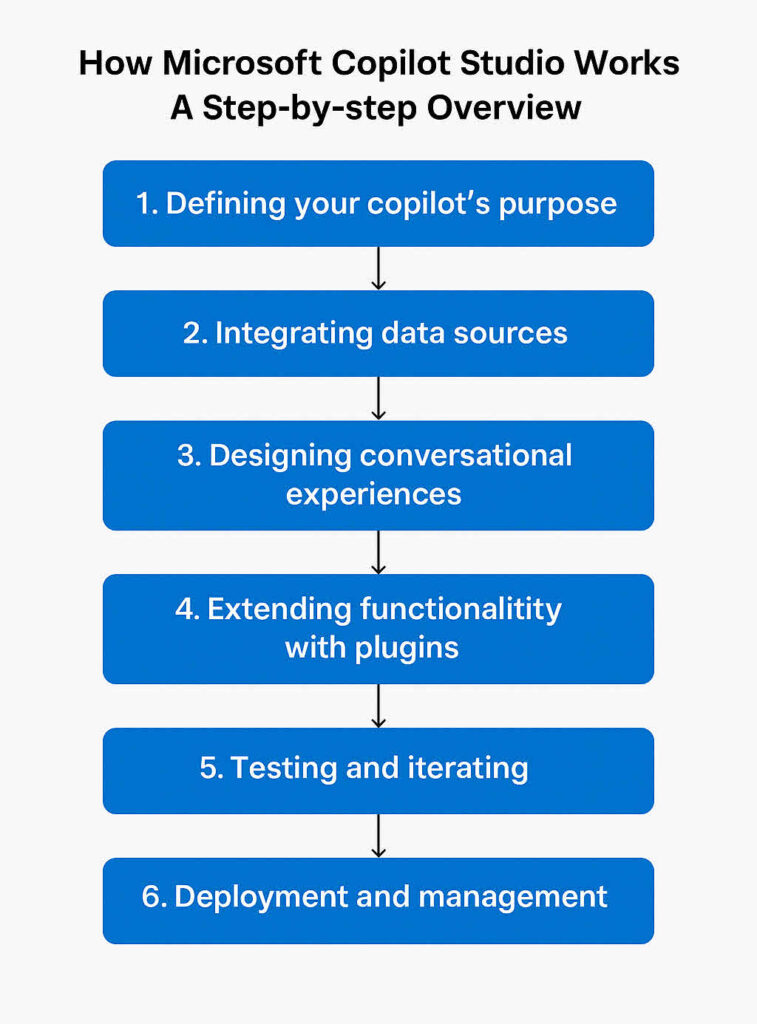
How Microsoft Copilot Studio works: A Step-by-step overview
Building a copilot with Microsoft Copilot Studio is a methodical process that usually follows a series of logical steps, moving from defining the purpose to deployment and ongoing management. Let’s walk through this process.
1. Defining your copilot’s purpose
Before you even touch the platform, the crucial first step is to clearly define what your copilot is intended to do. What specific problems will it solve? Who is its target audience? What are the key questions it needs to answer, or the specific actions it needs to perform?
For instance, if you’re building a customer service copilot, its purpose might be to “answer frequently asked questions about product returns and check order status.” A clear purpose guides all design and development decisions, ensuring your copilot remains focused and effective. Without a well-defined purpose, your copilot risks becoming a generalized tool that fails to meet specific user needs.
2. Integrating data sources
Once the purpose is clear, you need to ensure your copilot has access to the information it needs. This involves identifying and integrating relevant data sources. This could mean connecting to internal knowledgebases (e.g., SharePoint sites, Confluence wikis), enterprise applications (e.g., CRM, ERP), databases, or even public-facing websites.
Copilot Studio provides a variety of connectors and capabilities to ingest data. For generative AI features, you might point your copilot to specific documents, web pages, or data repositories to ground its responses in your organization’s information. The goal is to make sure your copilot is informed by the most accurate and up-to-date information available.
3. Designing conversational experiences
This is where you bring your copilot’s personality and intelligence to life. Using the visual design canvas in Copilot Studio, you will create topics and dialog flows.
You start by defining key topics that correspond to your copilot’s purpose (e.g., “Return Policy,” “Order Tracking”). For each topic, you’ll list various “trigger phrases” that a user might use to initiate that conversation. Then, you design the conversational path:
- What questions should the copilot ask to gather necessary information?
- How should it respond?
- Are there any conditions that need to be checked?
- Should it offer options or buttons? This iterative design process ensures the conversation flows naturally and efficiently, guiding the user to the desired outcome.
4. Extending functionality with plugins
To move beyond simple Q&A, you will integrate plugins and Power Automate flows into your dialogs. If your copilot needs to perform an action, like looking up a record in a database, sending an email, or updating a ticket, you’ll configure a connector or create a Power Automate flow to execute the action.
For example, if a user asks to “check my order status,” your dialog flow might prompt for an order ID, then call a Power Automate flow that queries your e-commerce system and returns the status, which the copilot then communicates back to the user. This step transforms your copilot from a simple informational agent into an active participant in the business process.
5. Testing and iterating
Building a robust copilot is an iterative process. Throughout development, and especially after significant changes, testing is essential.
Copilot Studio provides built-in testing tools that allow you to simulate user conversations and observe how your copilot responds. You’ll input various trigger phrases and follow different conversational paths to identify any ambiguities, errors, or areas where the copilot might misunderstand the user.
Based on this feedback, you’ll refine trigger phrases, adjust dialog flows, improve NLU models, and improve responses. The continuous cycle of testing, refining, and iterating is important for improving the copilot’s accuracy, reliability, and user satisfaction.
6. Deployment and management
Once your copilot has been thoroughly tested and is performing as expected, you are ready to deploy it. This could include embedding it on a website, integrating it into Microsoft Teams, or making it accessible via other messaging platforms.
Post-deployment, the work isn’t over. You will need to continuously monitor its performance using the analytics provided by Copilot Studio, which include tracking user engagement, identifying common questions that the copilot struggles with, and analyzing resolution rates. Based on these insights, you can make refinements, add new topics, update integrations, and make sure the copilot remains effective and current with evolving business needs.
Who can benefit from Microsoft Copilot Studio?
Microsoft Copilot Studio is designed with a broad audience in mind, catering to various roles within an organization that can leverage it to drive efficiency and innovation.
| Role or Use Case | Description | How Microsoft Copilot Studio Helps |
| Business Users & Subject Matter Experts | Deep understanding of processes, policies, and customer needs. | Enables non-technical users to build and improve copilots using a low-code interface. They can define topics, add example phrases, and craft responses directly without relying on IT. |
| Citizen Developers | Technically inclined employees who are not professional programmers. | Use visual tools and pre-built components to build conversational AI assistants, automate tasks, and improve information access. Bridges business needs and technical solutions. |
| Professional Developers | Developers who want to extend Copilot Studio with advanced logic and integrations. | Allows developers to write custom code, create APIs, and develop Azure Functions or connectors. Frees them to focus on business logic instead of AI infrastructure. |
| IT Administrators | Manage enterprise-wide AI solutions and ensure compliance and security. | Provide tools for access control, governance, and performance monitoring. Integrates seamlessly with Microsoft 365 and Azure security for secure deployment. |
| Customer Service & Support | Provide real-time, 24/7 support for users and customers. | Build copilots that answer FAQs, track orders, guide troubleshooting, and handle simple transactions, reducing workload on human agents. |
| Employee Self-Service & HR | Enable staff to find company information and complete HR-related tasks. | Create copilots that answer policy questions, help with onboarding, and process leave or payroll requests, improving efficiency and employee experience. |
| Internal Knowledge Management | Centralize company information across departments. | Build copilots that connect to SharePoint, wikis, and databases, helping employees retrieve insights and documents instantly. |
| Sales & Marketing Assistance | Support sales and marketing workflows and customer engagement. | Create copilots that qualify leads, pull CRM data, provide product info, or assist in content creation using AI-generated summaries. |
| Operations & Workflow Automation | Streamline business operations and automate repetitive processes. | Develop copilots that trigger Power Automate flows, generate reports, and assist field staff with real-time access to manuals or data. |
Key takeaway: Copilot Studio copilots streamline business processes, saving time and improving access to organizational knowledge.
Getting started with Copilot Studio
Starting your journey with Microsoft Copilot Studio is straightforward. The process is designed to get you building intelligent conversational agents quickly.
Prerequisites and licensing
To begin using Copilot Studio, you’ll need access to a Microsoft 365 tenant and licenses, depending on the scope and usage of your copilots. Licensing often revolves around the number of sessions or conversations your copilot handles, and there are various plans available that integrate with other Power Platform services.
It’s advisable to consult the official Microsoft documentation or your Microsoft account representative to understand the specific licensing requirements for your organization’s intended use cases. Often, you can start with a trial version or included capabilities within existing Microsoft 365 subscriptions to explore the platform’s features.
| Plan Option | Description | Cost & Credits | Best For |
|---|---|---|---|
| Option 1: Stand-alone Copilot Studio | Full-featured plan for organizations seeking scalability and control. Includes access to advanced capabilities and custom deployment. | Base Plan: 25,000 Copilot Credits/month for US $200. Extra Usage: Pay-as-you-go at US $0.01 per credit. User Access: Requires a free Copilot Studio user license assigned through Microsoft 365 Admin Center. | Large organizations or enterprises building multiple copilots and managing high interaction volumes. |
| Option 2: Included with Microsoft 365 Copilot | Provides basic Copilot Studio features integrated with Microsoft 365 Copilot for internal, employee-facing copilots. | Included in the Microsoft 365 Copilot license (US $30/user/month). | Teams or departments extending Microsoft 365 Copilot with organization-specific automations and knowledge integrations. |
| Option 3: Free Trial | Lets users explore and build copilots risk-free before committing to a plan. Agents remain active up to 90 days after the trial ends (publication requires a paid plan). | Cost: Free during trial period. Duration: Up to 90 days. | Individuals or teams testing Copilot Studio’s features and suitability for internal or customer-facing copilots. |
Exploring the user interface
Once you have access, navigating the Copilot Studio user interface is your next step. The interface is web-based and well designed.
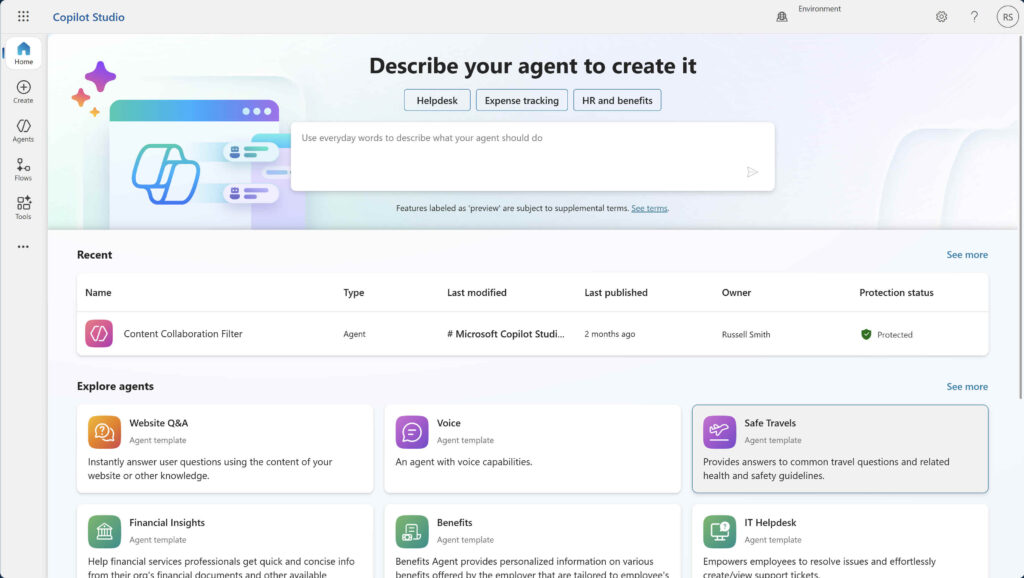
The central canvas is where you’ll spend most of your time designing dialog flows, while a testing pane usually sits to the side, allowing you to interact with your copilot in real-time as you build.
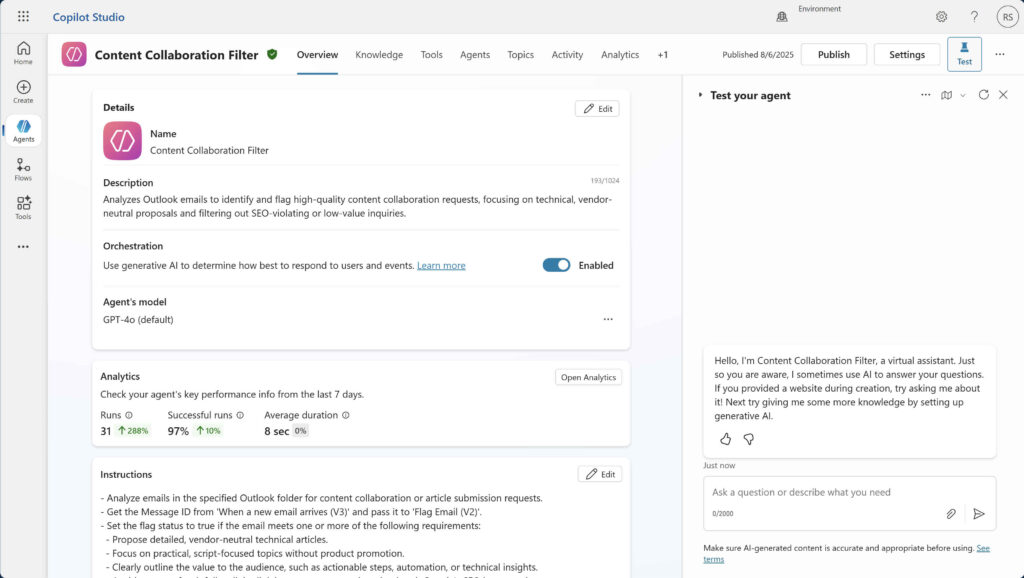
Familiarize yourself with these sections, understanding where to define what your copilot should talk about, how it learns, what actions it can take, and how to monitor its performance.
Building your first simple copilot
I recommend building a simple copilot to familiarize yourself with Copilot Studio. Start with a straightforward purpose, such as “answer questions about office hours” or “provide directions to a specific location.”
- Create a New Topic: Begin by navigating to the “Topics” section and creating a new topic. Give it a descriptive name (e.g., “Office Hours Inquiry”).
- Add Trigger Phrases: Provide several ways a user might ask about office hours (e.g., “What are your hours?”, “When are you open?”, “Office times?”).
- Design the Dialog Flow: On the canvas, simply add a “Message” node that provides the answer (e.g., “Our office hours are Monday to Friday, 9 AM to 5 PM.”).
- Test: Use the built-in test pane to ask your copilot one of your trigger phrases. Observe how it responds. This basic exercise will give you a foundational understanding of how topics and simple responses work. From there, you can gradually introduce more complexity, such as asking follow-up questions, storing user input into variables, or calling a simple Power Automate flow.
The future of AI with Microsoft Copilot Studio
The future of AI, particularly in conversational interfaces, points towards increasingly sophisticated and context-aware interactions. You can expect more advancements in its generative AI capabilities, making copilots more natural, empathetic, and capable of nuanced understanding.
The integration with the broader Microsoft ecosystem, including Azure AI services, Dynamics 365, and Microsoft 365, is likely to improve, enabling seamless handoffs between human and AI agents and more embedded intelligence within everyday workflows.
Furthermore, the platform will likely enhance its ability to learn from interactions more autonomously, reducing the need for explicit training. As AI models become more powerful and efficient, Copilot Studio will let organizations build more specialized, intelligent, and scalable AI assistants that understand and anticipate user needs, transforming how businesses interact with customers and employees.
The future involves copilots becoming indispensable partners in every aspect of an organization’s digital strategy.

Russell Smith, the Editorial Director at Petri IT Knowledgebase, has over two decades of hands-on experience in IT, in both small business settings and government IT infrastructure projects. Russell started writing for Windows IT Pro Magazine in t...


