Microsoft 365 Copilot Compliance: A Guide to Security and Data protection
What if the biggest risk with Microsoft 365 Copilot is not the AI itself but the forgotten data it can suddenly surface?
Microsoft 365 Copilot compliance represents a significant challenge for organizations using generative AI capabilities directly in the Microsoft 365 suite. Before you deploy this powerful tool, you must meticulously prepare your organisational environment to ensure both robust security and adherence to compliance mandates. This preparation is not merely a technical exercise. It involves strategic considerations concerning your data, user access, and overall information‑governance framework.
Microsoft 365 Copilot compliance – Could a single Copilot prompt surface data you never intended anyone to find?
To effectively secure Microsoft 365 Copilot, you must first comprehend its fundamental nature and the inherent security challenges it introduces.
What is Microsoft 365 Copilot?
Microsoft 365 Copilot is an AI‑powered assistant designed to enhance productivity across Microsoft 365 applications, including apps such as Word, Excel, PowerPoint, Outlook, Microsoft Teams, OneNote and more. It leverages large language models (LLMs) to generate content, summarise information, and automate tasks based on your organisation’s data, such as emails, documents, and chat histories stored within your Microsoft 365 tenant.
Copilot is designed to ingest this organisational data into Microsoft Graph, which allows it to provide contextually relevant and personalised assistance. This interaction means that Copilot operates directly on the information already present and governed within your Microsoft 365 and Azure environment, making the security of Copilot data paramount.
How does generative AI change data security?
The advent of generative AI, exemplified by technologies like Copilot, introduces a new dimension to data security. Unlike traditional applications that merely store or transmit data, generative AI actively processes, analyses, and often synthesises new content from existing data. This processing capability brings several key security implications.
- First, the potential for data leakage or unauthorised access to sensitive information increases if your foundational data‑governance is weak. As such, organisations should implement a data‑loss‑prevention solution as a way of preventing data leakage.
- Second, the reliance on vast datasets for AI training and operation necessitates stringent controls over data ingestion and usage.
- Third, the “black‑box” nature of some AI models can complicate auditing and understanding how specific outputs were derived from input data, posing challenges for compliance. Therefore, you must recognise that deploying generative AI tools like Copilot requires a proactive and comprehensive security strategy that addresses these unique characteristics of AI‑driven data interaction. It means making sure that audit logs are generated for all AI interactions.
Key pillars of Microsoft 365 Copilot security and compliance
If Copilot can see everything your users can, what hidden risks are your security pillars holding up?
| Pillar | Description | Why it matters |
|---|---|---|
| Data governance and lifecycle management | Establish policies and procedures that define how your organisation’s data is managed throughout its lifecycle, from creation to deletion. | Weak governance may allow Copilot to access or generate content from data that should be restricted, leading to compliance violations or inadvertent disclosure. |
| Identity and access management (IAM) | Govern who can access your systems and data and what actions they are permitted to perform. | Because Copilot inherits the permissions of the user who uses it, you must apply least‑privilege roles and MFA to prevent unauthorised access. |
| Information protection and data encryption | Safeguard sensitive information from unauthorised access, disclosure, or misuse. Use encryption, sensitivity labels, and DLP policies. | Ensures that even if Copilot processes sensitive information, it adheres to protection policies and the data remains secure at rest and in transit. |
| Threat protection and incident response | Prevent, detect, and mitigate cyber threats. Define procedures for reacting to security breaches involving Microsoft 365 services. | A compromised account or endpoint could enable malicious actors to exploit Copilot’s capabilities. You need clear incident‑response plans for AI‑related scenarios. |
| Regulatory compliance and auditing | Adhere to external laws, regulations, and internal policies. Provide systematic examination of these efforts. | Your organisation may be subject to regulations such as GDPR, HIPAA, or CCPA. Copilot’s processing of data must align with these mandates. You must track user activities, data interactions and policy enforcement. |
Preparing your environment for secure Copilot deployment
What if Copilot reveals weaknesses in your data, permissions and governance before you even switch it on?
Flow of secure deployment
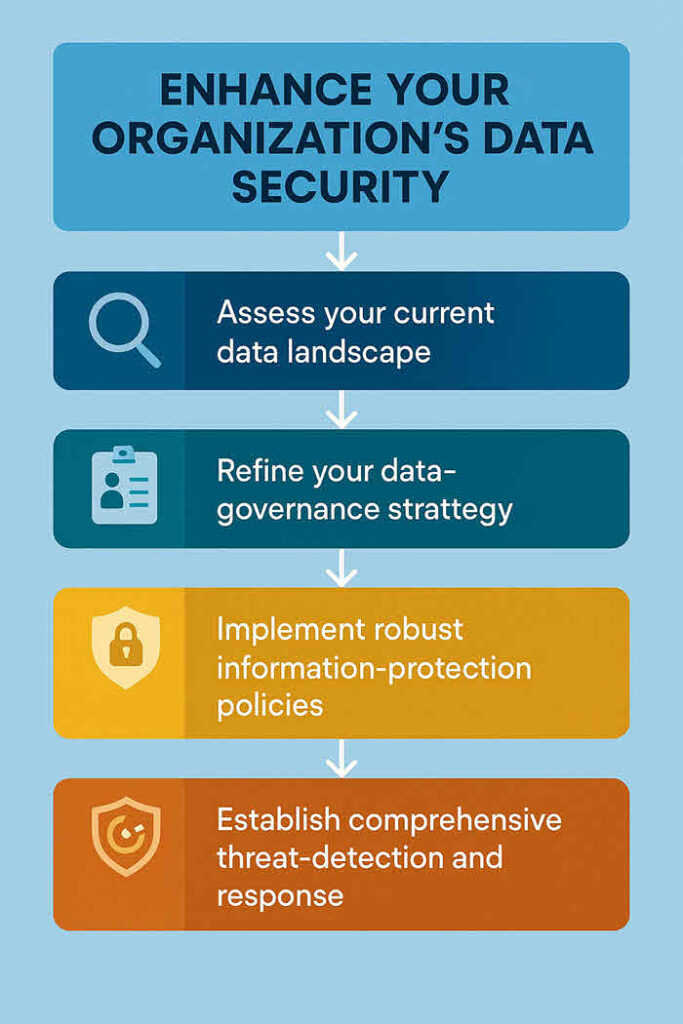
Step 1: Assess your current data landscape
Before you deploy Copilot, you must thoroughly understand what data resides within your Microsoft 365 tenant, where it is stored, and who has access to it. This assessment includes identifying sensitive information, mapping data flows, and cataloguing existing access permissions. Imagine you have years of legacy documents, some containing personally identifiable information (PII) or confidential intellectual property, stored in SharePoint sites with broad access permissions.
Copilot, by design, would be able to access this data if a user with those permissions queries it. Therefore, a comprehensive data audit is the foundational step, revealing potential vulnerabilities and areas requiring remediation. You should leverage tools like Microsoft Purview to discover and classify sensitive data proactively.
Step 2: Refine your data‑governance strategy
Following your data assessment, you must refine your data‑governance strategy to account for Copilot’s capabilities. This involves reviewing and updating your data‑classification schema to ensure it accurately reflects the sensitivity of your data. You also need to define or strengthen policies for data retention and deletion. For example, you should implement policies that automatically archive or delete old, sensitive documents that are no longer needed, reducing the attack surface for Copilot. Another crucial aspect is ensuring that data ownership is clearly defined for all critical datasets, assigning accountability for its management and protection.
Step 3: Strengthen identity and access controls
Effective identity and access management (IAM) is non‑negotiable for Copilot security. You must ensure that the principle of least privilege is rigorously applied across your Microsoft 365 environment. Review all user and group permissions, particularly for SharePoint, OneDrive, and Teams, and remove any unnecessary broad access.
For example, if a department has “everyone” access to a site containing HR records, you must restrict this access to only authorised personnel. Implement or enforce multi‑factor authentication (MFA) for all users, especially those with access to sensitive data. Consider deploying conditional‑access policies to restrict access based on device compliance, location, or risk level. This ensures that even if credentials are compromised, unauthorised access is significantly harder to achieve.
Step 4: Implement robust information‑protection policies
To protect your data as Copilot interacts with it, you must deploy and enforce strong information‑protection policies. Utilise Microsoft Purview Information Protection (MPIP) to apply sensitivity labels to sensitive documents, emails, and other content. These labels can automatically encrypt data, apply watermarks, or restrict forwarding and copying.
Configure Data‑Loss‑Prevention (DLP) policies to detect and prevent the accidental or intentional sharing of sensitive information outside authorised channels, including through Copilot’s output. For example, a DLP policy can prevent Copilot from drafting an email that includes customer credit‑card numbers if that email is intended for an external recipient.
Step 5: Establish comprehensive threat‑detection and response
Finally, you must bolster your capabilities for detecting and responding to potential threats. This means ensuring your Microsoft 365 Defender suite, including Defender for Endpoint, Defender for Office 365 and Defender for Identity, is fully deployed and configured. These tools provide advanced threat‑intelligence and detection capabilities that are vital for monitoring Copilot‑related activities.
Establish clear alert policies for unusual Copilot usage patterns or attempts to access sensitive data. Your incident‑response plan should be updated to include scenarios involving AI‑generated content or potential AI‑model misuse, with defined steps for investigation, containment and recovery.
Best practices for ongoing Copilot security and compliance
If Copilot becomes part of everyday work, should it not also become part of your constant security routine?
Securing Copilot is not a one‑time task. It requires continuous effort and adaptation.
Regular policy review and updates
The threat landscape evolves, as do regulatory requirements and your organisation’s internal processes. Therefore, you must regularly review and update your data‑governance, IAM and information‑protection policies. Schedule periodic reviews, perhaps quarterly or bi‑annually, to ensure your policies remain effective and align with the current operational environment and emerging threats. A proactive approach prevents policies from becoming outdated and ineffective.
User education and training
Even the most robust technical controls can be undermined by human error. Comprehensive user education and training are crucial for the secure and compliant use of Copilot. Train your users on data‑handling best practices, the importance of sensitivity labels, and how to use Copilot responsibly. Emphasise that Copilot operates within their security context and they are accountable for its outputs. Users need

As an internationally bestselling tech author and a former 22-time Microsoft MVP, Brien Posey has written or contributed to dozens of books and created a variety of full-length video training courses on all sorts of IT and space-related topics. He’...




