Introducing Microsoft 365 Copilot Connectors: What You Need to Know
Connectors make it so that Copilot can interact with data that is stored outside of the Microsoft ecosystem.

Key Takeaways:
- Copilot connectors let Microsoft 365 understand and search external data.
- Semantic indexing adds meaning so Copilot answers natural-language questions intelligently.
- Semantic labels make topic-based searches smarter.
- Admins stay in control as permissions follow Entra rules.
Microsoft 365 Copilot Connectors provide a way of making data outside of Microsoft 365 available to Copilot.
Although Microsoft 365 Copilot is probably best known for its ability to interact with Microsoft 365 data, businesses typically also have data stored in other data sources.
What if Copilot could read your Google Drive or Salesforce records just as easily as your SharePoint files?
Microsoft 365 Copilot was originally designed to act as a tool for interacting with documents and data stored within the Microsoft ecosystem. Realistically however, nearly every business has data that lives in other locations. For example, an organization might have data residing within the Google platform or within a SaaS application such as Salesforce.
This is where Microsoft 365 Copilot connectors come into play. Copilot connectors make it so that Copilot can interact with data that is stored outside of the Microsoft ecosystem.
If your data lives everywhere, why shouldn’t your AI assistant?
The main benefit to using Copilot Connectors is that connectors can bring all of an organization’s data together in one place, making it easier for users to interact with that data.
It’s not magic – it’s plumbing. But very smart plumbing.
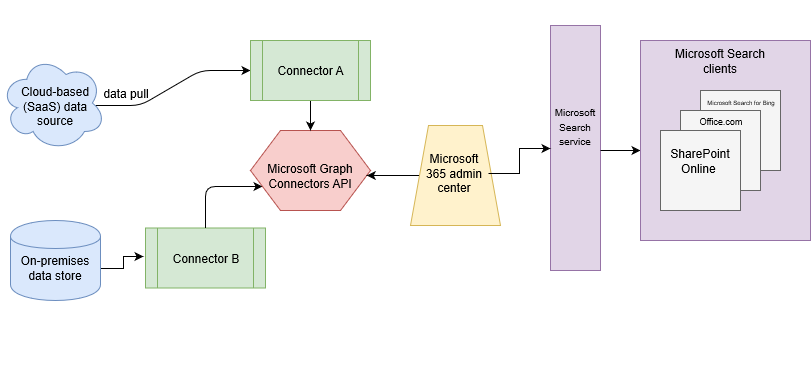
When an organization uses a Copilot connector to link to an external data source, the data within that external data source is ingested into Microsoft Graph, where it resides alongside native Microsoft data, such as the data associated with applications such as SharePoint or Outlook.
When a user attempts to locate data using Microsoft Search, the search is able to return results from both Microsoft and external data sources. As an example, the search results might include data from sources such as the Microsoft 365 applications (Outlook, SharePoint, etc.) as well as business data from external sources such as ServiceNow, MediaWiki, Salesforce, or Jira.
Better still, because Copilot is designed around Microsoft Graph, it means that the user’s Copilot prompts will automatically take into account data that is stored natively in the Microsoft cloud, as well as data that has been pulled in from other sources and is now referenced within the Microsoft Graph. To put it another way, users no longer need to search every app or data source separately, users can receive aggregated search results within Microsoft Search.
Microsoft further enhances the search experience by accompanying Copilot responses with a list of references. These references display the data source and a document preview.
Without Copilot connectors
- Search each app individually
- Switch tools constantly
- Miss insights due to data fragmentation
With Copilot connectors
- One unified search
- AI understands the meaning, not just keywords
- External + Microsoft data appear together
Semantic indexing – Copilot doesn’t just read your data, it interprets it
In order for Microsoft Copilot to work properly with external data sources, it needs to do more than to simply ingest the data into Microsoft Graph. Copilot must actually understand the data. Otherwise, it will be unable to properly answer user’s natural language queries pertaining to that data.
Semantic indexing helps Copilot to understand what you mean, not just the words that you type. To understand why this is important, imagine for a moment that you are looking for a recipe online using your favorite search engine. If you enter a generic phrase such as “blackberry dessert”, you are probably going to get results such as blackberry cobbler, blackberry pie, and blackberry ice cream. It’s likely a safe bet that none of those web pages included the phrase “blackberry dessert” and yet the search engine found the recipes anyway because it understood that a pie is a dessert.
This is layer of understanding is exactly what semantic indexing provides to Microsoft Copilot. Semantic indexing helps Copilot to find what you are looking for, even when your query is a little bit vague. This level of understanding goes a long way toward making Microsoft Search more useful and delivering better overall satisfaction with the search experience for your end users.
At a minimum, Copilot connectors index each document’s title and content. However, some connectors index additional pieces of information.
Semantic labels – When keywords fail, labels guide Copilot to the right shelf.
Semantic labels can also help Copilot to deliver better results for natural language queries. It is worth noting that semantic labels exist separately from semantic indexing and do not affect the indexing process.
A semantic label is essentially a tag that can help make it easier to locate certain information. This tagging process is somewhat similar to putting a sticky note on a book as a way of helping to remember where you found information that you want to come back to later on.
Semantic labels are useful for delivering better results from topic and keyword searches or for searches in which the system needs to understand the contextual relationship between various data sources.
While semantic labels can be useful, there are some types of searches that simply do not benefit from their use. For example, if you are performing a multi-parameter query or a query that is based on something other than topics or keywords, then semantic labels won’t help you.
If for example, you were to search for all of the projects assigned to a particular user, then semantic labels will not typically be used, because semantic labels focus on content and keywords, not on metadata.
What types of Copilot connectors are available?
In order for an organization to access business data stored outside of the Microsoft ecosystem using Copilot, the organization will need a connector that is specifically designed to work with the external service. Fortunately, Microsoft provides over 100 prebuilt connectors that are available within the Copilot Connectors gallery.
A few of the available prebuilt connectors include:
| Category | Example Connectors |
|---|---|
| Productivity | Google Drive, Box |
| CRM | Salesforce |
| ITSM | ServiceNow |
| Microsoft Native | Azure, SharePoint |
Not surprisingly, there are also prebuilt connectors that can link to native Microsoft content sources, such as Microsoft Azure.
Custom Copilot connectors
Although the Microsoft Copilot Connectors gallery contains numerous connectors that are ready to use, there is not a readily available connector for every conceivable data source. Fortunately, however, Microsoft provides an Application Programming Interface (API) that you can use to build your own custom Copilot connectors that you can use as a toolkit to link Copilot to various external items. Some organizations have gone as far as to make the creation of copilot connectors part of their DevOps workflows.
If you aren’t a developer, you may be able to link Copilot to external content sources without having to know how to use an API or a Software Development Kit (SDK). Many software vendors and independent experts have created their own custom Copilot connectors and made them available for download on GitHub.
Data access permissions – If you can’t access it, neither can Copilot. It’s as simple as that.
Microsoft 365 Copilot is designed to respect access control permissions that have been put in place. That way, a user cannot use Copilot to gain access to information that they would not ordinarily have access to. In order to do so, admins register an external connection to an app or a data source. And then use the Admin Center to grant permissions through Microsoft Entra.
Because Microsoft Entra handles the user authentication process, it understands which users are signed in and which source systems and resources those users have access to. The end result is that Copilot respects all of the access controls that have been put in place, meaning that users will never be exposed to data that they can’t already access.

As an internationally bestselling tech author and a former 22-time Microsoft MVP, Brien Posey has written or contributed to dozens of books and created a variety of full-length video training courses on all sorts of IT and space-related topics. He’...