Introducing Copilot Agents: What You Need to Know
AI enabled bots that live inside of the apps that you use every day.

Imagine finishing your workday and realizing that a Copilot agent has already summarized your meetings, scheduled follow-ups, and drafted your next client email, without you lifting a finger. That’s the reality Copilot agents are bringing to Microsoft 365.
What is a Copilot Agent?
A Copilot agent is an AI enabled bot that lives inside of the apps that you use every day. Whereas Microsoft has designed Copilot Chat to answer questions and Copilot Search to locate data, Copilot agents are able to take automated actions on your behalf.
As an example, an agent might send an Outlook email or pull data from SharePoint. Microsoft provides numerous prebuilt agents, but it is also possible to build your own agents by using tools such as Microsoft Copilot Studio. It is also possible to build agents using more advanced tools such as Visual Studio.
Defining the core concept
Microsoft 365 Copilot agents are designed to make Copilot more useful to you. The agents reside within the applications that you use every day, meaning that you can use agents to perform repetitive tasks without having to leave the app that you are working in.
What is the purpose of Copilot agents?
Copilot agents are autonomous agents that are designed to perform automated tasks on your behalf. Whereas Microsoft 365 Copilot was designed to act as an AI assistant of sorts, Copilot agents are generally used for automating workflows. As an example, an agent might be designed to respond to take action based on @ mentions within Microsoft Teams.
Automating repetitive tasks
One of the more helpful things that Copilot agents can do is to automate repetitive tasks. As an example, these AI agents could be used to automatically generate content, such as a summary of a Microsoft Teams meeting. Similarly, an agent might be designed to automatically schedule a meeting in response to a new sales lead.
Regardless of the use case, Copilot agents are meant to reduce the amount of button clicking that users have to do, by automating recurring business processes.
Enhancing productivity
AI agents can also help an organization to boost its overall productivity. For example, a user might use agents to help with research or summarization. Or an AI powered agent might summarize a long Outlook email thread or a collection of SharePoint documents. These processes occur in realtime, allowing the user to quickly access the information that they need and move on to the next task.
Streamlining complex workflows
AI powered agents are also useful for streamlining complex workflows. Copilot agents are able to orchestrate multiple Microsoft 365 applications, thereby allowing those applications to seamlessly work together.
For instance, an agent might automatically generate a Power BI dashboard that is based on data found within an Excel spreadsheet. Similarly, an agent could be used to automatically generate a PowerPoint presentation based on the information found within a Microsoft Word document.
Copilot agent use case examples
Here are some examples of how Copilot agents might be used to automate processes or workflows:
- Automating HR onboarding workflows.
- Generating weekly sales summaries from Excel.
- Monitoring SharePoint updates and alerting teams in Teams.
- Auto-generating customer response drafts in Outlook.
Key capabilities and features
Even though every Copilot agent is different, there are certain key capabilities and features that tend to be consistent from one agent to the next.
Natural language interaction
Natural language interaction is common across a variety of Copilot tools such as Copilot Chat and Copilot Search. The idea is that users can enter natural language queries, using conversational language. They can talk with Copilot similarly to the way that they might converse with a coworker.
A user might simply ask Copilot to display the fourth quarter sales figures, as opposed to the user needing to memorize and use a series of archaic commands.
Contextual understanding
Natural language interaction can only work when there is also contextual understanding. Microsoft Copilot is designed to ingest content into Microsoft Graph, which in turn allows Copilot to understand document contents.
Additionally, Copilot might gain additional context from other queues such as past conversations or even the other documents that the user has open at the moment.
Adaptive learning
Microsoft Copilot is designed to learn over time and to become more personalized and more useful as time goes on. It is worth noting however, that doing so involves performing something of a balancing act; balancing the organization’s specific needs against those of the end user.
Microsoft has made a public commitment to responsible AI, meaning that Microsoft AI tools such as Copilot have guardrails in place that are designed to protect against AI misuse. Not surprisingly, a big part of this is aligning Copilot with an organization’s specific needs, particularly with regard to the handling of sensitive information.
At the same time however, Copilot also learns from user inputs. As users continue to work with Copilot and Copilot agents, Copilot learns from those interactions, while still respecting the boundaries that the organization has put into place.
How are Copilot agents different from Power Automate?
Power Automate executes defined rules, while Copilot agents reason and adapt. Used together, they represent a powerful evolution in Microsoft’s automation ecosystem, moving from “if this, then that” logic to context-aware, AI-driven action.
How do Copilot agents work?
The underlying architecture
Microsoft Copilot agents are designed to accept user inputs and respond by performing actions or launching workflows. In order to make this possible, there are a few different architectural components that the agents rely on, beyond triggers, actions, and the knowledge that is stored within Microsoft Graph.
Orchestrator
The first of these architectural components is the orchestrator. The orchestrator is basically the engine that allows all of the various Copilot components to work with one another.
Foundation model
A second component is the foundation model. The foundation model is the underlying AI model that provides reasoning, an understanding of natural language, and basic intelligence. Microsoft uses a foundation model that was developed by OpenAI, which is the organization that created ChatGPT.
User experience layer
A third architectural component is the user experience layer. This is the layer through which the agent is integrated into a software application.
Custom Copilot agents
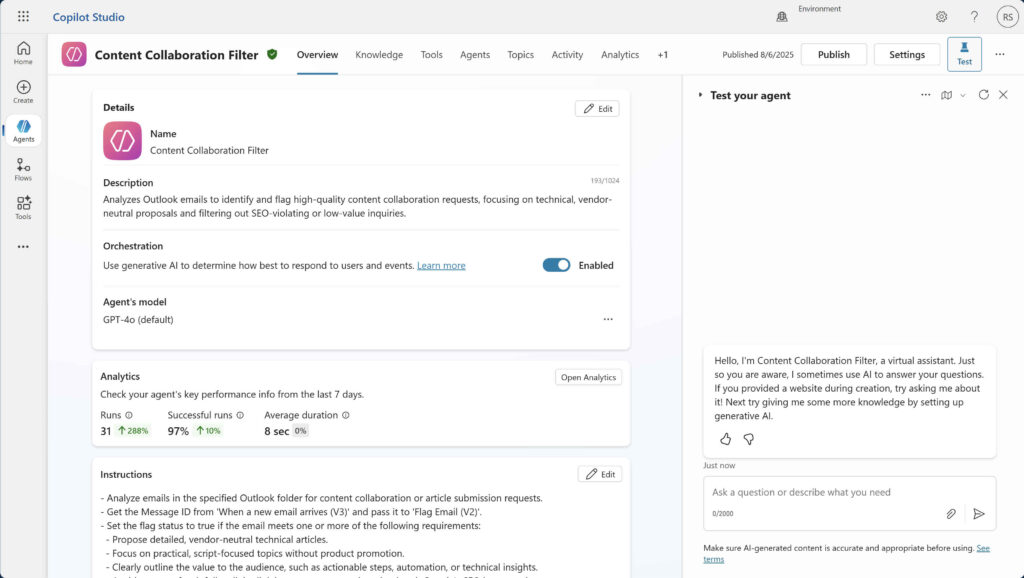
Although there are a number of prebuilt AI agents that are readily available for use, Microsoft also makes it possible to build your own custom agent. This can be useful when the prebuilt agents do not fully address your organization’s specific needs.
There are two main types of custom agents, each with their own specific use cases.
Declarative Agents
The first option for building a custom agent is to create a declaritive agent. Declarative agents are easy to build, but somewhat limited in scope. These agents rely on the native Copilot orchestrator and foundation model. This means that they adhere to the same security and compliance boundaries that Copilot does. Declarative agents fully comply with Microsoft’s responsible AI requirements.
Building a declarative agent usually involves using a low code tool, such as Microsoft Copilot Studio, although you can opt for using more advanced tools such as Visual Studio or Visual Studio Code.
Once constructed, declarative agents integrate into Microsoft 365 apps such as Microsoft Teams, Word, Excel, and PowerPoint. Developing the agent involves little more than providing the agent with custom instructions and linking it to the data sources that you want to use.
Custom engine agents
Custom engine agents are fully customizable and more advanced than declarative agents. Custom engine agents must be developed using advanced tools such as Visual Studio and the agent will need to be hosted outside of the Microsoft 365 ecosystem. Microsoft Azure is a popular choice for hosting agents, but like all cloud platforms, hosting on Azure incurs additional costs.
The main advantage to building custom engine agents is that they allow for tremendous flexibility. You can for example, choose to use custom models as opposed to the one size fits all OpenAI model. Custom engine agents give organizations a way of building an agent with the functionality that they need, but without having to start completely from scratch.
Of course, all of this flexibility means that developers will have to pay special attention to security, making sure that their code is not introducing any vulnerabilities into the organization.
| Feature | Declarative Agents | Custom Engine Agents |
|---|---|---|
| Development Approach | Built using low-code tools like Microsoft Copilot Studio | Built using advanced development tools like Visual Studio or Visual Studio Code |
| Complexity Level | Simple to build — ideal for automating straightforward tasks | More complex — suitable for custom or enterprise-grade workflows |
| Hosting Environment | Runs within Microsoft 365 ecosystem | Hosted externally, often on Microsoft Azure or other cloud platforms |
| Customization | Limited customization; uses Copilot’s native orchestrator and model | Fully customizable — can use custom AI models, APIs, and external data sources |
| Security & Compliance | Automatically inherits Microsoft 365 security and compliance settings | Requires manual implementation of security and compliance measures |
| Cost | Minimal — included within existing Microsoft 365 or Copilot Studio environments | Additional costs for hosting and compute resources (e.g., Azure services) |
| Integration Scope | Integrates easily with Microsoft 365 apps (Teams, Word, Excel, PowerPoint) | Can integrate with external systems and third-party applications |
| Use Case Examples | Automate Teams meeting summaries, schedule tasks, or pull simple SharePoint data | Build AI-driven dashboards, multi-app workflows, or intelligent customer service bots |
| Best For | Organizations seeking quick wins and low-code automation | Organizations needing deep customization, scalability, and unique functionality |
Where to start with Copilot agents?
Ready to explore how Copilot agents can streamline your daily workflows? Start small. Automate one recurring task in Teams or Outlook and see how much time your team gains back in a week.
Frequently asked questions
What is a Copilot agent?
A “Copilot agent” refers to a specialised AI component that works under the umbrella of Microsoft 365 Copilot. It is not the general Copilot assistant itself, but rather:
- An “agent” is built to perform a specific task or workflow, using data, actions and logic tailored to that scenario.
- The general Copilot is the AI interface (the “assistant” you talk to) and the agent is like an “app inside that assistant” that can do more than just respond. It can carry out actions, invoke tools, access connectors, or run workflows.
- In Microsoft speak: Agents combine knowledge, actions, tools/connectors, and instructions to automate or assist business processes.
Is Copilot agent free?
The answer is: “it depends”. In general usage and licensing terms there are free components, but full agent capabilities require licenses. Key points:
- The basic chat-experience of Microsoft 365 Copilot (or “Copilot Chat” in some contexts) may be included with eligible Microsoft 365 subscriptions.
- However, to use agents (build custom agents, deploy them, integrate enterprise data sources, manage them) you typically need the proper Copilot/agent license or upgrade.
- For many organisations: agents are part of the “premium” add-on for Microsoft 365 Copilot rather than a completely free feature.
Does Copilot have an agent mode?
Yes. The term “agent mode” may be used loosely, but in practice:
- Microsoft 365 Copilot does support agents via platforms like Copilot Studio (including the “lite” experience) where you can build agents.
- These agents can be “invoked” inside Copilot Chat, Outlook, Teams, etc., where users pick which agent to use.
- So yes. You could say “agent mode” refers to Copilot operating via one of these agents rather than just plain chat.
What data can Copilot agents access?
Agents within the Microsoft 365 Copilot ecosystem can access data but with important controls. The main data access rules:
Accessible data
- If a user has permission, Copilot (and its agents) can access that user’s organisational data: e.g., documents, emails, chats, meetings, one-on-one/teams chats, contacts via Microsoft Graph.
- Agents may also integrate external data sources, knowledge sources (SharePoint, Teams, public websites, internal documents) and connectors.
- For example: you can add SharePoint files, Teams chat URLs, public websites as knowledge sources for an agent.
Limits / Governance
- The agent only surfaces content that the particular user is already authorized to see. Permissions still apply.
- Admins can control which agents are available, what data they can access, whether external agents are allowed, etc.
- There are specific data-privacy / security safeguards: e.g., Prompts and responses are encrypted and not used to train Microsoft’s foundational models.
Summary of “what data”
- Internal organisational data (emails, meetings, chats, documents, contacts) if the user has permission.
- External/public data (websites) and other knowledge sources if configured.
- Data through connectors/APIs for enterprise systems if set up properly.

As an internationally bestselling tech author and a former 22-time Microsoft MVP, Brien Posey has written or contributed to dozens of books and created a variety of full-length video training courses on all sorts of IT and space-related topics. He’...