Top 12 Enterprise-Grade Active Directory Security Tools: What Matters and Why
While free Active Directory security tools give you a quick snapshot of risk, enterprise grade security requires deeper capabilities.

Active Directory (AD) has been around a long time, but it remains the primary target for attackers. Research shows that nine out of ten breaches involve AD or Entra ID. Many environments today are hybrid, which further complicates keeping organizations secure.
🎬 Watch This Week in IT.
While free tools give you a quick snapshot of risk, enterprise grade security requires deeper capabilities like the ability to identify and fix misconfigurations, real-time change monitoring, alerting, dashboards, and custom reporting, covering of both on-premises AD and Entra ID.
Top 12 enterprise-grade Active Directory security tools
Here’s Petri’s list of the top enterprise AD security tools and the features you should look for. The list is in alphabetical order and the order in which the tools appear doesn’t constitute a recommendation of one tool over another.
1. Cayosoft Guardian
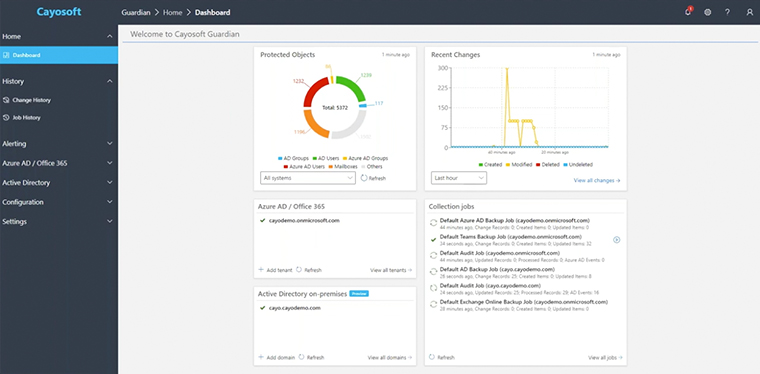
Cayosoft Guardian excels at the must-have features. It continuously monitors on-premises AD and Entra ID, keeping a near real-time backup of every change and providing one click rollback of malicious or accidental modifications.
Cayosoft Guardian’s Change Monitoring shows who changed what, where and when across your hybrid environment. And because it stores every change, you can investigate indicators of exposure or compromise over time. Guardian also offers customizable alerts and reports, so you see only what matters. Cayosoft’s unified console means you don’t need separate tools for AD and Entra ID.
Key points:
- Identify and fix misconfigurations: Guardian Identifies existing misconfigurations and vulnerabilities, prioritizes severity ranking and remediation complexity, while providing detailed remediation guidance. h
- Indicators of Exposure, Compromise, and Attack: for lateral movement, privilege scalation, credential theft, persistence mechanisms, and privilege abuse across hybrid identity systems
- Real-time changes and rollback: Instant notifications and the ability to undo changes.
- Dashboards and reporting: Customizable dashboards provide at glance visibility into your hybrid identity posture.
- AD and Entra ID: Full coverage for on-premises and cloud identities.
- Easy Upgrade Path to full AD Forest Recovery- Easily upgrade Guardian to Guardian Forest Recovery that enables instant standby AD forest recovery to AWS or Azure.
Pricing
Cayosoft uses subscription licensing and does not publish prices.
2. CrowdStrike Falcon Identity Threat Protection
CrowdStrike’s Falcon Identity module brings AI into identity security. It correlates identity, endpoint and data telemetry to detect anomalies and stop lateral movement. Falcon’s agentic AI triages alerts and automates remediation workflows. The platform enforces just‑in‑time privileged access and supports full rollback of suspicious privilege escalations.
A 24/7 managed service option means experts can watch for indicators of attack around the clock. Falcon integrates with Entra ID and Okta directly.
Key points:
- Real‑time changes and remediation: AI triages alerts and initiates response automatically.
- Just‑in‑time access and rollback: Enforces least privilege and rolls back misuse.
- Dashboards and credential analysis: Correlates identity and endpoint data for deep insights.
- Hybrid scope: Protects AD, Entra ID, and Okta identities.
Pricing
CrowdStrike does not publish prices.
3. Lepide Auditor
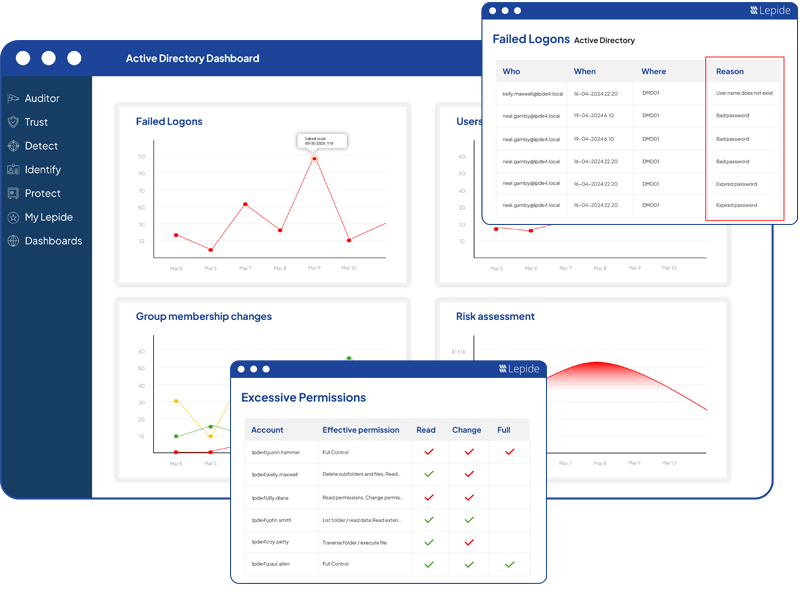
Lepide Auditor monitors multiple systems from one console. It offers real‑time change auditing across AD, file servers, Exchange and Microsoft 365, turning raw logs into readable reports. The tool includes state‑in‑time reports to identify risky configurations and unused accounts.
Lepide can restore unwanted changes, investigate account lockouts, and reminds users to reset passwords. Hundreds of built‑in compliance reports cover regulations like GDPR, HIPAA and PCI.
Key points:
- Who, what, where, when: Tracks change details and offers long‑term audit trails.
- Dashboards and custom reports: Shows state‑in‑time risk and supports compliance templates.
- AD and Entra ID: Audits on‑prem AD, file servers, Exchange and Microsoft 365.
Pricing
Lepide doesn’t publish pricing.
4. ManageEngine ADAudit Plus
ManageEngine’s ADAudit Plus offers extensive coverage across AD, Entra ID and multiple Windows services. It tracks real‑time changes to AD users, groups, Organizational Units (OUs), Group Policy Objects (GPOs), file servers and more. A key differentiator is its ransomware detection engine, which detects spikes in file access and can shut down infected devices.
ADAudit Plus offers over 250 pre‑built reports, with custom filters and dashboards for compliance and investigative needs. It integrates with SIEM platforms and supports long‑term log archival for forensics.
Key points:
- Real‑time changes and alerts: Monitors a wide range of AD and server events.
- Indicators of compromise: Built-in ransomware detection and response.
- Customizable reports and dashboards: Hundreds of templates plus custom query capability.
- AD and Entra ID: Audits both on‑prem and cloud directories.
Pricing
Standard edition starts at US$595 per year for 2 domain controllers and US$945 per year for the Professional edition. Pricing scales with the number of domain controllers. Additional addons cover Entra ID and file servers.
5. Microsoft Defender for Identity
Defender for Identity (formerly Azure ATP) is Microsoft’s own Identity Threat Detection and Response (ITDR) solution. It continually evaluates your identity security posture, detects threats in real time and can automatically respond to compromised identities.
The service collects signals from domain controllers, AD Federation Services (AD FS), AD Certificate Services (AD CS), and Entra ID. Defender provides lateral movement path analysis so you can see how an attacker might progress from one account to another. Alerts are prioritized and integrated into Microsoft’s Extended Detection and Response (XDR) suite, giving your Security Operations Center (SOC) context across users, endpoints, and network devices.
Key points:
- Indicators of exposure, compromise and attack: Detects reconnaissance, credential theft and lateral movement across the kill chain.
- Real‑time monitoring: Automatically surfaces suspicious activities and prioritizes alerts.
- Identity posture and remediation: Provides security assessments and recommendations to harden your environment.
- AD and Entra ID: Sensors monitor both domain controllers and Entra ID services.
Pricing
Microsoft Defender for Identity is available as part of Enterprise Mobility and Security 5 suite (EMS E5). You can also purchase it as a standalone license. Licenses can be bought from the Microsoft 365 portal or through a Cloud Solution Partner (CSP).
6. PingCastle Enterprise
PingCastle Enterprise turns the free PingCastle assessment into an enterprise‑grade governance platform. It’s designed for complex organizations with thousands of domains, providing delegation models and the ability to manage up to 10 levels of hierarchy.
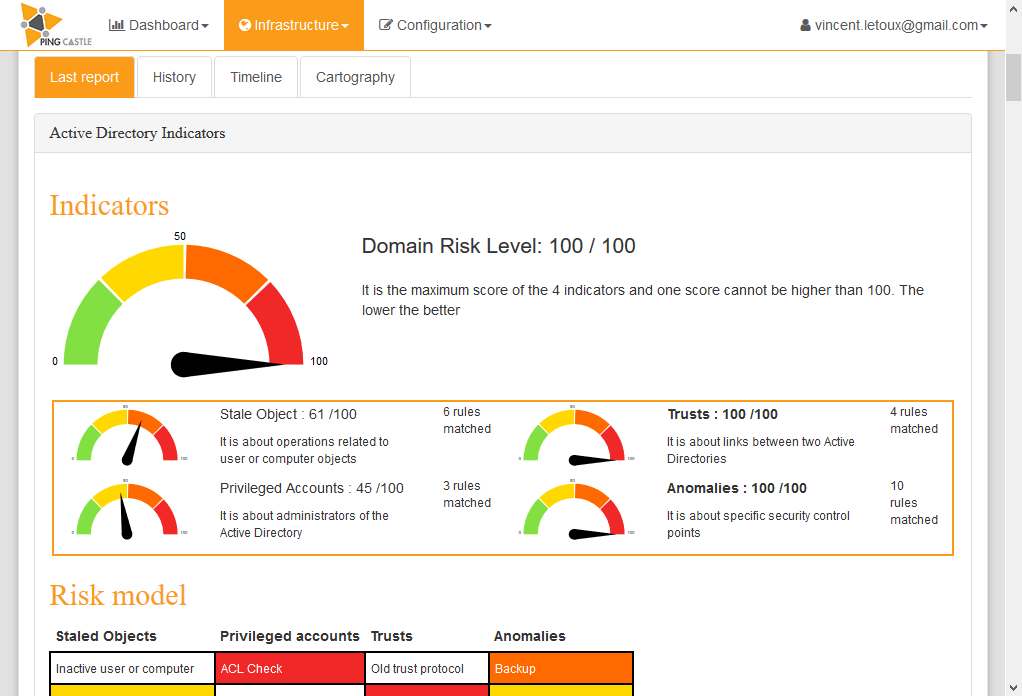
The tool produces maturity scores and key performance indicators (KPIs) across process areas, helping you track improvements or declines over time. A built‑in domain database maintains an inventory and captures historical KPIs. PingCastle Enterprise supports SQL Server and PostgreSQL and integrates with single-sign on (SSO) providers, making deployment flexible.
Key points:
- Identify misconfigurations: Highlights domain risks and maturity gaps.
- Dashboards and reporting: Provides radar charts and KPI histories.
- Process follow up: Tracks remediation steps and progress.
- Scalable and customizable: Supports complex hierarchical structures and database options.
Pricing
A PingCastle Standard (formerly Auditor) license costs US$3,449 per year. PingCastle Pro starts from US$10,347 per domain per year. PingCastle Enterprise is for six or more domains and has custom pricing.
7. Quest Security Guardian
Quest’s Security Guardian merges posture assessment with threat detection. It continuously assesses your AD configuration, comparing it against best practice and flagging deviations. The tool then monitors for identity threat indicators and tactics, techniques, and procedures (TTPs), pulling signals into an ITDR engine. Security Guardian applies special intelligence to protect tier‑zero assets, which are the most sensitive accounts and systems.
Key points:
- Identify and fix misconfigurations: Provides clear, actionable guidance for hardening AD.
- Indicators of attack: Monitors for TTPs targeting tier‑zero systems.
- Dashboards and tier zero focus: Highlights the most critical assets for priority response.
- AD and Entra ID: Designed for hybrid environments.
Pricing
Quest does not publish prices.
8. Semperis Directory Services Protector
Semperis DSP is designed to catch threats before they become breaches. It continuously monitors AD and Entra ID, using AI to detect misconfigurations, risky changes and signs of attack. Unlike many tools, DSP offers automated remediation and rollback, enabling you to reverse malicious changes immediately.
The solution includes templates for compliance reports and scales across multi‑forest environments. Because it analyzes replication traffic, it can spot stealthy attack techniques and credential theft indicators.
Key points:
- Indicators of exposure and attack: Detects risky changes and privilege escalations.
- Real‑time changes and rollback: Automatically reverses malicious modifications.
- Dashboards and reporting: Provides compliance templates and health dashboards.
- AD and Entra ID: Full hybrid monitoring.
Pricing
Semperis doesn’t publish pricing.
9. SolarWinds Access Rights Manager
SolarWinds ARM focuses on access visibility. It helps you analyze who has access to what resources and identifies over‑provisioned accounts. The tool generates customizable compliance reports and offers dashboards for AD, Entra ID, file servers and SharePoint.
ARM includes a self‑service permissions portal that delegates change requests to data owners, ensuring least privilege without overloading the IT team. While it doesn’t provide full IT disaster recovery (ITDR) functionality, it integrates well with Security Information and Event Management (SIEM) tools and other systems.
Key points:
- Identify misconfigurations: Visualizes permissions and highlights risky access.
- Custom dashboards and reports: Quickly produce auditor‑friendly documentation.
- Self‑service and delegation: Allows users to request and approve access with an audit trail.
- AD and Entra ID: Monitors permissions across hybrid environments.
Pricing
SolarWinds doesn’t publish pricing.
10. SpecterOps BloodHound Enterprise
BloodHound Enterprise transforms the popular attack graph tool into an enterprise platform. It maps, prioritizes and remediates millions of identity attack paths, giving security teams a measurable program for identity risk reduction.
The platform provides tested remediation guidance and shows which changes will cut the most paths. Customers report a 35 % risk reduction in the first 30 days, and a single choke point often removes more than 17,000 attack paths. BloodHound also supports Privilege Zones, enforcing least‑privilege segmentation for tier‑zero assets.
Key points:
- Identify misconfigurations and attack paths: Advanced attack graph technology surfaces dangerous relationships.
- Remediation steps and risk metrics: Provides guidance to eliminate paths and measures risk reduction.
- Dashboards and prioritization: Visualizes attack paths and focuses efforts on choke points.
Pricing
SpecterOps doesn’t publish prices for BloodHound Enterprise.
11. Tenable Identity Exposure
Tenable’s Identity Exposure tool maps identities across AD and Entra ID, spotting risky trust relationships and attack paths. The tool rates misconfigurations and over‑privileged accounts, showing you where to start remediation. Tenable’s dashboards visualize the attack graph and provide guided remediation steps so you can close off paths quickly.
The solution is agentless and it monitors for indicators of exposure and compromise such as DCShadow, DCSync and Golden Ticket attacks. Because it consolidates identities across providers, it also helps with credential analysis by identifying stale or risky credentials.
Key points:
- Identify and fix misconfigurations: Prioritized misconfiguration scoring and remediation guidance.
- Indicators of exposure/attack: Built-in detection for DCShadow, DCSync and other credential theft techniques.
- Custom dashboards and reporting: Visual attack graphs and risk scores help you track progress.
- AD and Entra ID: Unified view of on‑premises and cloud identities.
Pricing
Subscription pricing based on the number of enabled directory-service users.
12. Varonis Data Security Platform
Varonis ties identity activity to data access. Its AD modules identify misconfigurations and risky privilege assignments, while using machine learning to detect insider threats. The platform monitors real-time changes in AD and Entra ID events, correlating them with file and network activity for richer context. Builtin threat models detect Kerberoasting, DCSync and DCShadow attacks.
Varonis dashboards allow custom queries and reporting, and its focus on data means you can see not only who changed something, but also which files they accessed and whether that change exposed sensitive data.
Key points:
- Identify and fix misconfigurations: Highlights risky SPNs and misconfigured delegation.
- Indicators of exposure/attack: Detects Kerberoasting and directory replication abuse.
- Custom dashboards and data context: Pulls together identity, data and network activity.
- AD and Entra ID: Monitors both on‑prem and cloud events.
Pricing
Varonis does not post public pricing.
Choosing an enterprise-grade Active Directory security tool
As you evaluate AD security tools, focus on how well each candidate maps to your organization’s needs. Start by examining the essential capabilities: can the tool identify and prioritize misconfigurations, provide clear remediation guidance, monitor real‑time changes with the ability to roll back unwanted modifications, and offer custom dashboards and reporting?
Hybrid environments require coverage for both on‑premises AD and Entra ID, so verify that sensors can see domain controllers and Entra ID tenants. You should also assess how the product surfaces indicators of exposure, compromise and attack and whether it includes credential analysis for stale or over‑privileged accounts.
Other practical considerations include:
- licensing model
- deployment complexity
- scalability and vendor support
Choosing a tool that aligns with your risk appetite and operational constraints is important in addition to the feature set. A well‑matched solution should strengthen your security posture and aid compliance without adding unnecessary overhead.
Frequently asked questions
Is Active Directory a security tool?
Active Directory (AD) is not a standalone security tool, but rather Microsoft’s directory service for managing identities, authentication, and authorization in a Windows domain environment. It provides the foundation for security by:
- Centralized Identity Management – Storing and managing user, computer, and group accounts.
- Authentication & Authorization – Enforcing login policies, password policies, and access rights.
- Group Policy Enforcement – Applying consistent security configurations across all systems.
While AD itself isn’t purely a “security tool,” it is a critical security infrastructure component. Security tools often integrate with AD to detect misuse, monitor changes, and harden access controls.
What is the Active Directory auditing tool?
An Active Directory auditing tool is software that helps organizations track and monitor changes within AD to enhance visibility and security. These tools typically provide:
- Change Auditing – Tracking who made changes to user accounts, groups, permissions, or policies.
- Real-Time Alerts – Notifying administrators of suspicious or unauthorized activity (e.g., privilege escalation).
- Compliance Reporting – Generating reports for regulations such as GDPR, HIPAA, or SOX.
- Security Insights – Detecting anomalies such as brute-force login attempts, inactive accounts, or unusual group membership changes.
Examples include Cayosoft Guardian, Microsoft’s native Advanced Security Auditing (via Event Logs and Group Policy), as well as third-party tools like Quest Change Auditor, Netwrix Auditor, ManageEngine ADAudit Plus.
How do I secure my Active Directory?
Securing Active Directory is essential since it is often the primary target in cyberattacks. Best practices include:
Identity & Access Controls
- Enforce strong password and lockout policies.
- Use multi-factor authentication (MFA) for privileged accounts.
- Implement the principle of least privilege (PoLP) – limit admin rights.
Monitoring & Auditing
- Enable auditing for logon events, object changes, and group modifications.
- Deploy SIEM integration to correlate and analyze AD logs.
- Use AD auditing tools for real-time alerts and compliance tracking.
Configuration Hardening
- Protect Domain Controllers with strict patching, segmentation, and limited physical access.
- Disable or remove unused accounts and stale objects.
- Regularly review Group Policy Objects (GPOs) for misconfigurations.
Incident Response & Recovery
- Maintain secure, tested backups of AD for disaster recovery.
- Use tiered administration models (separating DC, server, and workstation admin roles).
- Consider read-only domain controllers (RODCs) in branch offices for reduced exposure.

Russell Smith, the Editorial Director at Petri IT Knowledgebase, has over two decades of hands-on experience in IT, in both small business settings and government IT infrastructure projects. Russell started writing for Windows IT Pro Magazine in t...