Cayosoft Guardian Protector vs Semperis Purple Knight vs PingCastle: A Complete Comparison
3 approaches to assessing and monitoring Microsoft identity security across AD and Entra ID.

This article compares Cayosoft Guardian Protector, Semperis Purple Knight and PingCastle, 3 popular free tools that help you reduce risk in Active Directory (AD) and Microsoft Entra ID. While Purple Knight and PingCastle focus on point-in-time assessments, Guardian Protector adds continuous change monitoring and real-time alerting, which changes how you operationalize identity security day to day.
🎬 Watch This Week in IT.
Which free tool is right for you?
- Cayosoft Guardian Protector is best if you want free, always-on monitoring with real-time alerts for risky identity changes across AD and Entra ID (plus selected Microsoft 365 services).
- PingCastle is best if you want a detailed AD health-check report and a maturity/risk model you can rerun periodically to track improvement (especially across many domains).
- Purple Knight is best if you want a quick, guided snapshot of AD/Entra ID (and Okta) security posture, with prioritized remediation guidance.
Why AD and identity security assessment tools matter
Tools that audit Active Directory and its cloud sibling Entra ID/Azure AD help administrators discover vulnerabilities and prioritize remediation before an adversary does. Misconfigurations, outdated protocols, stale objects or poorly configured trusts can give attackers a foothold in a domain.
Cayosoft Guardian Protector
Cayosoft Guardian Protector is a free, agentless monitoring tool that provides real-time threat detection and continuous change monitoring across on-premises Active Directory and Microsoft Entra ID. Unlike point-in-time scanners, it’s designed to show what changed (and who changed it) as it happens, so teams can spot risky identity activity without waiting for the next assessment cycle.
Some of the key features include:
- Continuous monitoring and alerts: Detects suspect changes in near real time (for example, privilege escalations, dormant account reactivation, and Group Policy tampering).
- Hybrid visibility: Monitors AD and Entra ID, and can also surface identity-relevant changes across selected Microsoft 365 services (for example, Teams, Intune, and Exchange Online).
- Who/what/when/where context: Tracks object- and attribute-level changes to support investigations and audit workflows.
- Posture and hardening insights: Surfaces risky configurations and attack pathways that can lead to tenant or domain compromise using 200+ threat signatures.
- Threat indicators (IOEs/IOCs/IOAs): Flags indicators of exposure, compromise, and attack in real time to help teams prioritize response.
- Audit-ready evidence: Provides dashboards and tamper-evident/immutable logs to support investigations and compliance reporting.
- Unlimited object coverage: Designed to monitor Microsoft identity objects without hidden quotas or trial expirations.
- Automatic updates: Downloads updated detection intelligence automatically so you don’t have to maintain custom rules.
- Agentless deployment: No agents on domain controllers; designed to get running quickly.

How Cayosoft Guardian Protector works
In practice, Guardian Protector runs as an always-on service. You install it on a Windows Server, connect it to AD and Entra ID, and then leave it running so it can continuously collect identity change activity, evaluate it for risk, and surface alerts and dashboards your team can use for triage and investigations.
- Deploy once: Install on a member server (no agents on domain controllers).
- Connect sources: Add your AD forest(s) and Entra ID tenant so changes can be observed across hybrid identity.
- Monitor continuously: Capture object and attribute changes with the associated context (who made the change, when, and where).
- Alert on risk: Flag risky patterns such as privilege changes, suspicious group membership updates, and policy tampering.
- Investigate: Pivot from alerts into recent change views and history to validate intent and support incident response/audits.
Semperis Purple Knight
Purple Knight is a free security assessment tool for hybrid AD environments. It helps organizations uncover “indicators of exposure and indicators of compromise” across Active Directory, Entra ID and even Okta. It performs comprehensive tests against common attack vectors to find risky configurations and vulnerabilities.
Some of the key features include:
- Free tool with 185 + security indicators: Semperis markets the tool as a free download (Community Edition). The current release includes over 185 security indicators, which cover categories such as account security, AD delegation, infrastructure, Group Policy, Kerberos and Okta.
- Mapping to MITRE ATT&CK and ANSSI: Purple Knight maps pre‑ and post‑attack indicators to the MITRE ATT&CK and ANSSI frameworks to produce an overall risk score and provide the likelihood of compromise. It also tags indicators against the MITRE D3FEND model.
- Prioritised remediation guidance: The tool’s report card groups findings into five categories and gives prescriptive guidance from Semperis identity‑security experts to prioritise remediation.
- Hybrid coverage: Purple Knight can assess on‑premises AD, Entra ID and Okta environments. It provides scores and guidance across all three.
- Indicators of Exposure (IOEs) and Indicators of Compromise (IOCs): The assessment differentiates between misconfigurations that could be exploited (IOEs) and evidence of active compromise (IOCs).
- Point‑in‑time assessment: Purple Knight is a point‑in‑time scorecard and does not make changes to AD. It does not phone home or collect data beyond the organization’s environment.
How Purple Knight works
Purple Knight scans the domain and cloud tenants for misconfigurations, insecure protocols, vulnerable delegations, stale accounts, exposed credentials and suspicious configurations. For each indicator it reports a severity and ties it to attack techniques such as credential access or privilege escalation.
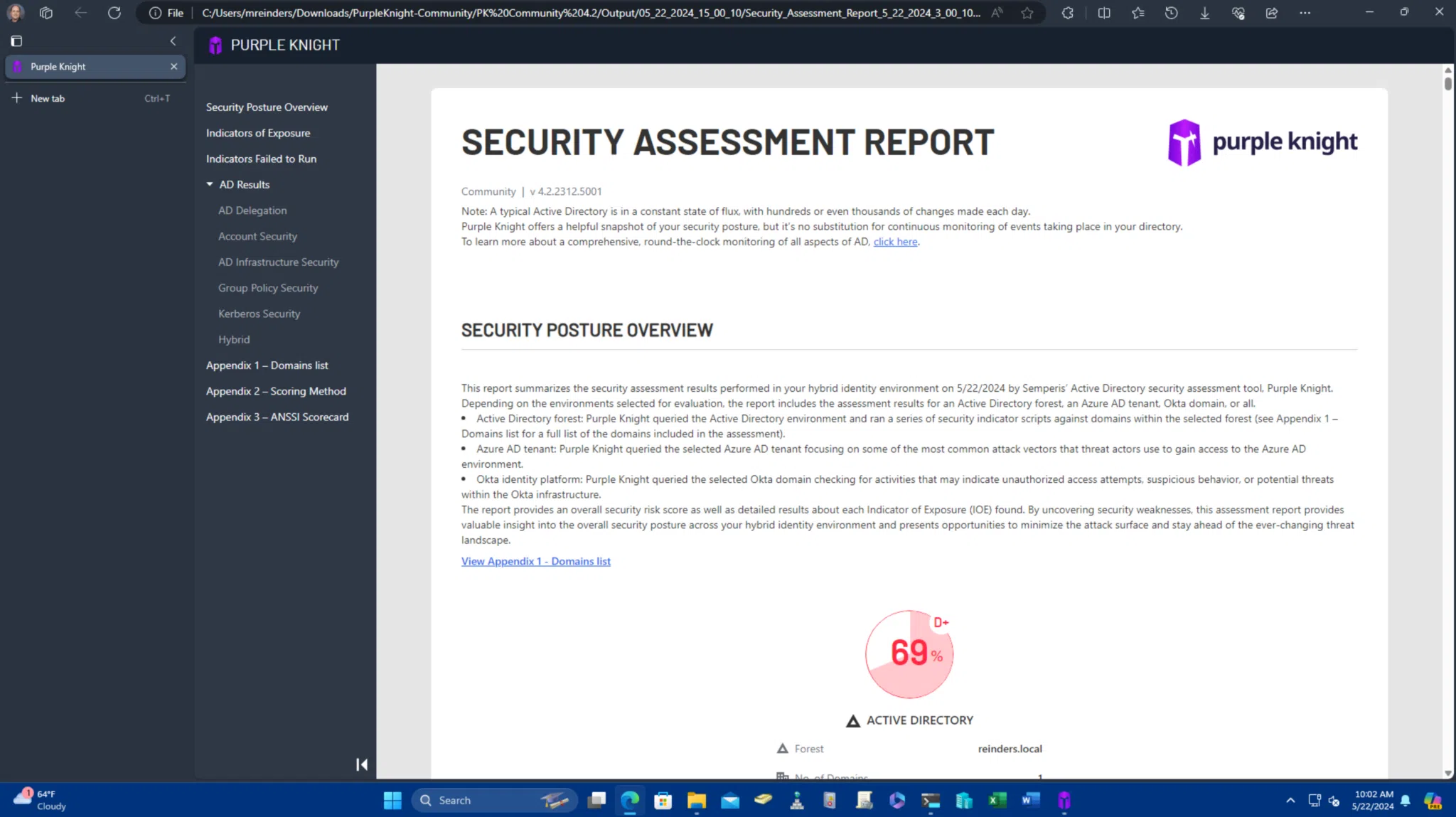
The report summarizes the organization’s risk score and provides step‑by‑step remediation guidance. Because it is read‑only, it can be run periodically without affecting production systems, and scanning a single forest typically takes only a few minutes.
Semperis also has a paid enterprise-grade tool, Directory Services Protector (DSP), which provides continuous monitoring, alerting, and automated remediation across hybrid AD and Entra ID environments to detect and reverse malicious changes in real time.
Netwrix PingCastle
PingCastle started as an independent project and was later acquired by Netwrix. It is both a methodology and a set of tools aimed at assessing and improving the maturity of AD security. The default Health Check report quickly collects the most important AD information, evaluates sub‑processes against a model and rules, and reports the associated risks.
Core aspects include:
- Multiple editions: The tool is available as a Basic edition (free for personal use), Standard (Auditor) edition ($3,449/year), Professional edition ($10,347 per domain per year) and Enterprise edition with custom pricing. The Basic edition allows organisations to audit their own system but does not include support; commercial auditors must purchase a licence.
- Maturity‑based methodology: PingCastle’s four‑step methodology focuses on understanding stakeholders, preparing a battle plan, discovering domains and performing periodic controls. It adapts the Carnegie Mellon CMMI model to Active Directory security.
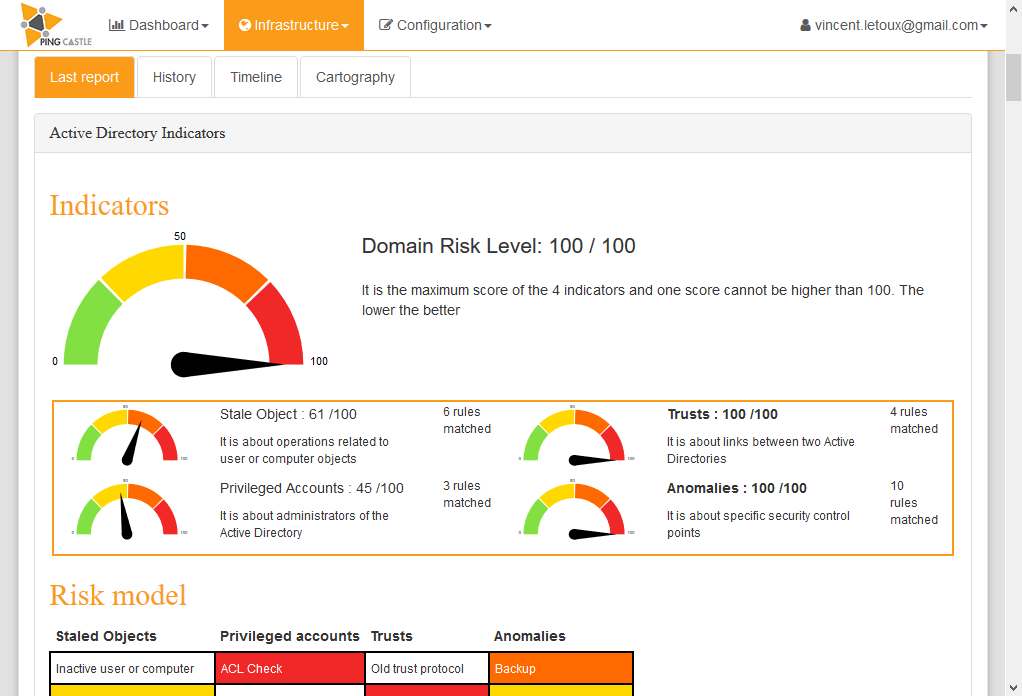
- Health Check, Map and Management reports: The Health Check report evaluates risk categories such as stale objects, privileged accounts, trusts and anomalies. The Active Directory map builds a map of all domains known to PingCastle and can discover neglected domains using a fast discovery mode. When contextual data is provided, PingCastle can generate management dashboards showing maturity scores and KPIs.
- Scanner and export modules: Additional modules can scan workstations for local admin privileges, open shares and other conditions without requiring administrator credentials. Delegation scans find misconfigured permissions that could enable lateral movement.
- Open‑source and free licence: PingCastle releases its code under the Non‑Profit Open Software License (OSL 3.0) and signs binaries digitally for integrity. The free version can be run without charge as long as the user does not derive revenue from it; commercial use requires purchasing a licence.
- Enterprise web application: For large organisations with thousands of domains, PingCastle Enterprise builds a global view of all reports, evaluates maturity continuously and provides KPIs and history.
How PingCastle works
PingCastle uses unprivileged LDAP queries and Windows Management Instrumentation (WMI) calls to collect AD data. The tool’s health‑check engine applies a risk model grouped into categories such as stale objects, privileged accounts, trusts and anomalies.
The resulting report provides a risk score and identifies critical issues like old trust protocols, delegation misconfigurations, weak Kerberos settings or insecure control paths. PingCastle’s map and consolidation features are useful for environments with multiple domains or trusts.
Read our comprehensive review of PingCastle on Petri.com.
Purple Knight vs PingCastle vs Guardian Protector – a feature comparison
The table below summarises major criteria and highlights how each tool differs. Phrases are kept brief per the formatting guidelines.
| Criteria | Semperis Purple Knight | Netwrix PingCastle | Cayosoft Guardian Protector |
| Primary focus | Point-in-time security assessment with prioritized remediation guidance. | Point-in-time AD health check and maturity/risk model (rerun periodically). | Continuous monitoring + real-time alerting for identity-layer change risk. |
| Coverage | AD + Entra ID + Okta. | Primarily AD (plus Entra ID-related checks depending on mode/version). | AD + Entra ID, plus selected Microsoft 365 services (for example, Teams, Intune, Exchange Online). |
| Real-time monitoring | No (assessment snapshot). | No (assessment snapshot). | Yes (continuous change monitoring). |
| Alerts | Report findings (no live alerting). | Report findings (no live alerting). | Yes (built-in alerts with who/what/when/where context). |
| Output & reporting | GUI report card; remediation guidance tied to indicators (IOEs/IOCs). | HTML/Excel-style reports; health-check score + maturity/risk categories. | Dashboards + change history + audit-ready logs (monitoring-centric). |
| Deployment model | Run on demand to scan and generate results. | Portable tool run on demand (often scheduled periodically). | Install once and leave running (agentless, always-on service). |
| Best used for | Fast posture baseline + prioritized fixes for common attack paths. | Deep AD hygiene, maturity tracking, multi-domain discovery and reporting. | Catching risky identity changes between assessments; incident response and audit visibility. |
How to use these tools together (and when to pick one)
If you only run scanners, you’ll always have a blind spot between assessment runs. Use Guardian Protector to continuously watch for risky identity changes (across AD, Entra ID, and select Microsoft 365 services) so you can respond as changes occur and not weeks later.
Purple Knight is ideal for administrators who want a fast, free and actionable assessment of AD/Entra ID/Okta security. Its guided report card and prescriptive checklist make it a strong starting point for small IT teams or organizations without dedicated identity-security specialists.
PingCastle excels when you need comprehensive AD risk modeling, domain mapping, and a maturity framework you can rerun on a schedule (for example, monthly or quarterly) to prove remediation progress. Its reports can be particularly useful in larger environments with multiple domains and trusts.

Russell Smith, the Editorial Director at Petri IT Knowledgebase, has over two decades of hands-on experience in IT, in both small business settings and government IT infrastructure projects. Russell started writing for Windows IT Pro Magazine in t...