New Microsoft Teams Admin Center Enhancements Simplify App Trust and Compliance Reviews
Microsoft enhances Teams app oversight with trust-focused admin features.

Key Takeaways:
- Microsoft is making it easier for IT admins to identify and approve trusted Teams apps from a single dashboard.
- Compliance and security signals are now more visible, helping speed up app review decisions.
- Certified and well-documented apps gain greater visibility inside the Teams Admin Center.
Microsoft has introduced new trust-focused enhancements in the Teams Admin Center (TAC) to help IT admins more easily evaluate, approve, and manage applications used within Microsoft Teams. These updates are designed to strengthen governance, streamline compliance checks, and highlight trusted solutions.
Improved trust visibility for apps
First off, Microsoft has a new “Apps to Consider Allowing” section that highlights apps that are Microsoft 365-certified, publisher attested, or that provide strong compliance documentation. It helps administrators quickly identify which apps meet organizational trust and security standards.
Enhanced security & compliance information
The Teams Admin Center (TAC) now shows detailed compliance attributes, such as SOC 2, FedRAMP, ISO 27001, HIPAA, GDPR, and results from penetration testing directly in the dashboard. This feature allows administrators to filter apps by these specific compliance frameworks to speed up app reviews with trust-based filters.
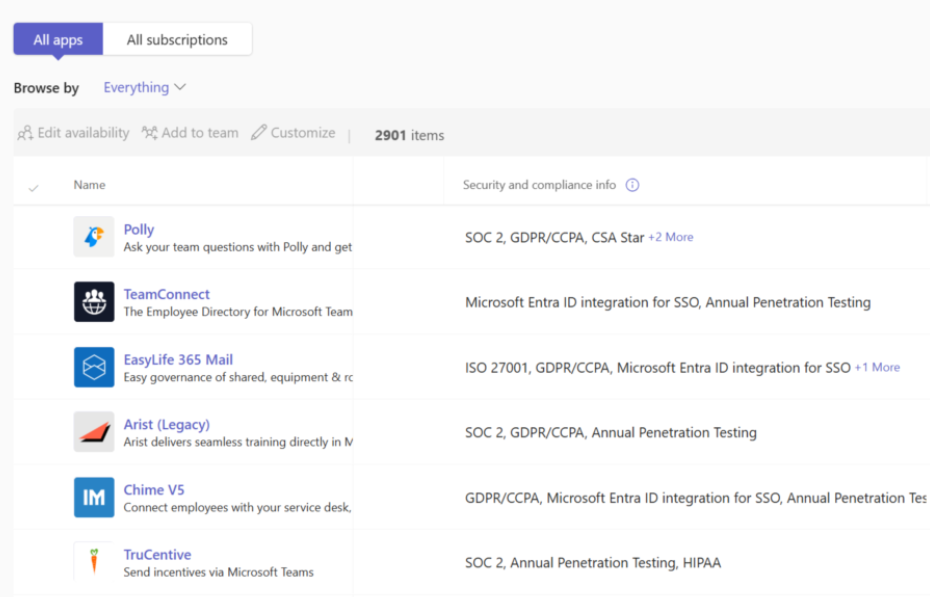
How trust signals simplify Teams app approval workflows
Microsoft mentioned that these updates build on the existing visibility tools in the Security & Compliance tab of the Teams Admin Center. This section previously displayed important details like publisher identity, permission usage, and data access levels.
The new capabilities streamline the process by bringing all trust indicators together in a centralized dashboard. It eliminates the need for admins to manually compare and verify these details across different areas. The dashboard is currently available in public preview to customers with a Microsoft Defender for Office 365 Plan 2 subscription.
What does Microsoft 365 Certification mean for ISVs and admins?
Lastly, Microsoft mentioned that achieving Microsoft 365 Certification provides independent software vendors (ISVs) with stronger visibility in the Teams Admin Center. It makes their apps more prominent to IT administrators and increases the likelihood of adoption.
Consequently, certified solutions gain additional credibility and stand out more effectively in a competitive marketplace. If you’re interested, you can find more information about Microsoft 365 Certification on this support page.

Rabia has a master's degree in Software Engineering and she has years of experience writing professionally about Microsoft products and other technologies. Rabia has also written for OnMSFT.com as well as Windows Report. She is always up to date on t...




