Microsoft Launches Connected Cache to Cut Bandwidth Usage for Enterprises

Key Takeaways:
- Microsoft Connected Cache is now generally available for enterprise.
- MCC helps reduce bandwidth usage by locally storing frequently accessed content.
- The feature integrates with Delivery Optimization and requires specific Windows versions and configurations.
Microsoft has officially released Microsoft Connected Cache (MCC) for enterprise and education customers. This built-in Windows feature helps reduce internet bandwidth usage by locally caching frequently accessed content within an organization’s network.
“As more organizations move to a cloud-native approach to device management, internet bandwidth consumption has become a major pain point. Without on-premises distribution points running Configuration Manager, customers have seen their network bandwidth consumption skyrocket as all their devices attempt to download updates directly from Windows Update over the internet,” Microsoft explained.
How does Microsoft Connected Cache work?
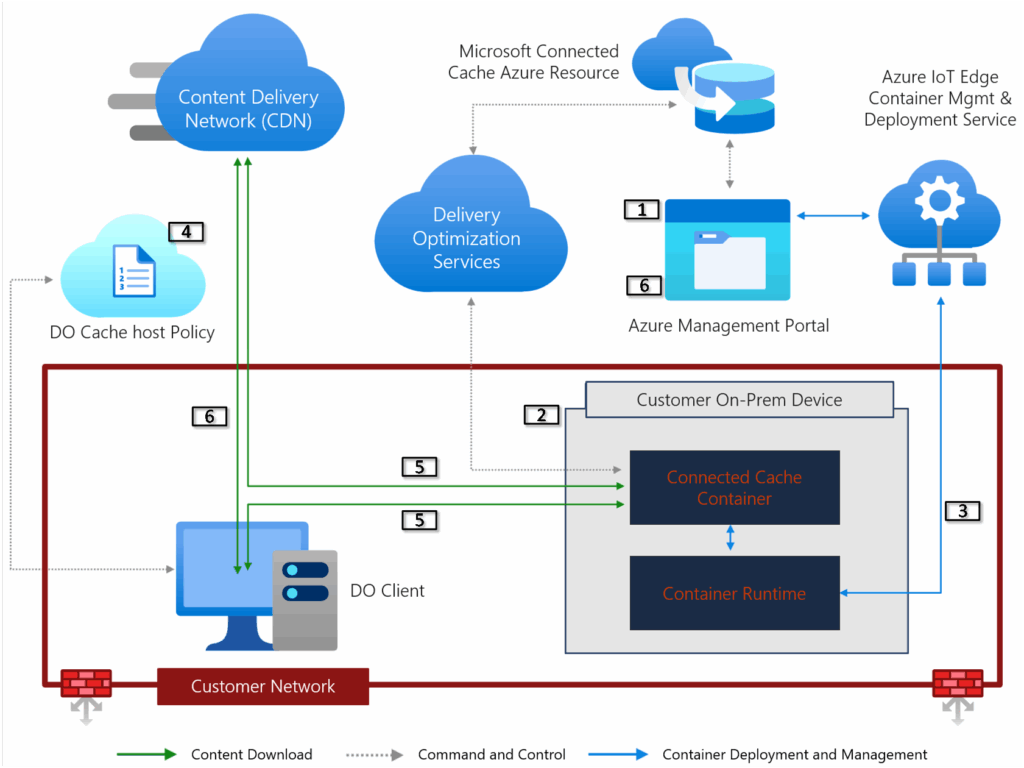
Microsoft Connected Cache works by storing frequently requested content (such as Windows updates and apps) on a local server within an organization’s network. When devices on the network request this content, instead of downloading it from the Internet, they retrieve it from the cache to speed up delivery and reduce bandwidth usage.
MCC supports caching of content from Windows Update, Microsoft Store, Windows Autopilot, Microsoft Defender, and Microsoft Intune updates. This service integrates with Delivery Optimization, which manages how content is downloaded and shared across devices. It’s designed for use in branch offices, school labs, and other locations with limited Internet bandwidth.
Microsoft says that MCC is available for Windows 10 and Windows 11 Pro, Enterprise, and Education editions. However, this feature is not supported on Windows 10/11 Home editions as well as Windows Server editions.
Here are some more important facts about how Microsoft Connected Cache for Enterprise works:
- Connected Cache now supports both HTTP and HTTPS protocols.
- To enable HTTPS support, IT administrators must deploy a certificate to Connected Cache
- Enables access to Teams content via Connected Cache
- Caching in Windows Autopilot deployment scenarios
- Microsoft Connected Cache deployed directly to Windows relies on Windows Subsystem for Linux (WSL)
- Connected Cache can be managed from the Azure portal or through Azure CLI.
- Managed Windows devices can be configured to request Microsoft content from a Connected Cache host machine by applying Delivery Optimization policies using device management tools such as Microsoft Intune.
System requirements
To use Microsoft Connected Cache, customers must be running Windows 11 or Windows 10 version 2004 (or later). Moreover, Delivery Optimization must be enabled, and devices must be on the same physical network as the MCC host. The MCC host Windows 11 or 10 device must be running at least 8 GB of RAM and 100 GB of available disk space.
“One of the standout benefits of Microsoft Connected Cache is its remarkable flexibility—it can be deployed on almost any platform within your existing infrastructure, including Windows Server, Windows Desktop, and popular Linux distributions like Ubuntu and Red Hat Enterprise Linux. This versatility ensures that organizations of all sizes and architectures can take advantage of its features without the need for significant hardware changes or investments.”, Microsoft says on its website.
The MCC feature is enabled and managed through Microsoft Intune by configuring the ‘Delivery Optimization’ settings. The corresponding Group Policy is applied using the ‘Enable Microsoft Connected Cache’ policy. If you’re interested, you can check out the deployment guidance and performance monitoring tips on this support page.

Rabia has a master's degree in Software Engineering and she has years of experience writing professionally about Microsoft products and other technologies. Rabia has also written for OnMSFT.com as well as Windows Report. She is always up to date on t...