Microsoft 365 Tools to Spearhead Business Growth
How IT teams can translate Microsoft 365’s technical capabilities into real, measurable business impact.

Key Takeaways:
- Many Microsoft 365 tools remain underutilized despite their potential to drive measurable business growth.
- Dynamics 365, Copilot, Power Automate, and Microsoft 365 Backup each offer technical capabilities that directly support scaling organizations.
- System administrators can unlock significant ROI by strategically deploying automation, analytics, and continuity architecture.
- A sustainable Microsoft 365 strategy requires consistent measurement, cross-department alignment, and intentional use-case selection.
Data-driven insights have become indispensable for business leaders, and many tools play a pivotal role in driving Microsoft 365 business growth by delivering enterprise-level analytics that transcend standard reporting templates.
For IT professionals managing growing organizations, Microsoft 365 encompasses far more than a standard set of programs like Outlook, Excel and Word. It encompasses a suite of technical tools that can profoundly affect how businesses operate, scale, and innovate.
Microsoft 365 business growth
In terms of Microsoft 365’s inherent features and capabilities, many organizations barely scratch the surface. System administrators who recognize the platform’s deeper technical features can, however, deliver measurable and strategic benefits for organizations across a range of sectors.
The challenge for IT decision-makers isn’t whether Microsoft 365 can support business growth, that much is clear. Instead, it’s about understanding the lesser-known tools to utilize and how to deploy them strategically. In this article, some key technical tools within Microsoft 365 will be highlighted to give ambitious and growth-minded IT teams food for thought to drive success and growth.
Dynamics 365 – Unmatched real-time intelligence
What hidden analytics capabilities inside Dynamics 365 can immediately change how leaders make decisions?
Dynamics 365 delivers enterprise-level analytics that transcend reporting templates. The built-in Business Performance Analytics (BPA) function unifies data all across an organization’s estate, including finance, operations, sales, services, marketing and more, into a single, process-aware dimensional model. It’s a powerful, all-inclusive and cloud-based toolkit to provide a unified view of business operations and customer interactions.
System administrators benefit significantly from the real-time data refresh function. Unlike most analytics solutions relying on overnight batch processing, BPA provides immediate deployment capabilities. This allows businesses to analyze data and generate insights without long setup times. Growing companies can leverage this, with finance teams able to isolate and analyze transactions from minutes earlier, while supply chain managers gain immediate visibility into inventory levels.
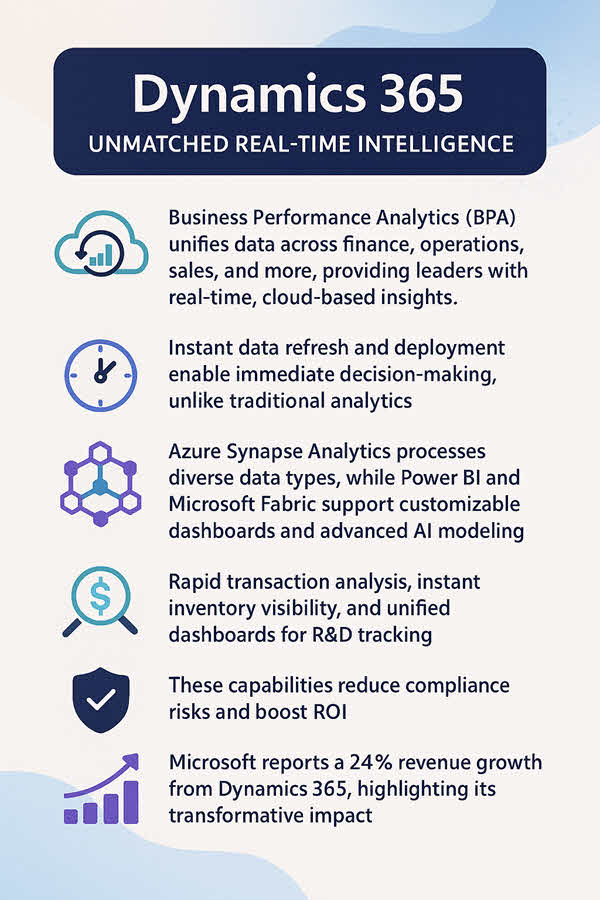
The technical architecture leverages Azure Synapse Analytics to process diverse data types, from historical financial records to unstructured IoT data. This enables internal teams to discover new customer segments, devise targeted marketing strategies, and predict stock fluctuations.
Dynamics 365 is also compatible with Power BI, enabling administrators to build customizable dashboards surfacing real-time KPIs. It also works alongside Microsoft Fabric for advanced AI modeling through Copilot Studio.
For organizations involved in research and development, Dynamics 365 enables tracking of milestones, budgets, assets, and resource allocation through unified dashboards. This real-time data capture is critical for producing auditable records of advancement efforts. The system’s ability to maintain comprehensive records reduces the risk of non-compliance, offering significant ROI on data management. For enterprises handling complex regulatory requirements, such as R&D tax relief claims, expert guidance on data structure and reporting is recommended.
Recent Microsoft statistics show that Dynamics 365 has grown revenue by 24% over a short period, demonstrating the impact that proper implementation can deliver.
Microsoft 365 Copilot – Enterprise-grade automation
How can AI automation move beyond surface-level productivity and reshape full business operations?
The introduction of AI through Microsoft 365 Copilot represents a shift in how IT departments can approach sustainable automation. Copilot isn’t a chatbot, but an enterprise IT asset integrated across the Microsoft ecosystem. It leverages LLMs and the Microsoft Graph to provide contextual intelligence.
The business case for Copilot is compelling. A Forrester study found that implementing Microsoft 365 Copilot can increase top-line revenue by up to 2.6%, primarily through improvements in qualified opportunities, win rates, and customer retention. Growing businesses also reported faster time-to-market for product launches and nearly tripled projected ROI ranges.
Technically, Copilot’s value extends far beyond standalone productivity boosts. Organizations reported reduced time spent summarizing meetings, developing internal training materials, and creating technical documentation while maintaining quality.
For IT teams supporting data-heavy operations, these efficiency improvements translate directly into operational and innovation gains. Administrators should pay close attention to Copilot Studio, which enables the creation of custom AI agents that automate complex, multi-step processes. These agents can handle tasks such as customer onboarding workflows or procurement approvals, making contextual decisions based on organizational data and established business rules.
Power Automate – Process automation with measurable ROI
What happens when automation expands beyond basic workflows and touches every part of the enterprise stack?
Microsoft Power Automate is widely known as a workflow automation tool, but system administrators can leverage it as a core component in an enterprise automation strategy. It enables users to automate tasks by connecting siloed applications and services, capturing real-time data with full synchronicity.
A 2024 Forrester study reported that organizations using Power Automate achieved a three-year ROI of 248% with a payback period under six months, generating a net present value of $39.85 million for a composite organization. These results highlight the financial and operational value of consolidating disparate tools on a unified platform.
Power Automate supports three approaches:
- Robotic process automation (RPA) for legacy systems
- Digital process automation (DPA) for cloud-based applications
- AI-powered process mining capabilities
For IT teams managing hybrid environments, this flexibility is invaluable. System administrators can automate interactions between systems so cloud-native workflows across Microsoft 365 do not require manual approval or costly API development.
By expanding automation across systems and applications, organizations unlock more value, save significant resources, and free time for revenue-generating activities. The platform’s monitoring capabilities and Copilot-powered exception handling also help administrators maintain oversight without micromanaging workflows.
Microsoft 365 Backup – Continuity architecture
How can IT teams ensure data integrity when modern environments are increasingly vulnerable to cyber threats?
The shared responsibility model for SaaS places data protection on the customer. Microsoft manages infrastructure availability, but organizations are responsible for data integrity and protection from errors or attacks.
Microsoft 365 Backup, built on the Microsoft 365 Backup Storage platform, addresses this through an architecture optimized for rapid recovery and business continuity. With the ability to back up SharePoint sites, Exchange mailboxes, and OneDrive accounts, Microsoft 365 Backup allows users to restore data quickly and reliably. Large volumes of content risk being lost when moved at scale or when ransomware targets data in transit. However, Microsoft 365 Backup provides fast restores with consolidated security certificates, encryption, and compliance domain management.
The service backs up OneDrive, Exchange, and SharePoint data every 10 minutes, with initial backups processing roughly 15 minutes per 1,000 protection units. For business continuity planning, this supports fast recovery point objectives. For administrators managing compliance obligations, keeping backup data within the Microsoft 365 security boundary is critical for meeting regulatory standards.
Harnessing Microsoft 365 for enterprise success
What separates organizations that flourish with Microsoft 365 from those that barely scratch the surface?
The technical tools explored here represent only a fraction of Microsoft 365’s enterprise capabilities, but they are often underutilized despite their potential to drive measurable outcomes. For IT professionals in growing organizations, success does not depend on tool complexity, but on deploying the right capabilities strategically.
Organizations that benefit most from Microsoft 365 view it as an integrated platform for growth rather than a simple productivity suite. Automation, analytics, innovation, and security all become possible with intentional adoption.
For system administrators and decision-makers, approach estate-wide Microsoft 365 deployment with caution and strategy. Identify the most valuable use cases, implement reporting mechanisms, and measure KPIs regularly. Treat Microsoft 365 as a platform for organization-wide improvement, not a tool for solving isolated tasks.
Consolidated comparison table: Microsoft 365 tools for business growth
| Tool | What it does technically | Why it matters for business growth |
|---|---|---|
| Dynamics 365 | Provides unified, real-time analytics using BPA and Azure Synapse | Enables data-driven decisions, improves forecasting, and optimizes operations |
| Microsoft 365 Copilot | Uses LLMs + Microsoft Graph to automate knowledge work and internal processes | Reduces workload, speeds time-to-market, and boosts revenue opportunities |
| Power Automate | Connects systems for RPA, DPA, and process mining with AI support | Streamlines workflows, reduces costs, and improves operational efficiency |
| Microsoft 365 Backup | Provides rapid, secure backups and restores inside the Microsoft 365 boundary | Strengthens resilience, ensures compliance, and protects against data loss |
Ready to deepen your knowledge of Microsoft 365 security and enterprise AI best practices? Explore Petri’s extensive library of resources for the hands-on guidance system administrators need to manage and secure their complex cloud environments.
Frequently asked questions
How does Microsoft 365 support business growth?
Microsoft 365 supports business growth by providing automation, analytics, collaboration, and security tools that help organizations operate more efficiently. When used strategically, these tools reduce costs, streamline workflows, and increase productivity across departments.
Which Microsoft 365 tools are most impactful for scaling businesses?
Dynamics 365, Microsoft 365 Copilot, Power Automate, and Microsoft 365 Backup stand out for their ability to influence decision-making, automate complex tasks, and improve resilience. Their combined impact helps growing organizations scale operations smoothly.
Is Microsoft 365 Copilot worth the investment for small or mid-sized businesses?
Yes. Copilot can dramatically reduce time spent on routine tasks, accelerate internal processes, and improve communication. Even smaller teams benefit from automated meeting summaries, content generation, and AI-driven workflows.
How can IT administrators ensure full ROI on Microsoft 365?
To maximize ROI, IT admins should identify high-impact use cases, deploy automated workflows, implement analytics dashboards, and measure outcomes consistently. Strategic adoption, not tool availability, drives the strongest returns.

Chester Avey is a Freelance Writer and Consultant based in the UK with more than 20 years’ experience. He has extensive knowledge of today's emerging tech industry and writes authoritative articles and up-to-date opinion pieces on a wide range of t...



