Protect AD and Entra ID with Cayosoft’s Free Guardian Protector
Cayosoft Guardian Protector was built to make visibility effortless.

Key Takeaways:
- Tracks changes across Active Directory, Microsoft Entra ID, and Microsoft 365 instantly, catching risks like privilege escalations or dormant account reactivations as they happen.
- No agents or domain controller installs required; setup takes minutes and runs with minimal overhead.
- Maintains historical awareness of identity changes with immutable logs and dashboards, simplifying compliance and investigations.
- Unlike most free tools, it offers continuous monitoring, automatic threat intelligence updates, and full hybrid coverage without restrictions.
Introducing Cayosoft Guardian Protector. As identity increasingly becomes the most important pillar for securing data and IT systems, security teams face increasing challenges keeping track of who is changing what and when.
What is Cayosoft Guardian Protector?
Guardian Protector is a free, agentless monitoring solution that delivers real-time insight across Active Directory, Microsoft Entra ID, and Microsoft 365 services like Teams, Intune, and Exchange Online. It helps organizations detect identity-layer risks as they happen, without complicated setups, scripts, or costs.
Why was Cayosoft Guardian Protector released now?
Experienced Active Directory (AD) engineers are retiring or getting ready to retire. The attack surface has expanded for AD. Active Directory is no longer something that we use just within the four walls of our datacenters. Identities from AD are synchronized to support cloud resources like Entra ID, Okta, and AWS just to name a few. Not only has the AD attack surface expanded, but the modern-day Microsoft attack surface includes M365 services, including Teams and Intune.
Traditional tools fall short while covering the expanding attack surface or only offer scanning and reporting. If you want real-time visibility, this often requires purchasing a enterprise solution that may be too expensive for organizations, leaving them vulnerable until the next time they scan their environment.
Guardian Protector was created to change that reality. It gives IT teams continuous visibility into hybrid identity environments and the ability to detect threats in real time. By combining enterprise-grade threat monitoring with a zero-cost, zero-agent design, it brings continuous protection to every organization, regardless of budget or size.
Always on, always ready
Guardian Protector runs quietly in the background, always watching for the changes that matter. Instead of waiting for scheduled scans or manual reviews, it delivers live insights into your identity systems the moment something shifts.
Real-time threat detection
Guardian Protector monitors every identity change across Active Directory, Entra ID, and Microsoft 365, identifying risks as they occur. From privilege escalations and dormant account reactivations to unexpected Group Policy Object (GPO) edits or policy changes, it surfaces activity in real time so your team can respond to suspicious activity before damage spreads.
Unified hybrid change monitoring
Most organizations rely on several tools to cover on-premises and cloud environments. Guardian Protector unifies them, offering a continuous stream of change data. Every modification is tracked, correlated, and displayed in context, helping eliminate blind spots and simplify investigations.
Effortless, agentless deployment
Guardian Protector installs without agents or domain controller components. Deployment takes minutes, system overhead is minimal, and maintenance is almost nonexistent. It’s built for efficiency, not complexity.
Continuous visibility
Unlike scanners that only show what happened at a specific moment, Guardian Protector continuously tracks changes and maintains historical awareness. You can see exactly who, what, when, and where the change was made, even weeks later.
Audit-ready insights
Compliance and auditing are simplified with built-in dashboards and immutable logs. Guardian Protector delivers ready-to-export reports that make investigations and audits faster, cleaner, and more reliable.
Prerequisites for installing Cayosoft Guardian Protector
Because Cayosoft Guardian Protector is agentless, setup is simple and fast. There’s nothing to install on domain controllers, endpoints, or users’ machines. Still, a few prerequisites ensure the software can collect data smoothly and connect to your hybrid environment.
Before you install Guardian Protector, make sure the following conditions are met:
- Windows Server environment – You’ll need Windows Server 2019 or later to host the Guardian service. The system should have access to Active Directory and network connectivity to Microsoft Entra ID and Microsoft 365 services.
- Permissions – You’ll need an Entra ID Global Administrator account for app registration during setup and an AD Schema Admin account for setup and gMSA creation if you want schema monitoring.
- Connectivity – Ensure outbound HTTPS access to Microsoft cloud services and Cayosoft update servers. Guardian Protector automatically retrieves the latest threat intelligence definitions, so network access is required for continuous updates.
- .NET and PowerShell – The system should have a current version of .NET Framework and PowerShell installed, as these are used during setup and for collecting hybrid identity data.
- Browser access – A modern web browser (such as Microsoft Edge or Chrome) is required to access the Guardian Protector web interface and dashboards.
For more information on installation perquisites, check out the Guardian Protector wiki on Reddit.
Once those prerequisites are in place, you can install Guardian Protector in just a few minutes. Since it’s agentless and cloud-connected, you’ll start seeing hybrid change data right away, without restarting domain controllers or deploying any scripts.
How to install Cayosoft Guardian Protector
Getting started with Cayosoft Guardian Protector takes only a few minutes. Once you’ve confirmed the prerequisites, follow these steps:
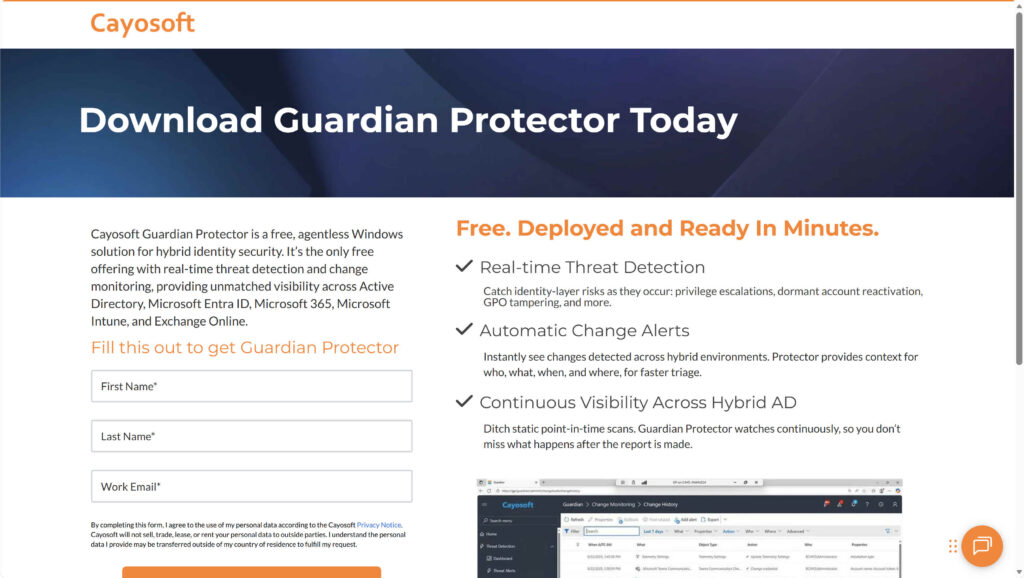
- Download the installer
Download the free Guardian Protector setup package. - Run the installer
Launch the downloaded file on a Windows Server with connectivity to your Active Directory and Microsoft Entra ID environments. Accept the license agreement and follow the installation prompts.
Note – in a production environment, you would likely install Guardian Protector on an Active Directory member server and choose an Azure SQL or on-premises SQL Server database.
- Sign in with admin credentials
After installation, open the Guardian Protector web console and sign in using an account with local administrative rights and directory read permissions. - Connect your directories
Add your on-prem Active Directory and Microsoft Entra ID connections using the built-in wizard. The setup will validate access and begin collecting initial change data. - Activate the product
After login, we’re presented with the Welcome screen.

The Product Activation screen that pops up will walk you through entering your business email address and asking for an activation code.

- Review dashboards
Once data collection starts, open the Home dashboard to view recent changes, active threats, and collection job status. You’ll start seeing hybrid activity almost immediately. - Stay up to date
Guardian Protector automatically downloads new threat intelligence definitions, so no manual updates are required.
That’s it, installation is complete. From here, you can begin monitoring changes, investigating suspicious activity, and exploring dashboards to get a full picture of your hybrid identity environment.
Exploring the Guardian Protector dashboards
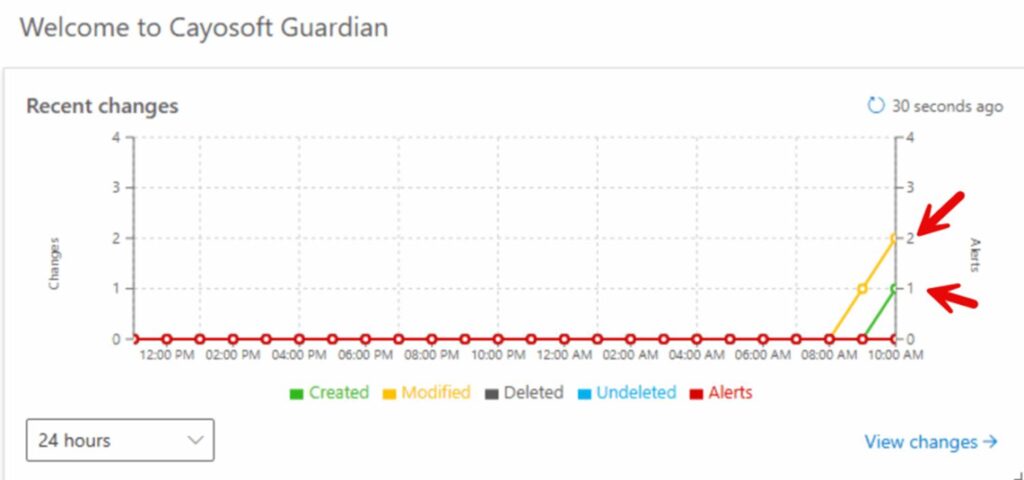
The Guardian Protector dashboards make monitoring your hybrid identity environment intuitive and visual. The Home dashboard provides a high-level view of your environment with sections for Recent changes, Active threats, and the current status of your Collection jobs from AD and Entra ID.
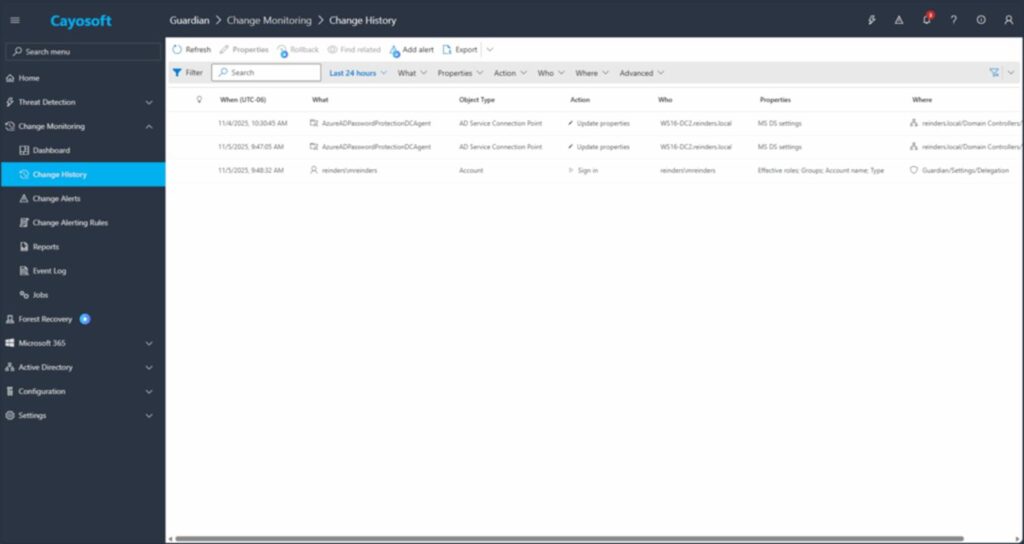
The recent changes view shows newly detected activity across AD and Entra ID. Each item can be expanded to view detailed properties and context, including who made the change, when it occurred, and which system it affected. Unlike the Windows Event Log, which doesn’t provide before and after information, making tracking changes difficult without third-party software.
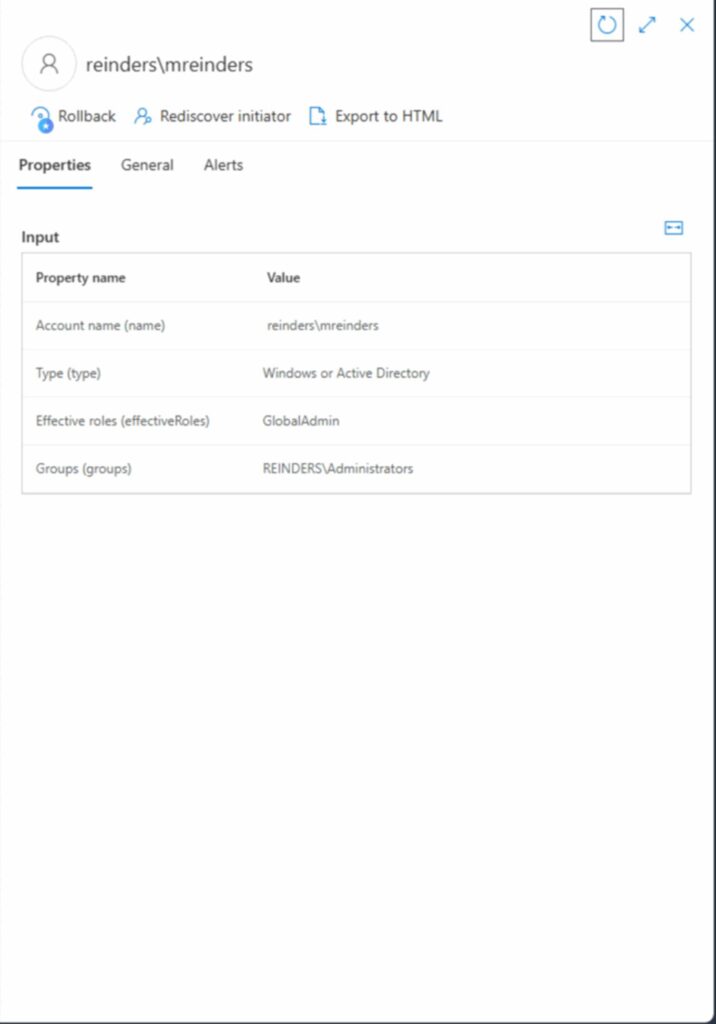
During testing, the software immediately detected the addition of a user to an AD security group and the creation of a new user in Entra ID.
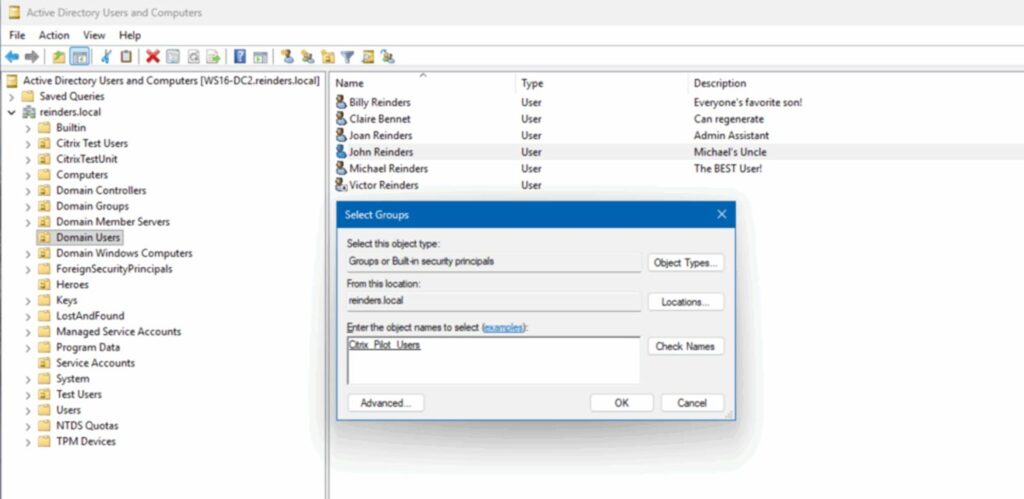
Within moments of refreshing the dashboard, both activities appeared under recent changes, demonstrating the tool’s ability to capture hybrid activity in real time.
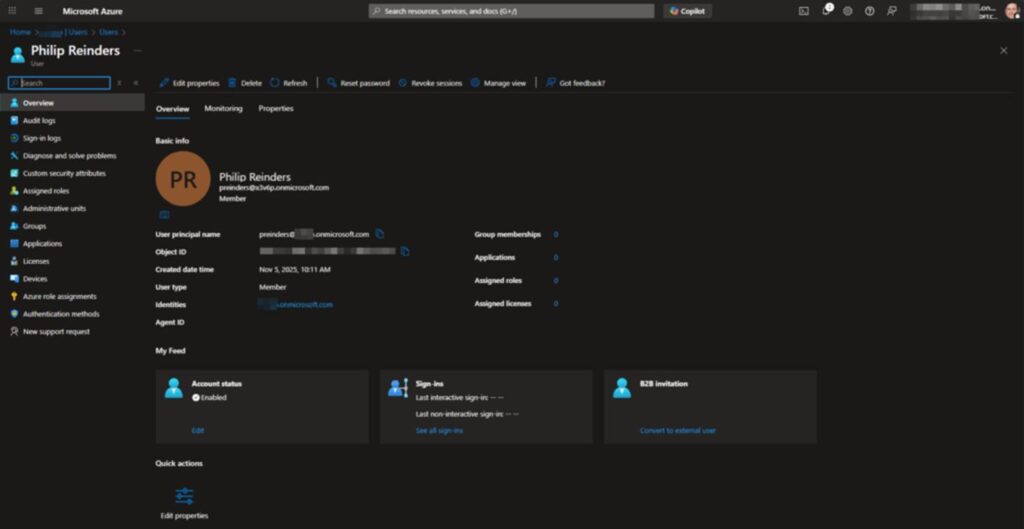
Guardian Protector’s continuous sync tracking also highlights broader patterns of change. For example, when an Entra Cloud Sync configuration was re-enabled after being paused, a flood of new updates appeared as AD users synced to the cloud and joined dynamic Entra groups based on their attributes.
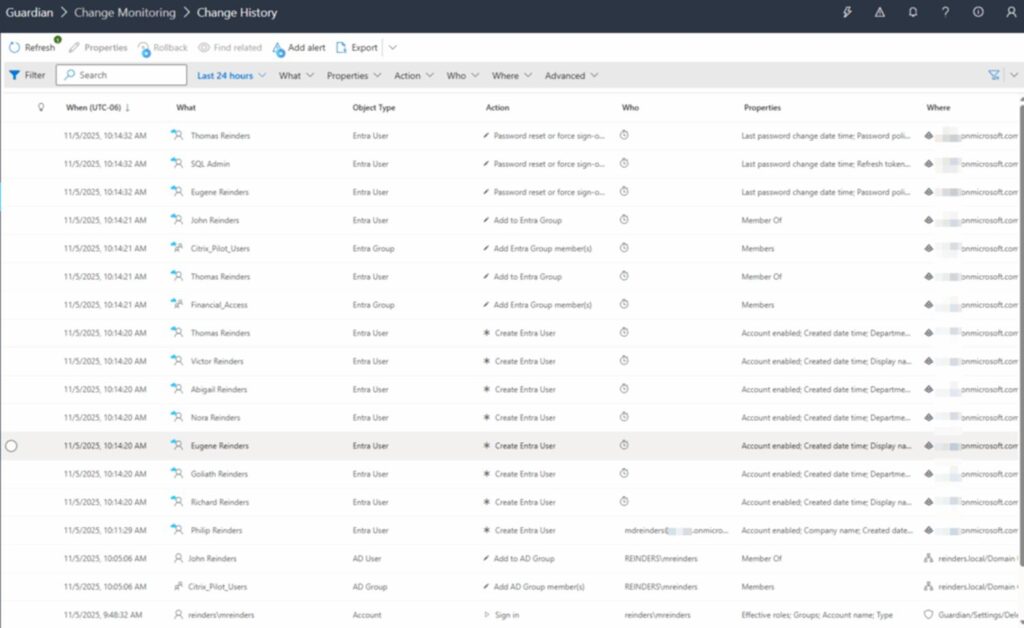
These dashboards make it easy to understand the full story of what’s happening in your environment, from user creation to password resets, without digging through logs.
Guardian Protector also monitors Microsoft Teams activity. When several users matched criteria to join a dynamic team, the system detected the membership update instantly, showing the new total in the Teams dashboard.
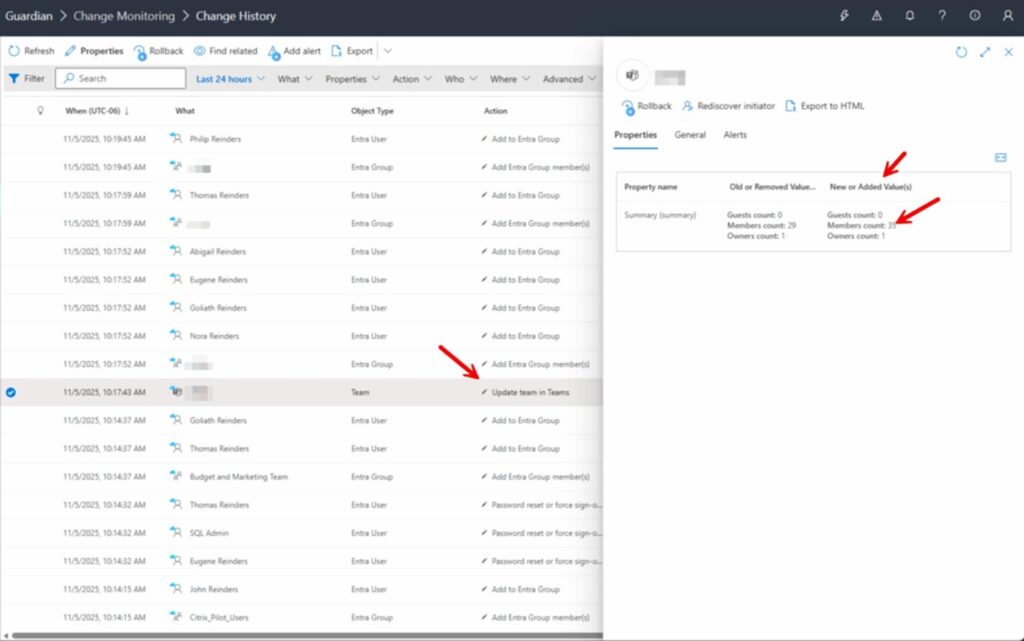
These capabilities show how Guardian Protector not only provides visibility but also clarity. The dashboards bring hybrid change monitoring to life, offering IT and security teams a complete, visual understanding of what’s changing across their environment.
Built for IT and security professionals
Cayosoft Guardian Protector fits naturally into the daily workflows of security and IT operations teams.
- Security analysts and SOC teams, who need immediate visibility into identity-layer changes and potential compromises.
- System administrators and identity engineers, who want to track hybrid AD and Entra ID changes without relying on log scraping or custom scripts.
- Compliance and audit professionals, who benefit from complete change histories and transparent reporting.
- Mid-market and enterprise IT teams, especially those in industries like healthcare, finance, education, and government, where hybrid Microsoft environments are mission-critical.
The benefits that matter
Guardian Protector doesn’t just record changes, it lets IT teams act faster and with greater confidence.
- Faster incident response, with real-time alerts for identity and privilege anomalies.
- Improved compliance, through immutable logs and detailed reporting.
- Reduced complexity, thanks to an agentless, cost-free design.
- Community collaboration, with shared detection patterns, best practices, and access to Cayosoft’s Threat Directory.
How Guardian Protector stands apart
Most free security tools offer only partial protection, limited scans, or feature-capped trials. Guardian Protector redefines what “free” can mean for identity threat detection.
It provides continuous monitoring across both on-premises and cloud environments, automatic threat intelligence updates, and complete visibility into hybrid identity systems. It’s the only free tool that offers real-time alerting, continuous change history, Microsoft 365 and Intune coverage, and comprehensive Entra ID analysis, all without restrictions or hidden costs.
Guardian Protector delivers the kind of depth and reliability that traditionally required expensive enterprise software, but at no cost and with zero setup friction.
From visibility to recovery: the Cayosoft Guardian Platform
Guardian Protector is part of the Cayosoft Guardian Platform, which scales as your organization’s needs evolve.
| Tier | Key capabilities | Cost |
| Protector | Real-time threat detection, hybrid change monitoring, automatic updates, and compliance-ready reporting | Free forever |
| Guardian | Adds one-click rollback, automated remediation, unlimited data retention, custom alerts, and SIEM integration | Paid upgrade |
| Forest Recovery | Adds domain and forest recovery, automated testing, and patented standby recovery technology | Paid upgrade |
Whether you’re just starting with hybrid identity monitoring or looking to add automated recovery and rollback, Guardian Protector lays the foundation.
Get started with Cayosoft Guardian Protector
You can start protecting your AD, Entra ID, and Microsoft 365 environments today, for free.
Download Cayosoft Guardian Protector, explore its dashboards, and experience the hybrid identity visibility it provides for free.
If you need help or support with the product, check out the Cayosoft Guardian Protector page on Reddit.
Frequently asked questions
What is Cayosoft Guardian used for?
Cayosoft Guardian provides continuous monitoring, protection, and rapid recovery for directory and identity platforms. It helps organizations detect changes, prevent misconfigurations, and quickly restore critical settings.
What platforms does Cayosoft Guardian support?
Cayosoft Guardian supports Azure Active Directory (Entra ID), on-premises Active Directory, and hybrid identity environments.

Michael has been an IT Pro since 1998. He has worked predominantly in the Windows world including client and server operating systems, on-prem systems engineering (AD, DNS, etc.), and over the last ten years or so has embraced and immersed himself in...