Zero Trust Security – A Complete Guide
Learn how zero trust can help improve security and simplify remote access infrastructure.

In this article, I provide a complete overview of the zero trust security model.
What is zero trust security?
Zero Trust Security is a modern cybersecurity model whose fundamental principle is based on the approach “never trust, always verify.”
Unlike the traditional cybersecurity model, which follows the principle of “trust but verify,” Zero Trust Security makes no distinction between internal and external resources: it doesn’t matter whether a device is inside the network or outside it, no one and nothing is granted automatic trust.
What are the key concepts of zero trust?
- Never trust, always verify
No device in the corporate network is trusted by default. Every device and user has to be checked and verified.
- Least privilege access
Ensures that all users are granted only the exact amount of privileges they need. This significantly reduces the risk to organizations by directly limiting the potential spread of attacks and the compromise of accounts or devices.
- Multi-Factor Authentication (MFA)
Multi-factor authentication requires users to provide two or more methods of verifying their identity before accessing the network. This adds more protection compared to just a password. Even if a login and password are compromised by malicious actors, MFA helps minimize the risk of data breaches by making it more difficult to gain access to the network.
- Network microsegmentation
The core idea of this method is to divide the network into separate segments. For example, there might be a single local Wi-Fi network that all employees use: managers, administrators, and staff alike. In the case of a typical phishing attack and hacker intrusion into such a network, the attacker would gain access to everything connected to that network.
Therefore, a more practical solution is to divide the network into distinct segments. For example, creating separate networks for staff, administrators, and managers.
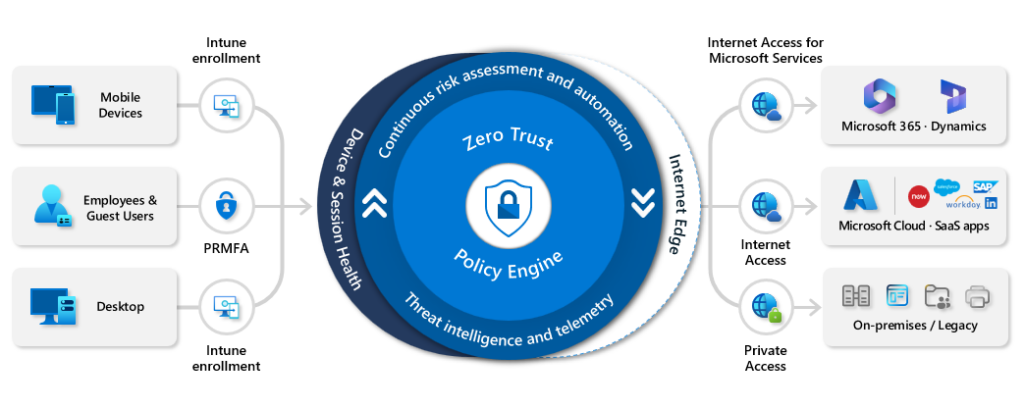
What are the core principles of the zero trust model (NIST 800-207)
- Continuously Verify
“Never trust, always verify.” In traditional security models, a device or user is considered trusted after the first login. However, in the Zero Trust Security model, trust is never granted automatically. It requires continuous verification of:
- Identity
- location
- behavior
- and device status.
This is essential for detecting threats at an early stage, even after successful authentication, which makes Zero Trust Security a more effective and reliable solution for protection.
- Limit the Blast Radius
Zero Trust Security is based on the principle that a system breach is inevitable sooner or later. Therefore, it makes sense to divide the infrastructure into segments so that in the event of an attack, a cybercriminal cannot gain access to all systems. This type of protection is achieved through network segmentation, enforcing least privilege access, and defining strict access boundaries for every resource.
- Automate Collection and Response
Organizations should gather context such as:
- what device is being used
- who the user is
- where the device is located
- when the device requested access
- and which resource was requested
Automated responses, which automatically make decisions to allow or deny access, request verification via MFA, isolate the device, or even send an alert to the security operations center, can then be made.
What are the key benefits of zero trust Security?
Here are the nine main benefits of zero trust security:
- The Zero Trust model significantly enhances overall security by continuously verifying every user and device, which greatly reduces risk.
- Access is granted strictly on a need-to-know basis (principle of least privilege).
- Network micro-segmentation and strict access controls prevent lateral movement by cybercriminals within the network.
- Continuous monitoring and behavior analysis help detect threats in a timely manner.
- Access decisions are made based on user reputation, location, and behavior.
- The model ensures secure access from any device and any network, enabling flexible and safe remote work.
- It supports consistent security policies across cloud and hybrid environments.
- Provides detailed logging and fine-grained access control, essential for meeting compliance standards like GDPR, HIPAA, and NIST.
- It makes your environment transparent, well-controlled, and audit-ready.
What technologies are used to achieve zero trust?
- Identity and Access Management (IAM) – Active Directory, Entra ID, Okta etc.
Taking Active Directory (AD) as an example, you create a user account for an employee and give them access to only the resources they need to perform their work-related tasks. After the employee leaves the company, their access to resources is revoked.
- Multi-Factor Authentication (MFA) – Entra ID etc.
Multi-Factor Authentication (MFA) helps prevent unauthorized access, even if the login and password have been compromised. Microsoft is pushing for organizations and consumers to adopt passwordless authentication, which is considered more secure than MFA.
- Identity Detection and Response (ITDR)
Plays a key role in zero trust architecture by safeguarding the identity layer. ITDR continuously monitors identity related activities to detect anomalies and prevent compromise.
- Zero Trust Network Access (ZTNA) – Zscaler, Cisco Zero Trust Security etc.
Users must verify their identity and confirm that their device meets security requirements (such as using antivirus or whether a VPN is enabled) before gaining access to network resources.
- Security Information and Event Management (SIEM) – Microsoft Sentinel, Splunk
Security data from various sources is continuously collected. If suspicious activity, such as multiple failed login attempts, is detectedm the threat can be automatically blocked, and the system will send a notification to the security team.
- Microsegmentation – Cisco Secure Workload
A network is divided into separate segments (microsegments) where each group of employees has access only to the parts of the network they need. This reduces the risk of an internal attack spreading, even if one part of the infrastructure is compromised.
- Endpoint Detection and Response (EDR/XDR), Microsoft Defender for Endpoints etc.
EDR/XDR solutions monitor activity on PCs. If the system detects suspicious behavior, such as the execution of a malicious file or connection of an unknown device, it can automatically isolate the device from the network and notify the security team.
What are the stages of implementing zero trust?
- Visualize
At the visualization stage, complete visibility of workloads, devices, users, and network data is created, which is especially important for understanding the current security posture and determining what actions can be taken to improve security and reduce the attack surface. Monitoring tools are fundamental for the successful implementation of zero trust security technology.
- Mitigate
Right after you have completed the visualization, you need to reduce risks. To do this, strict access control, microsegmentation, and multi-factor authentication are applied, along with limiting user privileges to only what is necessary for their work. This helps to minimize the blast radius and prevent unauthorized access.
- Optimize
Optimization and automation of processes help to continuously analyze vulnerabilities and threats automatically, as well as update security policies. The goal of this key stage is to maintain maximum effectiveness of zero trust security and promptly adapt to new cyber threats.
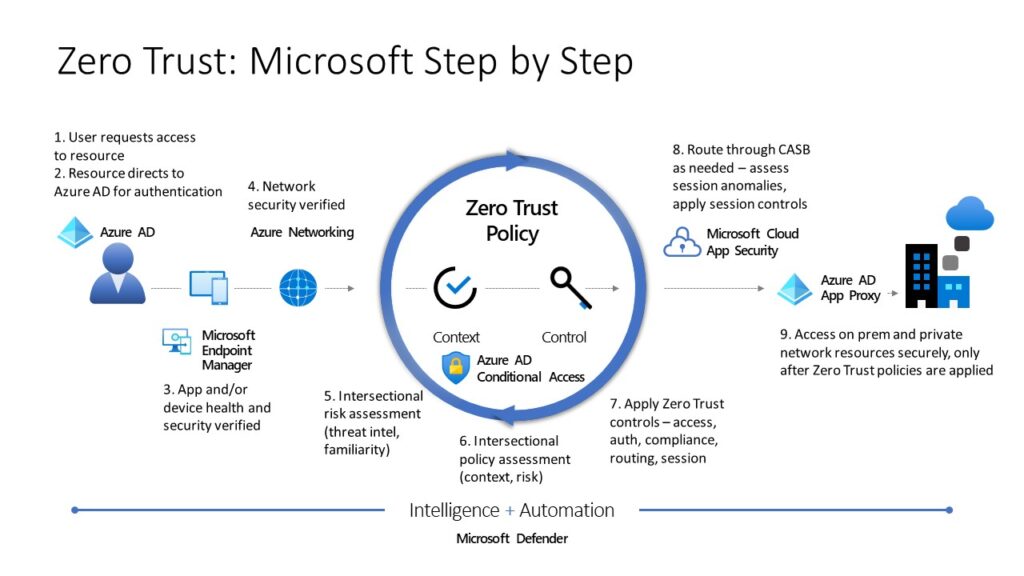
What are the 5 pillars of the zero trust maturity model?
The five pillars of a zero trust architecture are:
- Identity
IAM, MFA, and least privilege secuirity protect against unauthorized access and reduce the attack surface.
- Devices
Monitoring the health of endpoints using EDR/XDR helps quickly detect threats and vulnerabilities through automation and continuous monitoring.
- Network
Microsegmentation and ZTNA limit lateral movement and reduce the blast radius.
- Applications and workloads
Strict access control to data reduces the risk of implicit trust, significantly shrinks the attack surface, and prevents data breaches in multi-cloud environments.
- Data
Data protection through policies and encryption ensures optimal security and restricts access for unauthorized users.
Why zero trust is important (i.e. why traditional network security is not adequate)
The main difference between Zero Trust and traditional security models is that the traditional model is based on the “castle and moat” or “trust but verify” approach. This means that anyone inside the system is automatically considered trustworthy. This model worked well when employees worked in the office and devices were corporate-owned and controlled.
But modern IT environments operate without clear boundaries: employees work remotely or in hybrid setups, data is stored in the cloud, and users access data from personal devices. In such conditions, the traditional security model isn’t effective.
Zero Trust is better suited here because it is based on the principle of “never trust, always verify.” This means that no user is trusted by default, even if they are inside the network. Continuous authentication and authorization happen for every request.
Minimizing breach impact is achieved through network segmentation — even if an attacker gets into the system, they cannot move freely or access all resources.
Zero Trust also relies on contextual information for each user individually: reputation, location, behavior, identity. The model improves visibility and control over the security system.
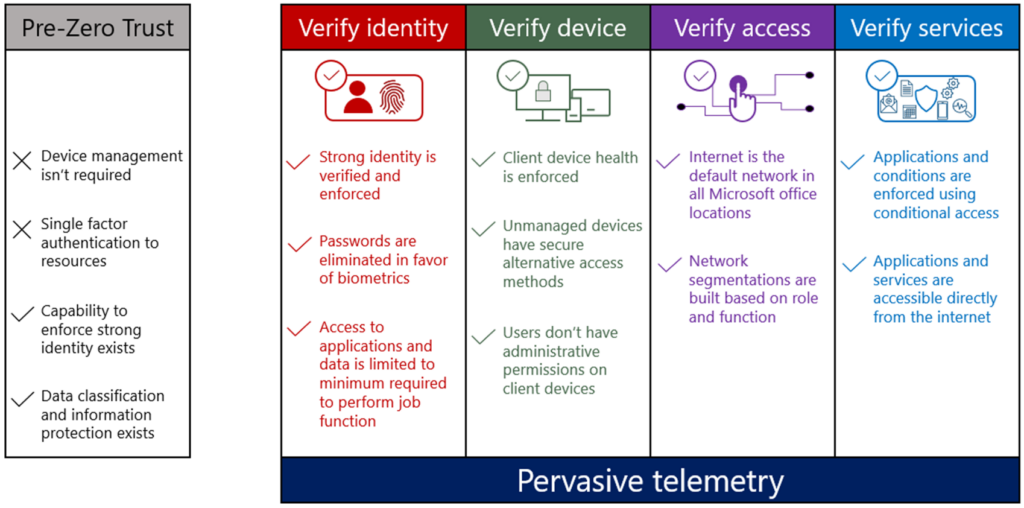
Virtual private networks (VPN) vs zero trust network access (ZTNA)
Virtual private networks (VPNs) create an encrypted “tunnel” over the public Internet, providing a secure and private connection. Whereas ZTNA provides secure access to resources based on user identity and device health verification without implicit trust.
VPNs are based on a trust model that assumes all users and devices are trusted once connected, while ZTNA follows the principle of “never trust, always verify.” Access is granted incrementally after full authentication.
VPNs provide full network access after connection, whereas ZTNA grants users access only to the specific resources they need, which reduces risk.
This makes VPN more vulnerable to insider attacks because it allows attackers to move freely within the network and does not enforce segmentation, unlike ZTNA.
It’s also important to note that VPNs can slow down connections because all traffic passes through corporate gateways, while ZTNA offers a smoother and faster connection by providing direct access to applications.
Zero trust security puts Identity and Access Management (IAM) at heart of the solution
IAM (Identity and Access Management) plays a critical role in the zero trust security model. While traditional security systems focus on protecting the network or devices, Zero Trust assumes that the most important factor in securing a system is the user specifically, knowing exactly who is trying to access the network or device.
Instead of trusting users by default, zero trust requires continuous verification of identities and access rights through IAM.
IAM is responsible for authentication (verifying identity) and authorization (determining what the user is allowed to do), which enables strict control over every access request to resources.
How zero trust uses machine learning and artificial intelligence (AI) to improve security
Zero trust architectures actively leverage artificial intelligence (AI) and machine learning (ML) technologies to enhance security.
AI and ML analyze user and device behavior by creating unique behavioral patterns. Any deviation from typical activity, such as logging in from an unknown device, accessing the system from an unusual location, or downloading large volumes of data, is flagged as suspicious. This allows the system to detect threats early and prevent incidents proactively.
Machine learning can also make real-time access decisions based on factors like user reputation, location, device type, and other contextual elements. This enables organizations to move away from rigid, one-size-fits-all policies and implement context-aware, adaptive security measures instead.
Additionally, AI helps process and analyze both network traffic and large volumes of data from endpoints and cloud environments. It can identify threats quickly and accurately, including previously unknown (zero-day) attacks, and, if necessary, automatically block users or devices to minimize potential damage.
Who are the main players in the zero trust security market?
- Microsoft
Has a strong zero trust model built on Entra ID, Microsoft Defender, and Microsoft Entra.
Offers identity protection, Conditional Access policies, device compliance checking and threat detection.
- Cayosoft
Cayosoft offers zero trust protection through management, monitoring, and recovery of Microsoft Identity platforms, such as Active Directory, Entra ID, Microsoft 365 and Intune. Plays a key role in supporting the following Zero Trust Pillars:
- Identity – eliminates standing elevated permissions and identifies identity misconfigurations and vulnerabilities
- Devices – ensures Intune devices are compliant, monitors for policy changes, and eliminates administrative drift by enabling rollback of unwanted changes
- Network – works in conjunction with Microsoft Conditional Policies via continuous monitoring, alerting, and rollback of unwanted configurations
- Applications and workloads – Identifies misconfiguration, monitors, and rolls back unwanted changes to Entra ID applications, Teams, and Exchange Online
- Data – Ensures data integrity of Microsoft Identity Platforms including Active Directory and Entra ID
- Palo Alto Networks
Prisma Access, Prisma Cloud, and Cortex XDR.
A strong architecture for securing networks and cloud applications.
- Zscaler
A cloud-based cybersecurity company specializing in secure access to applications and data for organizations
- Fortinet
Combines next-generation firewalls (NGFW), SD-WAN, ZTNA, and endpoint protection.
- Okta
Specializes in identity and access management (IAM) and multi-factor authentication (MFA).
A highly popular solution for security and zero trust identity management.
What your organization should consider before implementing a zero trust security model
Before implementing the zero trust model, ensure that several key factors are properly addressed:
- Current security assessment
Clearly understand what exactly you are protecting. This may include users, devices, applications, data, and other digital assets.
- Business risks
Identify which systems are critical and what level of risk is acceptable for your organization.
- Access management (IAM)
Implement multi-factor authentication (MFA), least privilege access control for each user and device, and establish continuous monitoring.
- Network architecture
Segment your network into access levels and ensure full inspection and control of all network traffic.
- Data classification
Classify all data and identify which is more important to provide it with enhanced protection.
- Monitoring and visibility
Set up continuous log collection and system monitoring.
- Compatibility
Your organization must ensure that the zero trust model is compatible with your infrastructure, whether it includes on-premises systems, cloud storage, or other components.
Frequently asked questions
1. What is meant by Zero Trust Security?
Zero Trust Security is a cybersecurity framework based on the principle of “never trust, always verify.” Instead of assuming that users or devices inside a network are trustworthy, Zero Trust requires continuous verification of every access request, regardless of location.
Key ideas:
- Every user, device, and application must prove its identity before gaining access.
- Access is granted only to the minimum resources necessary.
- Security checks are continuous, not just at login.
2. What are the 5 pillars of Zero Trust?
While different frameworks (like NIST and Forrester) define them slightly differently, the five commonly recognized pillars are:
- Identity Security – Strong authentication and authorization for all users and devices.
- Device Security – Ensuring endpoints are verified, compliant, and monitored.
- Network Security – Microsegmentation, encryption, and monitoring of traffic.
- Application Security – Securing access to apps and APIs through policies.
- Data Security – Protecting sensitive data through classification, encryption, and access controls.
3. Is Zero Trust better than VPN?
Zero Trust and VPNs serve different purposes, but Zero Trust is generally considered more secure and adaptable:
- VPN: Creates a secure tunnel into the network, but once inside, users often have broad access. If compromised, the attacker may move laterally within the network.
- Zero Trust: Applies strict verification and access rules for every request, even for internal users, reducing lateral movement risk.
- Verdict: VPNs are useful for secure remote access, but Zero Trust offers granular, continuous security that aligns better with modern cloud and hybrid environments.
4. What are the three principles of Zero Trust?
The core principles are:
- Verify explicitly – Authenticate and authorize every request using all available data points (user identity, device health, location, etc.).
- Use least privilege access – Grant the smallest set of permissions needed to perform a task.
- Assume breach – Operate as if an attacker is already inside the network, and design controls to limit potential damage.

Zakhar Bielov is a Cybersecurity enthusiast and an intern at Cayosoft. Passionate about ethical hacking and digital defense, Bielov is studying Cybersecurity at William Jewell College.




