- Blog
- Networking
- Post
Network Devices Explained: Understanding the Backbone of Modern Networking
Network devices ensure that information flows between computers, endpoints, servers, and printers efficiently.

This article explains the most common network devices, their functions, and how they work together in your network topologies.
Network devices explained
A network device is a hardware component that handles communication, the transfer of data, and connectivity within a computer-based network. These devices ensure that information flows between computers, endpoints, servers, and printers with efficiency. This traffic can be on a local area network (LAN), the Internet, and other wide area networks (WANs).
There are several major types of network devices, all with their distinct role and general designs. They operate at different layers of the ‘network’ OSI model (Physical, Data Link, Network, etc.).
What role do network devices play?
Network devices essentially serve two main roles within a network:
- Establishing a connection between one or more devices.
- Maintaining said connection with reliability, security protocols, and protection.
These devices are crucial to maintain a network and its functions and value. The purpose of a network of this type is to allow the sharing of resources: files, printers, applications, websites, and various Internet apps.
Key functions of network devices
Network devices play various roles in ensuring efficient, secure, and reliable communication across networks. Their primary functions include:
1. Connectivity and communication
Enable devices (computers, servers, IoT devices, etc.) to connect and exchange data.
| Device | Function |
| Hubs | For connecting multiple devices to a single network, now mostly obsolete |
| Switches | Intelligently forward data within a LAN |
| Routers | Link different networks, such as a home network to the Internet |
2. Traffic management and data forwarding
Direct data packets efficiently to their intended destinations.
Here are some examples:
- Switches use MAC addresses to forward frames within a local network.
- Routers use IP addresses and routing tables to route traffic between networks.
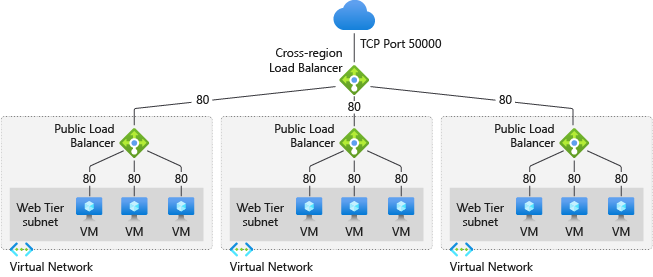
- Load balancers distribute traffic across servers to prevent overload.
3. Network security and access control
Protect networks from unauthorized access and cyber threats.
Examples:
- Firewalls filter incoming/outgoing traffic based on security rules.
- VPN gateways encrypt data for secure remote access.
- Intrusion Detection/Prevention Systems (IDS/IPS) monitor and block malicious activity.
4. Signal conversion and transmission
Convert and amplify signals for long-distance communication.
Examples:
- Modems convert digital signals to analog (and vice versa) for internet access.
- Media converters change signal types (e.g., fiber to Ethernet).
- Repeaters and extenders boost Wi-Fi or wired signals for greater distances.
5. Wireless access & mobility support
Provide Wi-Fi connectivity and seamless roaming.
Some examples:
- Access Points (APs) create wireless networks.
- Wireless controllers manage multiple APs in large deployments.
Types of network devices
There are about a half-dozen ‘major’ types of network devices. Understanding the varying types of devices is important to assist you in optimizing your network infrastructure. Let me list them out and offer a brief description of each.
Hubs and switches
A network hub is a multiport device that connects other Ethernet-based devices into a single segment. Broadcast traffic from attached Network Interface Cards (NICs) is contained to the segment on the hub. Traffic can not go beyond the physical segment of the hub.
Hubs are rarely used today, mostly due to the helpful enhancements that switches offer (more in a moment). Hubs run at the physical layer (1) of the OSI model.
In contrast, switches operate at the data link layer (Layer 2) of the OSI model and often Layer 3 for “smart” or managed switches. Switches only send data only to the port for the intended recipient for improved network efficiency, speed, and security.
Bridges
A bridge is a network device that connects and filters traffic between two or more network segments, operating at the data link layer (2) of the OSI model. They use MAC addresses to determine whether to forward or filter data, helping to reduce traffic and collisions on a network.
Bridges are primarily used to divide large networks into smaller, more manageable sections while maintaining communication between them.
Routers
A router is a network device that connects multiple networks and directs data packets between them. Operating primarily at the Network layer (3) of the OSI model, routers use IP addresses to determine the optimal (and often shortest) path for forwarding data.
Routers are essential for enabling communication between different networks—such as between a home network and the Internet—and often include additional features like Network Address Translation (NAT), firewalls, DNS, and DHCP services.
Gateways
A gateway is a network device that acts as a protocol converter, enabling communication between networks that use different architectures, protocols, or formats. It operates across multiple layers of the OSI model, often including the Application Layer (7).
Gateways are essential for connecting dissimilar systems, such as translating traffic between a TCP/IP network and a legacy protocol network, or between enterprise networks and external systems like the Internet or cloud services.
An example of a gateway is the WiFi Gateway you get when you subscribe to the AT&T Fiber home-based Internet service. It translates traffic requests that go between the home network and the Internet (the backend for the Spotify app, for example).
Network Interface Cards (NICs)
A Network Interface Card (NIC) is a hardware component or card that’s either built into a device’s motherboard or added as a PCI expansion card. NICs enable a computer or device to connect to a network. Operating at the data link layer (2) and interfacing with the physical layer (1) of the OSI model, a NIC provides the physical interface for networking (via Ethernet, Wi-Fi, etc.).
NICs handle tasks like addressing (using MAC addresses) and error checking. Each NIC has a unique MAC address used for identification on local networks. These addresses are how switches communicate.
Firewalls
A firewall is a security-focused network device that monitors, filters, and controls incoming and outgoing network traffic on the ‘edge’ of a network based on predefined security rules. It can be hardware-based, software-based, or a combination of both. Firewalls operate across multiple OSI layers but are primarily associated with the network layer (3) and transport layer (4), and in advanced cases, the application layer (7). Their primary role is to protect networks from unauthorized access and cyberthreats. As a general rule, all inbound ports are denied, and all outbound ports are allowed.
Wireless Access Points (WAPs)
A Wireless Access Point (WAP) is a device that allows wireless-capable devices to connect to a wired network using Wi-Fi. It acts as a bridge between the wired LAN and wireless clients, extending network access without the need for cables. WAPs operate at the data link layer (2) and often work in conjunction with routers and switches in enterprise or large home networks to provide more reliable wireless coverage.
Other network devices
There are additional network device types that are simply less common than the ones above. But, for completeness, let me list them out here and describe them for you.
Network cables
Network cables are physical wires/cables used to transmit data between computers, routers, switches, and other network devices. Common types include Ethernet cables (e.g., Cat5e, Cat6) for wired LANs and fiber optic cables for high-speed, long-distance connections. These cables operate at the physical layer (1) of the OSI model and are essential for reliable, high-speed data transmission.
As an example, my home AT&T Fiber service offers a fiber-optic cable directly from a pole around my house into my home right into my WiFi Gateway for a rock-solid connection.
Modems
A modem (or modulator-demodulator) is a device that converts digital data from a computer into analog signals suitable for transmission over telephone lines or cable systems and vice versa. It enables Internet connectivity by communicating with the service provider’s backend network. Modems typically operate at the physical layer (1) and data link layer (2) and they are often integrated with routers in home networks.
Virtual network devices
In contrast to physical network devices and types described above, virtual network devices (VPNs) are software-based simulations of physical devices. VPNs are created and managed by software, often running on a single physical server. A single server can host multiple virtual switches, routers, and firewalls, each with its virtual NICs. These devices perform the same functions as their physical counterparts but do so by utilizing the underlying server’s resources.
Software-Defined Networking
Software-Defined Networking (SDN) is an approach to networking that separates the control plane (e.g., how data should flow through the network) from the data plane (e.g., moves the data). In older network devices like routers and switches, both of these planes were integrated, meaning each device independently makes forwarding decisions based on its configuration. SDN changes this by centralizing the control function in a software-based controller, which communicates with the underlying hardware using standardized protocols (e.g., OpenFlow).

This architecture offers a fundamental shift in how network devices are managed and utilized. Instead of manually configuring individual switches or routers, IT Pros can program the network behavior dynamically through the SDN controller. This leads to more automation and scalability in network management—especially important in large enterprises, data centers, and larger cloud environments.
In the context of network devices, SDN doesn’t replace traditional hardware like routers, switches, or firewalls but it redefines how they are controlled. Hardware still plays a critical role in forwarding traffic, but SDN abstracts and consolidates the decision-making, allowing for smarter, faster, and more adaptable network infrastructure.
Network architecture components
When discussing network architecture, it’s customary and prudent to understand the foundational components that work together to enable this communication we often take for granted. Network architecture refers to the complete framework of a network, including the hardware and software components, as well as their various functions. While it can be a complex topic, it can be broken down into three key components:
Protocols
These are the rules and standards that govern how data is formatted, sent, and received. They can be thought of as a shared language that all devices on a network must speak to understand one another. If you don’t know or speak Klingon, all you’ll hear are indecipherable grunts and yelling.
Without protocols, a computer wouldn’t know how to interpret a data packet from a server. Examples include TCP/IP (Transmission Control Protocol/Internet Protocol), which is the foundation of the internet, and HTTP (Hypertext Transfer Protocol), which governs web traffic.
Transmission media
This is the physical pathway over which data travels. It’s the “road” connecting network devices. The choice of media significantly impacts a network’s speed, range, and security. Common examples include:
- Guided Media: Tangible connections like Ethernet cables (twisted-pair), coaxial cables, and fiber-optic cables, which physically guide the data signal.
- Unguided Media: Wireless connections that transmit data through the air, such as Wi-Fi, radio waves, and satellite communication.
Topology
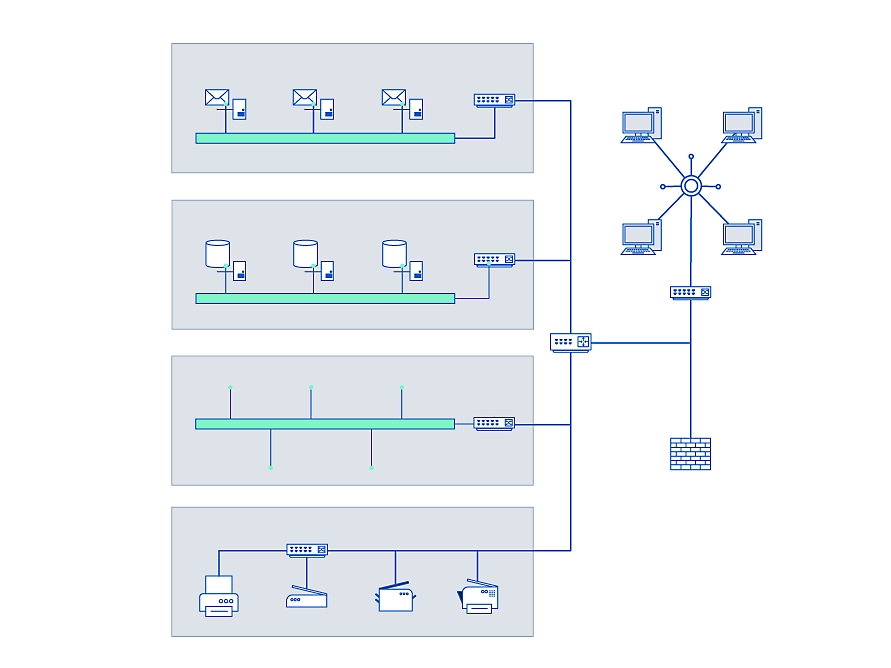
This describes the physical or logical arrangement of a network. It’s the blueprint of how devices are connected. The topology determines how data flows and how reliable and resilient the network is.
Common topologies include:
- Bus: All devices are connected to a single central cable.
- Star: All devices are connected to a central hub or switch.
- Ring: Devices are connected in a closed loop.
- Mesh: Every device is connected to every other device, providing high redundancy.
Common challenges with network devices
Despite the sophistication of modern networks, problems still exist. Understanding the common challenges with network devices is paramount to maintaining a healthy and reliable network. These issues can range from simple physical problems to complex multi-system errors, all of which can disrupt communication and impact performance.
Performance
One of the most frequently cited issues is slow network performance. This can manifest as laggy video calls, slow file transfers, or unresponsive websites. Performance degradation is often caused by factors like:
- Network Congestion: Too many devices or applications competing for the same limited bandwidth, leading to a traffic jam.
- High CPU/Memory Usage: A network device’s internal components may be overwhelmed by the amount of traffic it’s processing, causing it to slow down or fail.
- Packet Loss: Data packets failing to reach their destination due to faulty hardware, an overloaded network, or other issues, requiring re-transmission and slowing down the connection. You’d be amazed how often a bad network cable can stymie even the best of IT Pros and network engineers. Read on…
Physical (Layer 1) issues
The most basic, yet often overlooked, problems are physical. These are hardware-level issues that can bring a network to a halt. Examples include:
- Damaged Cables: A bent, frayed, or severed Ethernet cable can cause a complete loss of connectivity or intermittent connection drops. Even a cable that ‘looks’ perfectly fine can be bad.
- Faulty Connectors: Loose or broken connectors on a cable or network port can lead to poor signal quality.
- Incorrect Cabling: Using the wrong type of cable for a specific connection (e.g., using a straight-through cable where a crossover cable is needed) can prevent devices from communicating.
Network device malfunctions
Network hardware itself is susceptible to failure. This can range from a minor glitch to a complete hardware failure.
- Firmware/Software Bugs: An outdated or corrupted firmware on a router or switch can cause unexpected behavior, security vulnerabilities, or performance issues.
- Hardware Failure: Components like a fan, power supply, or a network interface card (NIC) can fail, leading to an unresponsive device.
- Configuration Errors: A simple typo in a configuration file or an incorrect setting can prevent devices from communicating properly. For example, a misconfigured VLAN or an incorrect routing rule can cripple parts of a network.
Domain Name System (DNS) issues
The Domain Name System (DNS) is a critical part of the Internet, but it’s also a common point of failure. Problems with DNS can prevent devices from resolving human-readable domain names (like google.com) into their corresponding IP addresses.
- DNS Server Not Responding: This can be due to a server outage or a configuration error on the client device.
- Corrupted DNS Cache: Stale or incorrect information stored in a device’s local DNS cache can cause it to try to connect to the wrong IP address. Flushing a local device’s DNS cache often resolves browsing issues.
- Incorrect DNS Configuration: A network device or client computer may be configured to use a non-existent or misconfigured DNS server.
Temperature and thermal control issues
Network devices generate heat, and if this heat is not properly managed, it can lead to more outages, sometimes difficult to trace.
- Overheating: When a device’s internal temperature rises above its operational limit, it can lead to performance degradation, intermittent crashes, or permanent damage to internal components.
- Poor Ventilation: Placing a router or switch in a confined space, a dusty cabinet, or against a wall can restrict airflow, causing heat to build up.
- Fan Failure: A malfunctioning cooling fan in a device can result in rapid temperature spikes and eventual hardware failure. Maintaining a cool, clean environment for network devices is essential for their long-term health and reliability.
Network security and best practices
To close out my post on network devices, I would be remiss if I didn’t mention network security. As cyberthreats grow in sophistication, securing your network infrastructure becomes critical to safeguarding your sensitive data, maintaining business continuity, and avoiding breaches. I will offer some examples of actionable best practices to fortify your network against attacks.
| Example | Purpose |
| Regular Updates and Patch Management | Keep firmware, software, and security tools updated to address vulnerabilities. Unpatched systems are low-hanging fruit for attackers. |
| Implement Strong Access Controls | Use multifactor authentication (MFA) and enforce the principle of least privilege (grant users only the access they need). |
| Segment Your Network | Divide your network into smaller zones (e.g., separating guest Wi-Fi from internal servers) to limit movement during breaches. |
| Monitor and Log Activity | Deploy tools like SIEM (Security Information and Event Management) to analyze logs, detect anomalies, and respond to incidents faster. |
| Backup Critical Data | Maintain offline or cloud backups to recover quickly from ransomware or hardware failures. |
Frequently asked questions
1. What are 7 network devices?
When people refer to 7 common network devices, they typically mean the essential hardware used to build and maintain a network. These are:
- Router – Connects multiple networks together (e.g., home network to the internet).
- Switch – Connects devices within a local area network (LAN) and forwards data intelligently.
- Hub – A basic device that broadcasts data to all connected devices (less common today).
- Access Point (AP) – Extends wireless connectivity for Wi-Fi-enabled devices.
- Firewall – Monitors and filters incoming/outgoing traffic for security.
- Gateway – Acts as an entry/exit point between different networks, translating protocols if needed.
- Modem – Converts digital signals into a form usable by internet service providers (e.g., DSL, cable, fiber).
2. What are network devices and explain its types?
Network devices are hardware components that connect computers, servers, printers, and other equipment so they can communicate and share resources. They can be classified into different types:
- Connectivity Devices: Router, Switch, Hub, Access Point.
- Security Devices: Firewall, Intrusion Detection Systems (IDS).
- Transmission Devices: Modem, Repeaters, Bridges.
- Hybrid Devices: Gateway (performs multiple roles such as protocol conversion).
Each type plays a unique role in ensuring data moves efficiently, securely, and reliably across a network.
3. What are the 7 types of network?
While “7 types of network” refers to network classifications, not hardware, here are the seven commonly recognized types:
- LAN (Local Area Network) – Small area (office, home).
- WAN (Wide Area Network) – Large area, spanning cities or countries (e.g., the internet).
- MAN (Metropolitan Area Network) – Covers a city or large campus.
- WLAN (Wireless LAN) – A LAN using Wi-Fi.
- SAN (Storage Area Network) – Dedicated to data storage access.
- CAN (Campus/Controller Area Network) – Used in universities or vehicle communication systems.
- PAN (Personal Area Network) – Very small range, like Bluetooth connections.

Michael has been an IT Pro since 1998. He has worked predominantly in the Windows world including client and server operating systems, on-prem systems engineering (AD, DNS, etc.), and over the last ten years or so has embraced and immersed himself in...

