- Blog
- Networking
- Post
What Is a DHCP Lease? Understanding How Devices Get IP Addresses
Learn how the DHCP lease process works using the DORA Cycle.

In this post, we’ll dive into what a DHCP lease is, how it works, and why it matters for overall network management.
What is a DHCP lease?
A Dynamic Host Configuration Protocol (DHCP) lease is the temporary assignment of an IP address to a device. Instead of permanently giving a laptop the address 192.168.1.50, for example, the server leases it to the laptop for a certain period—say, 24 hours.
This concept of leasing, rather than permanent assignment, makes the system flexible. Devices that leave the network free up addresses when their leases expire, and the DHCP server can reassign those addresses to new devices.
Lease durations vary:
- Home networks often use longer leases (days or even weeks) since the pool of devices is small and stable.
- Enterprise networks may set shorter leases (hours) to maximize efficiency, especially when hundreds or thousands of devices may connect temporarily, like in a conference center.
How the lease process works: The DORA Cycle
When a device connects to a network, it goes through a four-step handshake with the DHCP server. This is often called the DORA cycle:
- Discover – The device sends a broadcast message on the network asking if there’s a DHCP server available. The network card’s MAC Address is used for identification.
- Offer – A DHCP server responds with an available IP address from an allocation pool and configuration details. This is a DHCP offer.
- Request – The device replies, requesting to use the offered IP address.
- Acknowledge – The DHCP server confirms, finalizing the lease.
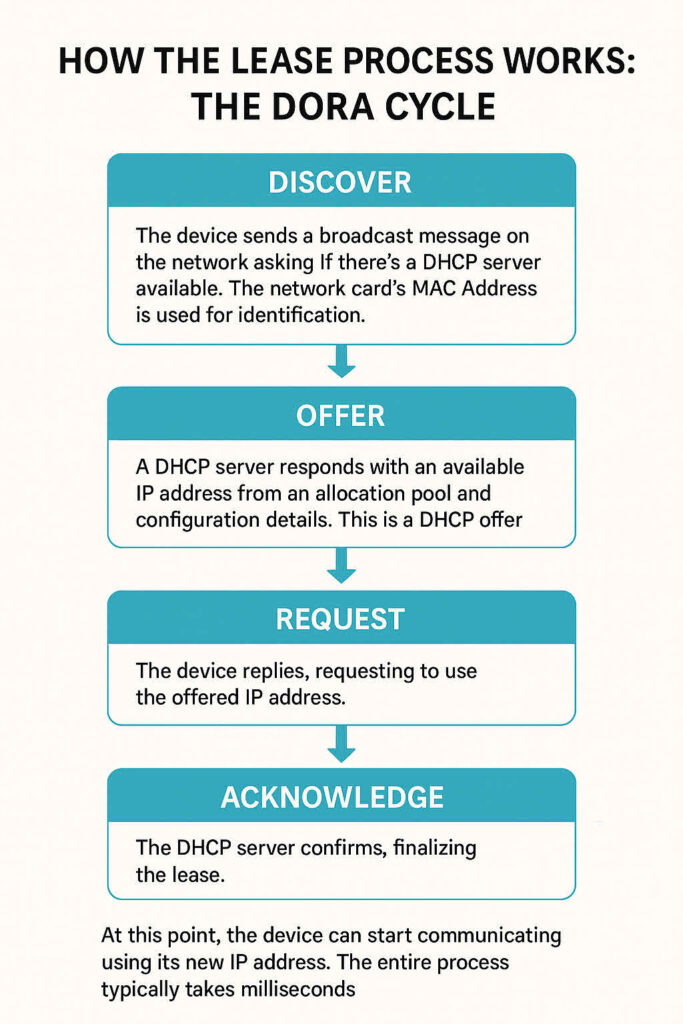
At this point, the device can start communicating using its new IP address. The entire process typically takes milliseconds.
Renewal and expiration of DHCP leases
Leases don’t last forever. Each lease comes with a timer. When half of the lease period has passed, the device will try to renew its lease with the DHCP server. If successful, the lease timer resets, and the device keeps the same IP address. This is known as a lease renewal.
If the device can’t renew—say, it’s offline or the DHCP server is unavailable—the device will keep trying periodically. If the lease fully expires, the device must restart the DORA process to get a new address.
This renewal system ensures addresses aren’t wasted on devices that no longer need them.
Why lease management matters
Efficient lease management is crucial for healthy networks:
- Prevents conflicts – No two devices end up with the same IP address.
- Maximizes resources – In networks with limited address pools (such as IPv4), leases allow addresses to be recycled.
- Supports mobility – Devices can be added and removed without requiring administrator intervention.
On the flip side, poorly managed leases can cause problems. If the lease pool is too small, some devices may fail to get an address. If leases are too long in a busy environment, inactive devices may “hold onto” addresses that others need.
Medium to large-sized enterprises often use DHCP management as a pillar under their IPAM (Internet Protocol Address Management) umbrella. IP address assignments from DHCP servers can be automatically tracked with IPAM for easier reporting and troubleshooting.
DHCP leases and IPv6
So far, we’ve focused on IPv4, since that’s what nearly all networks use today. But what about IPv6? After all, IPv6 was designed to solve the shortage of IPv4 addresses, so does it even need DHCP leases?
The answer = sometimes.
IPv6 devices can obtain addresses in two main ways:
- Stateless Address Autoconfiguration (SLAAC)
- Devices generate their own IPv6 addresses based on the prefix announced by routers.
- No DHCP server is involved, so there’s technically no “lease” — the device manages its own address validity based on the prefix lifetime.
- DHCPv6
- Works much like DHCP for IPv4, with leases and renewals managed by a DHCPv6 server.
- This is often used in enterprise or managed networks where administrators need more control (DNS settings, address assignment policies, etc.).
This is some pretty slick engineering – with IPv6, DHCP leases aren’t always required — but in environments that use DHCPv6, the concept of leasing an address still applies. The device borrows an IPv6 address for a defined period and renews it as needed, just as with IPv4.
Common issues with DHCP leases
While DHCP is designed to make life easier, problems can still occur:
- IP conflicts – Rare, but possible if there are multiple DHCP servers misconfigured on the same network.
- Expired leases – A device may lose connectivity if it can’t renew its lease.
- Stale leases – A server might “remember” devices that are no longer active, leading to inefficient use of the address pool.
These issues are often solved by checking DHCP server logs, adjusting lease durations, or manually clearing leases when necessary.
Best practices for network admins
To keep networks running smoothly, administrators should consider the following when configuring DHCP leases:

Thank you for reading my article on DHCP leases. Please feel free to leave a comment or question below.
Why IP address management matters
Think of an IP address like a street address in a city. Every home or business needs one to send and receive mail. On a network, your devices need IP addresses for the same reason—to send and receive data packets.
If network administrators had to assign every IP address manually, it would be tedious and prone to errors. Imagine an office with 300 employees, each with a laptop, phone, and maybe even a VoIP phone. That’s nearly 1,000 addresses to manage. Adding temporary visitors or devices that come online and offline, and manually assigning them, quickly becomes unmanageable.
That’s why DHCP exists—to automate the process and make sure no two devices get the same address.
Frequently asked questions
What does a DHCP lease do?
A DHCP lease is a temporary agreement between your device (like a computer, phone, or smart device) and a DHCP server (often your router). When your device connects to the network, the DHCP server assigns it an IP address for a set period of time — this period is the “lease.”
- It ensures each device gets a valid, unique IP address.
- When the lease is close to expiring, the device usually tries to renew it automatically to keep the same IP address.
What should my DHCP lease be?
The ideal lease time depends on your network:
- Home networks: 24 hours (default) or longer is common. This reduces unnecessary renewals since the number of devices is usually stable.
- Public Wi-Fi or guest networks: Short leases (30 minutes–2 hours) are better, so unused IP addresses return to the pool quickly.
- Business or enterprise networks: Lease times may vary depending on how often devices connect/disconnect.
In short: longer leases for stable networks, shorter leases for frequently changing ones.
What happens if a DHCP lease expires?
If the lease expires and the device hasn’t renewed it:
- The IP address is released back into the pool for other devices to use.
- Your device will request a new IP address from the DHCP server.
- If no IP is available, your device may lose network connectivity until it gets one.
Usually, renewals happen automatically before the lease fully expires, so you rarely notice any interruption.
Should I renew my DHCP lease?
- Yes, if you’re having network issues (like connection drops, slow speeds, or IP conflicts). Renewing forces your device to request a fresh IP, which can resolve problems.
- Otherwise, you don’t need to worry. Most devices automatically handle lease renewal without user input.
Manually renewing is sometimes helpful when switching networks or troubleshooting connectivity.

Michael has been an IT Pro since 1998. He has worked predominantly in the Windows world including client and server operating systems, on-prem systems engineering (AD, DNS, etc.), and over the last ten years or so has embraced and immersed himself in...

