Introduction to Microsoft Copilot Enterprise Data Protection
Organizations must take steps to ensure proper data handling prior to Copilot being deployed.

Key Takeaways:
- Microsoft Copilot Enterprise Data Protection ensures productivity without compromising security or compliance, keeping sensitive organisational data within Microsoft 365 boundaries.
- Copilot respects identity, access controls, and sensitivity labels, preventing unauthorised access and maintaining compliance with regulations like GDPR and HIPAA.
- Data is never used for model training or stored beyond the session, and organisations retain full governance through Microsoft Purview features such as eDiscovery, audit logging, and retention policies.
As organizations rush to adopt various generative AI tools, Microsoft Copilot Enterprise Data Protection helps organizations maintain security and compliance. If a user were to upload a file to a random generative AI tool for example, the file’s contents could potentially be used to further train the underlying model. This could cause an organization’s sensitive data to be exposed to others outside of the organization. Worse still, if the organization is subject to regulatory requirements such as those associated with GDPR or HIPAA. then reckless use of large language models by end users could result in a compliance violation.
This is where Microsoft Copilot Enterprise Data Protection comes into play. Enterprise Data Protection ensures that Microsoft 365 Copilot helps to boost an organization’s productivity, but without sacrificing security or causing compliance violations in the process.
What is Enterprise Data Protection?
Enterprise Data Protection, which is sometimes called EDP, is a set of identity, security, and governance controls that are designed to protect enterprise data when Microsoft 365 Copilot is in use. These controls force Copilot to respect an organization’s data boundaries and to ensure that Copilot adheres to the permissions, policies, and access controls that protect the organization’s Microsoft 365 data.
Additionally, EDP ensures that when a user enters a prompt into Copilot Chat, the prompt’s contents and the results of that prompt are kept secure and are maintained within the organization’s Microsoft 365 tenant. Microsoft has made a commitment to customers that it will not retain or share customer data, nor will that data be used for training the foundational model.
5 Pillars of Microsoft Copilot Enterprise Data Protection
There are five key pillars for Enterprise Data Protection, although Microsoft has not formalized them as such. These pillars are essentially policies that Microsoft has put in place as a way of governing the way that customer data will be handled.
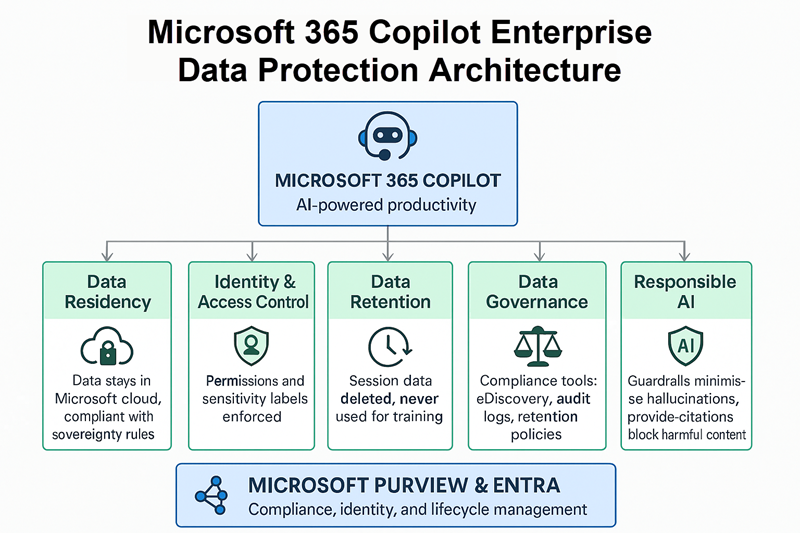
1. Data residency
The first of the five pillars is related to data residency. With this pillar, Microsoft ensures that customer data will remain isolated and accessible only to the organization that owns the data. Specifically, Microsoft ensures that all AI prompts and responses are handled within the Microsoft cloud and that the data never leaves the Microsoft ecosystem to be processed by an external or a consumer grade AI model. Additionally, Microsoft ensures that like all Microsoft 365 data, Copilot data is maintained in a way that is compliant with any data sovereignty or data residency requirements.
2. Identity and Access Control (IAM)
The second pillar has to do with identity and access control. This pillar essentially states that Copilot is bound by the same permissions as the user who is using it. In other words, if a user lacks the permission to open a document, then the document’s contents will never be exposed to the user through Copilot. This holds true for all manner of Microsoft 365 documents, including those created by apps such as Word, Excel, or PowerPoint. Permissions are also respected for things like Outlook emails and documents that are stored within a SharePoint site.
Microsoft Copilot is also designed to respect the use of sensitivity labels. For those who might not be familiar with this feature, sensitivity labels are a feature of Microsoft Purview and allow users to categorize Microsoft 365 data based on the organization’s confidentiality or compliance requirements. Sensitivity labels might for instance, be used to mark a document as Public, Internal, Confidential, Highly Confidential, or Restricted.
Microsoft 365 Copilot is tightly integrated with Microsoft Purview and therefore adheres to sensitivity labels. If permissions tied to a sensitivity label prevent a user from opening a document, then Copilot won’t present information from the document to the user. Similarly, if a user prompts Copilot using a file containing a restrictive sensitivity label, then Copilot will suggest the same label, particularly if the user is sharing the data to Word, Outlook, Excel, PowerPoint, or SharePoint, OneDrive, or Microsoft Teams.
3. Data retention
The Data Retention pillar is all about preventing exposure of an organization’s sensitive data. Specifically, Microsoft guards against data leakage associated with model drift or model training. Microsoft accomplishes this through the use of data handling policies ensuring that Copilot data is not stored for future use and is not used to train Microsoft’s foundational models. A user’s Copilot data is deleted at the end of the user’s session.
4. Data governance
A fourth key pillar ensures compliance and data governance. Microsoft accomplishes this by ensuring that organizations have visibility into and control over Copilot data. In fact, Microsoft 365 Copilot data falls within the same compliance frameworks as other types of Microsoft 365 data.
As an example, the Microsoft Purview eDiscovery feature ensures that Copilot data is discoverable just like any other Microsoft 365 data. If an organization becomes subject to litigation, then the eDiscovery administrator can use search queries to locate Copilot data that falls within the legal hold requirements. This and other compliance features can be found within the various Microsoft 365 admin centers.
Another Microsoft Purview feature that helps with data governance is audit logging. Microsoft makes it possible to audit Copilot user access and search queries.
Finally, Microsoft allows administrators to apply retention policies and data lifecycle policies to Copilot data. That way, organizations can make sure that when users generate chat data through Copilot for Microsoft 365, that data is retained in accordance with any retention policies that the organization might have in place.
5. Responsible AI
Finally, Microsoft applies various guardrails to Copilot for Microsoft 365 in the interest of ensuring that copilot access is safe and in alignment with Microsoft’s product terms.
The first of these guardrails are designed to prevent AI hallucinations, with the goal of keeping Copilot from generating incorrect or misleading output. Copilot is based on a Large Language Model (LLM) developed by OpenAI (the creators of Chat GPT). Like all LLMs, Copilot can sometimes deliver incorrect information. However, Microsoft takes steps to minimize this.
Another guardrail is designed to provide citations and references when possible. When a user enters a prompt, Copilot will analyze the available data in real time and provide the user with a response that is based on the available data. When possible, Copilot will tell users exactly what data was used in formulating the answer.
The third guardrail that Microsoft has put into place is designed to prevent Copilot from including harmful content within its AI driven output.
| Pillar | Description |
| Data residency | Ensures customer data stays within the Microsoft cloud and complies with data sovereignty requirements. |
| Identity and access control (IAM) | Copilot respects user permissions and sensitivity labels, preventing unauthorised access to documents and emails. |
| Data retention | Copilot data is deleted at the end of each session and never used to train foundational models. |
| Data governance | Provides compliance tools like eDiscovery, audit logging, and retention policies for Copilot data. |
| Responsible AI | Implements guardrails to minimise hallucinations, provide citations, and block harmful content. |
Best practices for Microsoft 365 Copilot adoption
Although Microsoft has put significant controls into place to ensure responsible AI, proper data handling, and the avoidance of harmful content, Copilot for Microsoft 365 cannot do everything on its own. As such, an organization must take steps to ensure proper data handling prior to Copilot being deployed.
What steps should organisations take before deploying Copilot?
- Review and update permissions across the entire Microsoft 365 tenant to prevent unauthorised data access.
- Apply sensitivity labels to classify data appropriately and enforce confidentiality policies.
- Secure external data sources linked via connectors and ensure common identity management using Microsoft Entra.
- Educate users on secure prompt engineering and responsible AI use, including avoiding prompt injections.
Review and update permissions
The first thing that an organization should do is to review and update its permissions and data access controls across its entire Microsoft 365 tenant. Remember, these permissions are key to preventing Copilot from using data that it shouldn’t.
Apply sensitivity labels
Another best practice is to take the time to apply sensitivity labels where appropriate, so as to classify the data that Copilot will be interacting with.
Secure external data sources
As you work to properly secure your data, remember that Microsoft makes it possible to use connectors to link Copilot to external data sources. As an example, an organization might link Copilot to its SaaS applications or to resources stored in Azure. It’s important to make sure that these resources have the proper permissions applied. It’s also important to make sure that both internal and external resources are secured through a common identity provider, such as Microsoft Entra.
Educate users
Finally, educate users on secure prompt engineering and responsible AI use. As an example, users must understand that using prompt injections in an effort to circumvent security controls violates the organization’s terms of use.
Frequently asked questions
What is Microsoft Copilot Enterprise Data Protection?
Microsoft Copilot Enterprise Data Protection is a security feature that ensures sensitive organisational data is safeguarded when using Copilot in Microsoft 365 apps. It applies compliance policies, access controls, and data loss prevention to prevent accidental exposure of confidential information.
How does Enterprise Data Protection work in Copilot?
Enterprise Data Protection works by enforcing Microsoft 365 compliance and governance rules during Copilot interactions. It uses identity-based access, encryption, and conditional policies to ensure only authorised users can access and share enterprise data securely.
Is Copilot safe for enterprise use?
Yes, Copilot is designed with enterprise-grade security and compliance in mind. It integrates with Microsoft Purview, data loss prevention, and role-based access controls to protect sensitive information while maintaining productivity.
What data does Microsoft Copilot access?
Copilot accesses organisational data stored within Microsoft 365 services such as SharePoint, OneDrive, and Teams, based on user permissions. It does not override existing security policies, ensuring data remains protected under enterprise compliance standards.

As an internationally bestselling tech author and a former 22-time Microsoft MVP, Brien Posey has written or contributed to dozens of books and created a variety of full-length video training courses on all sorts of IT and space-related topics. He’...