Microsoft Baseline Security Mode Delivers Secure-by-Default Protection Across Microsoft 365
A new secure-by-default framework designed to streamline and modernize Microsoft 365 security.

Key Takeaways:
- Baseline Security Mode unifies security controls across Microsoft 365.
- New protections target legacy auth, risky file formats, and unmanaged devices.
- Telemetry and simulation tools support safer, phased deployment.
Microsoft is strengthening cloud defenses with the introduction of Baseline Security Mode, a unified framework that applies secure-by-default protections across Microsoft 365. The new feature streamlines the hardening of authentication, file security, and meeting devices, and reduces reliance on legacy configurations and manual effort.
Microsoft Baseline Security Mode is an opt-in feature that applies a predefined set of security configurations across Microsoft 365 services to make environments secure by default. It focuses on eliminating legacy vulnerabilities by enforcing modern protections like phishing-resistant authentication, blocking outdated protocols, securing file formats, and restricting unmanaged meeting devices. Microsoft Baseline Security Mode provides telemetry, simulation options, and phased deployment to help organizations strengthen their security posture without complex manual adjustments.
According to Microsoft, the latest release introduces 18 settings across five core services, including Microsoft Office, Exchange, Teams, SharePoint/OneDrive, and Entra. These settings focus on three critical areas: Authentication, File Security, and Room Devices.
Strengthening authentication with modern protections
Baseline Security Mode eliminates weak points by blocking outdated protocols like POP, IMAP, SMTP, and legacy EWS. Moreover, it disables basic authentication prompts that could be susceptible to phishing. Baseline Security Mode also enforces phishing-resistant multi-factor authentication for administrators and provides tools such as telemetry reports, selective exclusions, and CSV exports to help organizations assess and manage the impact of these changes.
Additionally, Baseline Security Mode introduces 12 granular authentication settings that tighten identity controls. These include disabling legacy browser authentication flows, restricting the use of app credentials, and limiting end-user consent to applications. These security measures should help to collectively reduce attack surfaces and prevent unauthorized access.
File security enhancements to reduce legacy risks
Microsoft Baseline Security Mode strengthens file protection by discouraging the use of outdated formats like .doc and blocking risky elements such as ActiveX from running. It also provides telemetry insights on how often these legacy files are accessed, which helps organizations make informed decisions to transition users toward safer, modern formats.
Furthermore, Baseline Security Mode applies six targeted file security settings to block common attack vectors. These include enforcing Protected View for suspicious documents, blocking ActiveX controls, disabling OLE Graph and DDE functionality, and preventing Publisher-based content from running.
Securing Meeting Rooms and unmanaged devices
Baseline Security Mode improves meeting security by blocking unmanaged devices and resource accounts from signing in to Microsoft 365 apps in conference rooms. It also prevents these devices from accessing shared files during meetings to reduce the risk of unauthorized data exposure.
How to enable and deploy Baseline Security Mode
To enable Baseline Security Mode, administrators will need to have one of the following roles: Global Admin, Security Admin, Office Apps Admin, SharePoint Admin, Exchange Admin, or Teams Admin.
- Sign in to the Microsoft 365 Admin Center.
- Head over to Settings > Org settings, then select the Security & privacy tab.
- Click Baseline Security Mode to access the BSM dashboard
- Now, select the deployment method:
- Select the Automatically apply default policies option to enable low-impact settings instantly.
- Enable the Generate reports option (including telemetry and audit logs) to understand the potential impact before enforcing stricter controls.
- It’s also possible to enable options to view more detailed reporting, such as end-user identifiable data and audit logs for Office apps.
- Select Save, then click Manage all policies to review, run impact reports, and toggle individual settings.
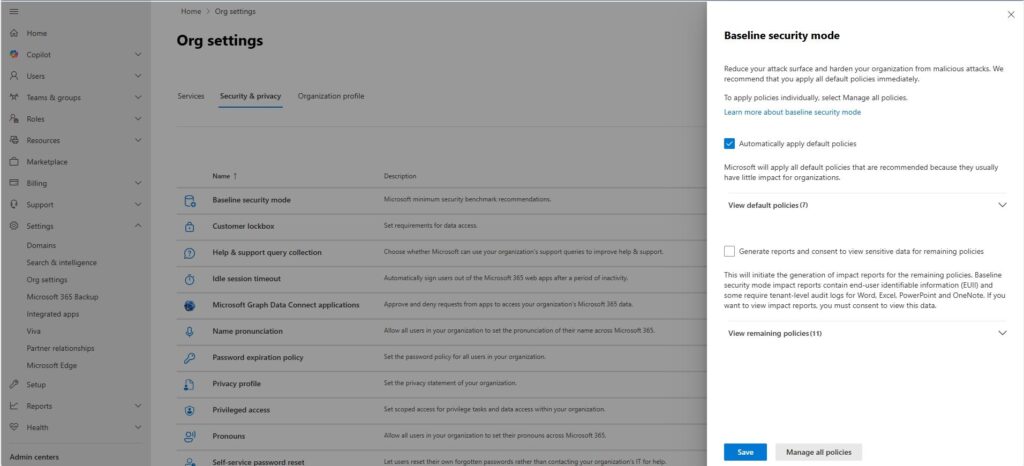
Before rolling out Baseline Security Mode, it’s highly recommended to run impact reports for each setting to identify potential issues. Administrators should begin by enabling configurations with little or no user impact immediately, and use simulation mode for higher-risk settings to minimize disruptions during deployment.
How BSM compares to third-party security tools
While Baseline Security Mode centralizes critical security settings in Microsoft 365, third-party solutions like AdminDroid or ourCloudNetwork often provide extended reporting, compliance dashboards, and granular policy controls. BSM helps to reduce reliance on PowerShell scripts, offers a unified admin center, and enables simulation before enforcement. This approach helps to save time for IT teams, but MSP tools may still be necessary for advanced analytics or multi-tenant management.
Microsoft plans to enhance BSM beyond static configurations by incorporating AI-driven threat detection and adaptive security measures. Going forward, Microsoft could add integrations with Purview for compliance and Intune for device management to create a holistic security ecosystem.

Rabia has a master's degree in Software Engineering and she has years of experience writing professionally about Microsoft products and other technologies. Rabia has also written for OnMSFT.com as well as Windows Report. She is always up to date on t...




