Active Directory Functional Levels Explained: Features, Requirements, and ‘Raising’
Learn about AD functional levels in clear, practical terms so you can better manage your environment and prepare for upgrades.

One of the mechanisms Microsoft uses to enable or restrict Active Directory (AD) capabilities in Windows Server is the concept of Active Directory functional levels. Windows Server introduces stronger security, improved performance, better manageability, and increased functionality in Active Directory for each new version of the server operating system. Functional levels determine which AD DS features are available by defining the minimum Windows Server versions that can operate as domain controllers (DCs) in a domain or forest.
🎬 Watch This Week in IT.
What are Active Directory functional levels?
Let’s look at how the different kinds of functional levels affect Active Directory features and domain controller compatibility.
Why did Microsoft introduce functional levels?
Functional levels provide predictable interoperability and feature availability. As you eliminate older DCs, you can raise the domain and forest functional levels to unlock features that require newer OS versions. This model ensures every DC can participate correctly in features such as modern Kerberos options or advanced replication.
Domain functional levels
Domain functional level determines domain‑wide Active Directory capabilities and the minimum Windows Server version allowed for domain controllers in that domain.
Forest functional levels
Forest functional level governs forest‑wide features in AD and the minimum Windows Server version for all DCs across the forest. Functional levels are independent of client or member‑server OS choices. For example, if your domain is running at the Windows Server 2016 functional level, all of your DCs must be running Windows Server 2016 or higher (later).
How do functional levels affect features in Active Directory?
Raising forest and/or domain levels can enable (or enforce) security and platform features. For example:
- Active Directory Recycle Bin (2008 R2)
- Claims/compound authentication (2012)
- Protected Users and authentication policy silos (2012 R2)
- Privileged Access Management (PAM) features (2016)
The Windows Server 2025 domain functional level adds the optional 32K database page size feature to support specific large environment and attribute scenarios. I’ll offer more details about these levels later on.
Domain vs forest functional levels
Next, I’ll go into more depth on the differences between domain and forest functional levels and how they interoperate.
This chart can help you understand how these work.
Functional Level interoperability
| Windows Server version (DC) | Windows Server 2025 functional level | Windows Server 2016 functional level | Windows Server 2012 R2 functional level |
|---|---|---|---|
| Windows Server 2025 | ✅ Supported | ✅ Supported | ❌ Not supported |
| Windows Server 2022 | ❌ Not supported | ✅ Supported | ✅ Supported |
| Windows Server 2019 | ❌ Not supported | ✅ Supported | ✅ Supported |
| Windows Server 2016 | ❌ Not supported | ✅ Supported | ✅ Supported |
| Windows Server 2012 R2 | ❌ Not supported | ❌ Not supported | ✅ Supported |
Domain functional levels
Domain functional levels are scoped to a single Active Directory domain. In my lab, my primary domain is reinders.local.
How to know what domain functional level I’m running?
- Open Active Directory Users and Computers (ADUC).
- In Active Directory Users and Computers, right-click on the domain name, and click Properties to see what domain functional level you are running.
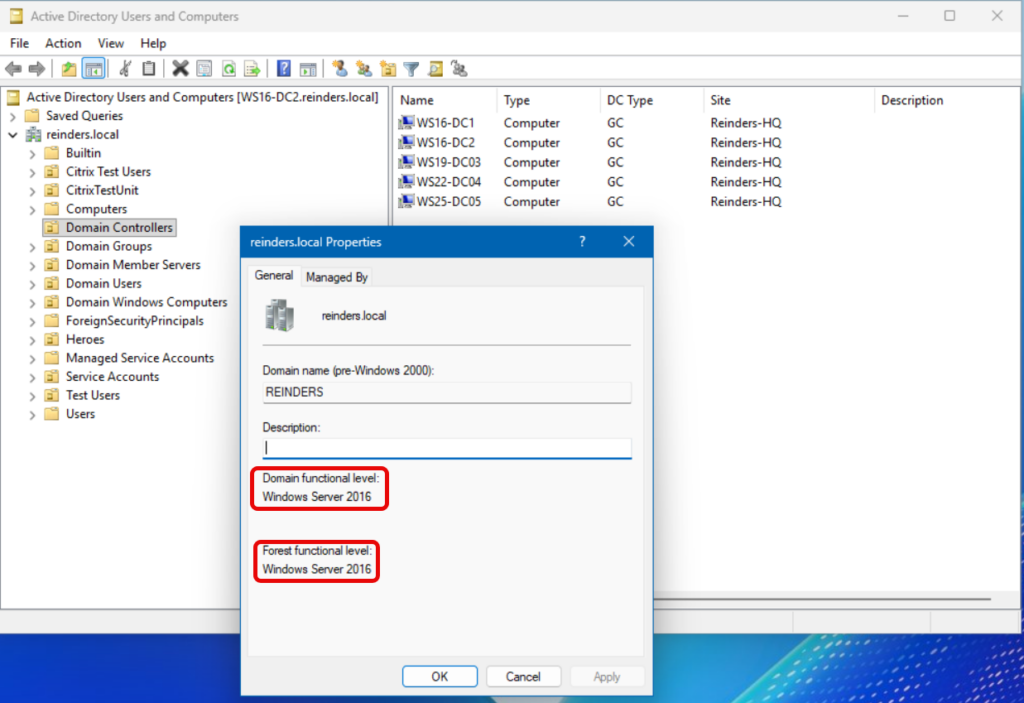
My domain is running on Windows Server 2016 functional level. This validates two main points: all of my DCs are running at least Windows Server 2016, and my AD has all the features available at the Windows Server 2016 level and all below it (Windows Server 2012 R2, etc)
Forest functional levels
Forest functional levels unlock capabilities that apply to an entire forest. These primarily focus on consistent behavior across the global catalog (GC) servers and forest trust boundaries. To increase the forest functional level, every DC in every domain in the forest needs to be running at least the level you wish to upgrade to. You also need to verify that the domain functional level is at the level you wish to upgrade to in every domain.
Older functional levels
- Windows Server 2003
- Domain Rename – this allowed administrators to rename an existing AD domain within the forest.
- Forest Trust Support – this enabled domains to participate in forest trusts once the forest functional level is also raised.
- Windows Server 2008
- The major change this level introduced was DFS-R (Distributed File System for Replication) for the SYSVOL share.
- Fine-grained password policies were introduced.
- Windows Server 2008 R2
- The Active Directory Recycle Bin! A great feature that lets you use the Active Directory Administrative Center tool to restore deleted objects from AD.
Modern functional levels
- Windows Server 2012 R2: Protected Users group and Authentication Policies / Policy Silos to contain privileges and restrict where sensitive accounts can log on; full domain‑controller protections require domain functional level = 2012 R2.
- Windows Server 2016: Privileged Access Management (PAM) capabilities (time‑bound admin via a bastion forest) rely on enabling the PAM optional feature at forest functional level 2016 in a privileged forest/trust model.
- Windows Server 2019 & 2022: No new functional levels were introduced—organizations typically run domain/forest functional level = 2016 when their DCs are 2016/2019/2022.
- Windows Server 2025: Introduces a new 2025 functional level; the domain functional level includes a 32K database page size optional feature (for specific AD database scenarios). Interoperability guidance clarifies which DC OS versions are supported at each level.
How do I upgrade an Active Directory domain or forest functional level?
Let me demonstrate how you raise the domain and forest functional levels. There are two tools we can use to accomplish this. I have an Active Directory forest with two domains: reinders.local and corp.reinders.local.
Raise the domain functional level
- Let me access one of my DCs in my Active Directory reinders.local domain and open Active Directory Users and Computers first.
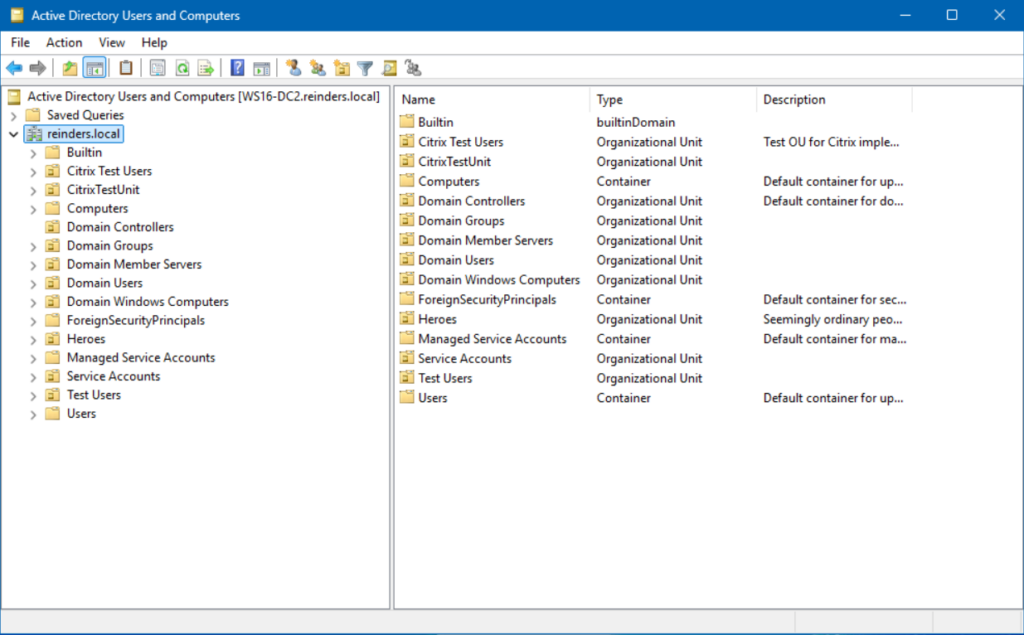
As I previously stated above, when you right-click on the domain and click Properties, it will show you what functional level you are running in the domain and the forest. I am running the Windows Server 2016 functional level for both the domain and forest.
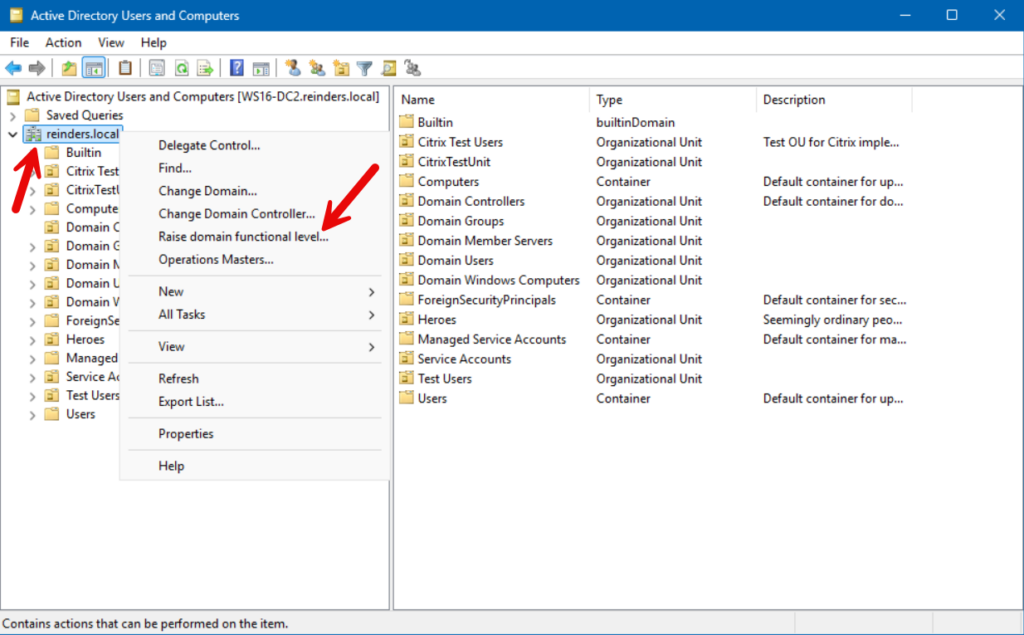
- To upgrade the domain functional level, right-click again on the domain and select Raise domain functional level…
- Confirm the information in the dialog is accurate.
- Now click Raise to upgrade to the Windows Server 2025 level.
CAUTION: This is an irreversible process. There is no supported method to revert this change. The only option you have is a full domain (forest) recovery from backup. Triple-check your environment before making this change.
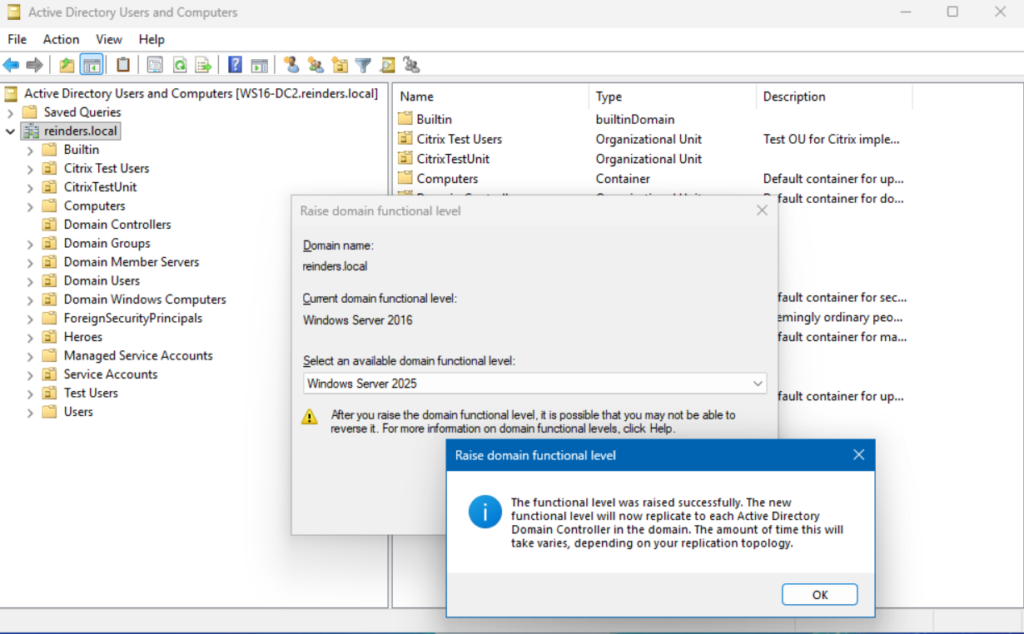
- Now, repeat the steps above and raise the domain functional level in the corp.reinders.local domain.
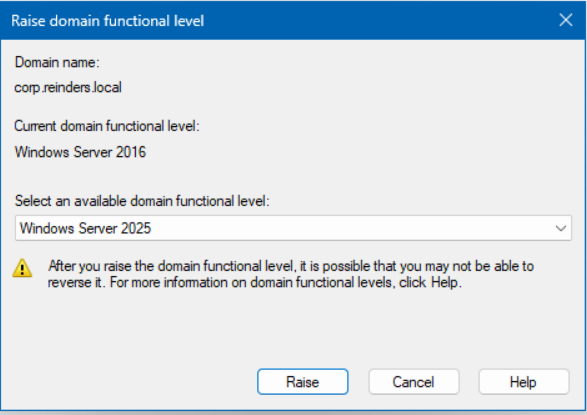
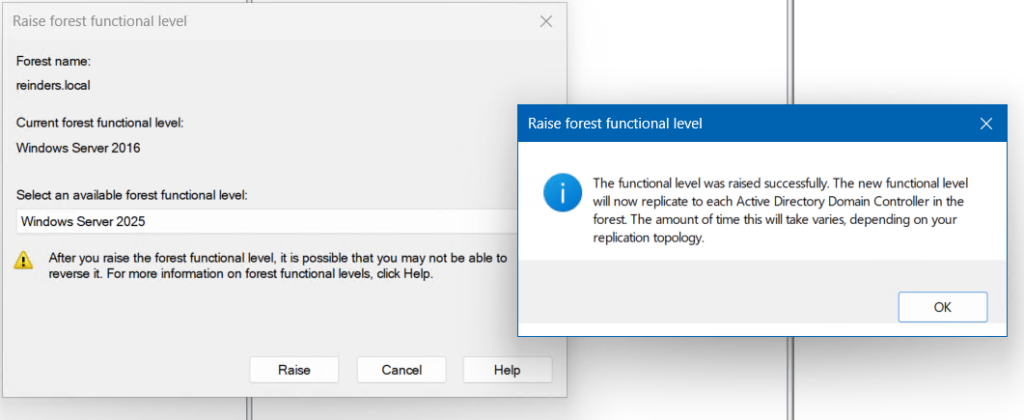
Raise the forest functional level
With all (both) domains in the forest at the Windows Server 2025 domain functional level, I can raise the forest functional level to Windows Server 2025.
- On my root DC in the reinders.local domain, I can now open Active Directory Domains and Trusts. In the Windows Tools category in the Start menu and open Active Directory Domains and Trusts.
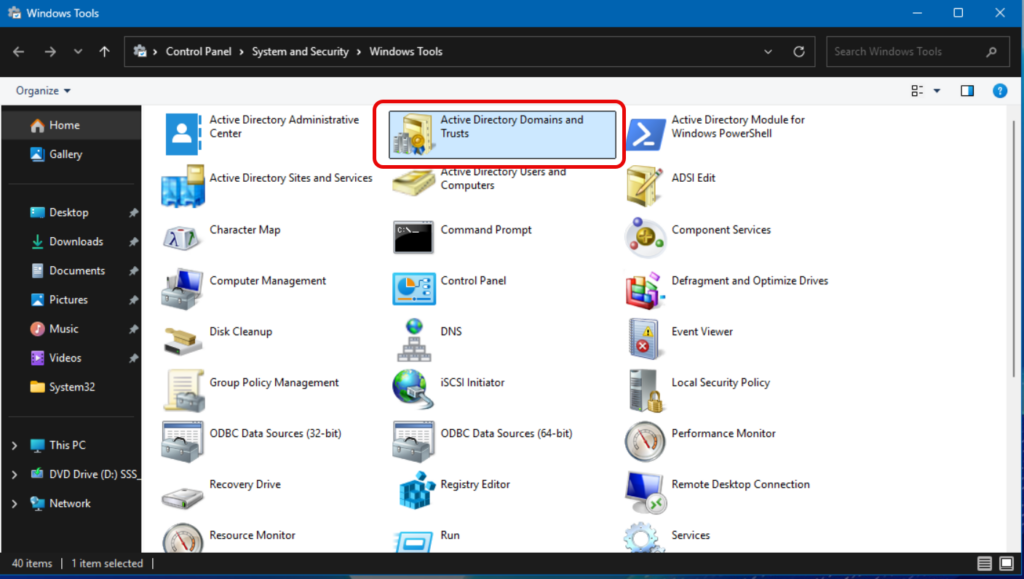
- Right-click on the top tree item, and click Raise forest functional level.
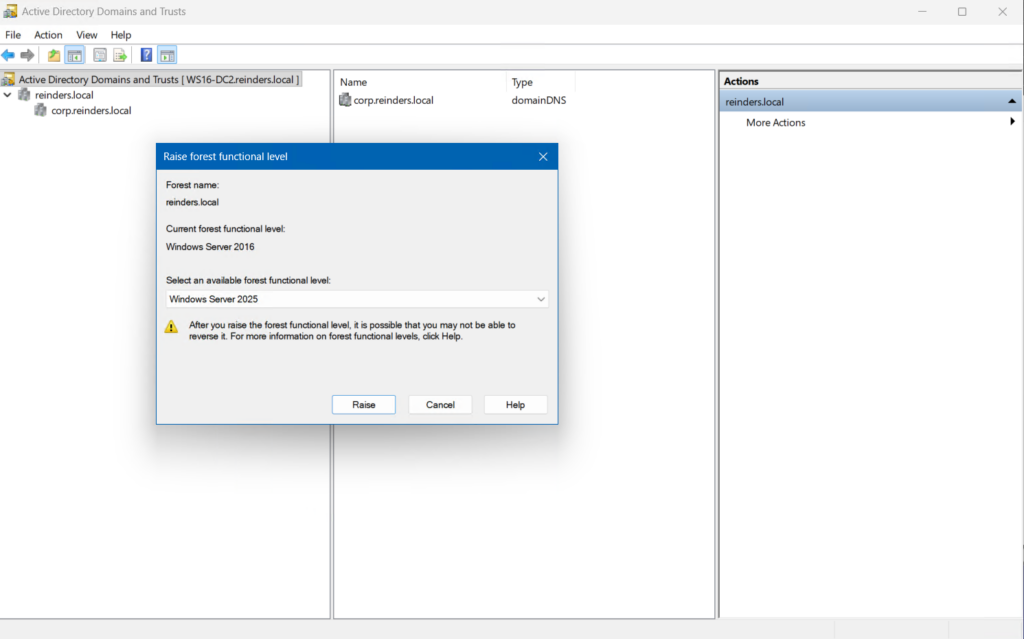
- Click Raise, it will prompt me that I’d better be ready to do this, and we get confirmation that we’re good!
How does Security affect/dictate which level I should use?
The last major topic I’ll discuss here is security. There are some considerations you should take into account when planning and executing on what functional level is appropriate in your environment (domains and forests). Let’s dive in.
Older, obsolete levels and their inherent risks
Higher functional levels allow you to phase out legacy protocols and ciphers/authentication protocols. For example, with 2012 R2 domain mode and the Protected Users group, NTLM logon for those accounts is blocked, DES/RC4 is disabled for Kerberos preauth, and TGT renewals are curtailed.
Raising to 2016 enables Kerberos armoring (FAST) and compound auth, which significantly hardens Kerberos against interception and downgrade attacks.
What security improvements have been made in recent levels?
- Protected Users (2012 R2 DFL): Enforces non‑configurable protections: no NTLM, no legacy ciphers, no credential caching; requires appropriate client OS support.
- Authentication Policies & Policy Silos (2012 R2 domain functional level): Constrain where privileged accounts can authenticate and tailor Kerberos TGT lifetimes, a benefit for authentication infrastructure.
- Privileged Access Management (2016 forest functional level): Time‑bound admin via a PAM (bastion) forest and PIM trust, commonly deployed with Microsoft Identity Manager (MIM).
- Kerberos AES everywhere: Modern DCs default to AES keys; Microsoft continues to push organizations to fully transition away from RC4 as part of hardening guidance.
What functional level should I run in my environment?
Although this is often overlooked by IT Pros and AD administrators, it is a rather fundamental concept that bears scrutiny. Besides adding features to AD when raising these functional levels, it also helps to maintain a solid security footprint and eases your overall problem resolution times. Running at the highest possible level is, in this case, best.
First, assess your current environment. Inventory your DCs by using helpful PowerShell commands.
Get-ADDomainController -Filter * | Select Name, OperatingSystemThen run:
Get-ADDomain and Get-ADForestSecond, plan for upgrades. Remove or upgrade DCs running older versions of Windows Server. Replace very old DCs with fresh new ones. If you’re planning to upgrade your functional levels to Windows Server 2016, it doesn’t hurt to install a new DC running Windows Server 2025.
Lastly, there are business justifications for higher functional levels:
- Security and compliance
- Newer versions of Windows Server are inherently more secure and robust
- Operational resilience
- Upgrades avoid break/fix surprises when introducing new DCs
- Future-readiness
- Windows Server 2025 introduces a new functional level with optional AD database enhancements. Another good reason to keep your forest ready to adopt current capabilities.
Frequently asked questions
What are Active Directory functional levels?
Active Directory functional levels define which AD DS features are available within a domain or forest based on the Windows Server versions running on domain controllers. Higher functional levels unlock newer capabilities but require all domain controllers to run the minimum supported OS version.
What is the difference between domain functional level and forest functional level?
A domain functional level applies to a single domain and controls the AD DS features and supported domain controller operating systems within that domain. A forest functional level applies across all domains in the forest and enables forest‑wide features dependent on unified domain controller versions.
Why do Active Directory functional levels matter?
Functional levels determine the advanced security, interoperability, and management features available in AD DS. Raising these levels enables new capabilities, such as improved authentication, replication, or security enhancements, once all domain controllers meet the required OS version.
How do you upgrade Active Directory functional levels?
You can upgrade functional levels after all domain controllers in the domain or forest run the necessary Windows Server version. Once raised, older domain controller versions can no longer be added, so administrators must ensure compatibility before making changes.

Michael has been an IT Pro since 1998. He has worked predominantly in the Windows world including client and server operating systems, on-prem systems engineering (AD, DNS, etc.), and over the last ten years or so has embraced and immersed himself in...