Active Directory Auditing Guide: What to Track and Why
The AD audit checklist: what to monitor to catch privilege abuse early.

Active Directory (AD) sits at the center of most on-premises Windows environments, powering identity, authentication, authorization, and access control. Because AD effectively governs who can do what across the estate, it’s also one of the first places attackers try to gain a foothold. Active Directory auditing won’t replace good security hygiene, but it can give you the visibility you need to detect abuse early, investigate incidents faster, and prove control effectiveness for compliance.
Many organisations start by identifying the most important Active Directory events to audit, then expand coverage as monitoring maturity improves.
🎬 Watch This Week in IT.
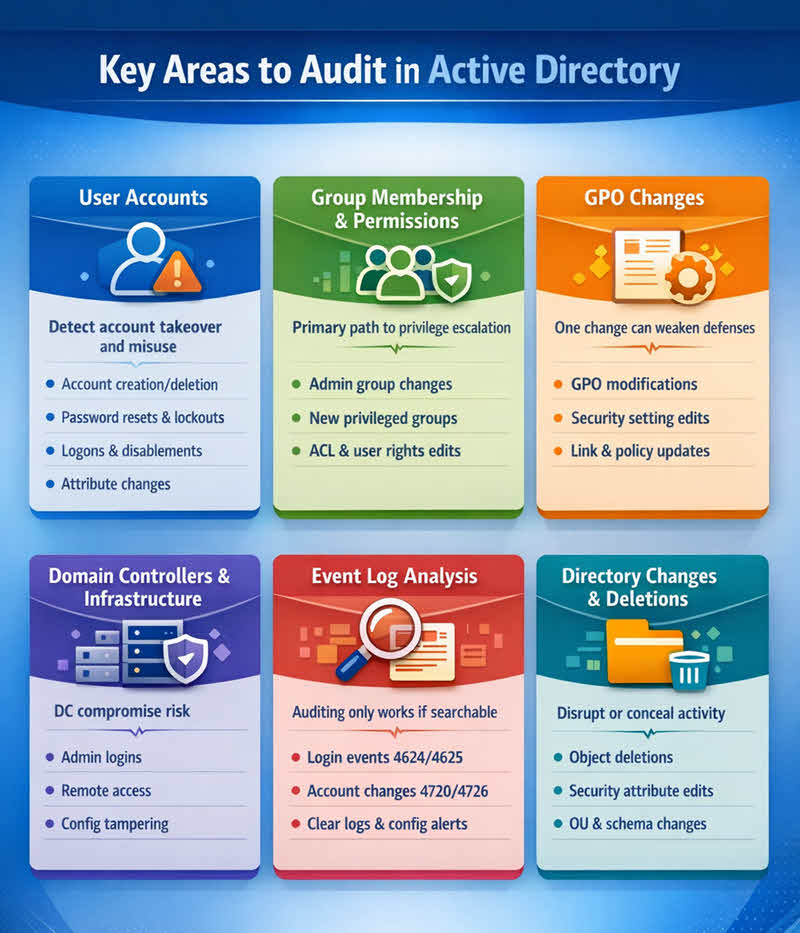
Quick checklist: key areas to audit in Active Directory
- User accounts
- Group membership and permissions
- Group Policy and GPO changes
- Domain controllers and critical infrastructure
- Event log collection and analysis
- Directory changes and object deletion
Why Active Directory auditing matters
Attackers know that compromising Active Directory can quickly lead to broad access across servers, workstations, and business applications. From a defender’s perspective, auditing treats AD as a source of security intelligence, capturing the: “who did what, where, and when” that you can correlate with other telemetry. In practice, AD auditing helps organizations:
- Detect unauthorized access and suspicious behavior
- Hold administrators and privileged users accountable
- Support incident response and forensic investigations
- Meet regulatory requirements (for example, HIPAA, GDPR, and PCI DSS)
- Strengthen identity governance and least-privilege access
Key areas to audit in Active Directory
Auditing everything in AD is rarely practical. Most organizations start by prioritizing the highest-risk areas, places where privilege can be gained, persistence can be established, or security settings can be weakened.
1) User accounts
User accounts are the foundation of identity and one of the most common attack surfaces. Your audit scope should include (at minimum):
- Account creation and deletion
- Password resets and password changes (especially for privileged accounts)
- Account lockouts
- Logon and logoff activity
- Other account management changes (enable/disable, group assignment, attribute edits)
These events happen every day on most networks, but patterns can be meaningful. Frequent lockouts can indicate password-spraying or brute-force attempts, and unexpected account deletions can signal malicious activity or even an insider threat.
Also watch for anomalous sign-ins, logons at unusual times, from unexpected subnets, or using uncommon logon types (for example, interactive logons to servers that should only be accessed via admin workstations).
2) Group membership and permissions
In AD, access is usually granted to groups rather than individual users, making group membership a key control point. Auditing should focus on changes that affect privilege and access, including:
- Changes to membership in privileged groups (for example, Domain Admins, Enterprise Admins, Schema Admins)
- Assignment or revocation of user rights and access control permissions
- Creation of new security groups (especially those granted elevated access)
- Changes to access control lists (ACLs) on OUs and critical objects
If an attacker can change group membership, privilege escalation usually follows. Even before that point, attackers often move laterally to find paths to higher privilege and then target group membership or ACLs to make those privileges stick.
A common persistence technique is creating (or re-enabling) additional accounts and adding them to privileged groups so access survives password resets or cleanup of the original compromised identity.
Auditing membership, delegated permissions, and ACL changes helps you spot this behavior quickly. It also helps with day-to-day governance by identifying privilege creep, legitimate users accumulating access over time that no longer matches their role.
3) Group Policy and GPO changes
Group Policy Objects (GPOs) are how administrators enforce configuration and security settings at scale. Because a single GPO change can weaken defenses across many systems, auditing should include:
- Creation, deletion, and version changes of GPOs
- Edits to security-relevant policy settings (for example, audit policy, user rights assignment, and Windows Defender settings)
- Linking, unlinking, or reordering GPO links on sites, domains, and OUs
- Policy changes that reduce security controls or expand attack surface
When you build your audit policy, assume mistakes will happen: a well-intentioned GPO tweak can unintentionally disable protections or apply weaker settings to sensitive systems. Capturing who changed what (and when) makes it much easier to spot risky changes and roll them back quickly.
4) Domain controllers and critical infrastructure
Domain controllers (and the DNS services they rely on) are the backbone of AD. They handle authentication, apply Group Policy, and host the directory database. If an attacker compromises even a single domain controller, they may be able to take over the entire forest. Prioritize monitoring for:
- Local interactive logons and unexpected remote access to domain controllers
- Administrative actions by Domain Admins and other highly privileged identities
- Service, configuration, and security setting changes that increase attack surface
- Security log events that indicate directory service abuse or tampering
5) Event log collection and analysis
Windows event logs are the primary source of AD audit data. Whether activity is benign or malicious, it leaves traces, if you’re collecting the right logs and retaining them long enough to investigate.
To make the logs usable, centralize them (for example, with Windows Event Forwarding and a collector, or with a SIEM such as Microsoft Sentinel, Splunk, or QRadar). Correlation and alerting matter because AD generates a high volume of noise. Your goal is to surface the few events that indicate a real risk.
At a minimum, your monitoring should cover:
- Authentication successes and failures (for example, 4624 and 4625)
- Account lockouts (for example, 4740)
- Sensitive account management events (for example, user created/deleted: 4720/4726; password reset: 4724)
- Directory service changes and object access (for example, 5136, 5137, 5141)
- System-level changes on domain controllers (service installs, scheduled tasks, and policy changes)
- Changes that reduce visibility (for example, cleared logs: 1102; audit policy changes: 4719)
The value of event logs isn’t just in collecting them—it’s in spotting patterns. For example, key Active Directory audit events include repeated failures (4625) across many accounts followed by a single success (4624) can indicate password spraying. Likewise, privileged group membership changes combined with new logons to servers can point to active privilege escalation.
6) Directory changes and object deletion
Finally, monitor directory changes that can disrupt operations or weaken security. Deleting objects can break authentication paths and access, while moving objects between OUs can apply an entirely different set of policies. Focus on:
- Creation and deletion of directory objects (users, computers, groups)
- Attribute changes on AD objects (especially security-related attributes)
- Movement of objects between OUs
- Attempted schema changes (rare, but high impact)
Conclusion
Windows Server includes solid auditing primitives, but getting value from them requires planning: choosing the right audit categories, enabling the right settings, and centralizing logs so you can actually search and alert on them. Many organizations also supplement native capabilities with third-party tools that add change reporting, dashboards, and easier alerting.
If you’re building (or refreshing) an AD auditing strategy, start small, define which events you should audit in Active Directory, and be consistent: define what “high risk” means for your environment, baseline normal admin activity, alert on changes to privileged groups and GPOs, and make sure domain controller logs are forwarded and retained. The goal is straightforward: reduce time to detect and reduce time to respond.

As an internationally bestselling tech author and a former 22-time Microsoft MVP, Brien Posey has written or contributed to dozens of books and created a variety of full-length video training courses on all sorts of IT and space-related topics. He’...