Microsoft Expands Windows 11 Passkey Support with 1Password and Bitwarden Integration
Microsoft makes passwordless sign-ins more secure and convenient.

Key Takeaways:
- Microsoft expands Windows 11 support for third-party passkey managers like 1Password and Bitwarden.
- New plugin integration enables secure, passwordless sign-ins using Windows Hello.
- Update strengthens enterprise security and simplifies authentication across devices.
Microsoft is advancing its passwordless vision with a new Windows 11 update that expands support for passkey managers. The company has collaborated with 1Password and Bitwarden to make logging in across devices faster, safer, and hassle-free.
Passkeys are cryptographic credentials that replace traditional passwords, allowing users to sign in securely without memorizing complex strings. They work by linking authentication to a trusted device, which makes logins faster and resistant to phishing attacks.
In June, Microsoft first started testing 1Password integration as a passkey provider through the Windows Insider Preview Program. After months of feedback and refinement, this feature is now available to all Windows 11 users. Starting today, users can choose their preferred passkey manager, including Microsoft Password Manager or third-party options like 1Password and Bitwarden.
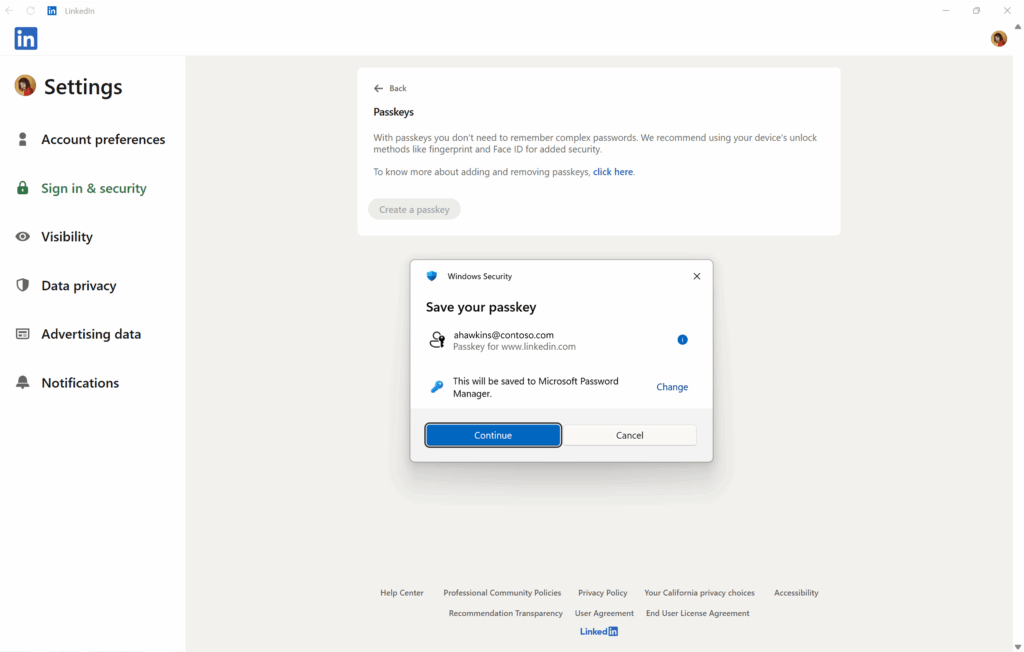
“With plugin passkey manager support, packaged credential managers can integrate directly into Windows. Users can save, manage, and use passkeys across browsers and native apps — thanks to the new plugin provider capability. Setting up your credential manager is part of the passkey creation flow. Authentication uses Windows Hello — whether that is PIN, face, or fingerprint — so only you can access your credentials,” Microsoft explained.

What are the benefits of plugin passkey manager support?
According to Microsoft, Windows 11’s plugin passkey manager support gives users the ability to choose any supported passkey manager natively on the platform. Moreover, it makes authentication simple and secure by allowing sign-ins through Windows Hello using a PIN, facial recognition, or fingerprint. Passkeys also sync seamlessly across Windows PCs and mobile devices.
Microsoft has enhanced its Password Manager by integrating it directly into Windows as a plugin, extending its functionality beyond Microsoft Edge. Passkeys stored in the Microsoft Password Manager now sync seamlessly across devices through users’ Microsoft accounts. These improvements are backed by robust security measures, including Azure Confidential Compute, Hardware Security Modules (HSMs), and tamper-proof recovery supported by Azure Confidential Ledger.
Why does passkey support matter for enterprise security?
The expansion of passkey manager support in Windows 11 has major implications for enterprise environments. IT administrators can now offer employees more flexibility in authentication while maintaining strong security controls. This aligns perfectly with Zero Trust principles, as passkeys reduce reliance on vulnerable passwords and ensure identity verification through device-bound credentials and Windows Hello. The new integration of third-party managers lets organizations standardize secure access across apps and browsers.
For businesses operating in BYOD or hybrid work models, this update lets employees use their preferred passkey manager on personal devices while still meeting corporate compliance requirements. This capability strengthens phishing resistance and credential protection across distributed teams.

Rabia has a master's degree in Software Engineering and she has years of experience writing professionally about Microsoft products and other technologies. Rabia has also written for OnMSFT.com as well as Windows Report. She is always up to date on t...


