Microsoft Brings Remote PC Connections to Windows App on Windows
Microsoft is bringing Remote PC access into the Windows App, potentially reducing the need to switch between multiple remote access tools.

Key Takeaways:
- Remote PC connections are now generally available in Windows App on Windows.
- Users can access physical PCs, Windows 365 Cloud PCs, Azure Virtual Desktop, and Dev Box resources from a single application.
- Organizations should still evaluate authentication, configuration, and workflow requirements before standardizing on Windows App.
Microsoft’s Windows App has supported cloud-based services such as Windows 365, Azure Virtual Desktop, and Microsoft Dev Box for some time, but users who needed direct access to traditional Windows PCs still had to rely on separate remote access tools. That created a fragmented experience, especially for organizations managing both cloud and on-premises environments.
As organizations adopt more cloud services, many still depend on physical PCs, test machines, and legacy workloads that require direct remote access. Until now, Windows App on Windows lacked generally available support for Remote PC connections, which forced users to switch between different applications depending on the type of device they wanted to access.
According to Microsoft, using multiple remote access tools can increase administrative overhead and create a less consistent user experience. Employees may need to manage different applications, settings, and connection methods for cloud resources and traditional PCs, which makes remote work and device management more unmanageable.
Remote PC connections reach general availability
Microsoft has now made Remote PC connections generally available in the Windows App on Windows. Users can add and access physical or virtual Windows PCs directly from the same application they already use for Windows 365 Cloud PCs, Azure Virtual Desktop, and Microsoft Dev Box resources.
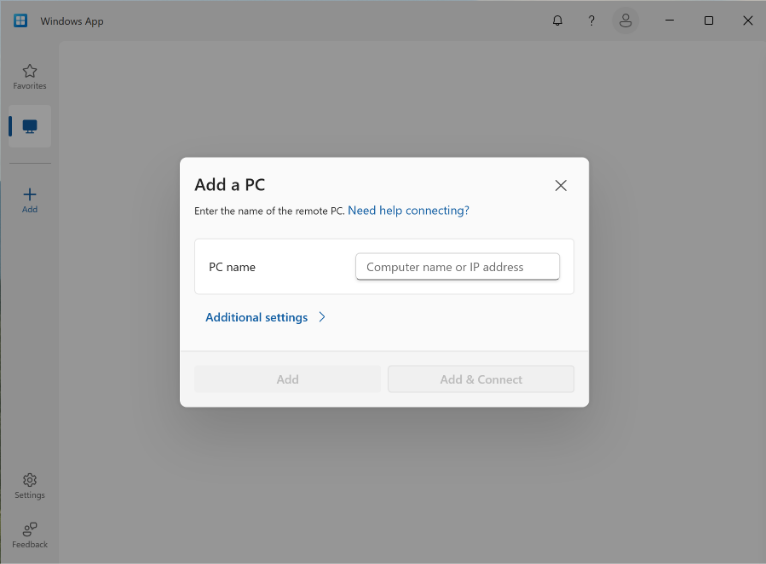
This feature supports connections using a PC name or IP address, which allows connection settings customization, and lets users save and favorite frequently accessed devices. A work or school account is not required for Remote PC access, but Remote Desktop must be enabled on the target device.
This update simplifies remote access by bringing more connection types into a single client, but it does not completely replace existing tools. Microsoft’s traditional Remote Desktop Connection (mstsc.exe) remains supported, and organizations will still need to configure Remote Desktop access and authentication on target devices. Businesses must also evaluate whether Windows App fits their existing remote access workflows before standardizing on it.

Rabia has a master's degree in Software Engineering and she has years of experience writing professionally about Microsoft products and other technologies. Rabia has also written for OnMSFT.com as well as Windows Report. She is always up to date on t...