Microsoft Pulls the Plug on Windows 10: What IT Admins Need to Know
Microsoft ends free support for Windows 10, pushing users and organizations to upgrade or opt for paid security updates.

Key Takeaways:
- Windows 10 reaches its official end of support, ending free updates and security patches.
- Millions of PCs still running Windows 10 could face security risks after the deadline.
- Microsoft offers limited paid and free options to extend protection or upgrade to Windows 11.
Microsoft is officially retiring Windows 10 today, marking the end of nearly a decade of updates and support for one of its most widely used operating systems. First launched in July 2015, Windows 10 now reaches the end of free support for its Home, Pro, and Enterprise editions.
After October 14, 2025, Microsoft will no longer offer free software updates, security patches, or technical assistance to Windows 10 PCs. This means that computers running the older operating system will still work, but they will become vulnerable to viruses, malware, data breaches, and cyberattacks.
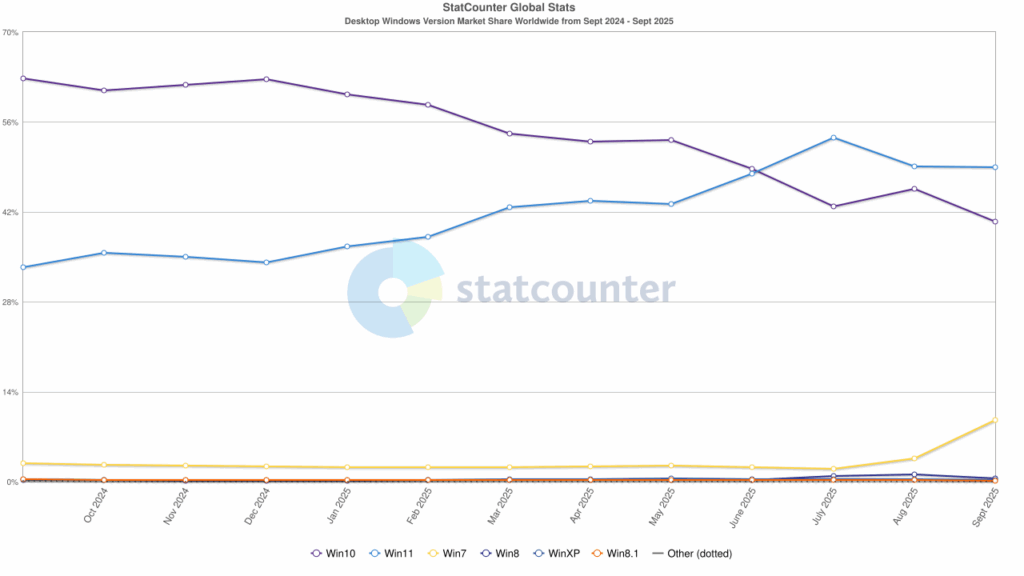
According to StatCounter, as of September, 40.8% of Windows PCs were still running Windows 10, while Windows 11 had a 49.05% market share. Canalys Research estimates that up to 240 million Windows 10 users could be vulnerable to security vulnerabilities after the end of support deadline.
What to do if your PC doesn’t support Windows 11?
Microsoft recommends that customers upgrade their eligible computers to Windows 11. However, the company will block PCs from upgrading via Windows Update that don’t meet the minimum hardware requirements.
If upgrading Windows 11 isn’t an option, consumers can get a free year of Extended Security Updates (ESUs) for the operating system for $30. Microsoft is also offering some free alternatives for Windows 10 users who are on a budget. These include redeeming 1,000 Microsoft Rewards or using Windows Backup to sync settings to the cloud.
Windows 10 users in the European Economic Area can enroll in the ESU program for free following pressure from consumer organizations. However, they will be required to sign in with a Microsoft account at least once every 60 days to keep getting security updates.
What does Windows 10 end of support mean for businesses and IT admins?
For organizations, Extended Security Updates for Windows 10 will be available on a subscription basis for up to three years. A license for security updates costs $61 per device, with the price doubling each year. However, businesses paying to access Windows 11 Cloud PCs through Windows 365 and Virtual Machines (VMs) will get free Windows 10 security updates.
Microsoft will also continue to provide security updates for Microsoft 365 apps on Windows 10 machines until October 10, 2028. Keep in mind that the company will stop providing feature updates after August 2026.
Lastly, Microsoft is also reminding customers that Exchange Server 2016 and 2019 have officially reached the end of extended support today. Organizations still relying on these versions must now migrate to supported platforms like Exchange Online or Exchange Server Subscription Edition (SE) to maintain security, compliance, and operational continuity.

Rabia has a master's degree in Software Engineering and she has years of experience writing professionally about Microsoft products and other technologies. Rabia has also written for OnMSFT.com as well as Windows Report. She is always up to date on t...