Windows Admin Center Combines Installation Paths, But a Key Limitation Remains
Microsoft has removed one of the biggest deployment hurdles in Windows Admin Center, but administrators must still choose between management modes during installation.

Key Takeaways:
- Windows Admin Center 2610 introduces a single installer for Administration Mode and Virtualization Mode.
- This release adds Azure Arc onboarding, backup and restore capabilities, and certificate lifecycle management.
- Administrators still cannot run both modes on the same machine, and the release remains in public preview.
Microsoft has been developing two separate experiences within Windows Admin Center, including Administration Mode (aMode) for general server management and Virtualization Mode (vMode) for managing Hyper-V and virtualization infrastructure. Having separate installation experiences created additional complexity for IT teams evaluating or deploying the platform, particularly those interested in trying the newer virtualization-focused capabilities.
This separate deployment model increased setup overhead and made onboarding more unmanageable. Organizations had to navigate different installation paths and requirements, which could slow adoption of virtualization management features and create extra work for administrators managing Windows Server environments.
Windows Admin Center gets a unified installer
In Windows Admin Center version 2610, Microsoft has introduced a unified installer that supports both Administration Mode and Virtualization Mode through a single installation workflow. This update aims to simplify deployment, reduce configuration complexity, and provide a more consistent setup experience.
This release also adds several virtualization-focused capabilities, including Azure Arc onboarding, backup and restore functionality, and certificate lifecycle management. Moreover, Microsoft has redesigned the Azure registration process, which reduces the permissions required and eliminates the need for tenant-wide administrator consent in many scenarios.
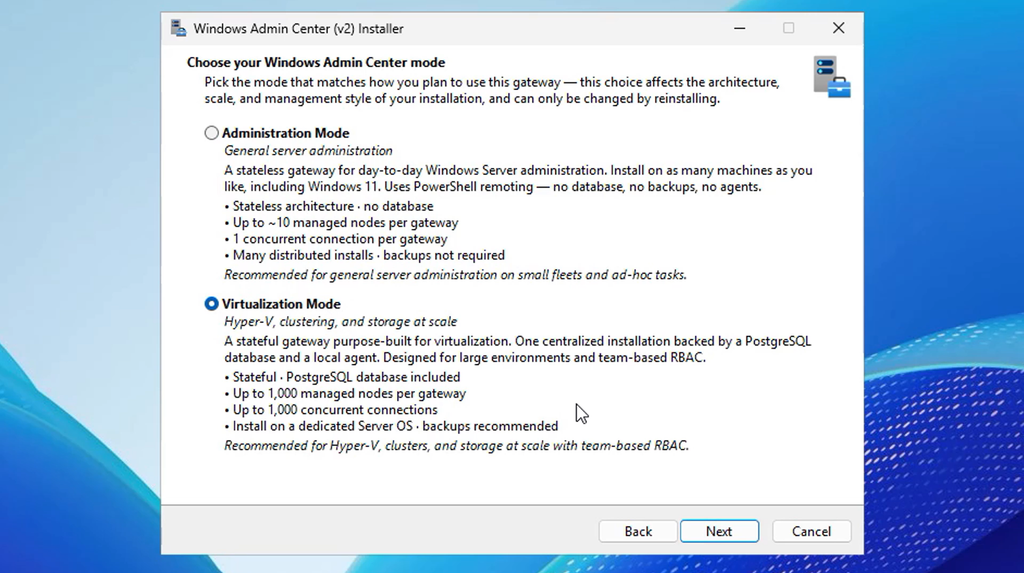
It’s important to note that the new installer streamlines deployment, but organizations still cannot run both modes on the same machine. Administrators must choose either Administration Mode or Virtualization Mode during installation.
This means some environments may still require separate deployments depending on their management needs. Moreover, the release remains in public preview, so organizations considering adoption should expect potential changes before general availability.

Rabia has a master's degree in Software Engineering and she has years of experience writing professionally about Microsoft products and other technologies. Rabia has also written for OnMSFT.com as well as Windows Report. She is always up to date on t...