Microsoft 365 Deployment Complexity Prompts a New Unified Setup Experience
Microsoft wants to make deployment progress easier to track, but administrators will still need to tackle the migration, configuration, and adoption work themselves.

Key Takeaways:
- Microsoft is consolidating deployment status, onboarding tasks, licensing data, and guidance into a single Setup experience.
- The new dashboard provides personalized recommendations based on deployment activity.
- The change improves visibility, but organizations remain responsible for the underlying deployment and migration work.
Organizations deploying Microsoft 365 often need to juggle onboarding tasks, licensing information, deployment guides, and support resources spread across different sections of the admin center. This fragmented experience can make it harder for IT teams to understand deployment progress and identify which tasks still require attention.
When deployment data and guidance are scattered across multiple locations, administrators may spend more time navigating between tools instead of completing rollout tasks. This can create delays, make it easier to overlook configuration steps, and complicate large-scale Microsoft 365 deployments.
New unified setup experience simplifies deployment management
To address these challenges, Microsoft is introducing a redesigned Setup experience in the Microsoft 365 admin center. This new dashboard brings together deployment status, onboarding progress, licensing information, readiness insights, deployment guides, and support resources in a single location. It also provides personalized recommendations based on an organization’s deployment activity, which helps administrators prioritize next steps and take action more quickly.
“Setup goes beyond visibility by using your organization’s deployment status and activity to deliver tailored recommendations in real time. By highlighting the most relevant setup tasks and deployment guidance, it enables admins to spend less time searching and more time taking action. From within the experience, admins can configure products, explore guidance across Microsoft 365 solution areas, and start or resume a deployment guide directly from Setup,” Microsoft explained.
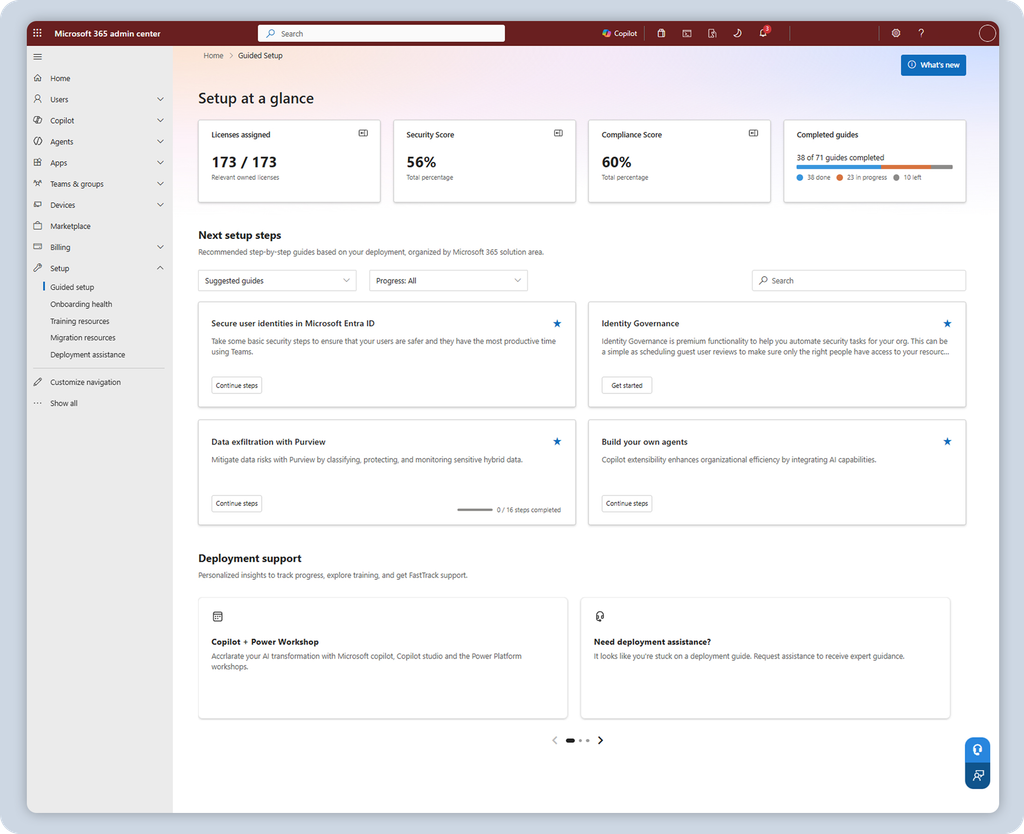
The unified dashboard should give administrators better visibility into Microsoft 365 rollouts, but organizations will still need to complete the underlying migration, configuration, and adoption work. This streamlined experience reduces complexity and surfaces recommendations more effectively, but it does not eliminate the planning and operational effort required for successful deployments.
Microsoft also plans to expand the experience over time with additional capabilities, including AI-powered insights. Administrators can configure this new Setup experience by selecting Setup in the Microsoft 365 admin center.

Rabia has a master's degree in Software Engineering and she has years of experience writing professionally about Microsoft products and other technologies. Rabia has also written for OnMSFT.com as well as Windows Report. She is always up to date on t...