Windows 11 Now Lets IT Admins Automatically Approve SSO Permissions on Managed Devices
New registry-based control reduces sign-in prompts for users on organization-managed devices.

Key Takeaways:
- IT admins can automatically approve SSO permissions on eligible managed devices.
- The feature removes extra consent prompts for Microsoft apps and services.
- This setting is available with the July 2026 security update for Windows 11 versions 24H2 and 25H2.
Microsoft is giving IT administrators greater control over the Windows sign-in experience with a new policy that automatically approves Single Sign-On (SSO) permissions on managed devices. This feature is rolling out as part of the July 2026 security update for Windows 11 versions 24H2 and 25H2.
Microsoft mentioned that recent changes in the European Economic Area (EEA) require Windows users to explicitly choose whether their Windows sign-in credentials can be used to access other Microsoft apps and services. Users now see prompts asking for consent instead of being automatically signed in. Many enterprise customers requested a way to streamline this experience on managed devices where the organization already governs authentication policies.
How does the registry setting work?
With this release, administrators can configure a registry setting to automatically grant SSO permissions to eligible managed devices. It allows users to access Microsoft apps and services with their existing Windows credentials without seeing additional prompts.
Registry Path: HKLM\SOFTWARE\Policies\Microsoft\Windows\AAD
Value: AutoAcceptSsoPermission (DWORD) = 1
“For managed enterprise environments, some organizations wanted additional flexibility to manage the SSO prompt experience on devices where their organizations already manage sign-in policies and trust relationships. To support those scenarios, we’ve developed a registry-based control that lets IT administrators automatically accept SSO permissions on eligible managed Windows devices,” Microsoft explained.
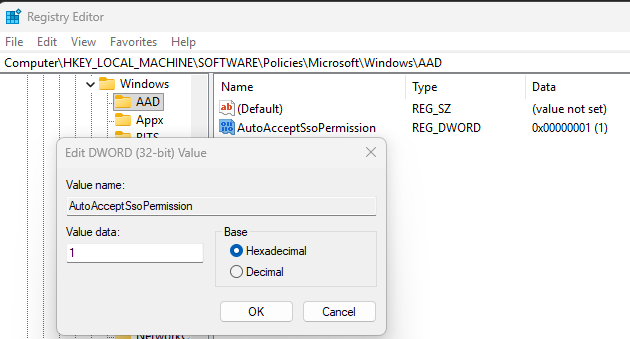
How can organizations enable the new Windows 11 SSO feature?
Administrators can configure this policy through the Windows registry under the Microsoft Entra ID settings. It can be deployed using enterprise management tools such as Group Policy, Microsoft Intune, Configuration Manager, or other solutions that support registry deployment.
This feature is designed specifically for managed enterprise devices that are connected to Microsoft Entra ID. It does not affect personal Microsoft accounts or unmanaged devices, which will continue to display consent prompts. The capability is available only on Windows 11 versions 24H2 and 25H2 and requires installation of the July 2026 security update.
Organizations first need to ensure their devices are running Windows 11 versions 24H2 or 25H2 and have the July 2026 security update installed. Once the update is in place, IT administrators can deploy the required registry policy through any management platform and then verify the configuration to confirm that the Single Sign-On experience works as expected across managed devices.

Rabia has a master's degree in Software Engineering and she has years of experience writing professionally about Microsoft products and other technologies. Rabia has also written for OnMSFT.com as well as Windows Report. She is always up to date on t...