Microsoft Brings Copilot Cowork to General Availability with New Compliance Controls
The latest updates enhance organizational insights, spending management, and governance across AI-powered workflows.

Key Takeaways:
- Copilot Cowork is now generally available for commercial customers.
- Work IQ and Dataverse integration improve access to business data.
- The new cost management, security, and compliance controls help IT teams govern AI usage.
Microsoft rolled out new Microsoft 365 Copilot capabilities in June to improve AI-powered productivity across enterprise environments. The updates make business data more accessible, actionable, and trustworthy while adding stronger management and compliance controls for IT teams.
🎬 Watch This Week in IT.
Microsoft has announced the general availability of Copilot Cowork for commercial customers. This new AI productivity agent is designed in collaboration with Anthropic and completes multi-step tasks on its own. Users can switch between Copilot Chat and Cowork via a toggle, and Cowork now supports multiple AI models, additional business-system plugins, custom skills, image creation, branded PowerPoint templates, browser-based actions, and push notifications for long-running tasks.
Work IQ brings smarter business insights to Microsoft 365 Copilot
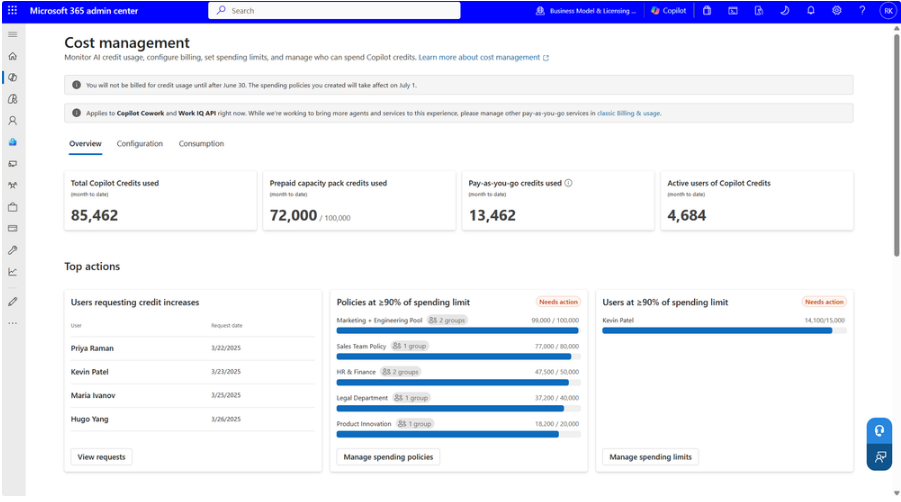
Administrators can enable Copilot Cowork through usage-based billing, monitor credit usage, manage budgets, and control spending via the new Cost Management Dashboard in the Microsoft 365 admin center. Moreover, Microsoft 365 Copilot now uses Work IQ to provide more meaningful answers from organizational data sources. Users can ask questions in natural language and receive insights directly from Power BI reports and semantic models.
Additionally, Copilot can now retrieve and analyze data stored in Dataverse, which allows employees to interact with business records via Copilot Chat without switching applications. This feature is expected to hit general availability in September.
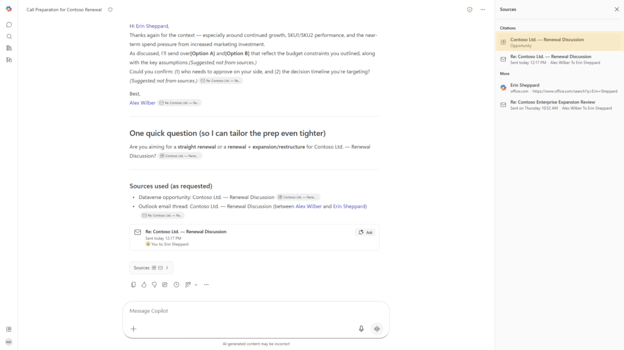
The new “deep citations” feature links Copilot responses directly to specific sections of source files, which makes it easier to verify information. It currently supports PowerPoint and Word files, with support for meetings, web, and PDF references coming soon. Moreover, users can regenerate responses with different approaches or models, and receive editing suggestions for Copilot Pages. Users can also regenerate responses with different approaches or models and receive editing suggestions for Copilot Pages.
IT admins get new Copilot Cost Management and spending controls
Microsoft has introduced a new feature that lets IT admins create/publish organizational prompts in the Microsoft 365 admin center. Moreover, the new Cost Management Dashboard in the Microsoft 365 admin center allows administrators to activate, manage, and optimize spending on AI experiences (such as Copilot Cowork). They can manage Copilot spending by allocating credits, creating spending policies and usage limits for specific groups, and selecting between prepaid credits and pay-as-you-go billing models.
In Insights, a new dashboard provides additional cost reporting at the group or team level, which gives managers a view into the usage of Copilot Credits. With agent metrics for cost reporting, analysts can explore and combine granular agent usage data with organizational context to identify adoption trends.
The organizational messages feature has added support for hybrid-joined devices, which enables IT admins to provide in-product communications to users on devices connected to both on‑premises Active Directory and Microsoft Entra ID. Moreover, IT admins can now control access to Vision features in Microsoft 365.
Last but not least, Microsoft Purview Data Loss Prevention enables administrators to restrict external emails from being referenced in Microsoft 365 Copilot and Copilot Chat. Moreover, Administrators can configure Copilot to prevent emails from external sources from being included in summaries, cited as references, or used as context when generating AI responses.
Microsoft has added new Purview controls to Copilot Cowork to help IT admins manage security and compliance. The AI agent supports audit logging, sensitivity label inheritance and display, Insider Risk Management of user risks associated with Cowork interactions, interaction content in Data Security Posture Management Activity Explorer, Data Lifecycle Management (DLM), eDiscovery, and Communication Compliance of Cowork interactions.

Rabia has a master's degree in Software Engineering and she has years of experience writing professionally about Microsoft products and other technologies. Rabia has also written for OnMSFT.com as well as Windows Report. She is always up to date on t...