Microsoft Purview Insider Risk Management Gets New Unified Alert Experience
The new capabilities consolidate alert management, user insights, and investigation records for security teams.

Key Takeaways:
- The classic and agent-generated alerts now appear in a single queue.
- The enhanced user profiles provide Entra data and insider risk context.
- The investigators can document findings directly within alerts and cases.
Microsoft has introduced a new unified alert experience for Microsoft Purview Insider Risk Management that brings alerts, user context, and cases into a single streamlined workflow. The update is designed to help security teams investigate insider risks more efficiently with fewer clicks and better visibility.
With this release, Microsoft has introduced three improvements for Purview Insider Risk Management. The company is combining traditional Insider Risk Management alerts and Data Security Triage Agent alerts into a single alert queue. This update allows security analysts to view classic and agent-generated alerts in one place and preview alert details, user information, and AI-generated summaries directly from the list.
Additionally, this feature allows analysts to filter and prioritize alerts using both classic and agent-specific attributes. It’s also possible to manage and act on alerts without constantly switching screens, as well as manage the agent directly from the alert list. Microsoft is also retiring alert spotlighting and removing the separate toggle between classic and agent alerts. To ease the transition, both old and new experiences will coexist until at least August 31, 2026.
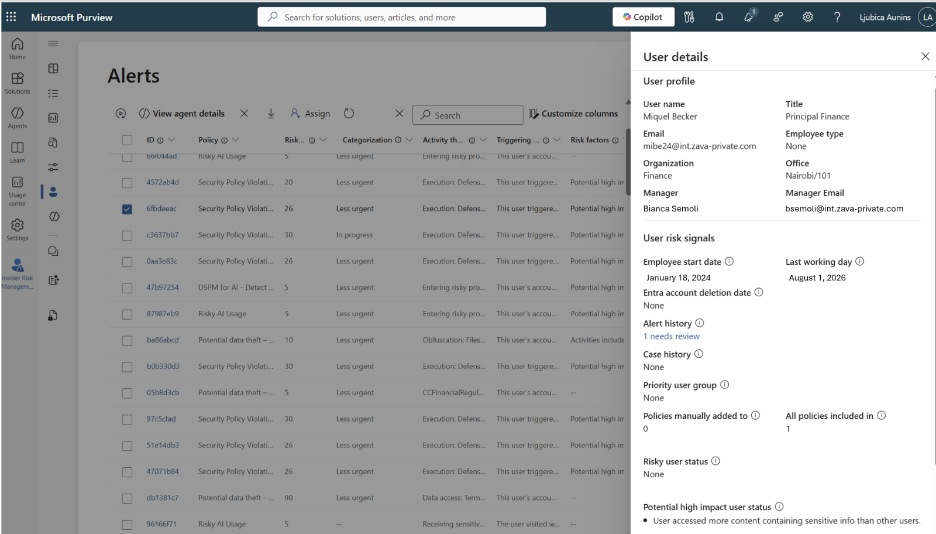
Expanded User Profile details
Microsoft has introduced an enhanced user profile view to provide more context about the user associated with the alert. This new profile view includes Microsoft Entra profile data (such as office location and department), historical insider risk information, and priority user group status and policy coverage. This consolidated view helps analysts analyze risk more efficiently without leaving the alert workflow.
Notes across alerts and cases
Microsoft has added a new feature that allows investigators to capture and review notes directly within alerts and cases within the Purview portal. This capability currently supports system-generated and analyst notes. The system-generated notes are designed for events such as assigned user, alert or case status, alert or case closure, and case escalations.
Additionally, the analyst notes are designed for documenting observations and investigation findings. This creates a more complete audit trail and preserves investigation context within Microsoft Purview.

Rabia has a master's degree in Software Engineering and she has years of experience writing professionally about Microsoft products and other technologies. Rabia has also written for OnMSFT.com as well as Windows Report. She is always up to date on t...




