Microsoft Entra ID Releases Group SOA Feature to Simplify Hybrid Group Management
New group SOA feature in Microsoft Entra ID enables flexible, cloud-based management for hybrid AD environments.

Key Takeaways:
- Microsoft introduces Group Source of Authority (SOA) in Entra ID to ease hybrid group management.
- Admins can now shift control of certain AD groups to the cloud for more flexibility.
- The feature supports gradual AD DS dependency reduction and improved governance.
Microsoft is giving IT admins more freedom in hybrid environments with the new Group Source of Authority (SOA) feature in Entra ID, now in public preview. This new capability allows organizations to transfer group management from on-premises Active Directory Domain Services (AD DS) to the cloud.
In a hybrid identity setup, when administrators sync groups from on-premises Active Directory (AD) to Microsoft Entra ID using tools such as Azure AD Connect or Cloud Sync, AD remains the source of authority. This means that the membership and properties of these groups must still be managed in AD. Microsoft Entra ID only contains a read-only copy of these groups, and IT admins can’t modify them directly in the cloud or add native Entra users. This setup limits flexibility in managing group memberships across hybrid environments.
How does Group SOA enhance hybrid identity management?
The Group Source of Authority (SOA) feature addresses the limitations of managing synced groups from on-premises Active Directory by allowing organizations to shift control of those groups to the cloud. It allows administrators to designate Entra as the authoritative source for specific groups, which makes them fully editable in the cloud. This feature enables direct management of group memberships, supports cloud native users, and simplifies administration.
“Rather than move the entire directory to the cloud at once, with object-level SOA, you can gradually reduce AD DS dependencies in a controlled manner. You can use Microsoft Entra ID Governance to manage access governance for both cloud and on-premises applications associated with security groups,” Microsoft explained.
According to Microsoft, applying Group SOA to a group that synchronizes from AD DS converts the group to a cloud object. This change allows administrators to edit, delete, and change the cloud group membership directly in the cloud. Administrators can choose to migrate specific groups or multiple groups.
How to enable Group SOA in the Microsoft Entra ID environment
To use this new Group SOA feature, administrators will need to update to the latest version of the Azure AD Connect or Entra Connect Sync client. They can download the latest version directly from the Microsoft Entra admin portal.
Microsoft mentioned various scenarios that are supported by Group SOA. These include transitioning group management to the cloud, cleaning up legacy AD groups, enabling cloud-only group membership, restoring or rolling back group ownership, and enhancing governance and access control.
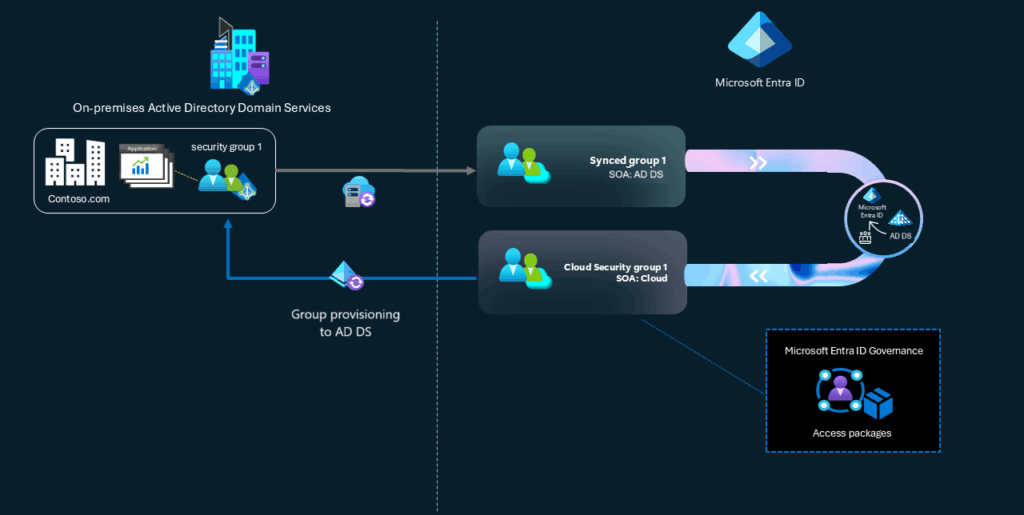
It’s recommended to avoid switching group ownership from on-premises AD to Entra too soon, especially if the group is still actively used in AD. Once the Source of Authority (SOA) is changed, the group becomes cloud-managed in Entra, and admins must decommission the original AD group to prevent duplication and confusion.
You can learn more about how to use Group SOA to manage, provision, restore, and roll back groups in hybrid and cloud environments on this support page.

Rabia has a master's degree in Software Engineering and she has years of experience writing professionally about Microsoft products and other technologies. Rabia has also written for OnMSFT.com as well as Windows Report. She is always up to date on t...