Windows 365 Cloud Apps Let Users Stream Individual Apps Without Full Cloud PCs
A new Windows 365 feature lets organizations stream individual apps from the cloud.

Key Takeaways:
- Microsoft debuts Windows 365 Cloud Apps in public preview.
- These Cloud Apps let users securely stream apps without a full Cloud PC.
- Designed for shift-based and part-time workers under one license.
Microsoft has rolled out the public preview of Windows 365 Cloud Apps, a service that lets organizations stream individual applications directly from the cloud. Instead of assigning each employee a full Cloud PC, IT admins can now provide secure, app-only access, which is ideal for flexible, task-based roles.
Microsoft says organizations can now use a single Windows 365 Frontline license to give multiple users access to cloud apps individually. Since the apps run in shared mode, only one person can use them simultaneously. This removes the need to purchase a separate Cloud PC for each user. The model is especially useful for industries with part-time or rotating staff, such as retail, healthcare, or government.
“Windows 365 Cloud Apps runs on Windows 365 Frontline Cloud PCs in shared mode. The Windows 365 Frontline licensing model enables shared Cloud PC access for shift-based or part-time workers, allowing unlimited users per license with one active session at a time. Since Windows 365 Cloud Apps streams only essential applications like Outlook or Word without loading a full desktop, it is ideal for task-based roles,” Microsoft explained.
Admin controls
Microsoft says that IT admins can set up Windows 365 Cloud Apps by creating provisioning policies that focus on app access rather than full desktop environments. These policies determine how Cloud PCs are created and assigned. They also help to ensure that each Cloud PC is used by one person at a time in a shared mode. Admins can publish apps directly from the Start menu of the gallery or custom images.
Currently, administrators face some limitations when deploying custom business applications through Windows 365 Cloud Apps. To make these apps available, IT admins must first create custom images, which adds complexity to the setup process. Microsoft plans to simplify this by integrating app publishing more directly into Microsoft Intune. Meanwhile, overall management of Cloud Apps (including provisioning, updates, and user access) is handled through Intune, while identity and access controls are managed through Microsoft Entra ID.
End user experience
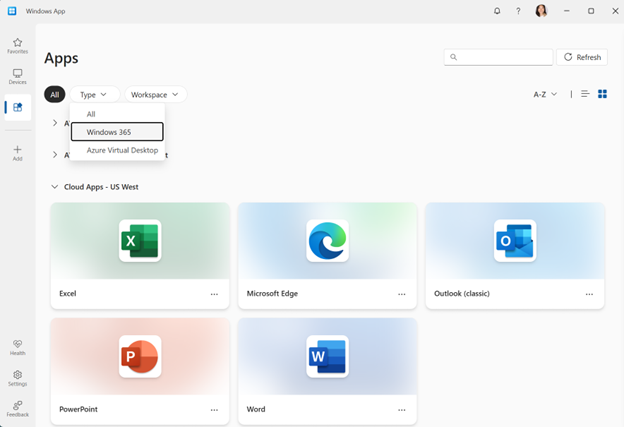
As for the end user expereince, they can access the Cloud apps through the Windows App. These apps stream directly to the user’s device and appear like local apps. Users can run multiple apps (such as Microsoft Word or Outlook) from the same Cloud PC using a single license.
The Cloud Apps preview offers a more efficient way to deliver applications without requiring full virtual desktops. However, the need for custom images to deploy business apps remains a challenge, and the shared mode setup may not suit all organizational needs.
Microsoft notes that this new Cloud Apps experience is currently available in public preview for organizations with a Windows 365 Frontline license. If you’re interested, you can learn more about how to get started on this support page.

Rabia has a master's degree in Software Engineering and she has years of experience writing professionally about Microsoft products and other technologies. Rabia has also written for OnMSFT.com as well as Windows Report. She is always up to date on t...