Microsoft Enhances Remote Session Reliability for Windows 365 and Azure Virtual Desktop
Say goodbye to dropped connections—Microsoft’s RDP Multipath keeps your virtual desktop running smoothly.

Key Takeaways:
- Microsoft rolls out RDP Multipath for Windows 365 and Azure Virtual Desktop to enhance connection reliability.
- The feature dynamically selects the best-performing network path in real time.
- No manual setup required if RDP Shortpath is already enabled—seamless failover included.
Microsoft has announced the general availability of RDP Multipath for Windows 365 and Azure Virtual Desktop (AVD). This feature intelligently selects the most stable network path in real time, ensuring smoother, uninterrupted user experiences—even in unstable network conditions.
RDP Multipath is a feature in Windows 365 and Azure Virtual Desktop that enhances connection reliability by continuously monitoring multiple network paths between a user’s device and their cloud session. It automatically selects the most stable and responsive path in order to ensure smooth performance and minimize disruptions without requiring any manual configuration.
“RDP Multipath uses multiple network paths, discovered with Interactive Connectivity Establishment (ICE), to improve connection reliability. These paths can include combinations like UDP over STUN or UDP over Relay. If the main connection fails, the system automatically switches to a backup path. If all paths are lost—such as during a network outage—the system tries to reconnect once the network is available again,” Microsoft explained.
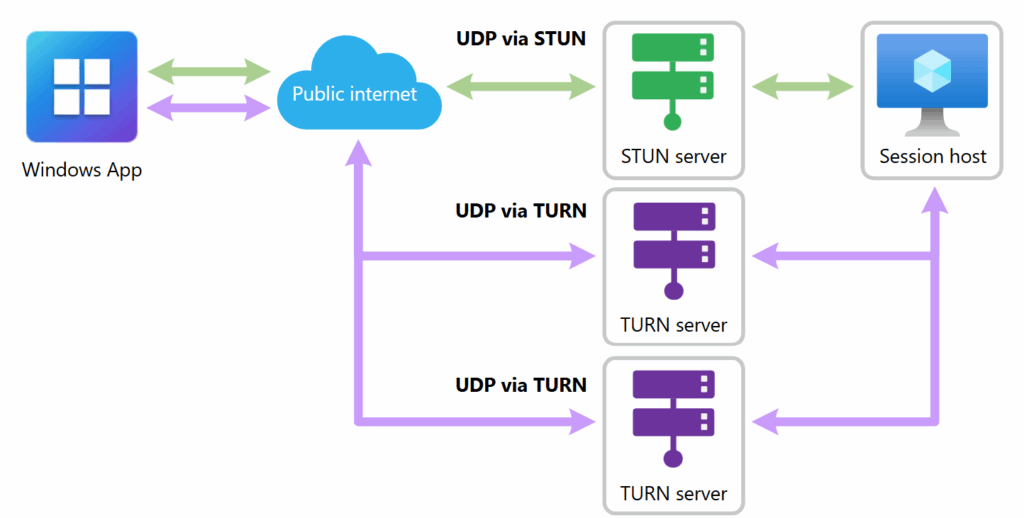
What are the benefits for Windows 365 and Azure Virtual Desktop users?
Microsoft has outlined several benefits of RDP Shortpath for both Windows 365 and Azure Virtual Desktop (AVD) customers. This feature doesn’t require additional configuration if RDP Shortpath is already supported. Moreover, it continuously monitors and switches to the best-performing path before a failure occurs. RDP Shortpath also helps to maintain redundant connections in order to allow instant failover without user disruption.
Additionally, the new RDP Shortpath integration leverages Microsoft’s global infrastructure (RDP Gateways and TURN relays in 40+ locations) to reduce latency and improve performance. Administrators can also view the RDP Multipath connection status from the connection bar.
Microsoft is gradually rolling out the RDP Multipath feature across Windows 365 and Azure Virtual Desktop to ensure quality and stability. This capability requires the latest version of the Remote Desktop client (MSRDC) (version 1.2.6074 or later) or Windows App (version 2.0.366.0 or later).

Rabia has a master's degree in Software Engineering and she has years of experience writing professionally about Microsoft products and other technologies. Rabia has also written for OnMSFT.com as well as Windows Report. She is always up to date on t...