Windows 11 Ditches Blue Screen for a New Look — Meet the Black Screen of Death!
Microsoft's latest Windows 11 update enhances recovery, stability, and system resilience with new tools and a visual overhaul.

Key Takeaways:
- Microsoft rolls out update KB5062660 as part of its Windows Resilience Initiative.
- The classic Blue Screen of Death gets a modern redesign for quicker issue diagnosis.
- New quick machine recovery feature boosts startup repair and minimizes downtime.
Microsoft has begun rolling out update KB5062660 for Windows 11 version 24H2, which brings a range of new features under the Windows Resilience Initiative. These enhancements aim to reduce downtime and significantly improve system recovery and stability.
Microsoft launched the Windows Resiliency Initiative in late 2024. It’s a strategic effort by Microsoft to embed resilience and security directly into the Windows platform. WRI focuses on three core areas: ecosystem collaboration, actionable guidance, and product innovation. It aims to enhance the reliability of Windows endpoints by promoting safe deployment practices, improving incident response, and enabling faster recovery.
Goodbye Blue Screen of Death
First of all, Microsoft has redesigned the unexpected restart screen experience in Windows 11. The latest update replaces the iconic Blue Screen of Death (BSOD) with the much-awaited “Black Screen of Death.” The new BSOD no longer shows the old sad emoticon and the QR code. Instead, it shows the stop code, driver details, as well as a numerical error code to help IT admins diagnose issues more easily. However, the only problem with the new BSOD is that it’s only displayed for about two seconds before disappearing.
“For nearly four decades, the blue screen shown during an unexpected restart has been a visual shorthand for something going wrong,” Microsoft explained. “But it’s also been a source of anxiety and frustration. We heard from users that the blue screen was visually disruptive, often unhelpful, and frustrating to stall on — until recently, users could sit on this screen for up to 40 seconds.”
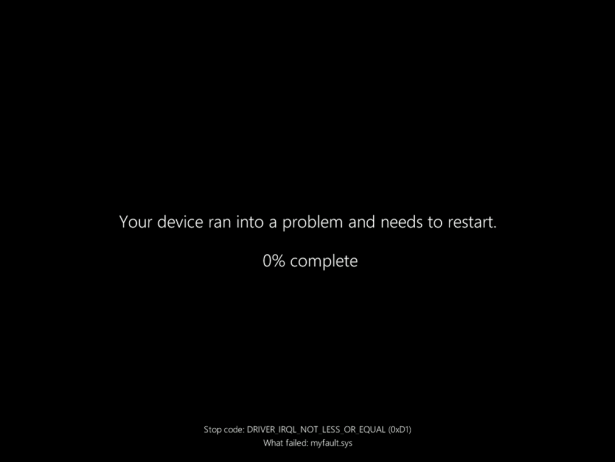
Quick Machine Recovery: Faster fixes for startup issues
Microsoft has announced the general availability of the new quick machine recovery (QMR) feature for Windows 11. It allows users to boot into the Windows Recovery Environment (WinRE), connect to the Internet, and download fixes through Windows Update to detect and address startup problems.
The Quick machine recovery feature is enabled by default for users running Windows 11 Home editions. However, Windows 11 Enterprise, Pro, and Education customers will need to enable this setting via the Settings app or manage it with tools such as Microsoft Intune. IT administrators can define policies to manage how frequently the system checks for issues, how fixes are implemented, and whether users receive notifications.
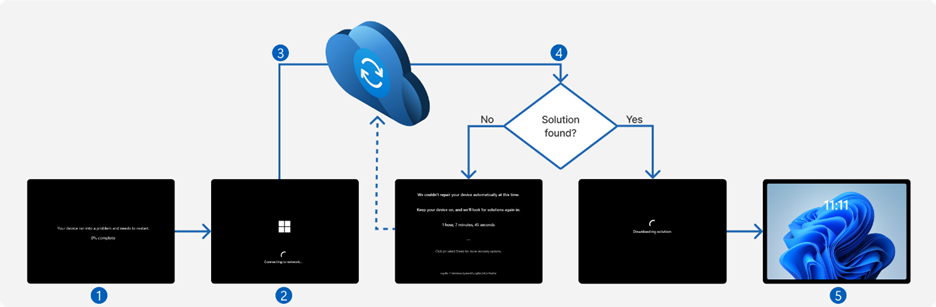
Microsoft reports a 24% drop in unexpected restart failures on Windows 11 version 24H2 devices compared to Windows 10 version 22H2. This improvement is part of broader efforts to enhance system stability, including updates like Local Connected Cache, Windows 365 Reserve, and a redesigned endpoint security model that moves critical components outside the Windows kernel.
To use quick machine recovery, devices must be running Windows 11 build 26100.4770 or newer. Microsoft advises enabling the feature via System > Recovery or through a mobile device management tool. It’s also recommended to train IT teams to understand the new hexadecimal stop codes shown during Windows system failures.
It’s important to note that the KB5062660 patch is an optional update for Windows 11 version 24H2. This means that users will need to install it manually through Windows Update. Alternatively, users can download and install this update directly from the Microsoft Update Catalog.

Rabia has a master's degree in Software Engineering and she has years of experience writing professionally about Microsoft products and other technologies. Rabia has also written for OnMSFT.com as well as Windows Report. She is always up to date on t...

