Windows 11 Adds Point-In-Time Restore to Roll Back Systems After Failures
New feature uses automatic restore points and built‑in recovery tools to help manage system issues.

Key Takeaways:
- Point-in-time restore creates automatic restore points to recover from system issues.
- This feature includes apps, settings, and files in rollback process.
- The point-in-time restore feature is available on Windows 11 24H2 and later.
Recovering from Windows issues is about to become much easier. Microsoft has released point-in-time restore for Windows 11, a built-in feature that lets administrators quickly roll back systems to a working state with minimal effort.
🎬 Watch This Week in IT.
Microsoft mentioned that when a Windows device encounters issues (such as faulty updates, software conflicts, or configuration errors), recovering it can be slow and complicated. IT teams often have to spend hours troubleshooting or completely rebuilding systems, which leads to significant downtime and loss of productivity for customers.
Point‑in‑time restore in Windows 11 is a built‑in recovery feature that lets a computer return to an earlier saved state when everything was working properly. It works by automatically creating restore points at regular intervals and storing them on the device. If a problem occurs (such as a faulty update, software issue, or configuration error), the system can quickly roll back to that previous condition.
The restore points can include Windows, installed applications, system and app configurations, local user files, and settings. This feature captures restore points every 24 hours, retains them for up to 72 hours, and is limited to 2 percent of disk usage. However, it’s possible to change some settings on Enterprise systems.
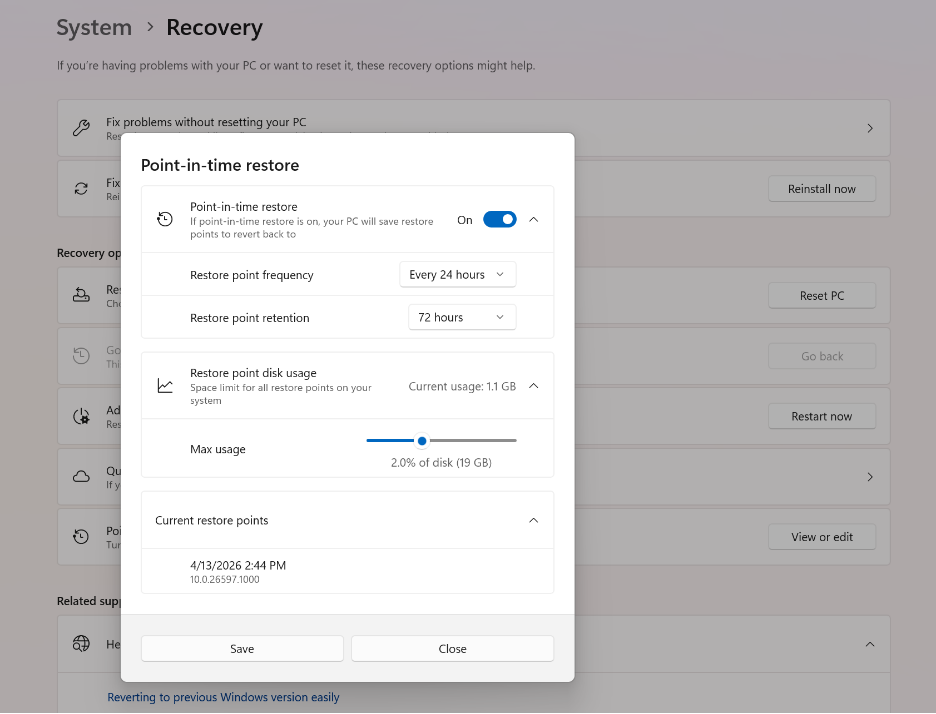
How does point-in-time restore differ from traditional system restore?
Under the hood, point-in-time restore and the traditional System Restore feature both use Volume Shadow Copy Service. However, point-in-time restore is a more advanced solution, as it automatically creates recovery points on a regular schedule instead of relying on manual actions. This feature includes user files in recovery and uses controlled storage and retention policies. It also offers better integration and future remote management capabilities.
The point-in-time restore feature is currently available for Windows 11 PCs running version 24H2 and later across Windows Enterprise, Pro, and Home editions. This feature is enabled by default on many consumer devices, but may require activation in enterprise-managed environments.
How can administrators use point-in-time restore through Windows RE?
Currently, users can start the restore process through the Windows Recovery Environment (Windows RE). Users can head over to Troubleshoot, choose Point-in-time restore, enter the BitLocker recovery key (if required), select a restore point, and finally confirm the restore. However, keep in mind that all changes made after that restore point (such as apps, settings, and files) will be lost.
Microsoft plans to add enhancements such as remote restore capabilities through Microsoft Intune. This feature is part of a broader push toward improving Windows reliability, intending to minimize disruption when devices run into serious issues or become unbootable.
Microsoft is encouraging administrators to get ready for the upcoming release of Windows 11 version 26H2. This update will be delivered via an enablement package that enables the new features and updates the versioning on Windows machines.

Rabia has a master's degree in Software Engineering and she has years of experience writing professionally about Microsoft products and other technologies. Rabia has also written for OnMSFT.com as well as Windows Report. She is always up to date on t...



