Microsoft Enhances Draft with Copilot in Word with New Content Transformation and Organization Capabilities

Key Takeaways:
- Microsoft has enhanced the Draft with Copilot feature in Word to enable users to rewrite, refine, or paraphrase selected text.
- This feature helps transform content into different formats, styles, or languages, making it easier to adapt text for various audiences.
- Microsoft Word users can now organize their content automatically with headings, paragraphs, and bullet points.
Microsoft has announced several enhancements coming to Copilot in Word. The Draft with Copilot experience now allows users to rewrite, refine, or paraphrase a selection of text, making it easier to transform content for different formats, styles, and audiences.
In Word, Draft with Copilot uses AI to help users create and enhance content with natural language commands. This feature allows users to summarize documents, generate tables, rewrite paragraphs, and refine content to be more concise or fit specific styles.
With this release, Microsoft has enhanced Draft with Copilot to allow users to refine, rewrite, or paraphrase selected text in Word documents. This new capability makes it easier to transform content into different formats or languages.
“Sometimes, you may need to transform your content into different formats or languages, such as converting a paragraph into a bullet list, or translating a paragraph into another language. For example, you may need to take a list and expand it to a paragraph with some added context or take notes and turn them into well-formed thoughts with references and statistics,” Microsoft explained.
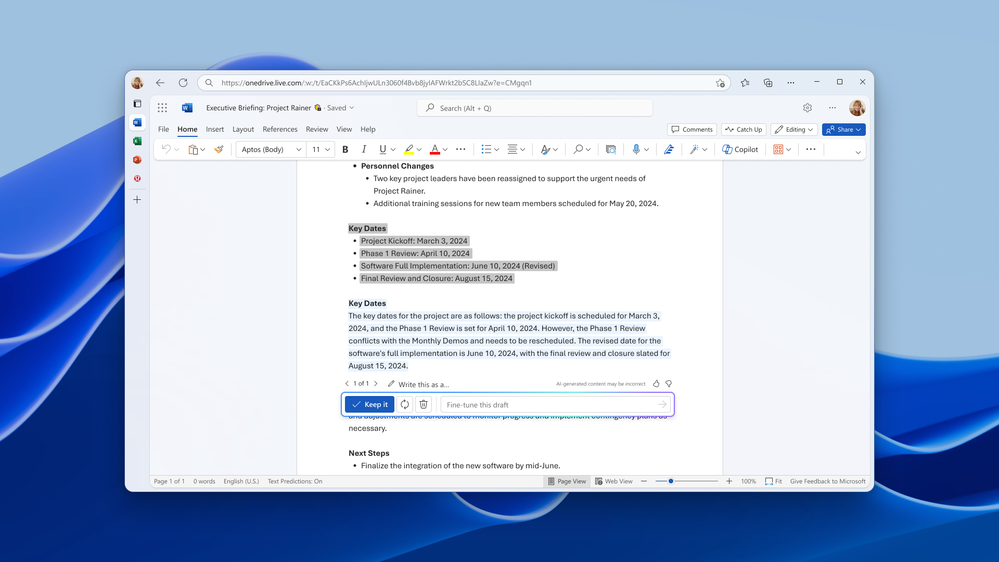
Update content to suit various contexts
Draft with Copilot now allows users to update content for different audiences, regions, or purposes. For example, users can ask the AI assistant to convert a paragraph from UK English to US English, adjusting spelling, currency, and cultural references. Microsoft has also made it easier to organize content automatically with headings, paragraphs, and bullet points.
To try out the new feature, users will need to select a section of a Word document and click the “Make Changes” option. Then, type the prompt that describes the change to update the content accordingly.
Microsoft notes that these new capabilities should help users quickly generate, update, organize, and transform their content. Keep in mind that the Draft with Copilot feature is only available to customers with a Copilot for Microsoft 365 or Copilot Pro license.
Microsoft plans to further improve the Copilot in Word experience in the coming months. Users will be able to reference and attach additional content from other files as well as ensure that newly generated content matches the original formatting.

Rabia has a master's degree in Software Engineering and she has years of experience writing professionally about Microsoft products and other technologies. Rabia has also written for OnMSFT.com as well as Windows Report. She is always up to date on t...




