Microsoft Adds Two-Way Trust Relationships Support to Entra Domain Services

Key Takeaways:
- Microsoft has announced that support for two-way trust relationships is now available in Entra Domain Services.
- The new feature gives organizations greater control over hybrid identity environment management.
- Microsoft encourages organizations to participate in the private preview program.
Microsoft has added support for two-way trust relationships in its Entra Domain Services solution. The new feature provides organizations with increased control over the management of hybrid identity environments.
Microsoft Entra Domain Services is a cloud-based solution that offers managed domain services, including group policy, domain joining, LDAP, and Kerberos/NTLM authentication. This service enables organizations to move legacy applications from an on-premises environment to a managed domain in the cloud without maintaining their own infrastructure. Customers can use trust relationships to integrate their cloud and on-premises resources.
In Microsoft Entra Domain Services, trust relationships provide secure access to resources across multiple domains or forests. Organizations might consider creating a trust relationship to address hybrid identity management or merger and acquisition scenarios.
What are two-way trust relationships?
Until now, Microsoft Entra Domain Services allowed organizations to create one-way outbound trusts from managed domains to on-premises forests or domains. This capability lets on-premises customers access resources in the managed domain, but not the other way around, limiting the scope of the trust relationship in AD.
Microsoft explained that the new feature allows administrators to create trust with Domain Services in three directions: two-way, one-way outgoing, and one-way incoming. They can select the trust direction based on their organization’s collaboration, security, and migration needs.
- Two-way: Users in the managed and on-premises domains can access resources in either domain.
- One-way outgoing: This option lets on-premises domain users access resources in the managed domain. However, the feature restricts access from the managed domain to the on-premises domain.
- One-way incoming: Users in the managed domain can access resources available in the on-premises domain.
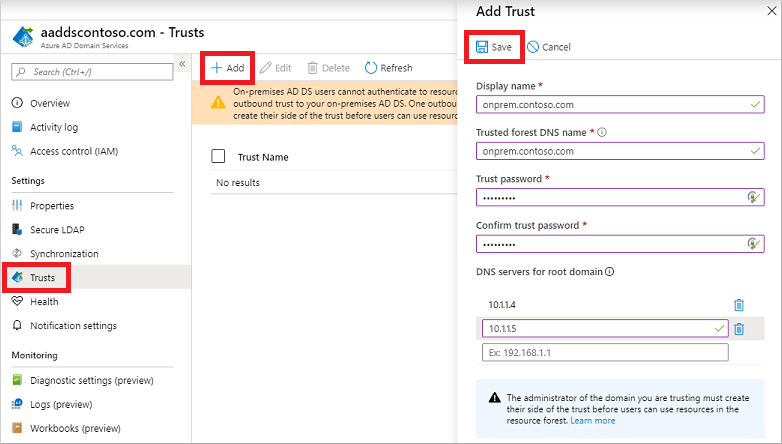
Microsoft notes that support for two-way trust relationships is available in private preview for select commercial customers. The company encourages organizations to sign up for the public preview of the new feature on this page.
However, keep in mind that customers should have an on-premises AD DS domain/forest and a Domain Services instance to participate in the private preview program. They will also need a VPN or ExpressRoute connection between their Azure virtual network and on-premises network to maintain a robust trust relationship in AD.
FAQs
What are the common troubleshooting steps for trust relationship in AD when it fails?
Common troubleshooting steps for trust relationship in AD include verifying network connectivity between domain controllers, checking DNS resolution, ensuring time synchronization is accurate, validating security policies, and using netdom trust commands to reset the relationship if necessary.
How does trust relationship in AD impact security compliance requirements?
Trust relationship in AD affects security compliance by requiring specific authentication protocols, audit logging configurations, password policies across trusted domains, and regular security assessments to maintain regulatory standards like HIPAA, SOX, or GDPR.
What are the best practices for monitoring trust relationships in AD health?
Monitoring trust relationships in AD health involves implementing automated trust status checks, setting up alerts for trust failures, regularly reviewing trust relationship logs, maintaining documentation of trust configurations, and conducting periodic trust validation tests.
How does trust relationship in AD affect disaster recovery planning?
Trust relationship in AD considerations in disaster recovery include maintaining backup configurations of trust settings, documenting trust restoration procedures, establishing failover protocols, and ensuring secondary domain controllers can maintain trust relationships during primary site failures.
What performance impacts should be considered when implementing trust relationships in AD across geographic locations?
Performance considerations for trust relationships in AD across locations include network latency between trusted domains, bandwidth requirements for authentication traffic, replication overhead, proper site topology design, and optimizing authentication protocols for WAN connections.

Rabia has a master's degree in Software Engineering and she has years of experience writing professionally about Microsoft products and other technologies. Rabia has also written for OnMSFT.com as well as Windows Report. She is always up to date on t...