Microsoft Defender for Identity Gets New AI Feature to Stop Credential Leaks
AI-powered alerts in Microsoft Defender for Identity help stop accidental credential leaks in Active Directory.

Key Takeaways:
- Microsoft adds an AI-powered alert in Defender for Identity to tackle credential exposure risks.
- The system scans Active Directory fields for hidden passwords and sensitive data.
- New security assessment helps admins act quickly before attackers exploit exposed credentials.
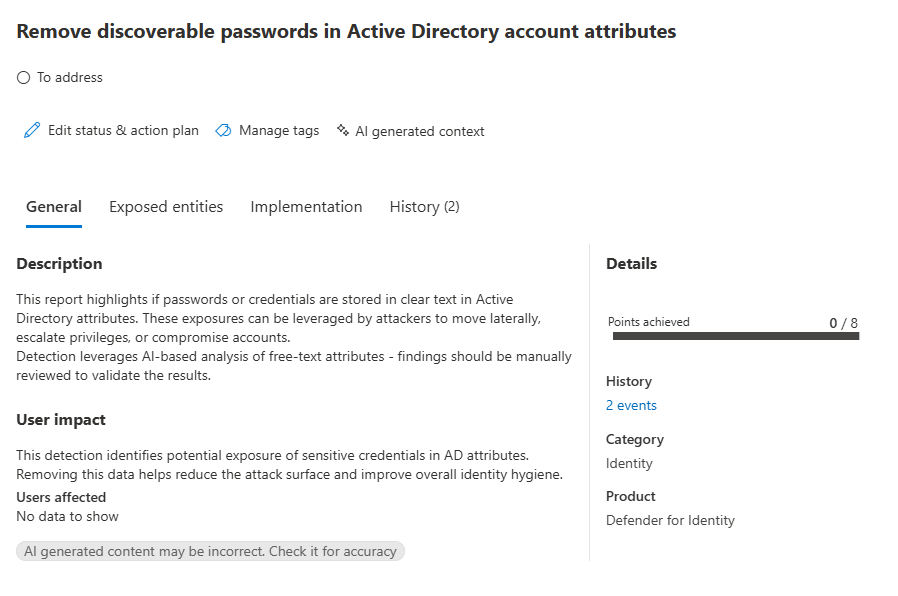
Microsoft Defender for Identity has introduced a new AI-powered posture alert designed to help administrators quickly identify potential credential exposure in Active Directory. This feature provides organizations with an edge in preventing breaches before attackers can exploit them.
Microsoft mentioned that this new feature addresses the critical issue of accidental credential exposure. This problem occurs when sensitive authentication details like passwords, API keys, or tokens are unintentionally stored in insecure locations such as public code repositories, logs, or misconfigured cloud services. Once exposed, they can be exploited to gain unauthorized access to systems and data, which leads to serious security breaches.
How does Microsoft Defender for Identity detect exposed credentials?
Microsoft Defender for Identity detects exposed credentials by scanning commonly used free-text fields in Active Directory (such as description, info, and adminComment), where sensitive data like passwords or reset hints could be mistakenly stored. It leverages generative AI to analyze these attributes for patterns resembling plaintext passwords, credential formats, or other clues.
The system flags potential exposures and presents them in security reports and Secure Score assessments, which allows administrators to review and remove sensitive information. This proactive detection helps prevent attackers from exploiting these fields for lateral movement or privilege escalation.
“First, a detailed scan of identity directories flags potential credential exposures. This includes everything from base64-encoded secrets to strings that match known password structures. Once complete, a more advanced AI model steps in to analyze the context, language, and structure. Looking at everything from the type of identity its associated with, if the value is static or recently changed and whether it’s referenced in automation scripts or log. This additional layer dramatically reduces false positives and ensures that alerts are both high-confidence and actionable,” Microsoft explained.
What are the remediation steps?
To address this security assessment, administrators will need to follow the steps mentioned below:
- Review the recommended action at Microsoft Secure Score to remove discoverable passwords in Active Directory account attributes.
- Now, examine the exposed entries in the security report, and identify any field content that includes cleartext passwords, reset instructions or credential clues, and sensitive business or system information
- Use standard directory management tools to remove sensitive information from the listed attribute fields.
- Finally, make sure to fully remove the sensitive information.
Microsoft’s new posture recommendation is available in public preview for all Defender for Identity customers. This feature helps administrators detect exposed credentials in real time to protect enterprise networks. If you’re interested, you can learn more about the new assessment on this support page.

Rabia has a master's degree in Software Engineering and she has years of experience writing professionally about Microsoft products and other technologies. Rabia has also written for OnMSFT.com as well as Windows Report. She is always up to date on t...



