Microsoft Intune Adds Windows Sync Visibility, macOS Compliance, Samsung Update Controls
Latest improvements provide greater visibility into device synchronization and more flexibility in compliance and update management.

Key Takeaways:
- Windows device sync progress can now be monitored in real time from the Intune admin center.
- Custom macOS compliance settings are now generally available.
- Samsung Knox E-FOTA support gives IT teams more control over firmware deployment schedules.
Microsoft’s July Intune update introduces several improvements to simplify day-to-day device management. This release includes enhanced Windows sync visibility, custom compliance settings for macOS, and improved control over Samsung firmware updates.
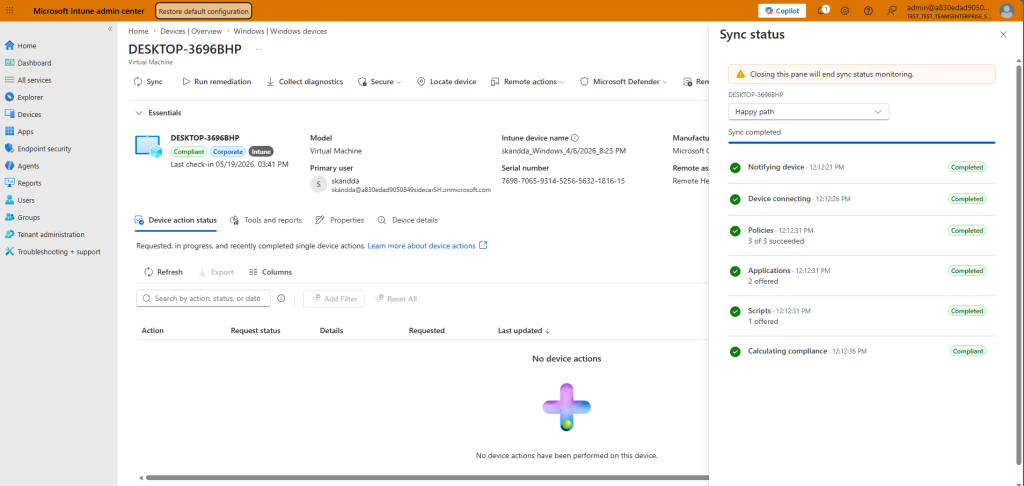
The Microsoft Intune admin center now provides a more transparent sync process for individual Windows devices. This update allows administrators to monitor sync progress in real time without feedback. A single sync action now triggers device management, compliance, policy, application, and script updates simultaneously, which makes troubleshooting faster and more efficient.
How custom compliance improves macOS device management
Microsoft has announced the general availability of custom compliance settings for macOS devices. Organizations can define their own compliance requirements beyond the standard built-in checks. It allows IT admins to align compliance and Conditional Access requirements with the Microsoft Intune security policies to reduce risk and unblock macOS deployments.
Administrators can use scripts and JSON-based rules to evaluate device-specific conditions such as installed applications, running processes, software versions, and security configurations. This creates a more consistent compliance management experience across Windows, Linux, and macOS devices.
“Think about installed software, running processes, app versions, or security posture that no Apple built-in setting captures. Now macOS devices report compliance the same way Windows and Linux devices do, giving you one consistent view instead of three different ones,” the Microsoft Intune team explained.
Microsoft Intune adds Samsung Knox E-FOTA firmware management
Microsoft Intune now offers enhanced management of Samsung Galaxy firmware and operating system updates through Samsung Knox Enterprise Firmware-Over-The-Air (E-FOTA). It allows IT admins to control which device groups receive specific firmware versions. Administrators can gain enhanced control over deployment timing, maintenance windows, battery requirements, and update postponement to maintain security and compliance.
Lastly, Microsoft’s latest update addresses a common misconception that all Windows Autopilot deployments require device registration. Traditional Autopilot scenarios may still use registration, but newer options such as Windows Autopilot Device Preparation can provision Windows 11 devices without it.

Rabia has a master's degree in Software Engineering and she has years of experience writing professionally about Microsoft products and other technologies. Rabia has also written for OnMSFT.com as well as Windows Report. She is always up to date on t...