Microsoft Redesigns Windows Update Experience With New Pause and Restart Controls
A redesigned update system that reduces interruptions while giving users greater control over installation timing.

Key Takeaways:
- Users gain more control over when updates install, reducing unwanted interruptions.
- The new options make it easier to pause and manage updates more flexibly.
- Microsoft is improving background updates while aiming for smoother, less disruptive system restarts.
Windows updates are about to become far less interruptive and far more user‑friendly. Microsoft has announced a redesigned Windows Update experience that puts control back in users’ hands while quietly working behind the scenes to keep devices secure.
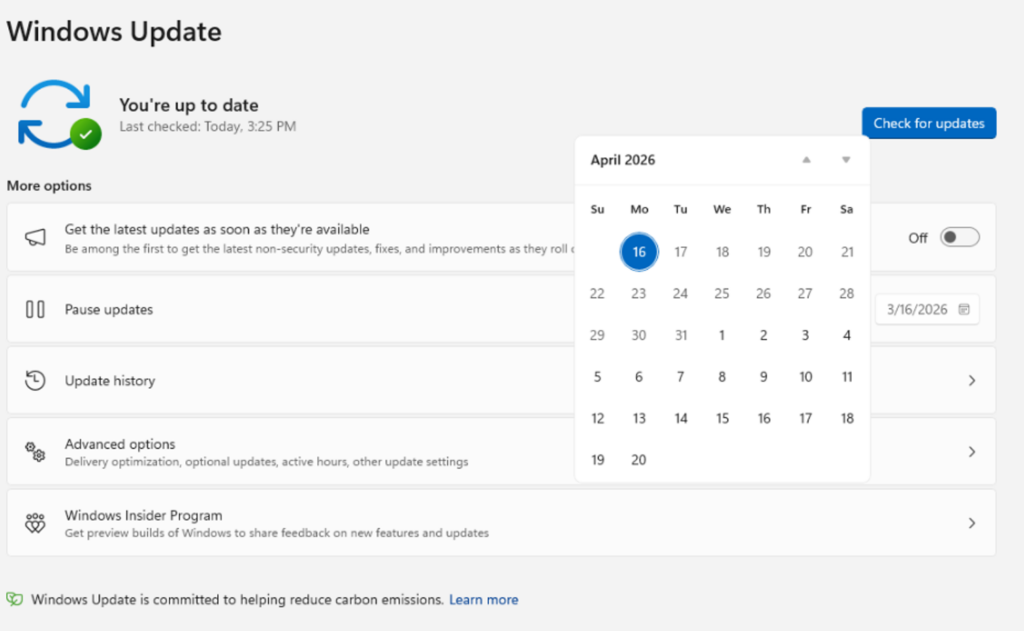
According to Microsoft, users can now choose to skip updates during the initial device setup, which allows them to reach the desktop quickly and install updates later if needed. Microsoft has introduced more flexible pause controls in Windows Update, which allow users to pause updates until a specific date (up to 35 days) and extend that pause repeatedly without a fixed limit.
Restarting Windows becomes less disruptive
Microsoft has announced that restarting or shutting down Windows PCs is now more predictable. The Power menu clearly separates normal restart/shutdown options from update-related actions, allowing users to power off or reboot without being forced into installing an update.
Additionally, driver updates now include the device category in their titles (such as display, audio, or battery), which makes it easier to understand what each update affects before installing it. Microsoft is also coordinating different update types (including drivers, .NET, and firmware) so they align with the regular monthly quality update. This reduces the number of times users are asked to restart their devices each month.
Background improvements for smoother performance
Microsoft mentioned that updates download quietly in the background and install automatically if users take no action. This release also brings improvements to speed up updates, handle poor internet connections better, and recover automatically from update failures.
Microsoft notes that most of these improvements are already rolling out to Windows Insiders in the Dev Channel and the new Experimental channel. The company plans to provide more details about managed and enterprise devices in the coming weeks.
For enterprises, these updates translate into smoother operations and lower IT overhead. Greater control over update timing helps organizations avoid unexpected disruptions during critical business hours, and coordinated updates and fewer reboots reduce downtime across large device fleets. Clearer update information and improved recovery from failures also make it easier for IT teams to troubleshoot issues, enforce security standards, and keep systems compliant without constant manual intervention.

Rabia has a master's degree in Software Engineering and she has years of experience writing professionally about Microsoft products and other technologies. Rabia has also written for OnMSFT.com as well as Windows Report. She is always up to date on t...


