Microsoft Brings Maintenance Windows to Intune-Managed Windows Devices
Poorly timed updates can disrupt kiosks, healthcare equipment, and other business-critical systems, forcing organizations to balance operational uptime against the need to remain secure and compliant.

Key Takeaways:
- Microsoft has expanded Maintenance Windows support for Windows 11 devices managed through Intune.
- Administrators can control when update installations and update-related restarts occur.
- The feature supports security updates, driver updates, firmware updates, Microsoft Defender updates, and feature updates.
Keeping always-on systems secure is a challenge for many organizations. Security updates are necessary, but applying them during business hours can interrupt kiosks, medical devices, factory-floor equipment, and other critical systems, resulting in downtime and productivity losses.
IT teams managing specialized devices frequently have to balance keeping systems fully patched against threats while ensuring those devices remain available when needed. Delaying updates can leave systems exposed, but applying them immediately can disrupt services that support manufacturing, retail, healthcare, or other business-critical functions.
This challenge is particularly significant for userless or single-purpose devices that may not have flexible maintenance schedules and often require tighter control over when updates and restarts occur.
Maintenance windows for cloud-managed Windows devices
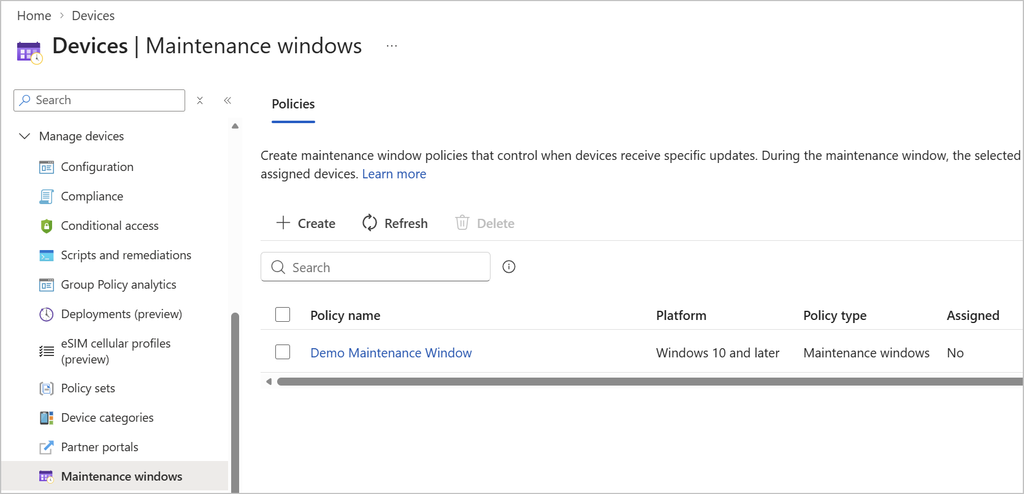
To address this problem, Microsoft has expanded support for Maintenance Windows in Windows 11 and integrated this feature into Microsoft Intune. This capability allows administrators to define specific periods during which update-related actions can occur, which helps ensure devices remain available during operational hours while still receiving required updates. This feature supports Windows 11 version 24H2 and later and can be managed through Group Policy or mobile device management solutions such as Microsoft Intune.
Administrators can choose which update activities are restricted to maintenance windows, including installations and update-triggered restarts. This capability applies to a broad range of Windows Update content, including security updates, .NET updates, Microsoft Defender updates, driver and firmware updates, and annual feature updates.
Microsoft also offers options for one-time or recurring maintenance windows, which allow organizations to align update schedules with device usage patterns.
More control requires more planning
Microsoft mentioned that IT teams must determine appropriate maintenance periods, identify which update actions should be restricted, and ensure windows are long enough for updates to complete successfully.
There are also limits to the control provided. Some update activities (such as downloads) can still occur outside the maintenance window depending on policy settings, and update processes that begin during an approved window may continue beyond its scheduled end time until completion. Users can also manually take update actions even when automatic scheduling is governed by maintenance windows.
Why it matters for IT pros?
Maintenance Windows give organizations a cloud-managed alternative to traditional update scheduling approaches, which helps reduce the risk of patch-related disruptions on critical Windows devices.
For enterprises managing kiosks, healthcare equipment, manufacturing systems, or other specialized endpoints, this feature offers finer control over update timing without requiring administrators to choose between operational uptime and security compliance.

Rabia has a master's degree in Software Engineering and she has years of experience writing professionally about Microsoft products and other technologies. Rabia has also written for OnMSFT.com as well as Windows Report. She is always up to date on t...