Microsoft Intune Adds App Auto-Updates, Privilege Controls, Improved Enrollment
Latest updates streamline app lifecycle management and strengthen endpoint security across platforms.

Key Takeaways:
- EAM auto-updates keep enterprise apps current with reduced manual effort.
- Enhanced privilege management enables controlled access without admin rights.
- Improved Apple enrollment simplifies device setup and policy deployment.
Microsoft has rolled out a new wave of Microsoft Intune enhancements for June, introducing Enterprise Application Management (EAM) auto-updates, expanded Endpoint Privilege Management capabilities, and improved device enrollment across multiple platforms. These updates are designed to strengthen security, streamline IT administration, and simplify endpoint management at scale.
🎬 Watch This Week in IT.
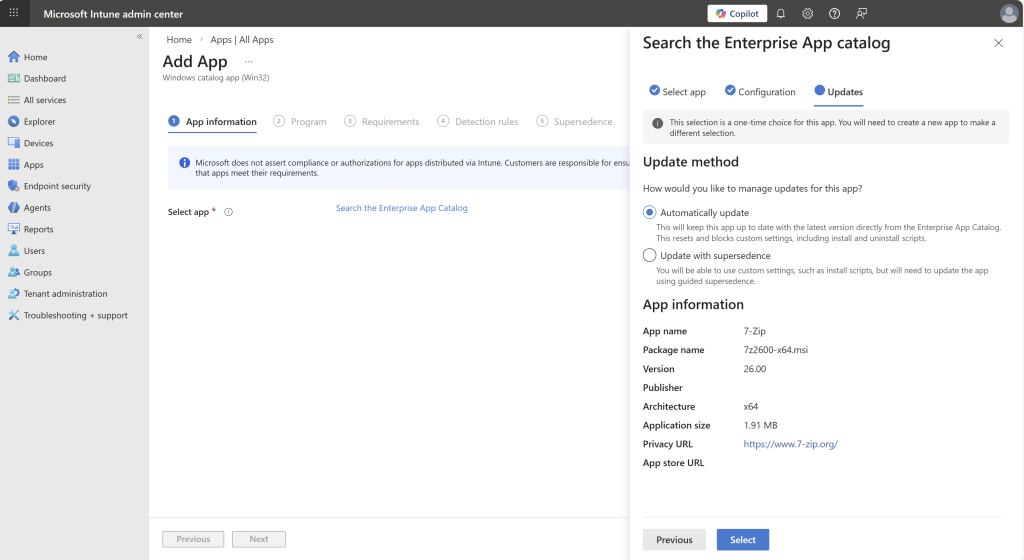
The new Microsoft Intune Enterprise Application Management (EAM) auto-updates feature is hitting general availability this month. The EAM helps organizations manage the full lifecycle of enterprise apps, including deployment, updates, and version control across devices. It simplifies the process of keeping applications secure and up to date while reducing manual effort for IT administrators.
The EAM auto-updates feature enables IT admins to keep managed apps on the latest versions automatically. It helps to reduce the need for manual updates and lowers the risk of known security issues between major releases. However, Microsoft has warned that new threats can still appear between these update cycles.
Vulnerability remediation agent helps IT teams prioritize critical security risks
Microsoft has introduced the Vulnerability Remediation Agent to help address emerging risks more effectively. This agent uses data from Defender Vulnerability Management to prioritize the most critical security issues across Intune-managed devices. It offers recommendations in the Intune admin center, along with impact summaries, affected systems, and suggested fixes.
Microsoft has introduced updates to Endpoint Privilege Management to support approval requests for non-primary users and system-level network configuration. This release lets IT admins extend file elevation requests to any user on a device.
The system-level network configuration support enables IT admins to configure rules-based policies that allow standard users to change network settings without local admin privileges. Previously, it required users to contact the IT support team or temporarily request administrative privileges. This release allows administrators to use policy for pre-authorizing specific network changes.
Apple automated device enrollment gets a modernized experience
Last but not least, Apple automated device enrollment for iOS, iPadOS, and macOS is moving to a redesigned system that improves how enrollment policies are structured and delivered. This change streamlines authentication steps, removes outdated options, and introduces more detailed policy controls, which makes it easier for IT admins to manage Apple devices.
Additionally, Microsoft Intune now extends enrollment time grouping to these Apple platforms, which allows apps and policies assigned to specific groups to be applied immediately during device setup. This means these devices are configured and secured as soon as employees begin using them to reduce delays and enable a smoother onboarding experience.

Rabia has a master's degree in Software Engineering and she has years of experience writing professionally about Microsoft products and other technologies. Rabia has also written for OnMSFT.com as well as Windows Report. She is always up to date on t...