New Microsoft Entra License Usage Insights Shows Feature‑Level License Consumption
Microsoft 365 Copilot’s Researcher agent now uses GPT and Claude with a new Critique feature to review AI‑generated research.

Key Takeaways:
- Microsoft Entra license usage insights provides clear visibility into how premium Entra features are actually used.
- The feature helps organizations identify unused or underutilized licenses.
- Organizations can link licensing data to real feature adoption.
Microsoft has introduced a new License Usage page in the Microsoft Entra admin center. This feature allows organizations to better understand and optimize how their Entra licenses are being used.
Many organizations struggle to manage Microsoft Entra licenses because they lack clear insight into how purchased licenses and premium features are actually used across their environment. Licenses are often assigned based on assumptions or growth projections, which makes it easy to overlook unused licenses, miss security capabilities that are already paid for, or unknowingly exceed licensed usage. This limited visibility turns license management into a reactive process, increasing costs, creating compliance risks, and making it difficult for organizations to confidently plan or optimize their identity and security investments.
“The License Usage page in the Microsoft Entra admin center helps you optimize your Microsoft Entra licenses by providing visibility into feature usage across your tenant. The page shows how many Microsoft Entra ID P1, P2, and Suite licenses you own, along with usage of key features mapped to each license type. This view gives you a clearer understanding of your license count, the value you’re getting from your Microsoft Entra license, and potential over-usage within your tenant,” Microsoft explained.
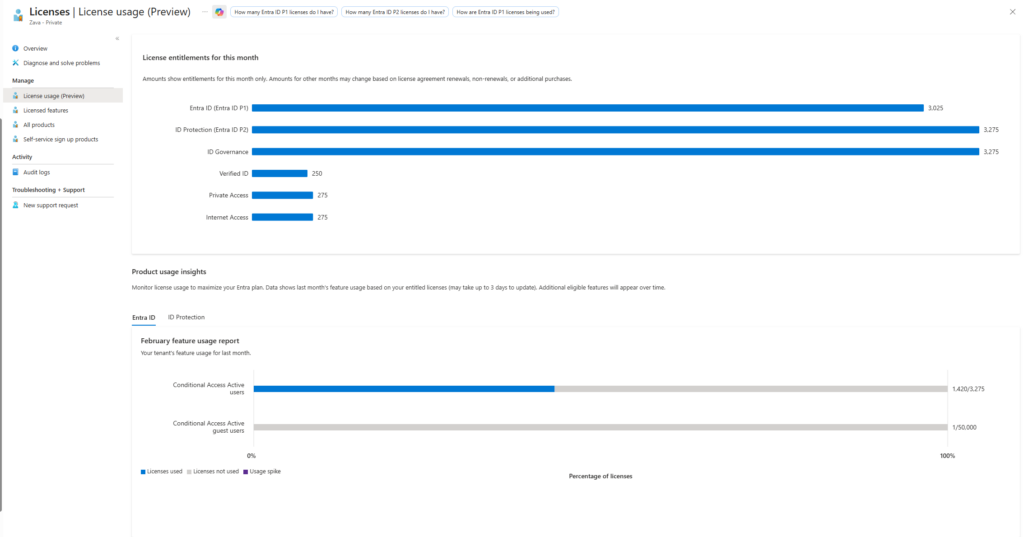
How to access the license usage insights page?
To access the license usage insights page, administrators will need to follow the steps mentioned below:
- Sign in to the Microsoft Entra admin center.
- Head over to Billing > Licenses.
- Alternatively, navigate directly to the License usage page.
Access and requirements
To access license usage insights, the tenant must have a paid Microsoft Entra license such as P1, P2, or the Entra Suite, and it must be running in a public cloud environment. At a minimum, users need the Reports Reader role, though other admin and security roles are also supported. The insights can be viewed in the Microsoft Entra admin center by navigating to Billing → Licenses.
Microsoft Entra license usage insights gives organizations a far more practical and actionable way to manage identity licensing. Security teams can clearly see which premium features are actively delivering value and where gaps or inefficiencies exist. This visibility helps reduce wasted spend, supports license compliance, and ensures that critical security capabilities are being used where they matter most.

Rabia has a master's degree in Software Engineering and she has years of experience writing professionally about Microsoft products and other technologies. Rabia has also written for OnMSFT.com as well as Windows Report. She is always up to date on t...